1. Introduzzjoni
This manual provides detailed instructions for the installation, operation, and maintenance of your KERUI G64 GSM/WiFi Home Alarm System. Please read this manual thoroughly before using the system to ensure proper functionality and safety. The KERUI G64 system offers advanced security features, including dual network connectivity (WiFi and 4G GSM), a 4.3-inch LCD touchscreen, and smart home integration.
2. Prodott Aktarview
The KERUI G64 is a comprehensive home security solution designed to protect your property. It features a central control panel with a touchscreen display and supports various wireless sensors and accessories.
2.1 Karatteristiċi ewlenin
- WiFi + 4G GSM Dual Network: Operates on 2.4 GHz WiFi and 2G/3G/4G SIM cards for reliable connectivity.
- 4.3-inch TFT Full-Touch Screen: Intuitive interface for local and remote control via Tuya APP/Smart Life APP.
- Timed Arming and Disarming: Schedule activation and deactivation to suit your routine.
- Rikonoxximent tal-marki tas-swaba': Supports up to 30 fingerprints for convenient arming/disarming.
- Sistema espansibbli: Supports up to 99 wireless sensors (door/window, motion, smoke, water leakage) and 10 remote controls.
- Kontroll tal-Vuċi: Kompatibbli ma 'Amazon Alexa u Google Assistant.
- Monitoraġġ f'ħin reali: Synchronizes information and provides instant alerts.
- Anti-theft Protection: Triggers a loud alarm and sends notifications to your smartphone upon detection.
- Wiri tat-Temperatura u l-Umdità: Shows current environmental conditions.
- Appoġġ f'diversi lingwi: Jappoġġja 12 lingwa.
2.2 Komponenti tas-Sistema

Figura 2.1: Main components of the KERUI G64 alarm system, including the control panel, siren, remote controls, door/window sensors, and motion detectors.
- Alarm Host (Control Panel): The central unit with a 4.3-inch touchscreen.
- Sensuri tal-Bieb/Twieqi: Detect opening and closing of doors and windows.
- Ditekters tal-Mozzjoni PIR: Detect movement within their coverage area.
- Kontrolli mill-bogħod: Għall-funzjonijiet ta' armar, diżarmar, u SOS.
- Sirena bil-fili: Emits a loud sound when an alarm is triggered.
- Adapter tal-Enerġija: For powering the alarm host.
- Manwal għall-Utent: Dan id-dokument.

Figura 2.2: Diagram illustrating the KERUI G64 alarm system with various compatible accessories such as IP cameras, smoke detectors, and water leakage detectors.
3. Setup
3.1 Qawwa Inizjali
- Connect the power adapter to the alarm host and plug it into a power outlet.
- The system will power on, and the 4.3-inch TFT display will activate.
- Follow the on-screen prompts for initial language selection and time/date settings.

Figura 3.1: The 4.3-inch TFT color touchscreen display of the KERUI G64 alarm host, showing the main interface with status, date, and time.
3.2 Network Configuration (WiFi & GSM)
- Konnessjoni WiFi:
- On the alarm host, navigate to "Settings" > "Network Settings" > "WiFi".
- Select your 2.4 GHz WiFi network (5G WiFi is not supported) and enter the password.
- Ensure the host is connected to the internet.
- GSM SIM Card Installation:
- Insert a 2G/3G/4G SIM card into the designated slot on the alarm host.
- The system will automatically detect the SIM card. Ensure it has sufficient credit for calls and SMS.
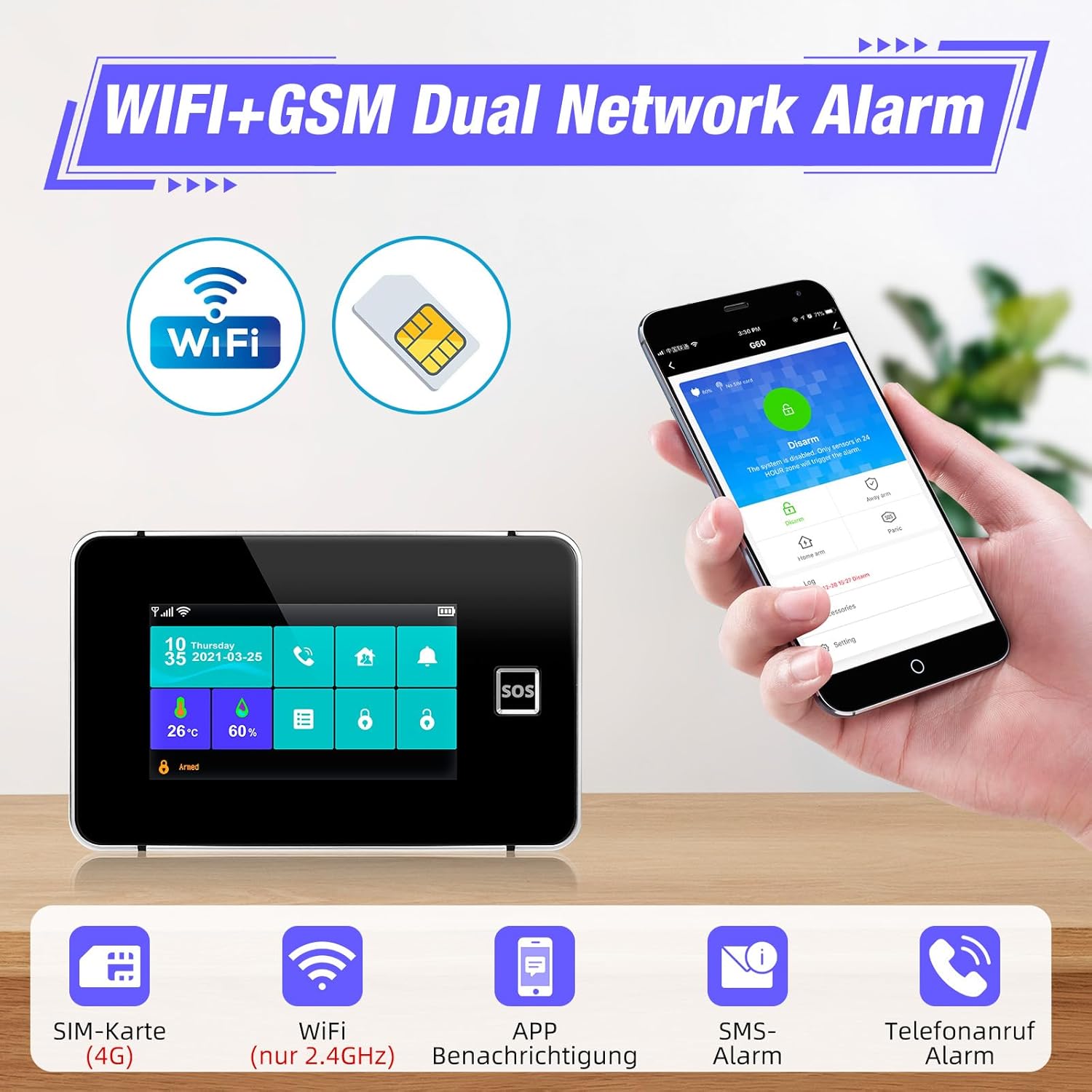
Figura 3.2: The KERUI G64 alarm host demonstrating its WiFi and GSM dual network capabilities, allowing remote control via a smartphone app.
3.3 Installazzjoni u Tqabbil tal-App
- Niżżel l-app "Tuya Smart" jew "Smart Life" mill-ħanut tal-apps tal-ismartphone tiegħek (iOS jew Android).
- Irreġistra kont u illoggja.
- In the app, select "Add Device" and follow the instructions to pair your KERUI G64 alarm host. This typically involves scanning a QR code on the host or selecting it from a list of nearby devices.

Figura 3.3: The Tuya Smart app interface showing integration with various smart home devices, including the alarm host, enabling remote control and monitoring.
3.4 Adding Sensors and Remote Controls
- On the alarm host, navigate to "Settings" > "Accessories" > "Add Sensor" or "Add Remote".
- Follow the on-screen instructions to trigger the sensor (e.g., open a door for a door sensor, press a button on the remote) or activate the pairing mode for motion detectors.
- The host will detect and add the accessory. You can then name the sensor for easier identification (e.g., "Front Door," "Living Room Motion").
- Repeat for all desired sensors and remote controls. The system supports up to 99 wireless sensors and 10 remote controls.
3.5 Konfigurazzjoni tal-Marki tas-Swaba'
- On the alarm host, go to "Settings" > "Fingerprint Management".
- Follow the prompts to register your fingerprints. You can register up to 30 fingerprints for arming, disarming, and unlocking the system.
3.6 Timed Arming and Disarming
- Access the "Timed Arm/Disarm" settings via the alarm host or the Tuya/Smart Life app.
- Set desired times for the system to automatically arm (e.g., when leaving for work) and disarm (e.g., upon returning home).
- You can also configure a delay time for arming to prevent false alarms when exiting the premises.

Figura 3.4: Eżample schedule for timed arming and disarming, illustrating how the system can be automated for daily routines.
4. Istruzzjonijiet Operattivi
4.1 L-Armar u d-Diżarmar tas-Sistema
- Via Touchscreen: Tap the "Arm" or "Disarm" icon on the main screen.
- Permezz tal-Kontroll mill-Bogħod: Press the "Arm" or "Disarm" button on your remote.
- Via Fingerprint: Poġġi s-saba' rreġistrat tiegħek fuq is-senser tal-marki tas-swaba'.
- Permezz tal-App: Use the "Arm" or "Disarm" function in the Tuya/Smart Life app.
- Kontroll tal-Vuċi: Use commands like "Alexa, arm my security system" or "Hey Google, disarm the alarm" (after linking accounts).
4.2 Funzjoni SOS
In an emergency, press the "SOS" button on the alarm host or remote control. The system will immediately trigger a loud siren and send emergency notifications to pre-configured contacts via call and SMS.
4.3 Receiving Alerts and Notifications
When a sensor is triggered (e.g., door opened, motion detected), the system will:
- Activate the siren.
- Send push notifications to your smartphone via the Tuya/Smart Life app.
- Send SMS messages to designated phone numbers.
- Make phone calls to designated phone numbers.

Figura 4.1: Illustration of an alarm event, showing a triggered sensor, the alarm host, and a smartphone receiving an immediate notification and call.
4.4 Monitoring Temperature and Humidity
The alarm host displays real-time temperature and humidity readings on its main screen, providing additional environmental information.

Figura 4.2: The alarm host display showing current temperature (26°C) and humidity (60%) readings.
5. Manutenzjoni
5.1 Ġestjoni tal-batterija
The KERUI G64 alarm host includes a backup battery to ensure continuous operation during power outages. Wireless sensors are battery-powered. The system will notify you of low battery levels for both the host and connected sensors.

Figura 5.1: Notifications for anti-tamper, low main unit battery, power outage, and low sensor battery, all sent to the user's smartphone.
- Alarm Host Battery: The internal alkaline battery provides backup power. If a "Low Battery" alert appears, contact support for replacement or follow specific instructions if user-replaceable.
- Batteriji tas-Sensor: When a sensor's battery is low, replace it promptly with the recommended battery type (refer to individual sensor manuals or product specifications).
5.2 Tindif
Wipe the alarm host and sensors with a soft, dry cloth. Do not use liquid cleaners or abrasive materials, as these can damage the devices.
5.3 Aġġornamenti tas-Sistema
Periodically check the Tuya/Smart Life app for firmware updates for your alarm host. Keeping the system updated ensures optimal performance and security.
6 Issolvi l-problemi
| Problema | Kawża Possibbli | Soluzzjoni |
|---|---|---|
| System not connecting to WiFi. | Incorrect WiFi password; 5GHz network selected; host too far from router. | Verify password; ensure 2.4GHz network is selected; move host closer to router. |
| No GSM signal or calls/SMS not working. | SIM card not inserted correctly; no credit on SIM; poor network coverage. | Reinsert SIM card; check SIM card balance; move host to an area with better signal. |
| Is-senser mhux qed jattiva l-allarm. | Sensor battery low; sensor not paired; sensor out of range; incorrect zone setting. | Replace sensor battery; re-pair sensor; move sensor closer to host; check zone settings. |
| App not receiving notifications. | App permissions not granted; host not connected to internet; app not running in background. | Check app notification permissions; ensure host has stable WiFi/GSM connection; keep app running. |
| Il-marka tas-swaba' mhux rikonoxxuta. | Finger wet or dirty; fingerprint not registered correctly. | Ensure finger is clean and dry; re-register fingerprint if issues persist. |
7. Speċifikazzjonijiet
- Numru tal-Mudell: G64
- Manifattur: KERUI
- Dimensjonijiet tal-Prodott: 14 x 10 x 22 ċm
- Piż tal-oġġett: 600 gramma
- Sors tal-Enerġija: Battery powered (with AC adapter)
- Metodu ta' Installazzjoni: Self-adhesive (for sensors)
- Livell tal-ħoss: 115 Decibels (siren)
- Teknoloġija tal-Konnettività: Wireless (WiFi 2.4GHz, GSM 2G/3G/4G)
- Wiri: 4.3-inch TFT Full-Touch Screen
- Apparati Kompatibbli: Smartphones (via Tuya/Smart Life App)
- Tip ta 'batterija: Alkaline (for backup and sensors)
- Komponenti Inklużi: Alarm Host, Door/Window Sensors, Motion Detector, Siren, Remote Controls, Power Adapter.
8. Garanzija u Appoġġ
KERUI products are designed for reliability and performance. For warranty information, technical support, or service inquiries, please refer to the warranty card included with your product or visit the official KERUI websit. Żomm l-irċevuta tax-xiri tiegħek bħala prova tax-xiri.
Għal aktar riżorsi u FAQs, tista' żżur Ħanut tal-Marka KERUI fuq Amazon.


