Introduzzjoni
The Motorola DLR1060 is a 6-channel digital business radio designed for reliable and private communication in various professional environments. Operating in the digital 900 MHz ISM license-free band, this radio offers enhanced clarity and security compared to analog systems. Its compact and lightweight design, combined with robust features, makes it an essential tool for efficient team coordination.
X'inhu Inkluż
The Motorola DLR1060 package typically includes the following items:
- Motorola DLR1060 2-Way Digital Business Radio (quantity as per pack size)
- Batterija tal-Ion tal-litju rikarikabbli
- Charging Tray with Power Adapter
- Swivel Belt Holster
- User Guide and Safety Leaflet

Image: A typical 6-pack of Motorola DLR1060 digital business radios, showcasing the compact design of each unit.
Karatteristiċi Ewlenin
- Digital 900 MHz ISM License-Free Band: Ensures private and reliable communication.
- Medda Estiża: Covers up to 300,000 square feet or 20 floors.
- 6-il kanal: Provides multiple communication lines for different teams or purposes.
- Prompts tal-Vuċi: User-friendly voice prompts for channel navigation, battery status, and feature customization.
- Radju Profile ID: Unique 4-digit ID for enhanced privacy and direct communication.
- Computer Programming Software (CPS): Allows for personalized setups, including Private Groups, custom channel names, and radio settings.
- Kostruzzjoni Durabbli: Complies with Military Standards 810 C, D, E, F, and G for resistance against shock, vibration, extreme temperatures, and dust.
- Ħajja twila tal-batterija: Internal rechargeable battery provides up to 14 hours of continuous operation.
- Instant Mute: Quickly silence the radio when needed.
- Customizable Top Button: Assign frequently used functions for quick access.
Setup
1. Iċċarġjar tal-batterija
- Insert the rechargeable Lithium-Ion battery into the radio, ensuring it clicks securely into place.
- Place the radio into the charging tray.
- Connect the power adapter to the charging tray and plug it into a standard electrical outlet.
- The charging indicator light on the tray will illuminate to show charging status. A full charge typically takes several hours.

Image: The Motorola DLR1060 radio securely seated in its charging cradle, ready for power connection.
2. Attaching the Belt Holster
- Align the radio with the swivel belt holster.
- Slide the radio into the holster until it locks into position.
- Attach the holster to your belt or clothing for convenient carrying.
Istruzzjonijiet Operattivi
1. Power On/Off
- Biex tixgħel, agħfas u żomm il-buttuna Qawwa / Menu button (usually located on the top or side) until you hear a tone or voice prompt.
- Biex tintefa, agħfas u żomm il-buttuna Qawwa / Menu button again until the radio shuts down.

Immaġni: Ġenb view of the DLR1060 radio, highlighting the power button and volume controls for easy access.
2. Volum ta 'aġġustament
- Uża l- Volum 'il fuq (+) u Volum 'l isfel (-) buttons on the side of the radio to adjust the listening volume.
3. Għażla ta' Kanal
- Dawwar il- Buttuna tas-Selettur tal-Kanal (typically on the top) to choose one of the 6 available channels.
- Ir-radju se jipprovdi messaġġ bil-vuċi li jħabbar in-numru tal-kanal magħżul.
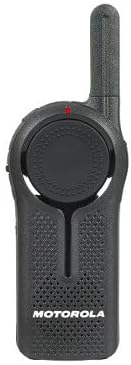
Immaġni: Quddiem view of the DLR1060 radio, featuring the prominent channel selector knob and integrated speaker.
4. Trażmissjoni u Riċeviment
- Biex tittrażmetti, agħfas u żomm il-buttuna Imbotta Biex Tkellem (PTT) buttuna fuq il-ġenb tar-radju. Tkellem b'mod ċar fil-mikrofonu.
- Itlaq il-buttuna PTT biex tisma' għal tweġiba.
- Ensure you are on the same channel as the person you wish to communicate with.
5. Private Communication (Radio Profile ID)
- The DLR1060 uses a unique 4-digit Radio Profile ID for private communication. This ID must be programmed into all radios intended for a private group.
- Refer to the Computer Programming Software (CPS) manual for detailed instructions on setting up and managing Radio Profile IDs and Private Groups.
Manutenzjoni
Tindif tar-Radju
- Imsaħ il-barra tar-radju b'ċarruta ratba uamp drapp.
- Do not use harsh chemicals, cleaning solvents, or strong detergents, as these can damage the radio's casing u komponenti interni.
- Ensure the radio is powered off and disconnected from any charging accessories before cleaning.
Kura tal-batterija
- Always use genuine Motorola batteries and charging accessories.
- Evita li tesponi l-batterija għal temperaturi estremi.
- If the radio will not be used for an extended period, store the battery separately in a cool, dry place.
Issolvi l-problemi
| Problema | Soluzzjoni Possibbli |
|---|---|
| Ir-radju ma jixgħelx. | Kun żgur li l-batterija hija ċċarġjata kompletament u mdaħħla b'mod korrett. |
| Ma jistax jittrażmetti jew jirċievi. | Verify that all radios are on the same channel and have the correct Radio Profile ID. Check if the battery is low. |
| Kwalità awdjo fqira jew statiku. | Move closer to the other radio or to an open area. Check for obstructions. Ensure the antenna is clear. |
| Il-ħajja tal-batterija hija iqsar milli kien mistenni. | Ensure the battery is fully charged before use. Battery performance can degrade over time; consider replacing older batteries. |
Speċifikazzjonijiet
| Karatteristika | Dettall |
|---|---|
| Banda ta' Frekwenza | 900 MHz ISM (License-Free) |
| Kanali | 6 |
| Firxa | Up to 300,000 sq ft / 20 Floors |
| Ħajja tal-batterija | Up to 14 hours (typical use) |
| Standards ta' Durabilità | Military Standards 810 C, D, E, F, G |
| Materjal tad-Djar | Polikarbonat |
| ID tal-FCC | AZ489FT5870 |
| Apparati Kompatibbli | Speaker, Headphone, Laptop (for CPS) |
| Kulur | Iswed |
Garanzija u Appoġġ
For detailed warranty information and technical support, please refer to the documentation provided with your product or visit the official Motorola Solutions websit. Żomm l-irċevuta tax-xiri tiegħek bħala prova tax-xiri għal talbiet ta' garanzija.


