1. Introduzzjoni
Thank you for choosing the MONODEAL 707-Black Portable CD Player. This device is designed to provide a versatile audio experience, supporting various formats including CD, CD-R, CD-RW, MP3, and WMA. It features built-in high-fidelity speakers, a 2.0-inch TFT color display, Bluetooth 5.3 for wireless connections, TF card support for expanded music options and recording, and AUX input for wired connections. Its compact and portable design makes it ideal for use at home, in the car, or on the go.

Image 1.1: The MONODEAL 707-Black Portable CD Player, showcasing its compact design and TFT color display.
2. Kontenut tal-Pakkett
Jekk jogħġbok iċċekkja l-pakkett għall-oġġetti li ġejjin:
- MONODEAL 707-Black Portable CD Player
- Cable tal-Iċċarġjar tal-USB tat-Tip-Ċ
- Kejbil AUX ta '3.5mm
- Headset bil-fili
- Manwal għall-Utent (dan id-dokument)
- Karta ta' Re[istrazzjoni

Image 2.1: All items included in the MONODEAL 707-Black Portable CD Player package.
3. Prodott Aktarview
The MONODEAL 707-Black features a user-friendly interface with clearly labeled buttons and a vibrant TFT color display. Key components include:
- Wiri bil-Kulur TFT ta' 2.0 pulzieri: Provides clear and colorful information.
- Kelliema Mibnija: High-fidelity audio output without external headphones.
- Buttuni tal-Kontroll: Play/Pause, Skip/Fast Forward/Rewind, Mode, Repeat, Program, Function, Volume Up/Down.
- Portijiet: USB-C for charging, 3.5mm Headphone Jack, AUX In, TF Card Slot.
- Swiċċ tal-Enerġija: Jinsab fuq il-ġenb għal kontroll faċli mixgħul/mitfi.

Image 3.1: The 2.0-inch TFT color display offers vibrant colors and sharp details compared to older LCD screens.
4. Setup
4.1 Iċċarġjar tal-Apparat
The CD player has a built-in 2000mAh rechargeable battery. Before first use, fully charge the device using the provided USB Type-C cable.
- Qabbad il-kejbil USB tat-Tip Ċ mal-port tal-iċċarġjar fuq l-apparat.
- Qabbad it-tarf l-ieħor tal-kejbil ma' adapter tal-enerġija USB (mhux inkluż) jew mal-port USB tal-kompjuter.
- The charging indicator on the display will show charging status. A full charge typically takes 3-4 hours and provides 7-10 hours of continuous playback.

Image 4.1: The CD player being charged via its USB-C port, indicating its large capacity battery.
4.2 Daħħal CD
- Żerżaq is-swiċċ tal-enerġija għall-pożizzjoni 'ON'.
- Gently open the CD compartment cover.
- Place the CD with the label side facing up onto the spindle.
- Agħlaq l-għatu tal-kompartiment tas-CD sew sakemm tikklikkja.
- The player will automatically read the disc.

Image 4.2: Proper method for inserting a CD into the player.
5. Istruzzjonijiet Operattivi
5.1 Daqq Bażiku tas-CD
- After inserting a CD, the player will automatically begin playback.
- Agħfas il- [Ilgħab/Pawża] buttuna biex tieqaf jew terġa’ tibda d-daqq.
- Agħfas il- [Preċedenti/Li jmiss] buttuni biex taqbeż għall-korsa preċedenti jew li jmiss.
- Agħfas fit-tul il- [Preċedenti/Li jmiss] buttons to fast forward or rewind within a track.
- Aġġusta l-volum billi tuża l-kontrolli tal-volum apposta.

Image 5.1: The player supports various playback modes for CDs.
5.2 Bluetooth Connectivity (BT 5.3)
The player supports both Bluetooth receiving (RX) and transmitting (TX) modes. Note: Car Bluetooth connection is not supported for direct audio streaming from the player to the car's Bluetooth system. Use AUX or FM transmission for car audio.
- Riċeviment Bluetooth (RX): Connect your smartphone or tablet to the CD player to use its built-in speakers.
- Trasmissjoni Bluetooth (TX): Connect the CD player to Bluetooth headphones or speakers for wireless audio output.
- To activate Bluetooth mode, press the [BT] button. The Bluetooth icon on the display will flash.
- On your external Bluetooth device (headphones/speaker), search for "CD Player" or similar and pair.

Image 5.2: The CD player supports both receiving and transmitting Bluetooth signals.
For a visual guide on connecting to Bluetooth in a car (via FM transmission), refer to the video below:
Video 5.1: Demonstration of connecting the CD player to a car's audio system, likely via FM transmission, as direct Bluetooth car connection is not supported by the player itself.
5.3 Daqq u Reġistrazzjoni tal-Karta TF
The CD player supports TF card music playback and can transcribe CD contents to a TF card (up to 32GB).
- Insert a TF card into the designated slot.
- To play music from the TF card, select the TF card mode using the [Modalità] buttuna.
- To transcribe a CD to the TF card, ensure a CD is playing and a TF card is inserted. Follow the on-screen prompts or refer to the full function demonstration video for specific steps.

Image 5.3: The CD player supports TF card functionality for playback and direct recording from CDs.
5.4 Trasmettitur FM
Use the FM transmitter function to broadcast audio from the CD player to an FM radio, useful for car audio systems without an AUX input.
- Agħfas il- [FM] button to activate the FM transmitter.
- Tune your car's FM radio to the same frequency displayed on the CD player's screen.
- Adjust the volume on both the CD player and your car stereo for optimal sound.

Image 5.4: The CD player can connect to car audio systems via AUX cable or FM transmission.
5.5 Konnessjoni AUX
Connect the CD player to external audio devices, such as car stereos or home audio systems, using the provided 3.5mm AUX cable.
- Qabbad tarf wieħed tal-kejbil AUX ta' 3.5mm mal- [AUX In] port on the CD player.
- Connect the other end to the AUX input of your external audio system.
- Select the AUX input on your external audio system to hear the CD player's audio.
5.6 Repeat Modes and Song Programming
The player offers various repeat modes and the ability to program a sequence of songs.
- Repeat Modes: Agħfas il- [Irrepeti] button to cycle through repeat options (e.g., repeat one, repeat all, random play, A-B repeat).
- Song Programming: Fil-modalità ta 'waqfien, agħfas il-buttuna [PROG] buttuna. Uża l- [Preċedenti/Li jmiss] buttons to select tracks, then press [PROG] again to add them to the program list. Press [Ilgħab] biex tibda d-daqq ipprogrammat.
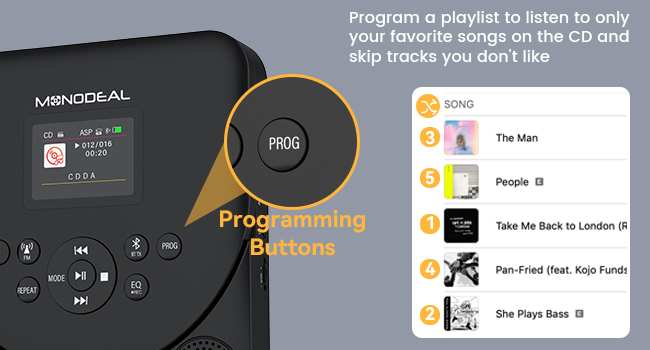
Image 5.5: The programming buttons allow users to create custom playlists.
5.7 Sleep Timer
Set a sleep timer to automatically turn off the player after a specified duration.
- Agħfas fit-tul il- [Rqad] buttuna.
- Uża l- [Preċedenti/Li jmiss] buttons to select a sleep time from 10 to 90 minutes.
- The player will automatically power off after the set time.
For a comprehensive demonstration of various functions including CD mode, repeat, programming, sleep timer, Bluetooth receiver, Bluetooth transmitter, and FM transmitter, please watch the video below:
Video 5.2: Detailed function operation demonstration for the CD player, covering various playback and connectivity features.
6. Manutenzjoni
- Żomm l-apparat nadif billi timsaħ b'ċarruta ratba u niexfa. Evita li tuża prodotti tat-tindif jew solventi li joborxu.
- Ensure the CD compartment is free of dust and debris.
- Handle CDs by their edges to prevent scratches and fingerprints.
- Aħżen il-plejer f'post frisk u niexef 'il bogħod mix-xemx diretta u minn temperaturi estremi.
7 Issolvi l-problemi
7.1 Disc Not Reading / Skipping
- Ensure the CD is clean and free of scratches. Wipe gently from the center outwards with a soft cloth.
- Iċċekkja li s-CD iddaħħal sew bin-naħa tat-tikketta tħares 'il fuq.
- Check if the disc format is supported (CD/CD-R/CD-RW/MP3/WMA).
- The player features advanced anti-skip protection, but severe shocks may still cause skipping.
7.2 Ebda Ħoss
- Adjust the volume on the CD player and any connected external devices.
- If using headphones, ensure they are properly plugged into the 3.5mm jack.
- If using Bluetooth, ensure the player is correctly paired and connected to the desired output device.
- If using AUX, ensure the cable is securely connected and the correct input is selected on the external device.
7.3 Kwistjonijiet ta' Konnessjoni Bluetooth
- Ensure the CD player is in the correct Bluetooth mode (RX or TX).
- Make sure the external Bluetooth device is in pairing mode and within range.
- Forget previous pairings on both devices and attempt to re-pair.
- Restart both the CD player and the external Bluetooth device.
8. Speċifikazzjonijiet
| Karatteristika | Dettall |
|---|---|
| Brand | MONODEAL |
| Numru tal-Mudell | 707-Iswed |
| Apparati Kompatibbli | Smartphone (for Bluetooth RX) |
| Formati Awdjo Appoġġjati | CD/CD-R/CD-RW/MP3/WMA |
| Teknoloġija tal-Konnettività | Bluetooth 5.3, AUX, TF Card, FM Transmitter |
| Headphones Jack | 3.5mm Jack |
| Kapaċità tal-batterija | 2000mAh |
| Ħin tal-Logħob (Ċarġ Sħiħ) | 7-10 sigħat |
| Ħin tal-Iċċarġjar | 3-4 sigħat |
| Wiri | Wiri bil-Kulur TFT ta' 2.0 pulzieri |
| Appoġġ għall-Karta TF | Sa 32GB |
| Dimensjonijiet | 22.9 x 18.5 x 5.4 ċm |
| Piż | 560 g |
9. Garanzija u Appoġġ
MONODEAL is committed to providing high-quality products and excellent customer service. Your MONODEAL 707-Black Portable CD Player comes with:
- 12 Months Replacement: For any manufacturing defects or issues within the first year of purchase.
- Appoġġ tul il-ħajja: Dedicated customer support to assist you with any questions or problems you may encounter throughout the product's lifespan.
For assistance, please refer to the contact information provided on your Registration Card or visit the official MONODEAL websit.


