1. Introduzzjoni
This manual provides essential instructions for the proper installation, operation, and maintenance of the Teltonika RUT241 Industrial 4G LTE Router. The RUT241 is a compact and rugged cellular router designed for industrial, IoT, and remote applications, offering reliable 4G LTE connectivity, dual Ethernet ports, and Wi-Fi capabilities.
Il-karatteristiċi ewlenin jinkludu:
- Reliable 4G LTE Cat 4 connectivity for fast and stable internet access.
- One LAN and one WAN Ethernet port, plus a 2.4GHz Wi-Fi hotspot.
- Compatibility with Teltonika's Remote Management System (RMS) for remote monitoring and configuration.
- Advanced security features including firewall, OpenVPN, IPsec, PPTP, and WireGuard VPN support.
- Industrial-grade durability for harsh environments.
- Wide power input range (9-30V) with digital I/O.

2. Setup
2.1. X'hemm fil-Kaxxa
Before proceeding with the installation, verify that all components are present:
- RUT241 Router
- Provvista tal-Enerġija
- Cable Ethernet
- 2 x Mobile Antennas
- 1 x Wi-Fi Antenna
- Kit tal-Adapter tas-SIM

2.2. Hardware Matulview
Familiarize yourself with the router's ports and indicators.
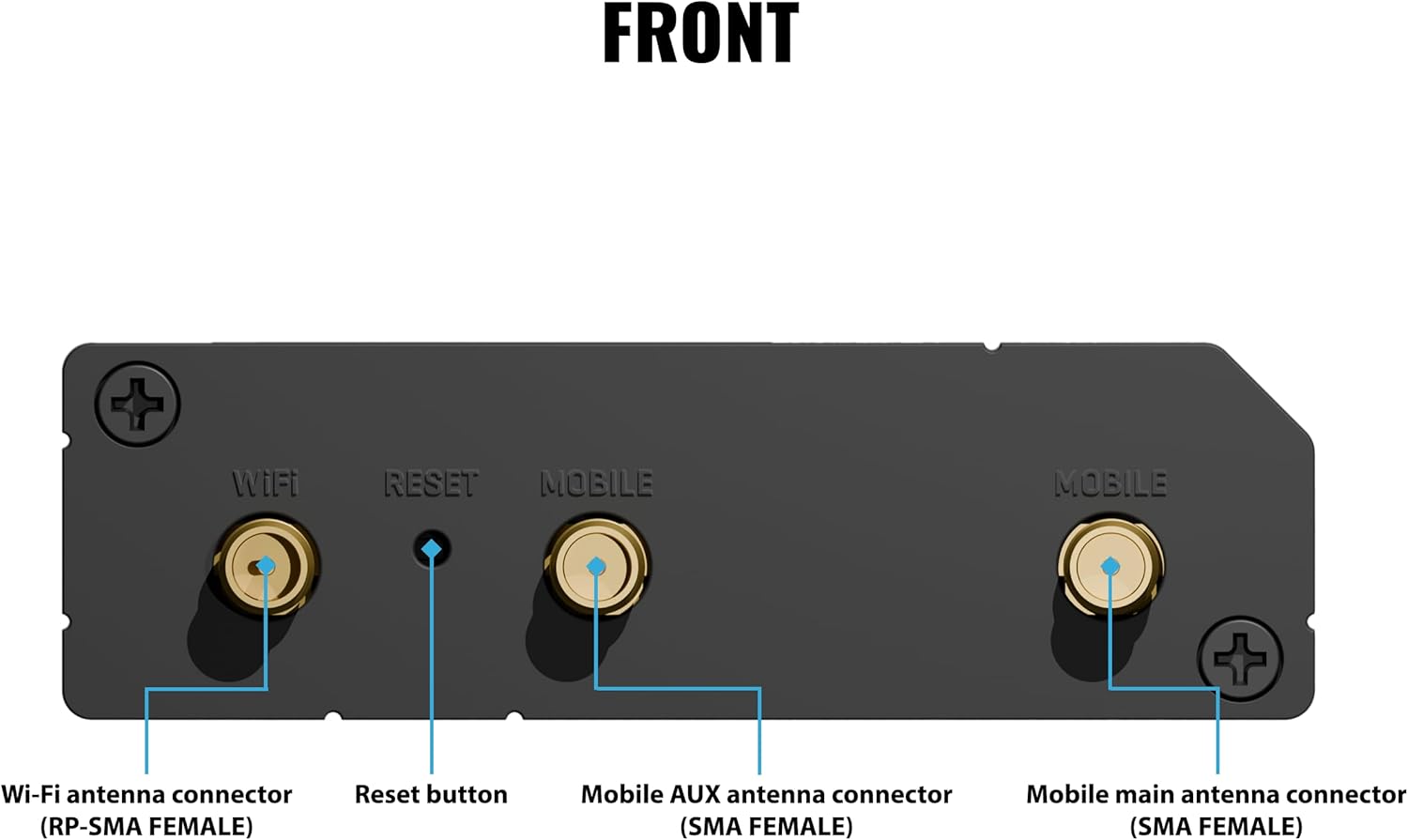

2.3. Installazzjoni ta' SIM Card
- Kun żgur li r-router huwa mitfi.
- Locate the SIM card slot on the back panel (refer to Figure 4).
- Insert your activated Mini-SIM card into the slot until it clicks into place. Use the provided SIM adapter if necessary.
2.4. Konnessjoni tal-antenna
- Attach the two mobile antennas to the 'MOBILE' connectors on the front panel (refer to Figure 3).
- Attach the Wi-Fi antenna to the 'WIFI' connector on the front panel.
- Ensure all antennas are securely tightened.
2.5. Konnessjoni tal-Enerġija
- Connect the power adapter to the 'POWER' socket on the back panel (refer to Figure 4).
- Plug the power adapter into a suitable power outlet. The Power LED should illuminate.
2.6. Konnessjoni Inizjali tan-Netwerk
You can connect to the router via Ethernet or Wi-Fi.
- Ethernet: Connect one end of the Ethernet cable to the 'LAN' port on the router and the other end to your computer's Ethernet port.
- Wi-Fi: The router broadcasts a default Wi-Fi network. The SSID and password are typically found on a label on the device or packaging.
3. Istruzzjonijiet Operattivi
3.1. Aċċess għall- Web Interface
- Iftaħ a web browser fuq il-kompjuter konness tiegħek.
- Daħħal l-indirizz IP default 192.168.1.1 fil-bar tal-indirizzi u agħfas Enter.
- Log in using the default username and password (usually 'admin' for both, check device label for specifics). You will be prompted to change the password upon first login for security.
3.2. Konfigurazzjoni Bażika
Fi ħdan il- web interface, you can configure various settings:
- Issettjar tal-WAN: Configure your cellular connection (APN, authentication) and Ethernet WAN settings.
- Settings tal-LAN: Adjust the router's internal IP address and DHCP server settings.
- Settings tal-Wi-Fi: Change the Wi-Fi network name (SSID), password, and security protocols.
3.3. Remote Management System (RMS)
The RUT241 supports Teltonika's Remote Management System (RMS), allowing for centralized monitoring and management of your devices.

To use RMS:
- Register your device on the Teltonika RMS portal.
- Enable RMS connectivity in the router's web interface.
- Manage your router from any web browser via the RMS platform.
3.4. VPN Configuration
The router supports various VPN protocols for secure communication, including OpenVPN, IPsec, PPTP, and WireGuard. Detailed configuration guides for each protocol are available in the router's web dokumentazzjoni tal-interface.
4. Manutenzjoni
4.1. Aġġornamenti tal-Firmware
Regularly update the router's firmware to ensure optimal performance, security, and access to new features. Firmware updates can be performed via the router's web interface or remotely through the Teltonika RMS platform.
4.2. Tindif
Clean the router's exterior with a soft, dry cloth. Do not use liquid cleaners or aerosols. Ensure ventilation openings are free from dust and obstructions.
4.3. Konsiderazzjonijiet Ambjentali
The RUT241 is designed for industrial environments. It can withstand temperatures up to 167°F (75°C) and down to -40°F (-40°C), and humidity levels between 10-90% (non-condensing). Ensure the router is installed in an environment within these specifications to maintain optimal performance and longevity.

5 Issolvi l-problemi
5.1. Kwistjonijiet Komuni u Soluzzjonijiet
- Ebda Konnessjoni tal-Internet:
- Iċċekkja l-inserzjoni u l-istatus tal-attivazzjoni tal-karta SIM.
- Verify antenna connections.
- Confirm APN settings in the web interface.
- Check mobile network type and signal strength LEDs (refer to Figure 4).
- Il-Wi-Fi Mhux Jaħdem:
- Ensure the Wi-Fi antenna is connected.
- Check Wi-Fi settings (SSID broadcast, password) in the web interface.
- Ibda mill-ġdid ir-router.
- Ma nistax naċċessa Web Interface:
- Kun żgur li l-kompjuter tiegħek huwa konness mar-router permezz ta' Ethernet jew Wi-Fi.
- Verify your computer's IP settings (should be set to obtain IP automatically).
- Ipprova differenti web browser.
5.2. Irrisettja Button
The reset button (refer to Figure 3) can be used for two functions:
- Irrisettja artab: Press and hold for approximately 5 seconds to restart the router.
- Irrisettjar tal-Fabbrika: Press and hold for approximately 30 seconds until all LEDs flash, then release. This will restore the router to its factory default settings. Twissija: Ir-reset tal-fabbrika se jħassar il-konfigurazzjonijiet kollha tad-dwana.
6. Speċifikazzjonijiet
| Karatteristika | Speċifikazzjoni |
|---|---|
| Isem tal-Mudell | RUT241 |
| Dimensjonijiet tal-Prodott | 3.26 x 2.91 x 0.98 pulzieri |
| Piż tal-oġġett | 4.3 uqija |
| Teknoloġija tal-Konnettività | Ethernet, LTE, Wi-Fi |
| Komunikazzjoni mingħajr fili Standard | 802.11n |
| Klassi ta' Banda ta' Frekwenza | Dual-Band (2.4GHz Wi-Fi) |
| Karatteristiċi Speċjali | 4G LTE, Wi-Fi, Auto Failover, RMS, VPN |
| Medda ta 'Input ta' Enerġija | 9-30V DC |
| Tip ta' Antenna | Fixed (External) |
| Temperatura operattiva | -40°F sa 167°F (-40°C sa 75°C) |
| Umdità Operattiva | 10% sa 90% mingħajr kondensazzjoni |
7. Garanzija u Appoġġ
7.1. Informazzjoni dwar Garanzija
Warranty terms and conditions for the Teltonika RUT241 router are provided by the manufacturer, Teltonika, or your authorized reseller. Please refer to the warranty card included with your product or visit the official Teltonika websit għal informazzjoni dettaljata.
7.2. Appoġġ Tekniku
For technical assistance, firmware downloads, or additional documentation, please visit the official Teltonika Networks website or contact your product reseller. Online resources often include FAQs, knowledge bases, and community forums.


