1. Introduzzjoni
Thank you for choosing the TATTMUSE Inkless Portable Printer. This compact and versatile thermal printer is designed for convenient printing on the go, supporting various paper sizes including US Letter and A4. It's ideal for business travel, home use, and educational purposes, offering inkless printing technology for a hassle-free experience.
This manual provides detailed instructions on setting up, operating, and maintaining your printer to ensure optimal performance.
2. X'hemm fil-Kaxxa
Jekk jogħġbok iċċekkja l-kontenut tal-pakkett biex tiżgura li l-oġġetti kollha huma preżenti:
- 1x Portable Thermal Printer
- 1x Każ tal-Ġarr
- 1 Roll US Letter Size Thermal Paper (pre-installed in the printer paper bin)
- 1 Roll 4.33'' Width Thermal Paper
- 1 Roll 3.14'' Width Thermal Paper
- 1 Roll 2.08'' Width Thermal Paper
- 1x USB-C & USB-A Cable
- 1x Manwal tal-Utent (dan id-dokument)

Immaġni: Fuqview of the TATTMUSE Portable Printer and its included accessories.
3. Gwida ta' Setup
3.1. Tagħbija tal-Karta
Your printer supports various thermal paper types including roll paper, folded paper, and single sheets. The printer comes with one US Letter size thermal paper roll pre-installed.
- Open the printer cover by gently pressing the release buttons on the sides.
- If loading a new roll, adjust the paper guides to fit the width of your thermal paper roll. Ensure the paper feeds smoothly.
- Pull out approximately 2 cm (0.8 inches) of paper from the roll.
- Agħlaq l-għatu tal-istampatur sew sakemm tikklikkja f'postu.
Video: Demonstrates how to load paper into the TATTMUSE Portable Thermal Printer, including adjusting paper guides and inserting the paper roll.

Image: Illustration of the printer supporting folded, single sheet, and thermal paper rolls, along with various document types.

Image: Visual comparison of using continuous thermal paper versus single sheet thermal paper with the printer.
3.2. Power On/Off
To turn on the printer, press and hold the power button for 3 seconds. The indicator light will illuminate. To turn off, press and hold the power button again until the light turns off.
3.3. Connecting to Your Device (Bluetooth)
The printer is compatible with iPhone, Android phones, iPad, and tablets via Bluetooth.
- Download the official TATTMUSE printer app from your device's app store (e.g., Apple App Store or Google Play Store).
- Kun żgur li l-Bluetooth huwa attivat fuq it-tagħmir mobbli tiegħek.
- Open the TATTMUSE app and follow the on-screen instructions to connect to your printer. Look for the printer's name (e.g., "A285M" or similar) in the app's device list.
- Ladarba tkun konnessa, l-app tindika tqabbil b'suċċess.

Image: Step-by-step guide for connecting the printer to a mobile device via Bluetooth using the dedicated app.
3.4. Connecting to Your Computer (USB)
For laptops and desktop computers (Windows, macOS, Chrome OS, Linux), use the provided USB-C cable for connection. A driver installation is required.
- Connect the printer to your computer using the USB-C cable.
- Visit the official TATTMUSE support website (refer to the user manual for the exact URL) to download the appropriate printer driver for your operating system.
- Installa s-sewwieq wara l-istruzzjonijiet fuq l-iskrin.
- Once the driver is installed, your computer should recognize the printer, and you can proceed with printing.

Image: Instructions for connecting the printer to a laptop via USB and downloading necessary drivers for various operating systems.
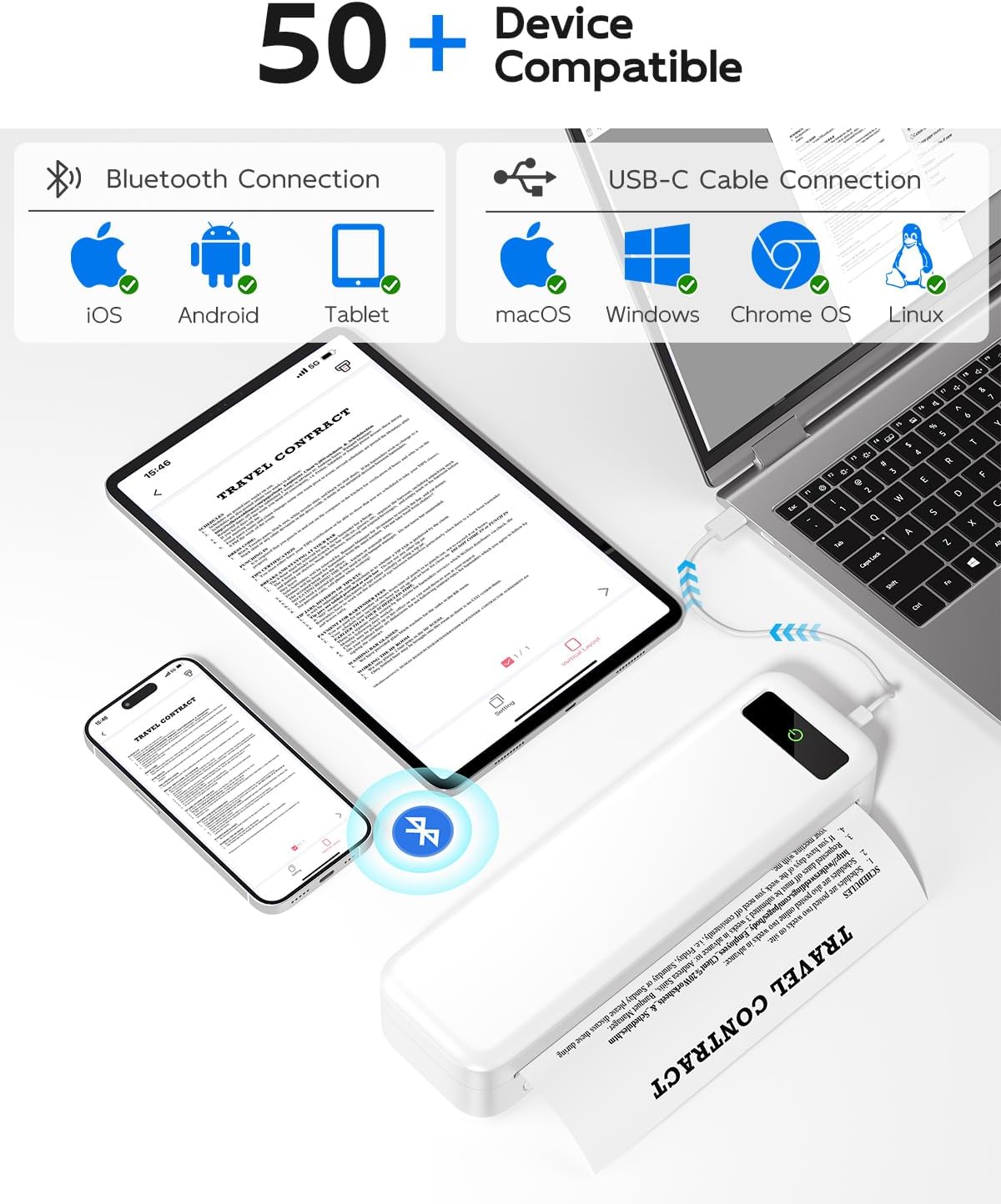
Image: The printer's compatibility with various devices, including iOS, Android, tablets via Bluetooth, and macOS, Windows, Chrome OS, Linux via USB-C.
4. Istruzzjonijiet Operattivi
4.1. Printing from Mobile Devices
Once connected via Bluetooth, you can print various document types directly from the TATTMUSE app.
- Open the TATTMUSE app.
- Agħżel id-dokument, l-immaġni, web page, or note you wish to print. The app supports common formats like Word, TXT, PDF, Excel, and JPG.
- Adjust print settings such as print density (light, medium, heavy) and paper size within the app.
- Initiate printing. The printer will feed the thermal paper and produce your printout.
Video: Shows the process of connecting the printer via Bluetooth and printing a document from a mobile phone, demonstrating the print quality.
Video: Illustrates the printer's ability to print various types of content, including images and text, from a mobile device.

Image: Display of the five supported print sizes (US Letter, A4, 4.33'', 3.14'', 2.08'') and compatible file formats (Word, Excel, PDF, JPG, TXT).
4.2. Printing from Computers
After installing the necessary drivers and connecting via USB, your computer will recognize the TATTMUSE printer as a standard printing device.
- Iftaħ id-dokument jew file tixtieq tipprintja fuq il-kompjuter tiegħek.
- Agħżel "Stampa" mill-menù tal-applikazzjoni (eż., File > Stampa).
- Agħżel il-printer TATTMUSE mil-lista ta' printers disponibbli.
- Adjust print preferences as needed (e.g., paper size, orientation, print quality).
- Ikklikkja "Ipprintja" biex tibgħat ix-xogħol lill-istampatur.
4.3. Supported Paper Sizes and Types
The TATTMUSE printer is designed exclusively for thermal paper and supports multiple sizes:
- 8.5" x 11" US Letter
- A4 (210mm x 297mm)
- 4.33'' (110mm) width
- 3.14'' (80mm) width
- 2.08'' (53mm) width
It can accommodate thermal roll paper, folded thermal paper, and single sheet thermal paper. Note: This printer only supports black and white printing and does not use ink, toner, or ribbons.

Image: Visual confirmation that the printer operates without the need for ink or toner cartridges.
5. Manutenzjoni
5.1. Tindif tal-Istampatur
To maintain print quality and prolong the life of your printer, regular cleaning is recommended.
- Itfi l-istampatur u skonnettjah minn kwalunkwe sors ta' enerġija.
- Gently wipe the exterior of the printer with a soft, dry cloth.
- Biex tnaddaf ir-ras tal-istampar termali, uża swab tal-qoton imxarrab ħafifampened with isopropyl alcohol. Wipe the print head gently and allow it to dry completely before closing the cover or turning on the printer.
- Remove any paper dust or debris from the paper path.
5.2. Informazzjoni dwar il-batterija
The printer features a built-in 2600mAh rechargeable battery, capable of printing up to 160 sheets of 8.5" x 11" thermal paper on a single charge.
- Charge the printer using the provided USB-C cable connected to a compatible power adapter or computer USB port.
- The indicator light will show charging status (e.g., red for charging, green for fully charged).
- Għal ħajja ottimali tal-batterija, evita li tiċċarġja kompletament il-batterija ta' spiss.
6 Issolvi l-problemi
| Problema | Kawża Possibbli | Soluzzjoni |
|---|---|---|
| Il-printer mhux qed jixgħel. | Batterija baxxa jew il-buttuna tal-qawwa ma nżammitx magħfusa għal żmien twil biżżejjed. | Charge the printer. Press and hold the power button for 3 seconds. |
| Poor print quality (faint or incomplete). | Low battery, dirty print head, or incorrect paper. | Charge the printer. Clean the print head (see Maintenance section). Ensure you are using thermal paper. |
| Il-printer mhux qed jikkonnettja permezz tal-Bluetooth. | Bluetooth off, app not open, or printer not discoverable. | Ensure printer is on and Bluetooth is enabled on your device. Restart the app and printer. Try re-pairing. |
| Il-printer mhux rikonoxxut mill-kompjuter. | Driver not installed or incorrect USB connection. | Install the correct driver for your OS (see Setup section). Ensure the USB cable is securely connected. Try a different USB port. |
| Ġamm tal-karta. | Tagħbija ħażina tal-karta jew oġġett barrani. | Turn off the printer. Open the cover and carefully remove any jammed paper. Ensure paper is loaded correctly. |
7. Speċifikazzjonijiet
| Karatteristika | Dettall |
|---|---|
| Numru tal-Mudell | A285M-WH-SNH |
| Teknoloġija tal-Istampar | Termali |
| Riżoluzzjoni tal-Istampar | 300 DPI |
| Konnettività | Bluetooth, USB-C |
| Daqsijiet tal-Karta Sostnuti | 8.5" x 11" US Letter, A4, 4.33'' (110mm), 3.14'' (80mm), 2.08'' (53mm) |
| Kapaċità tal-batterija | 2600mAh |
| Kapaċità Massima tal-Folja tal-Input | 160 sheets (8.5" x 11" thermal paper) |
| Dimensjonijiet tal-Prodott | 10.39 x 3.07 x 1.77 pulzieri |
| Piż tal-oġġett | 1.5 liri |
| Kulur | Abjad |
8. Garanzija u Appoġġ
TATTMUSE products are manufactured to the highest quality standards. For warranty information, technical support, or service inquiries, please refer to the contact details provided on the official TATTMUSE webis-sit jew l-imballaġġ tal-prodott. Żomm l-irċevuta tax-xiri tiegħek bħala prova tax-xiri għal talbiet ta' garanzija.
You can also find additional resources and FAQs on the TATTMUSE store page: Ħanut TATTMUSE.


