1. Introduzzjoni
Grazzi tax-xiriasing the NBCP Wired Game Controller Model 736D. This controller is designed to provide a responsive and immersive gaming experience across multiple platforms. Please read this manual carefully to ensure proper setup and operation.
2. Informazzjoni dwar is-Sigurtà
- Tesponix il-kontrollur għal temperaturi estremi, umdità, jew dawl tax-xemx dirett.
- Evita li twaqqa' jew li tissottometti l-kontrollur għal impatti qawwija.
- Tippruvax tiżżarma jew timmodifika l-kontrollur. Dan jannulla l-garanzija.
- Keep the controller away from liquids and small children.
- Uża biss il-kejbil USB provdut għall-konnessjoni.
3. Kontenut tal-Pakkett
- NBCP Wired Game Controller Model 736D
- 10-foot USB Connection Cable
- Manwal ta' Istruzzjoni
4. Prodott Aktarview
The NBCP Wired Game Controller features a comfortable ergonomic design and advanced functionalities for an enhanced gaming experience. It includes Hall Effect triggers, dual vibration motors, a 6-axis gyroscope, and a turbo function.
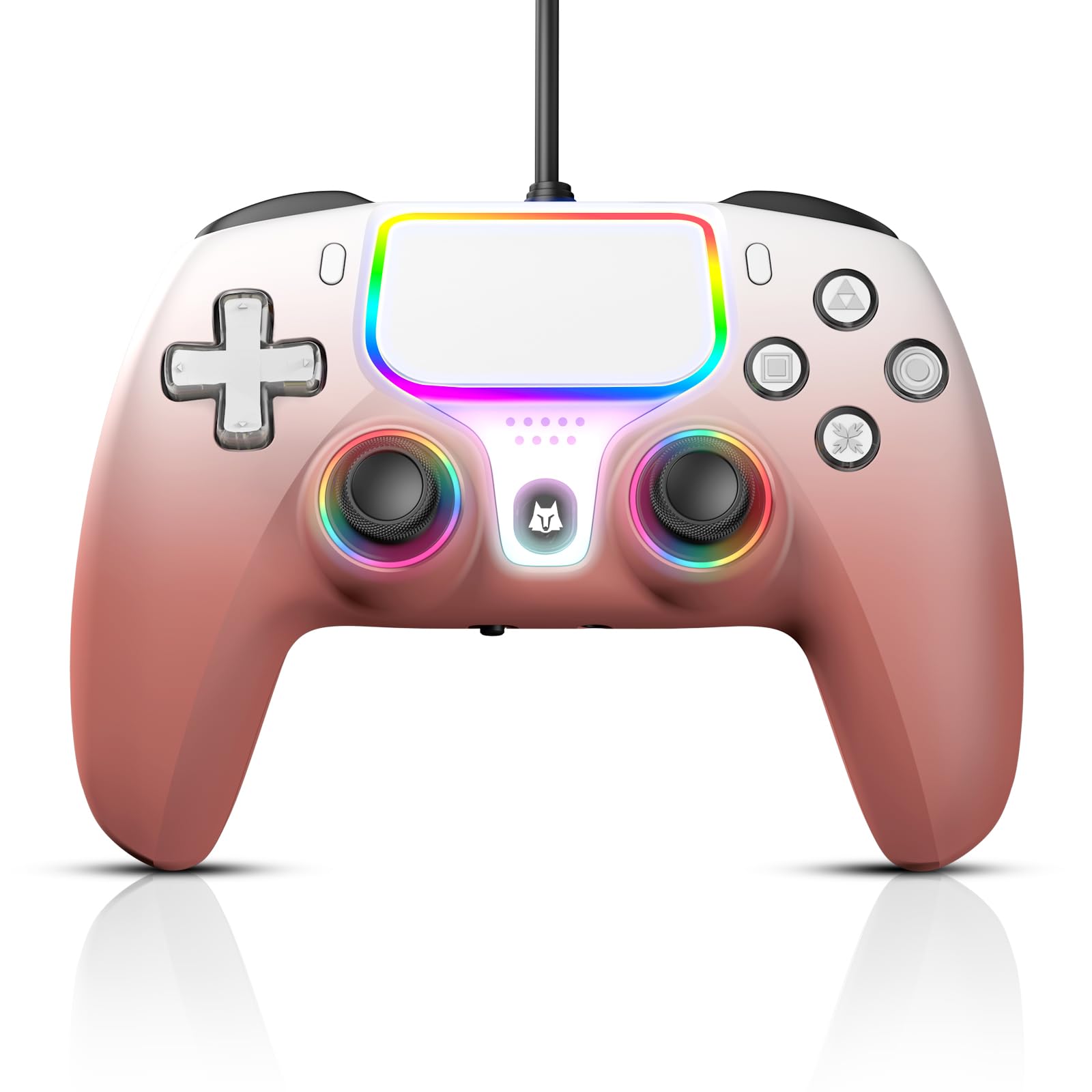
Immaġni: Quddiem view of the NBCP Wired Game Controller, showcasing its layout and RGB lighting.

Image: Diagram illustrating the wide compatibility of the controller with PS5, PS4, PC, and Android TV boxes.

Image: Close-up of the controller highlighting its vibrant RGB lighting around the joysticks and touchpad.

Image: Illustration of the high-sensitivity touchpad, supporting drag-and-drop, sliding, and multi-point simultaneous entry.
5. Setup
5.1 Konnessjoni mal-PlayStation 5
- Connect the USB cable to the controller and then to an available USB port on your PS5 console.
- Fuq il-PS5 tiegħek, mur fuq Settings > Aċċessorji > Controller (General) > Metodu ta' Komunikazzjoni.
- Agħżel Uża l-Kejbil tal-USB to enable the wired controller.

Image: Screenshot showing the PS5 settings menu to select "Use USB Cable" for wired controller communication.
5.2 Konnessjoni mal-PlayStation 4
Connect the USB cable from the controller to an available USB port on your PS4 console. The controller should be recognized automatically.
5.3 Connecting to PC (Windows 10/11)
Connect the USB cable from the controller to an available USB port on your PC. The operating system will typically install the necessary drivers automatically. The controller is compatible with Steam games.
6. Istruzzjonijiet Operattivi
6.1 Funzjoni Turbo
The Turbo function allows for rapid, continuous input of a button press. To activate or deactivate:
- Agħfas u żomm il- Buttuna Turbo (located on the left side of the right trigger system).
- While holding the Turbo button, press the desired action button (e.g., X, O, Square, Triangle, L1, R1, L2, R2) to assign or clear the Turbo function for that button.
- The Turbo function has 3 levels of speed. To adjust, hold the Turbo button and move the right joystick up or down.

Image: Illustration demonstrating the activation of the Turbo function for rapid input.
6.2 Ġiroskopju ta' 6 Assi
The built-in 6-axis gyro sensor provides precise motion control, enhancing responsiveness and smoothness in motion-sensitive games. This allows for aiming, steering, and advanced maneuvers by tilting the controller.

Image: Diagram illustrating the 6-axis somatosensor functionality for motion control in games.
6.3 Hall Effect Triggers
The Hall Effect triggers utilize contactless electromagnetic induction for precise and linear feedback. This design reduces friction and wear, providing a smoother and more durable trigger mechanism with accuracy up to 0.1mm.

Image: Cross-section diagram explaining the Hall Effect trigger mechanism, highlighting its accuracy and frictionless operation.
6.4 Vibrazzjoni Doppja
Dual vibration motors provide true-to-life haptic feedback, immersing players in game actions such as explosions, collisions, and other in-game events.

Image: Illustration showing the dual vibration motors within the controller, indicating haptic feedback.
6.5 3.5mm Headphone Jack
The controller includes a CTIA-standard 3.5mm audio jack for direct audio connection. Connect a headset with a microphone for private gaming and communication. Ensure the PS5 communication method is set to "Use USB Cable" for audio functionality.

Image: Diagram showing the 3.5mm headphone jack and its pinout for audio and microphone connections.
6.6 Joystick and Trigger Calibration (Drift Repair)
If you experience joystick or trigger drift, follow these steps to recalibrate the controller:
- Before plugging in the USB cable, hold down the buttuna Share u l- buttuna Għażliet fl-istess ħin.
- While holding these buttons, plug the USB cable into the controller and then into your console/PC. The blinking channel light indicates repair mode.
- Agħfas il- L2/R2 triggers fully three times each.
- Rotate both joysticks fully three times in a circular motion.
- Żomm il- buttuna X for 1 second to save the calibration and exit. Drift should now be fixed.

Image: Visual guide for fixing joystick and trigger drift issues through calibration.
6.7 Dimostrazzjoni bil-Vidjo
Video: A demonstration of the NBCP Wired Game Controller's features and compatibility with PS5. This video is provided by the seller, DOYO-US.
7. Manutenzjoni
- Clean the controller regularly with a soft, dry cloth.
- Do not use chemical cleaners or abrasive materials.
- Store the controller in a clean, dry place when not in use.
8 Issolvi l-problemi
| Ħruġ | Soluzzjoni |
|---|---|
| Controller not recognized by PS5 | Ensure the PS5 communication method is set to "Use USB Cable" in the accessory settings. Check USB cable connection. |
| No audio from headphone jack | Verify the PS5 communication method is set to "Use USB Cable". Ensure headphones are fully plugged in and functional. |
| Joystick/Trigger drift | Perform the joystick and trigger calibration steps outlined in Section 6.6. |
| Turbo function not working | Ensure the Turbo function is correctly assigned to the desired button as per Section 6.1. |
9. Speċifikazzjonijiet
| Karatteristika | Dettall |
|---|---|
| Numru tal-Mudell | 736D |
| Kompatibilità | PS5, PS4, PC (Windows 10/11), Steam |
| Tip ta' Konnessjoni | USB bil-fili |
| Tul tal-Cable | 10 piedi (madwar 3 metri) |
| Karatteristiċi Speċjali | Hall Effect Triggers, Dual Vibration, 6-Axis Gyroscope, Turbo Function, 3.5mm Headphone Jack, Touchpad |
| Piż tal-oġġett | 13.7 uqija (madwar 388 gramma) |
| Dimensjonijiet tal-Pakkett | 6.61 x 4.61 x 3.11 pulzieri |
10. Garanzija u Appoġġ
For warranty information or technical support, please contact NBCP customer service through the retailer where the product was purchased or refer to the official NBCP website for contact details. Please retain your proof of purchase for warranty claims.

