1. Introduzzjoni
Thank you for choosing the LENRUE A39PRO Computer Speakers. This wired USB-powered soundbar is designed to deliver clear 10W stereo sound for your PC desktop, laptops, and other compatible devices. Its plug-and-play functionality and convenient controls make it an ideal audio solution for various computing environments. Please read this manual carefully to ensure proper setup, operation, and maintenance of your new speakers.

Figure 1.1: LENRUE A39PRO Computer Speaker (White)
2. Karatteristiċi ewlenin
- Kompatibilità Wiesgħa: Works with any device featuring a standard 3.5mm headphone jack (PC, laptops, tablets, phones, MP3 players). The USB plug is solely for power.
- Stereo and Noiseless Sound: Utilizes upgraded 2x5W technology to provide clear and crystal-clear audio, enhancing your experience for movies, videos, music, and games.
- Kontroll tal-Volum Faċli: Features a conveniently located volume knob on the top of the speaker for instant and effortless adjustments.
- Colorful Breathlight Design: Integrated RGB LED lights create an enhanced atmosphere for your home or office. The lights can be turned on or off via a dedicated control button on the soundbar.
- Plug and Play: No drivers are needed, ensuring a hassle-free setup without sound delay. The 3.5mm audio interface and 47-inch (1.2m) cable provide ample connectivity.

Figure 2.1: Internal components highlighting HiFi Stereo Sound Technology

Figure 2.2: Wide compatibility with various devices and operating systems
3. Gwida ta' Setup
3.1 Disimballaġġ
Carefully remove the speaker from its packaging. Ensure all components listed in the 'Included Components' section (see Specifications) are present and undamaged.
3.2 Konnessjoni tal-Ispeaker
- Locate the USB power cable and the 3.5mm audio cable attached to the speaker.
- Plug the USB cable into a powered USB-A port on your computer, laptop, power bank, or a 5V 2A USB adapter (recommended for optimal performance). This cable provides power to the speaker.
- Plug the 3.5mm audio jack into the headphone or audio output port of your computer, laptop, tablet, or other audio source.
- Ensure both cables are securely connected.
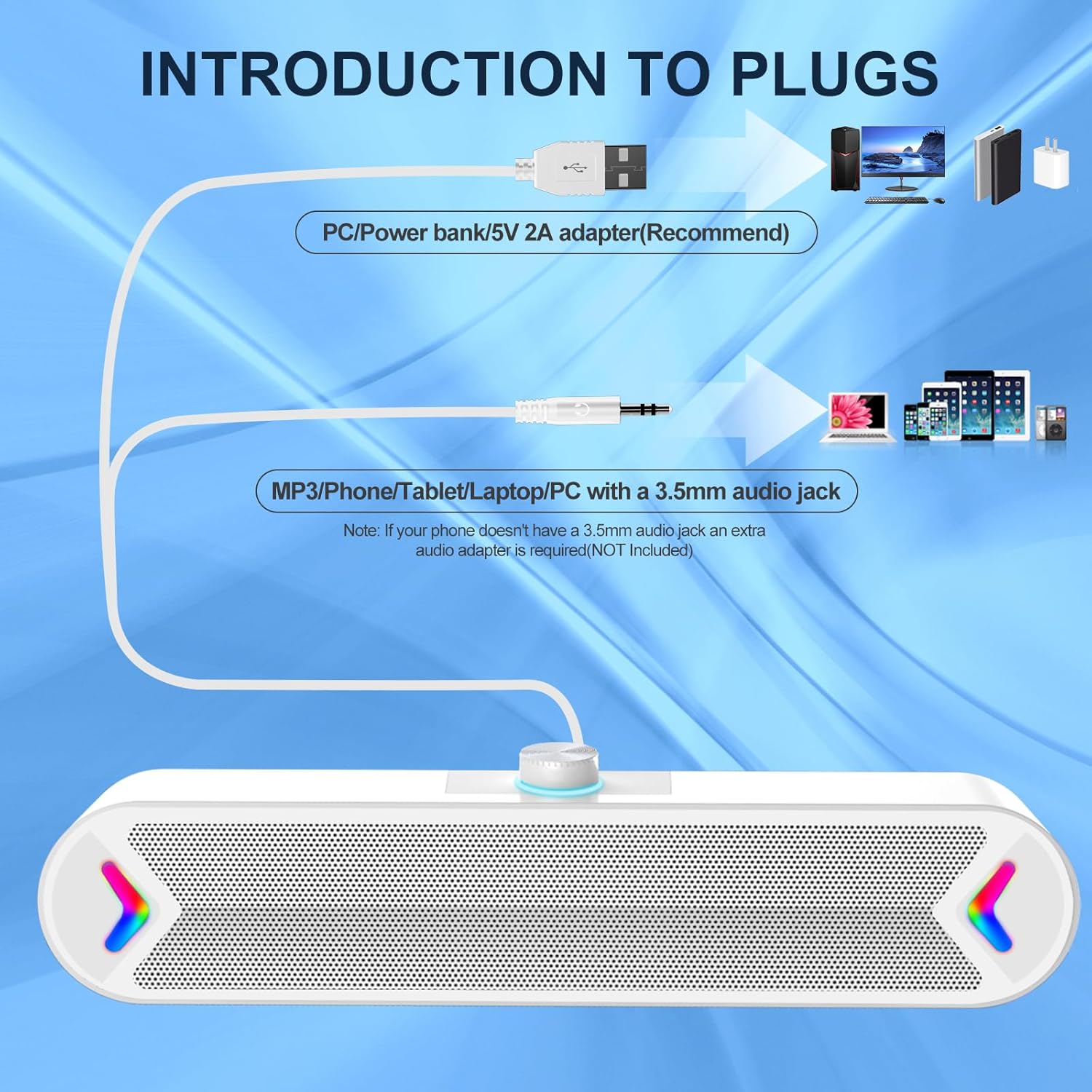
Figure 3.1: Connection Diagram for Power and Audio

Figure 3.2: Speaker in a typical desktop setup, ready for use
4. Istruzzjonijiet Operattivi
4.1 Power On/Off and LED Control
The speaker features a multi-function switch on the back for power and LED light control:
- DAWL: Turns on both the speaker power and the colorful RGB LED lights.
- FUQ: Powers on the speaker, but keeps the LED lights off.
- MITFI: Completely powers off both the speaker and the LED lights.

Figure 4.1: Power/Light Button and Volume Knob Location
4.2 Aġġustament tal-Volum
The volume knob is located on the top of the speaker for easy access:
- Rotate the knob clockwise to increase the volume.
- Rotate the knob counter-clockwise to decrease the volume.

Figure 4.2: Adjusting the Volume Knob
5. Manutenzjoni
To ensure the longevity and optimal performance of your LENRUE A39PRO speakers, follow these simple maintenance guidelines:
- Tindif: Use a soft, dry cloth to wipe down the speaker's exterior. Avoid using abrasive cleaners, solvents, or strong chemicals, as these can damage the surface.
- Tneħħija tat-Trab: Gently use a soft brush or compressed air to remove dust from the speaker grille and around the volume knob.
- Ħażna: Meta ma tkunx qed tużah għal perjodi twal, aħżen l-ispiker f'post frisk u niexef 'il bogħod mix-xemx diretta u minn temperaturi estremi.
- Immaniġġjar: Evita li twaqqa’ l-ispiker jew li tissottomettih għal impatti qawwija, għax dawn jistgħu jagħmlu ħsara lill-komponenti interni.
6 Issolvi l-problemi
If you encounter any issues with your LENRUE A39PRO speakers, please refer to the following common problems and solutions:
| Problema | Kawża Possibbli | Soluzzjoni |
|---|---|---|
| L-ebda ħoss jew volum baxx |
|
|
| Dwal LED ma jaħdmux |
|
|
| Ħoss distort |
|
|

Figure 6.1: Checking Audio Output Settings on Your Computer
7. Speċifikazzjonijiet
| Karatteristika | Dettall |
|---|---|
| Brand | LENRUE |
| Isem tal-Mudell | A39PRO |
| Tip ta' Kelliem | Speaker tal-Kompjuter |
| Teknoloġija tal-Konnettività | USB (for power), 3.5mm Audio Jack (for sound) |
| Modalità tal-Ħruġ tal-Awdjo | Stereo |
| Qawwa tal-Ħruġ Massimu tal-Ispeaker | 10 Watts (2x5W) |
| Rispons ta' Frekwenza | 20 Hz |
| Tip ta' Kontrollur | Kontroll tal-pum |
| Kulur | Abjad |
| Dimensjonijiet tal-Prodott | 2.17"D x 12.6"W x 2.56"H |
| Piż tal-oġġett | 1.37 liri |
| Tip ta 'Immuntar | Immonta fuq il-mejda |
| Użi Rakkomandati | For Computers (PC, Laptops, Tablets) |
| Komponenti Inklużi | A39PRO Computer Speaker |
8. Garanzija u Appoġġ
8.1 Informazzjoni dwar Garanzija
The LENRUE A39PRO Computer Speakers come with a limited warranty. Please refer to the product packaging or contact your retailer for specific details regarding the warranty period and terms.
8.2 Appoġġ għall-Klijent
For any questions, technical assistance, or support inquiries not covered in this manual, please contact LENRUE customer service through the retailer's platform or the official LENRUE website. Please have your product model number (A39PRO) and purchase information ready when contacting support.


