1. Introduzzjoni
The KLIM K7 is a versatile portable cassette player designed for both playback of audio cassettes and conversion of cassette audio to digital MP3 format. It features a built-in microphone for recording, an integrated speaker, and a rechargeable battery for on-the-go use. This manual provides detailed instructions for setting up, operating, and maintaining your KLIM K7 device.

Immaġni: Fuqview of KLIM K7 features including cassette to MP3 conversion, tape playback, built-in microphone, earphone jack, speaker, and compact size.
2. Kontenut tal-Pakkett
Jekk jogħġbok ivverifika li l-oġġetti kollha elenkati hawn taħt huma inklużi fil-pakkett tiegħek:
- KLIM K7 Portable Cassette Player and Converter
- KLIM Fusion Earphones
- 32GB Mikro SD Card
- Micro SD Card Reader (USB adapter)
- Cable tal-Iċċarġjar tal-USB tat-Tip-C
- Manwal għall-Utent (dan id-dokument)

Image: A visual representation of all items included in the KLIM K7 package: the cassette player, Type-C USB cable, 32GB Micro SD card, SD card reader, and Fusion earphones.
3. Prodott Aktarview
Familiarize yourself with the various parts and controls of your KLIM K7 device.

Immaġni: Quddiem view of the KLIM K7 cassette player, showing the cassette compartment, control buttons, built-in speaker, display, and included earphones, SD card, and USB adapter.
Kontrolli u Portijiet:
- Kompartiment tal-Kassett: Insert your audio cassettes here.
- Skrin tad-displej: Shows track time, SD card status, and recording indicator.
- Buttuna Play/Pause: Starts or pauses cassette playback/MP3 playback.
- Buttuna Waqqaf: Jieqaf daqq jew reġistrazzjoni.
- Buttuni 'l quddiem/rewind malajr: Navigates through cassette tape or MP3 tracks.
- Buttuna Rekord: Initiates recording from cassette or microphone to SD card.
- Buttuna tal-Modalità: Switches between cassette playback, MP3 playback, and recording modes.
- Kontroll tal-Volum: Jaġġusta l-livell tal-ħruġ tal-awdjo.
- Jack tal-widna ta' 3.5mm: Connect included earphones or other standard headphones.
- Mikrofonu: Built-in microphone for voice recording.
- Slot tal-Kard SD: Insert the provided 32GB Micro SD card for storage.
- Port USB tat-Tip Ċ: Għall-iċċarġjar tal-apparat.
- Swiċċ tal-Enerġija (ON/OFF): Ixgħel jew jitfi l-apparat.
4. Setup
4.1 Iċċarġjar tal-Apparat
The KLIM K7 is equipped with a 1000mAh rechargeable battery. Before first use, or when the battery is low, charge the device using the provided Type-C USB cable.
- Connect the Type-C end of the USB cable to the charging port on the KLIM K7.
- Connect the standard USB-A end of the cable to a USB power adapter (not included) or a computer's USB port.
- The charging indicator on the device will illuminate. A full charge typically takes approximately 2 hours.
- Ladarba tkun iċċarġjata kompletament, skonnettja l-kejbil.

Image: The KLIM K7 device shown with its Type-C USB charging cable, illustrating the rechargeable battery feature.
4.2 Daħħal il-Mikro SD Card
The included 32GB Micro SD card is essential for converting cassettes to MP3 and for recording audio. Ensure it is properly inserted before use.
- Locate the Micro SD card slot on the side of the KLIM K7.
- Gently insert the 32GB Micro SD card into the slot with the gold contacts facing down, until it clicks into place.
- To remove, gently push the card inward until it clicks, then release, and it will spring out.

Image: The KLIM K7 with its cassette compartment open, illustrating the insertion of the 32GB Micro SD card into its designated slot.
4.3 Inserting an Audio Cassette
- Open the cassette compartment door.
- Insert your audio cassette with the open edge facing the playback head.
- Close the cassette compartment door firmly until it clicks.
5. Istruzzjonijiet Operattivi
5.1 Tixgħel/Jitfi
Slide the Power Switch (ON/OFF) located on the side of the device to the 'ON' position to power on. Slide it to 'OFF' to power off.
5.2 Daqq ta' Tejp tal-Kassett
- Ensure a cassette tape is inserted and the device is powered on.
- Agħfas il- Play buttuna (►). The tape will begin to play.
- Aġġusta l-volum billi tuża l-kontroll tal-volum.
- Biex tieqaf, agħfas il- Play/Pawsa buttuna għal darb'oħra.
- Biex tieqaf, agħfas il- Waqqaf buttuna (■).
- Uża l- Fast 'il quddiem (►►) u Rewind (◄◄) buttons to navigate the tape.
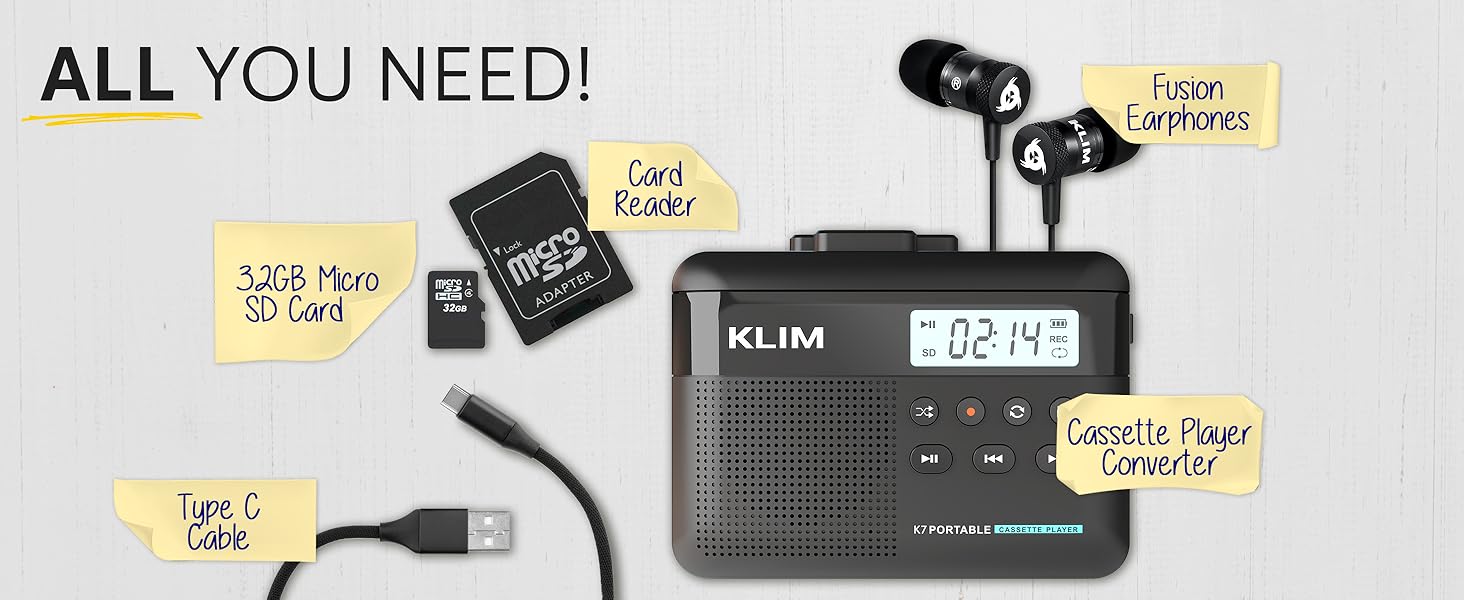
Image: A mother and child sharing earphones connected to the KLIM K7, demonstrating the device's use for listening to cassette tapes.
5.3 Converting Cassette to MP3
The KLIM K7 allows you to convert your cassette tapes directly to MP3 files on the inserted Micro SD card without needing a computer.
- Ensure a cassette tape is inserted and the 32GB Micro SD card is in its slot.
- Ixgħel l-apparat.
- Agħfas il- Play buttuna (►) to start playing the cassette.
- Agħfas fit-tul il- Rekord buttuna (●) to begin recording. The display will show a recording indicator.
- The device will convert the audio from the cassette to an MP3 file on the SD card. Each side of the tape will typically be saved as one MP3 file.
- Biex tieqaf tirrekordja, agħfas Rekord buttuna (●) għal darb'oħra.
- After recording, you can remove the SD card and use the provided USB adapter to transfer the MP3 files to a computer or other device.

Image: A five-step visual guide demonstrating how to convert cassette audio to MP3 files on the Micro SD card using the KLIM K7.
5.4 Using the Built-in Microphone for Recording
The KLIM K7 allows you to record external audio using its built-in microphone directly to the Micro SD card.
- Ensure the 32GB Micro SD card is inserted.
- Ixgħel l-apparat.
- Agħfas il- Modalità button until the device is in microphone recording mode (indicated on the display).
- Agħfas il- Rekord buttuna (●) to start recording.
- Speak clearly towards the built-in microphone.
- Biex tieqaf tirrekordja, agħfas Rekord buttuna (●) għal darb'oħra.
Note: The KLIM K7 does not support recording onto cassette tapes.

Image: A woman singing into a microphone, with the KLIM K7 and its SD card slot visible, illustrating the high-quality sound recording capability to the SD card.
5.5 Playing MP3 Files from SD Card
The KLIM K7 can also function as an MP3 player, playing files maħżuna fuq il-karta Micro SD.
- Ensure the Micro SD card with MP3 files hija mdaħħla.
- Ixgħel l-apparat.
- Agħfas il- Modalità button until the device is in MP3 playback mode.
- Agħfas il- Play buttuna (►) to start playing the first MP3 file.
- Uża l- Fast 'il quddiem (►►) u Rewind (◄◄buttuni ) biex taqbeż it-traċċi.
- Aġġusta l-volum billi tuża l-kontroll tal-volum.
5.6 Using Earphones and Speaker
The KLIM K7 offers flexible listening options:
- Earphones: For private listening, plug the included KLIM Fusion earphones into the 3.5mm earphone jack. The built-in speaker will automatically mute.
- Kelliem inkorporat: For shared listening, ensure no earphones are plugged in. The audio will play through the integrated speaker.

Image: A man wearing earphones, connected to the KLIM K7, highlighting the universal 3.5mm jack port for personal listening.
6. Manutenzjoni
Proper care and maintenance will ensure the longevity and optimal performance of your KLIM K7.
- Tindif: Use a soft, dry cloth to clean the exterior of the device. Do not use liquid cleaners or abrasive materials. For the playback head and pinch rollers, use a specialized cassette head cleaner if necessary, following its instructions.
- Ħażna: Meta ma tkunx qed tuża, aħżen l-apparat f'post frisk u niexef 'il bogħod mid-dawl tax-xemx dirett u temperaturi estremi.
- Kura tal-batterija: Biex ittawwal il-ħajja tal-batterija, evita li tiċċarġja kompletament il-batterija ta' spiss. Iċċarġja l-apparat regolarment, anke jekk ma tkunx qed tużah kontinwament.
- Cassette Tapes: Use clean, well-maintained cassette tapes to prevent damage to the playback head and ensure good audio quality.
7 Issolvi l-problemi
If you encounter issues with your KLIM K7, refer to the following common problems and solutions:
| Problema | Kawża Possibbli | Soluzzjoni |
|---|---|---|
| L-apparat ma jixgħelx. | Batterija baxxa jew eżawrita. | Iċċarġja l-apparat billi tuża l-kejbil USB-C ipprovdut. |
| No sound during cassette playback. | Volume too low; earphones not properly connected; dirty playback head. | Increase volume; ensure earphones are fully plugged in or removed for speaker; clean playback head. |
| Cassette to MP3 conversion not working. | SD card not inserted or full; cassette not playing. | Ensure SD card is correctly inserted and has free space; verify cassette playback is active before recording. |
| Poor audio quality during playback or recording. | Dirty playback head/pinch rollers; damaged cassette tape; low battery. | Clean playback head and pinch rollers; try a different cassette; ensure device is charged. |
| MP3 files not visible on computer after transfer. | SD card not properly read by computer/adapter. | Ensure SD card is fully inserted into the card reader; try a different USB port on your computer. |
8. Speċifikazzjonijiet
| Karatteristika | Dettall |
|---|---|
| Dimensjonijiet tal-Prodott | 4.76 x 3.61 x 1.56 pulzieri |
| Piż tal-oġġett | 7.7 uqija |
| Manifattur | KLIM |
| Numru tal-Mudell | K7 |
| Batterija | 1000mAh Lithium Ion (rikarikabbli, inkluż) |
| Port tal-Iċċarġjar | USB tat-tip C |
| Ħażna | 32GB Mikro SD Card (inkluża) |
| Output Awdjo | Built-in Speaker, 3.5mm Earphone Jack |
| Funzjoni ta' Reġistrazzjoni | Cassette to MP3, Built-in Microphone to MP3 (to SD card) |

Image: The KLIM K7 device with its compact dimensions (4.7" x 3.5" x 1.4") and weight (8 oz), highlighting its portability.
9. Garanzija u Appoġġ
KLIM is committed to producing quality electronics. The KLIM K7 comes with a 5-year assurance against manufacturing defects. If you encounter any problems with your device, please contact KLIM customer support for assistance.
For further support, product registration, or to view frequently asked questions, please visit the official KLIM websit:
10. Informazzjoni dwar is-Sigurtà
- Tesponix l-apparat għall-ilma, umdità, jew temperaturi estremi.
- Evita li twaqqa’ jew tissuġġetta l-apparat għal impatti qawwija.
- Tippruvax tiżżarma jew issewwi l-apparat int stess. Irreferi għal persunal tas-servizz kwalifikat.
- Żomm fejn ma jintlaħaqx mit-tfal.
- Armi l-apparat u l-batterija tiegħu b'mod responsabbli skont ir-regolamenti lokali.


