1. Introduzzjoni
This manual provides comprehensive instructions for the setup, operation, and maintenance of your ZdalaMit Voice Replacement Remote Control. This remote is designed to be compatible with various RCA Ultra HD 4K LED Smart Android TV models, including RTAQ5033, RTA4002, RTAU6504, RTA3201, RTAU5004, RTA4302, and 280401011330.
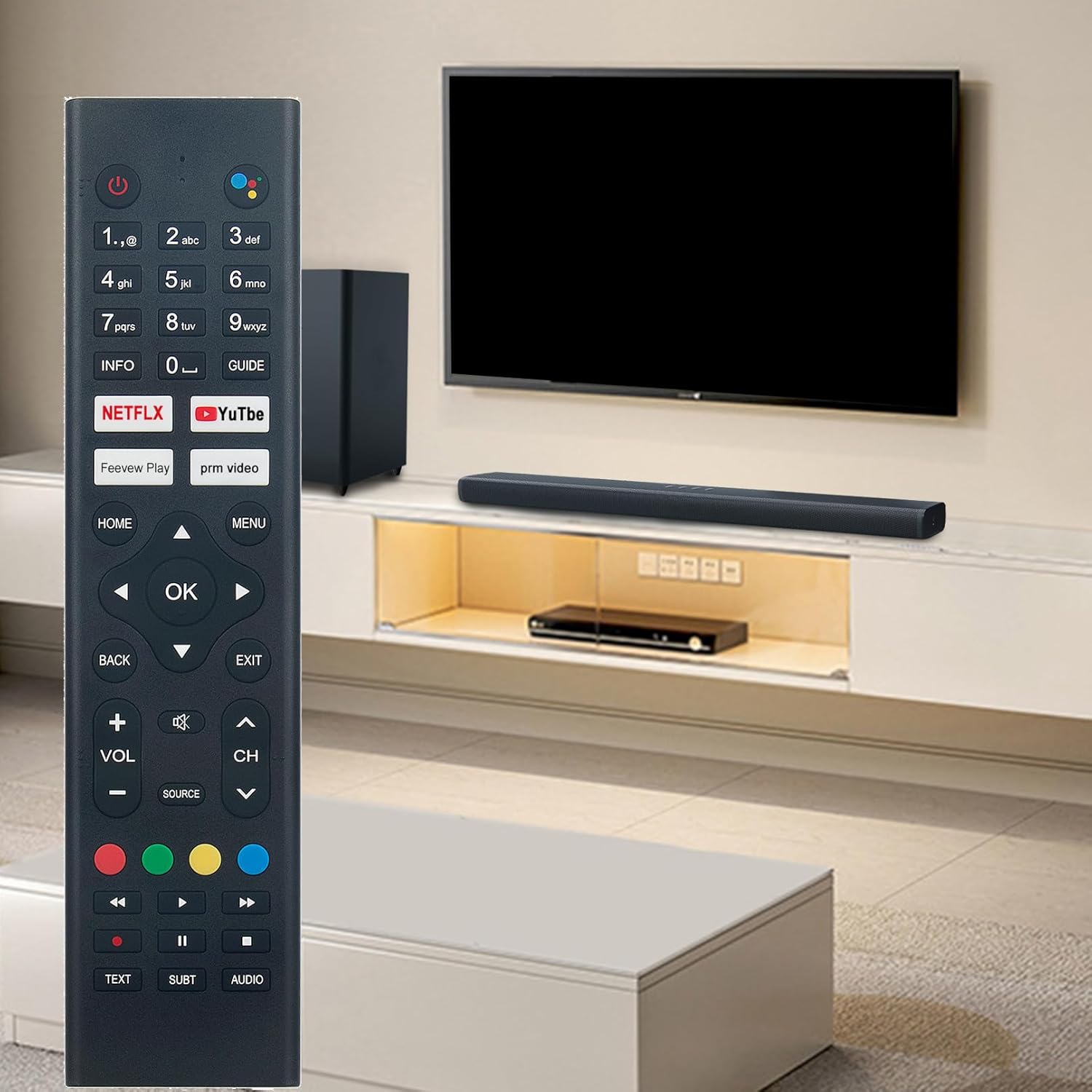
Figure 1: ZdalaMit Voice Replacement Remote Control in a typical home entertainment environment.
2. Setup
2.1 Installazzjoni tal-batterija
The remote control requires two (2) AAA size alkaline batteries (not included) for operation.
- Sib l-għatu tal-kompartiment tal-batterija fuq wara tal-kontroll remot.
- Żerżaq l-għatu 'l isfel biex tiftaħ il-kompartiment.
- Daħħal żewġ batteriji AAA, waqt li tiżgura li t-terminali pożittivi (+) u negattivi (-) ikunu allinjati sew mal-marki ġewwa l-kompartiment.
- Żerżaq l-għatu tal-kompartiment tal-batterija lura f'postu sakemm tikklikkja sew.

Figura 2: Quddiem view of the remote control, showing button layout. The battery compartment is on the reverse side.
2.2 Tqabbil tal-Kontroll mill-bogħod
Before using the remote control, it must be paired with your RCA Smart Android TV. Follow these steps:
- Ensure your RCA Smart Android TV is powered on.
- Point the remote control towards your TV.
- Simultaneously press and hold the "Dar" button and the "Vleġġa tax-Xellug" button for approximately 3 seconds.
- Release the buttons when an on-screen message indicates that the pairing process has begun or is complete.
- Test the remote control's functions to confirm successful pairing.
Note: If pairing fails, ensure the batteries are correctly installed and try the pairing process again. Maintain a clear line of sight between the remote and the TV during pairing.
3. Istruzzjonijiet Operattivi
This section details the functions of the various buttons on your ZdalaMit Voice Replacement Remote Control.
Figure 3: Layout of the remote control buttons for operational reference.
3.1 Funzjonijiet Bażiċi
- Buttuna tal-Qawwa (⏻): Jixgħel jew jitfi t-TV.
- Buttuni tan-Numri (0-9): Directly input channel numbers or other numerical data.
- Volum 'il fuq/'l isfel (VOL +/-): Jaġġusta l-volum tal-awdjo.
- Channel Up/Down (CH ^/v): Jibdel il-kanal tat-TV.
- Buttuna Mute (🔇): Jismuta jew jattiva l-awdjo tat-TV.
- Source Button (SOURCE): Jiċċikla bejn is-sorsi ta' input disponibbli (HDMI, AV, eċċ.).
3.2 Navigazzjoni u Kontroll tal-Menù
- Directional Pad (Up, Down, Left, Right Arrows): Navigates through menus and selections.
- Buttuna OK: Confirms a selection or enters a menu item.
- Home Button (HOME): Returns to the TV's main home screen.
- Back Button (BACK): Jirritorna għall-iskrin jew il-menù ta' qabel.
- Buttuna tal-Ħruġ (ĦRUĠ): Joħroġ mill-menù jew mill-applikazzjoni kurrenti.
- Buttuna tal-Menu (MENU): Opens the TV's main settings or options menu.
- INFO Button (INFO): Displays information about the current program or content.
- GUIDE Button (GUIDE): Jaċċessa l-gwida elettronika tal-programmi (EPG).
3.3 Kontroll tal-Vuċi
The remote features a voice control function for convenient operation.
- Buttuna tal-Assistent tal-Vuċi (●●●●): Press this button to activate the voice assistant. Speak clearly into the remote control's microphone to issue commands or search for content.

Figure 4: The voice assistant button, indicated by the multi-colored dots, is located at the top right of the remote.
3.4 Quick Access and Media Control Buttons
- Netflix Button (NETFLIX): Directly launches the Netflix application.
- YouTube Button (YouTube): Directly launches the YouTube application.
- Feevew Play Button (Feevew Play): Directly launches the Feevew Play application.
- prm video Button (prm video): Directly launches the prm video application.
- Buttuni kkuluriti (Aħmar, Aħdar, Isfar, Blu): These buttons may have specific functions depending on the TV application or menu. Refer to your TV's on-screen prompts.
- Media Control Buttons (Rewind, Play/Pause, Fast Forward, Stop): Control playback of media content.
- TEXT Button (TEXT): Accesses teletext services if available.
- SUBT Button (SUBT): Jixgħel jew jitfi s-sottotitli.
- AUDIO Button (AUDIO): Jagħżel it-traċċi jew il-modi tal-awdjo.
4. Manutenzjoni
- TindifUża drapp artab u niexef biex tnaddaf il-kontroll remot. Tużax prodotti tat-tindif likwidi jew materjali li joborxu.
- Sostituzzjoni tal-batterija: Replace batteries when the remote's performance degrades or it stops responding. Always replace both batteries at the same time with new AAA alkaline batteries.
- Ħażna: If the remote control will not be used for an extended period, remove the batteries to prevent leakage and damage.
- Evita Kundizzjonijiet Estremi: Do not expose the remote to direct sunlight, high temperatures, humidity, or water.
5 Issolvi l-problemi
- Remote ma jirrispondix:
- Iċċekkja jekk il-batteriji humiex imdaħħla sew bil-polarità korretta.
- Ibdel il-batteriji qodma b'batteriji alkalini AAA ġodda.
- Kun żgur li m'hemm l-ebda ostaklu bejn il-kontroll remot u r-riċevitur infra-aħmar tat-TV.
- Re-pair the remote control with the TV (refer to Section 2.2).
- Kontroll tal-vuċi mhux qed jaħdem:
- Ensure the remote is successfully paired with the TV.
- Tkellem b'mod ċar u direttament fil-mikrofonu.
- Check your TV's settings to ensure the voice assistant feature is enabled.
- Il-buttuni jwaħħlu jew ma jirrispondux:
- Clean the remote control with a soft, dry cloth. Avoid liquids.
- Jekk il-problema tippersisti wara t-tindif u s-sostituzzjoni tal-batterija, ir-remote jista' jkollu bżonn jinbidel.
6. Speċifikazzjonijiet
| Karatteristika | Dettall |
|---|---|
| Brand | ZdalaMit |
| Mudell | Voice Replacement Remote Control |
| Mudelli tat-TV Kompatibbli | RCA Ultra HD 4K LED Smart Android TV models: RTAQ5033, RTA4002, RTAU6504, RTA3201, RTAU5004, RTA4302, 280401011330 |
| Sors tal-Enerġija | 2 x Batteriji Alkalini AAA (mhux inklużi) |
| Karatteristika Speċjali | Tiftix bil-Vuċi |
| Kulur | Iswed |
| Dimensjonijiet tal-Prodott | 8.14 x 2 x 0.6 pulzieri (20.68 x 5.08 x 1.52 ċm) |
| Piż tal-oġġett | 2 uqija (56.7 gramma) |
| Manifattur | Qianhui Factory |

Figure 5: Remote control with approximate dimensions for reference.
7. Garanzija u Appoġġ
Għal informazzjoni dwar il-garanzija jew appoġġ tekniku, jekk jogħġbok irreferi għad-dokumentazzjoni pprovduta max-xiri tiegħek jew ikkuntattja lill-bejjiegħ direttament. Żomm l-irċevuta tax-xiri tiegħek bħala prova tax-xiri.
For further assistance, you may also visit the ZdalaMit brand page on Amazon or contact Amazon customer service regarding your order.


