1. Introduzzjoni
This manual provides comprehensive instructions for the assembly, operation, and maintenance of your FITUEYES Rolling TV Floor Stand. Please read this manual thoroughly before assembly and use to ensure safe and correct operation. Keep this manual for future reference.

Immaġni 1.1: Fuqview of the FITUEYES Rolling TV Floor Stand.
2. Informazzjoni dwar is-Sigurtà
Segwi l-linji gwida tas-sigurtà li ġejjin biex tevita korriment jew ħsara lill-prodott:
- Teċċedix il-kapaċità massima tal-piż ta' 132 lbs (60 kg).
- Ensure the TV size is within the recommended range of 40-85 pulzier.
- Verify that the VESA mounting pattern of your TV is compatible (100x100mm to 600x400mm).
- Assemble the stand on a soft, flat surface to prevent scratches.
- Always use two people for lifting and mounting the television.
- Engage the wheel locks when the stand is in a stationary position to prevent accidental movement.
- Żomm it-tfal u l-annimali domestiċi 'l bogħod miż-żona tal-assemblaġġ.
3. Kontenut tal-Pakkett
Before beginning assembly, ensure all parts are present and undamaged. Refer to the assembly diagram provided in your physical manual for a complete list of components and hardware.
Note: Specific hardware quantities may vary slightly. Contact customer support if any parts are missing or damaged.
4. Istruzzjonijiet tal-Assemblea
Follow these steps carefully for proper assembly. It is recommended to have a second person assist with TV mounting.
- Arma l-Bażi: Attach the vertical support columns to the wheeled base. Ensure all screws are tightened securely.
- Install Storage Components: Secure the wooden storage shelf, drawer, and pegboard to the vertical columns at your desired height.
- Attach TV Mounting Brackets: Secure the VESA mounting brackets to the back of your television using the appropriate screws and spacers. Ensure the brackets are centered and level.
- Immonta t-TV: With assistance, carefully lift the television and hook the mounting brackets onto the main TV mount bar on the stand.
- Assigura t-TV: Engage the safety locks on the TV mount to prevent the TV from accidentally disengaging from the stand.
- Ġestjoni tal-Kejbil: Utilize the integrated cable management straps and grommets to route and organize TV and device cables neatly along the stand's columns and through the drawer's cable hole.


Image 4.1: Safety lock and cable management features.
5. Istruzzjonijiet Operattivi
5.1 Adjusting TV Height
The TV mount offers 4 height adjustments. To adjust the height, loosen the securing bolts on the vertical columns, carefully raise or lower the TV to the desired position, and then re-tighten the bolts securely. Ensure the TV is level after adjustment.

Image 5.1: Height adjustment range of the TV stand.
5.2 Moving the Stand
The stand is equipped with 360° swivel wheels for easy mobility. To move the stand, ensure the wheel locks are disengaged. Once the stand is in the desired location, press down on the wheel locks to secure the stand in place and prevent unintended movement.

Image 5.2: Lockable wheel mechanism.
5.3 Utilizing Storage Features
The stand includes a spacious shelf, a drawer, and a pegboard for organizing media devices and accessories.
- Shelf Storage: Use the top shelf for soundbars, media players, or decorative items.
- Pegboard Storage: Hang game controllers, headphones, or other small accessories on the pegboard using compatible hooks (not included).
- Ħażna tal-kexxun: The integrated drawer provides concealed storage for remotes, cables, or other items. It also features a cable management hole for routing device wires.

Image 5.3: Storage shelf, pegboard, and drawer.
6. Manutenzjoni
Regular maintenance ensures the longevity and proper function of your TV stand.
- Tindif: Imsaħ l-uċuħ b'artab, damp drapp. Evita kimiċi ħarxa jew prodotti tat-tindif li joborxu li jistgħu jagħmlu ħsara lill-finitura.
- Iċċekkja tal-Hardware: Periodically inspect all screws and bolts to ensure they remain tight. Re-tighten as necessary.
- Wheel Functionality: Keep the wheels free of debris to ensure smooth movement. Test the wheel locks regularly.
7 Issolvi l-problemi
Jekk tiltaqa' ma' problemi, irreferi għall-problemi u s-soluzzjonijiet komuni li ġejjin:
| Problema | Kawża Possibbli | Soluzzjoni |
|---|---|---|
| L-istand mhux stabbli jew jitbandal. | Ħardwer maħlul; art irregolari. | Ensure all bolts are securely tightened. Move stand to a level surface. |
| TV cannot be mounted. | Incorrect VESA pattern; TV too heavy or too large. | Verify TV's VESA pattern, weight, and size against specifications. |
| Ir-roti ma jdurux bla xkiel jew jissakkru. | Debris in wheels; lock mechanism obstructed. | Clean wheels. Check for obstructions in the lock mechanism. |
| Cables are disorganized. | Cable management not fully utilized. | Use the provided cable straps and grommets to route cables. |
8. Speċifikazzjonijiet
| Karatteristika | Dettall |
|---|---|
| Numru tal-Mudell | B0DX26SBXW |
| Daqsijiet tat-TV Kompatibbli | 40 - 85 pulzieri |
| Kapaċità tal-piż | Sa 132 lbs (60 kg) |
| Kompatibilità VESA (W x H) | 100x100, 200x100, 300x100, 300x200, 300x300, 400x300, 600x400mm |
| Medda ta 'Aġġustament Għoli | 40.7 - 57.4 pulzieri |
| Materjal | Steel, MDF Wood |
| Kulur | Iswed |
| Piż tal-oġġett | 47.6 liri |
| Dimensjonijiet tal-Pakkett | 35.4 x 21.5 x 4.6 pulzieri |
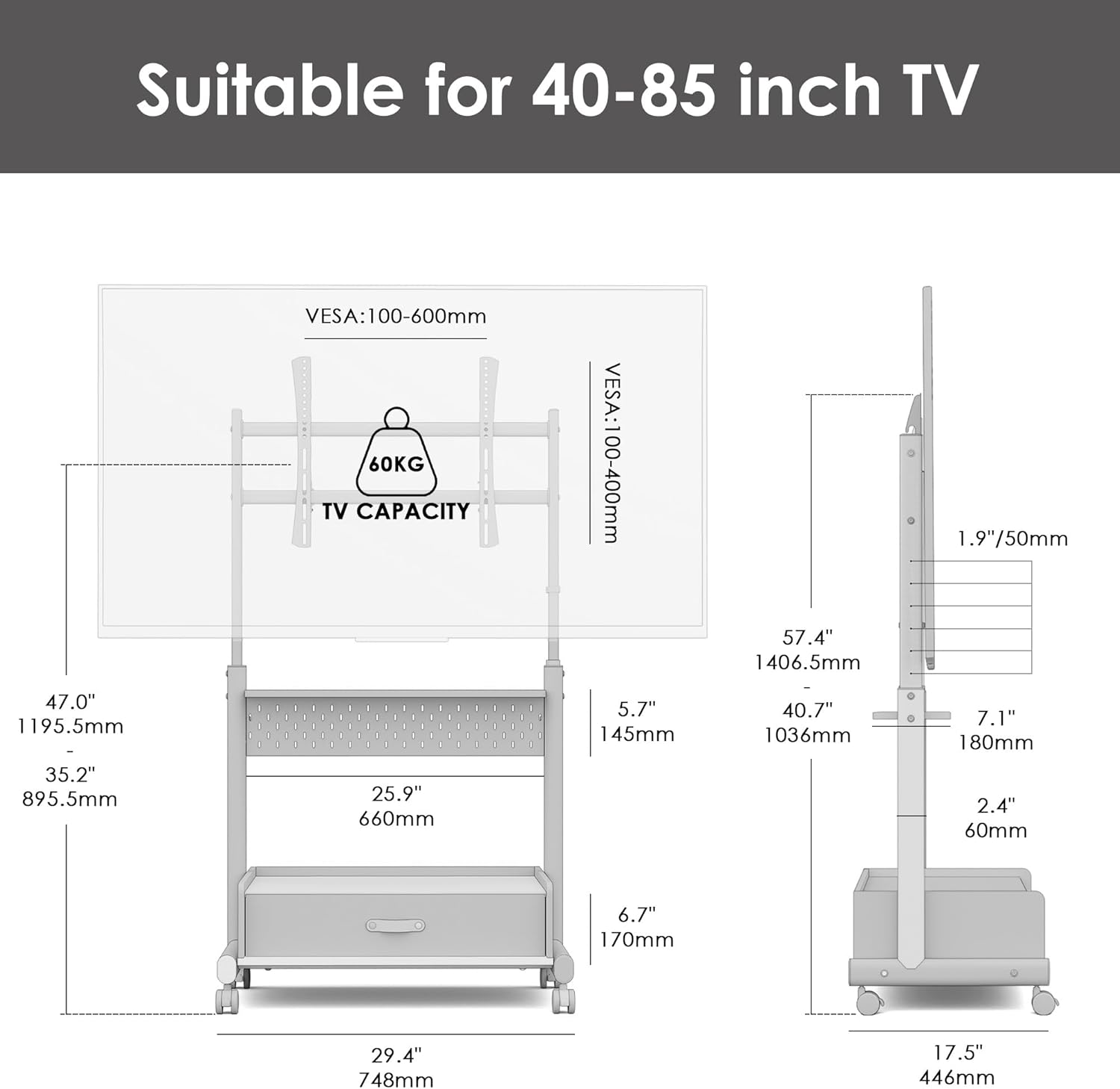
Immaġni 8.1: Dimensjonijiet u speċifikazzjonijiet tal-prodott.
9. Garanzija u Appoġġ
For warranty information, product support, or to report missing/damaged parts, please contact FITUEYES customer service directly. Refer to the contact information provided with your purchase or visit the official FITUEYES websit.
Note: Protection plans mentioned during purchase are typically third-party services and separate from the manufacturer's warranty.


