1. Introduzzjoni
This manual provides detailed instructions for the setup, operation, and maintenance of your Itari M102 Label Maker Machine. Please read this manual thoroughly before using the device to ensure proper function and longevity.
2. Kontenut tal-Pakkett
Ivverifika li l-oġġetti kollha huma preżenti fil-pakkett tiegħek:
- Itari M102 Label Maker Machine
- 3 Rolls of Thermal Labels (1.57" x 1.18" / 40mm x 30mm)
- Cable tal-Iċċarġjar tal-USB tat-Tip-Ċ
- Manwal għall-Utent (dan id-dokument)

Image 2.1: The Itari M102 Label Maker Machine shown with the included label rolls.
3. Prodott Aktarview
Familiarize yourself with the components of your label maker.
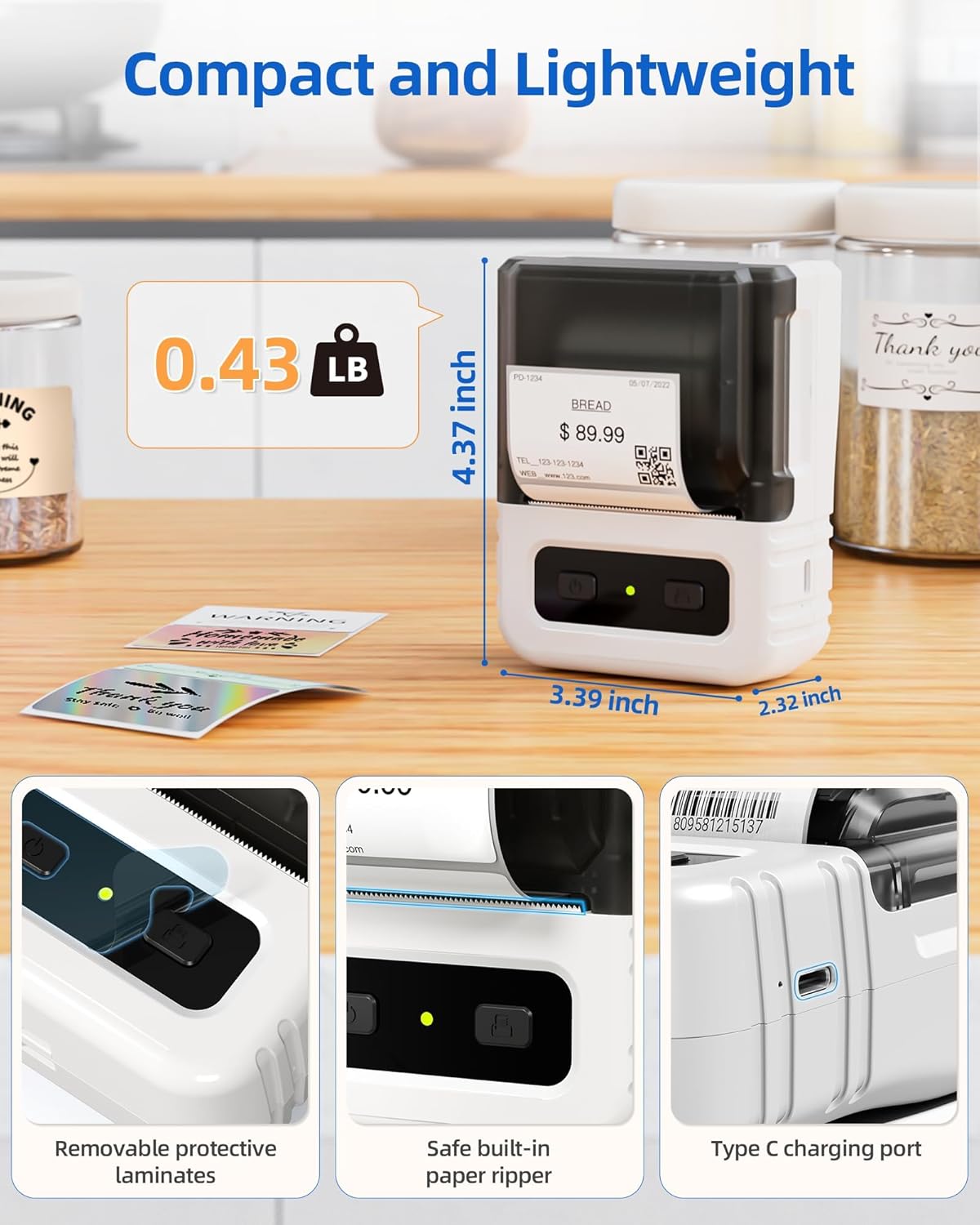
Immaġni 3.1: Dettaljata view highlighting the dimensions, safe built-in paper ripper, removable protective laminates, and Type-C charging port.
Karatteristiċi ewlenin:
- Buttuna tal-Qawwa: Użat biex jixgħel/itfi l-apparat.
- Kompartiment tat-Tikketta: Holds the label roll.
- Adjustable Guide: Ensures proper alignment for various label widths (supports 20-50mm wide labels).
- Slott tal-Ħruġ tal-Karta: Fejn joħorġu tikketti stampati.
- Built-in Paper Ripper: For cleanly detaching printed labels.
- Port tal-Iċċarġjar tat-Tip C: Għall-iċċarġjar mill-ġdid tal-batterija interna.
4. Setup
4.1. Iċċarġjar tal-Apparat
Before first use, fully charge the label maker. Connect the provided USB Type-C cable to the charging port on the device and a compatible USB power adapter (not included). A full charge takes approximately 2 hours and provides up to 1 month of typical usage.
4.2. It-Tagħbija tat-Tikketti
- Iftaħ l-għatu tal-kompartiment tat-tikketti.
- Insert a roll of thermal labels into the compartment, ensuring the labels feed from the bottom and the printing side faces upwards.
- Adjust the label guides to fit the width of your label roll snugly. The device supports labels from 20mm to 50mm wide.
- Pull a small portion of the label paper out through the paper exit slot.
- Agħlaq l-għatu tal-kompartiment tat-tikketti sew.

Image 4.1: The label compartment open, illustrating how to insert a label roll and adjust the width guides.
4.3. Installazzjoni u Konnettività tal-App
The Itari M102 Label Maker connects wirelessly via Bluetooth to your smartphone or tablet, and via USB to computers. Download the dedicated label editing application from your device's app store (e.g., Apple App Store for iOS, Google Play Store for Android).
- Għal Konnessjoni Bluetooth:
- Ixgħel il-magna tat-tikketti.
- Ippermetti Bluetooth fuq it-tagħmir mobbli tiegħek.
- Open the Itari label app and follow the in-app instructions to search for and pair with your M102 device. Pairing typically takes less than 2 seconds.
- Għal Konnessjoni USB:
- Connect the label maker to your computer using the USB Type-C cable.
- Install the necessary drivers or software for your operating system (Windows, macOS, Chrome OS, Linux) as prompted or available on the Itari support websit.

Image 4.2: Illustrates wireless Bluetooth connectivity for iOS and Android, and USB connectivity for Chrome OS, Windows, Mac OS, and Linux.
5. Istruzzjonijiet Operattivi
5.1. Ħolqien u Personalizzazzjoni tat-Tikketti
The Itari label app provides extensive customization options:
- Mudelli: Access over 300 free label templates for various uses (address, price, food, clothing, cable, jewelry, folder labels, etc.).
- Fonts & Symbols: Choose from over 100 fonts and 1000 symbols to personalize your labels.
- Stampi: Embed images into your label designs.
- Editjar tat-Test: Adjust text size, style, alignment, and add multiple lines.
- Kodiċijiet tal-bar u Kodiċijiet QR: Iġġenera u ipprintja diversi tipi ta' barcodes u kodiċijiet QR.
5.2. Stampar Tikketti
- Ensure the label maker is powered on and connected to your device (Bluetooth or USB).
- Open the Itari label app and create or select your desired label design.
- Confirm the label size in the app matches the loaded label roll.
- Tap the 'Print' button in the app.
- The label maker will print the label. Use the built-in paper ripper to cleanly detach the label from the roll.
6. Manutenzjoni
6.1. Tindif
To maintain print quality and device longevity:
- Turn off the label maker before cleaning.
- Gently wipe the print head with a soft, lint-free cloth moistened with isopropyl alcohol. Allow it to dry completely before use.
- Clean the exterior of the device with a soft, dry cloth. Do not use harsh chemicals or abrasive cleaners.
6.2. Ħażna tat-Tikketti
Store thermal labels in a cool, dry place away from direct sunlight and heat to prevent premature fading or damage to the thermal coating.
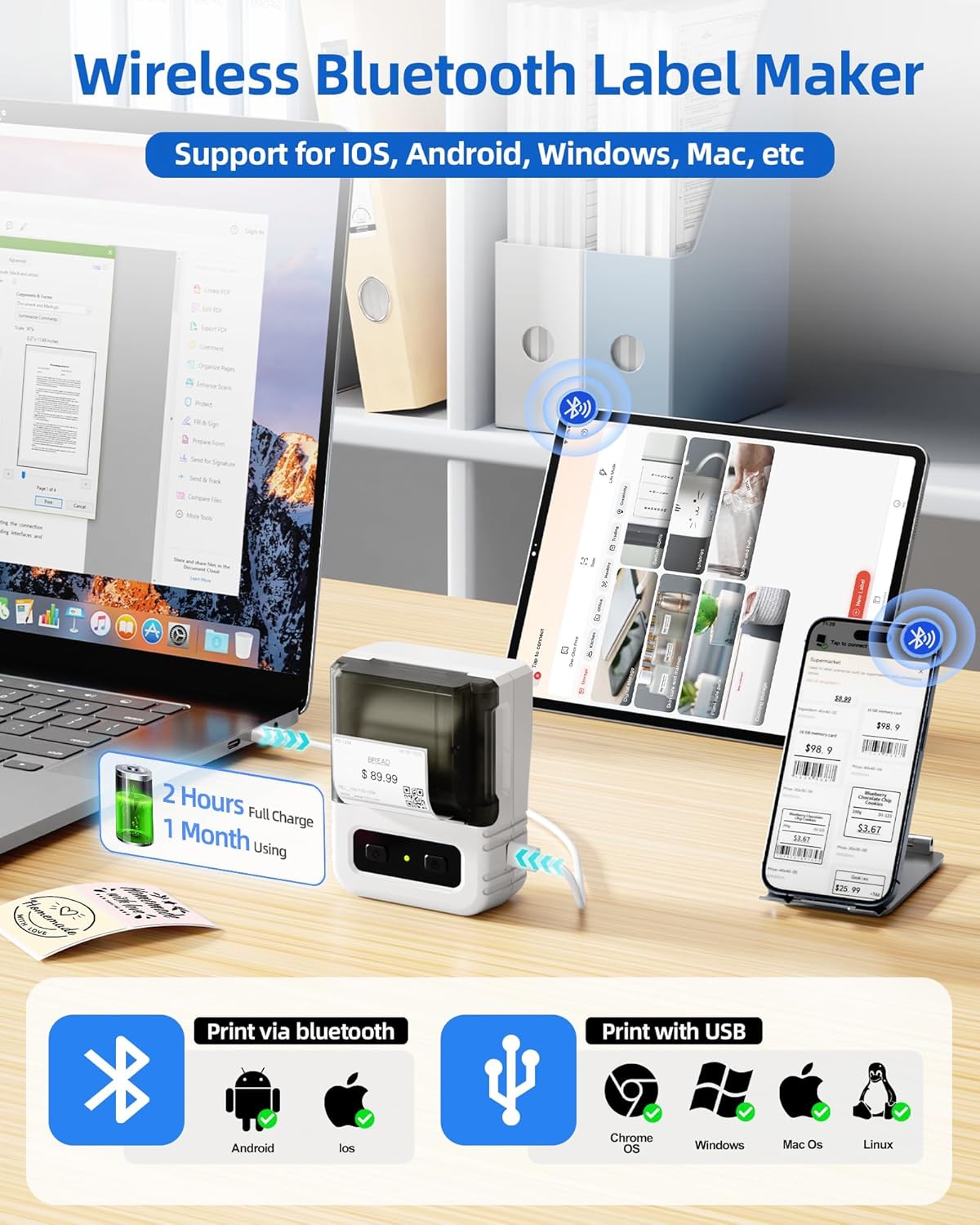
Image 6.1: Itari thermal label rolls, highlighting the 1.57" x 1.18" (40mm x 30mm) size, 230 sheets per roll, and high-quality thermal paper.
7 Issolvi l-problemi
If you encounter issues with your Itari M102 Label Maker, refer to the following common problems and solutions:
| Problema | Kawża Possibbli | Soluzzjoni |
|---|---|---|
| L-apparat ma jixgħelx | Batterija baxxa | Iċċarġja l-apparat billi tuża l-kejbil USB tat-Tip C provdut. |
| L-ebda stampa jew stampa ħafifa |
|
|
| Ħsara fil-konnessjoni Bluetooth |
|
|
| Labels jam |
|
|
8. Speċifikazzjonijiet
- Mudell: M102
- Teknoloġija tal-Istampar: Termali (Mingħajr Linka)
- Wisa' tat-Tikketta Appoġġjata: 20mm - 50mm
- Included Label Size: 1.57" x 1.18" (40mm x 30mm)
- Konnettività: Bluetooth, USB Type-C
- Ħajja tal-batterija: Up to 1 month of typical use (2 hours full charge)
- Dimensjonijiet: Approximately 4.37" (H) x 3.39" (W) x 2.32" (D)
- Piż: Madwar 0.43 lbs (0.195 kg)
9. Garanzija u Appoġġ
For warranty information and technical support, please refer to the contact details provided with your purchase or visit the official Itari websit. Żomm l-irċevuta tax-xiri tiegħek bħala prova tax-xiri għal talbiet ta' garanzija.


