1. Introduzzjoni
Thank you for choosing the Angrox Voice Remote Control. This remote is specifically designed as a replacement for Philips Google Smart TVs, offering enhanced functionality including voice control and dedicated shortcut buttons for popular streaming services. Please read this manual carefully to ensure proper setup and operation.

Immaġni: Minn quddiem u mill-ġenb view of the Angrox Voice Remote Control, showcasinid-disinn ergonomiku u t-tqassim tal-buttuni tiegħu.
2. Setup
2.1 Installazzjoni tal-batterija
The remote requires two (2) AAA batteries (not included). Ensure correct polarity when inserting the batteries.
- Neħħi l-għatu tal-batterija minn wara tar-remote billi tiżżerżaq 'l isfel.
- Insert two AAA batteries, matching the positive (+) and negative (-) terminals as indicated inside the battery compartment.
- Erġa’ poġġi l-għatu tal-batterija billi tiżżerżaqha lura f’postu sakemm tikklikkja sew.

Image: A three-step diagram illustrating how to remove the battery cover, insert two AAA batteries, and replace the cover.
2.2 It-tqabbil mat-TV tiegħek
Before using the remote, it must be paired with your Philips Google Smart TV. This remote supports both infrared and Bluetooth technology for optimal performance.
- Ensure your Philips Google Smart TV is powered on.
- Hold down the "VOL-" button and the "Mic" (Google Assistant) button simultaneously for 5 seconds.
- The remote will initiate the pairing process. All pairing transactions occur in the background, and no further setup is typically required once the pairing is successful.

Image: A hand holding the remote, with an arrow pointing from the 'VOL-' and 'Mic' buttons to a TV screen, illustrating the pairing process.

Image: A visual guide showing the remote and a TV screen with on-screen instructions for pairing, emphasizing holding the VOL- and Mic buttons.
2.3 Mudelli tat-TV Kompatibbli
This voice replacement remote is compatible with the following Philips Google Smart TV series:
- Serje 7000: 75PUL7552/F7, 65PUL7552/F7, 55PUL7552/F7, 50PUL7552/F7, 43PUL7652/F7
- Serje 7600: 65PUL7672/F7, 55PUL7672/F7, 50PUL7672/F7, 43PUL7672/F7

Image: The remote control centered between two Philips Google Smart TVs, with lists of compatible 7000 and 7600 series models.
3. Istruzzjonijiet Operattivi
3.1 Funzjonijiet tal-Buttuni 'l Fuqview
Familiarize yourself with the various buttons and their functions on your Angrox remote control:
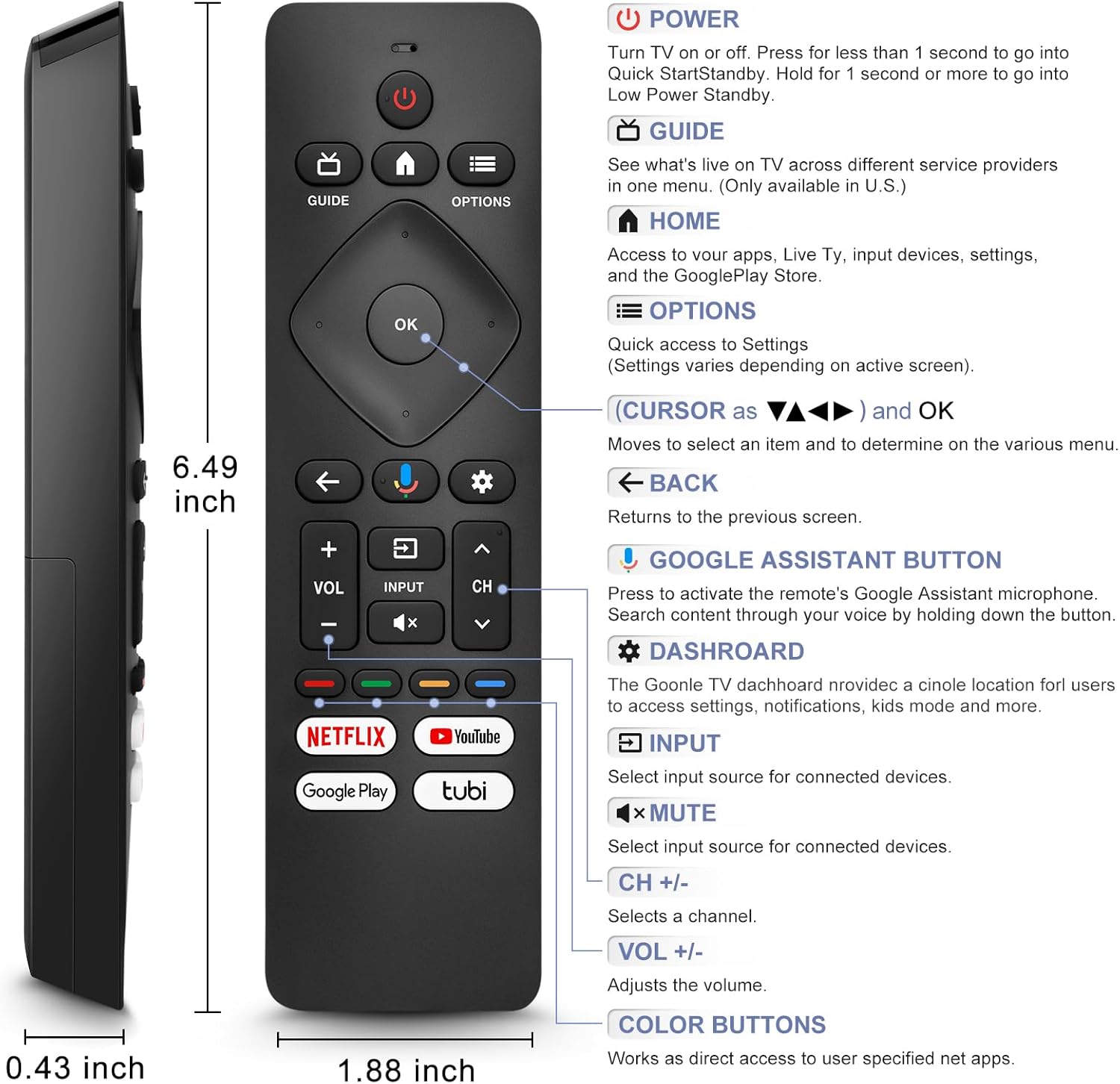
Image: A detailed diagram of the remote control with labels and descriptions for each button, including Power, Guide, Home, Options, Cursor/OK, Back, Google Assistant, Dashboard, Input, Mute, Volume, Channel, and Color Buttons.
- Qawwa: Press to turn TV on or off. Hold for 1 second for Quick Start Standby, or longer for Low Power Standby.
- Gwida: Access live TV service providers (availability may vary by region).
- Dar: Access apps, Live TV, input devices, settings, and the Google Play Store.
- Għażliet: Quick access to settings (settings vary based on active screen).
- Cursor (Up/Down/Left/Right) & OK: Innaviga l-menus u kkonferma l-għażliet.
- Dahar: Irritorna għall-iskrin preċedenti.
- Buttuna tal-Assistent tal-Google: Press and hold to activate the remote's microphone for voice search.
- Dashboard: Access the Google TV dashboard for settings, notifications, and kids mode.
- Input: Agħżel is-sors tad-dħul għall-apparati konnessi.
- Siekta: Mute or unmute the TV audio.
- VOL +/-: Aġġusta l-livell tal-volum.
- CH +/-: Select the next or previous channel.
- Buttuni tal-Kulur: Provide direct access to user-specified net apps.
3.2 Voice Search Function
The integrated voice function allows for easier and more intuitive interaction with your smart TV. Simply press and hold the Google Assistant button and speak your command or query.
- Agħfas u żomm il- buttuna Google Assistant (ikona tal-mikrofonu).
- Tkellem b'mod ċar fil-mikrofonu tar-remote.
- Erħi l-buttuna meta spiċċajt titkellem.
Examples of voice commands include: "What's the weather today?", "Turn down the volume", "Open YouTube", or searching for specific content.
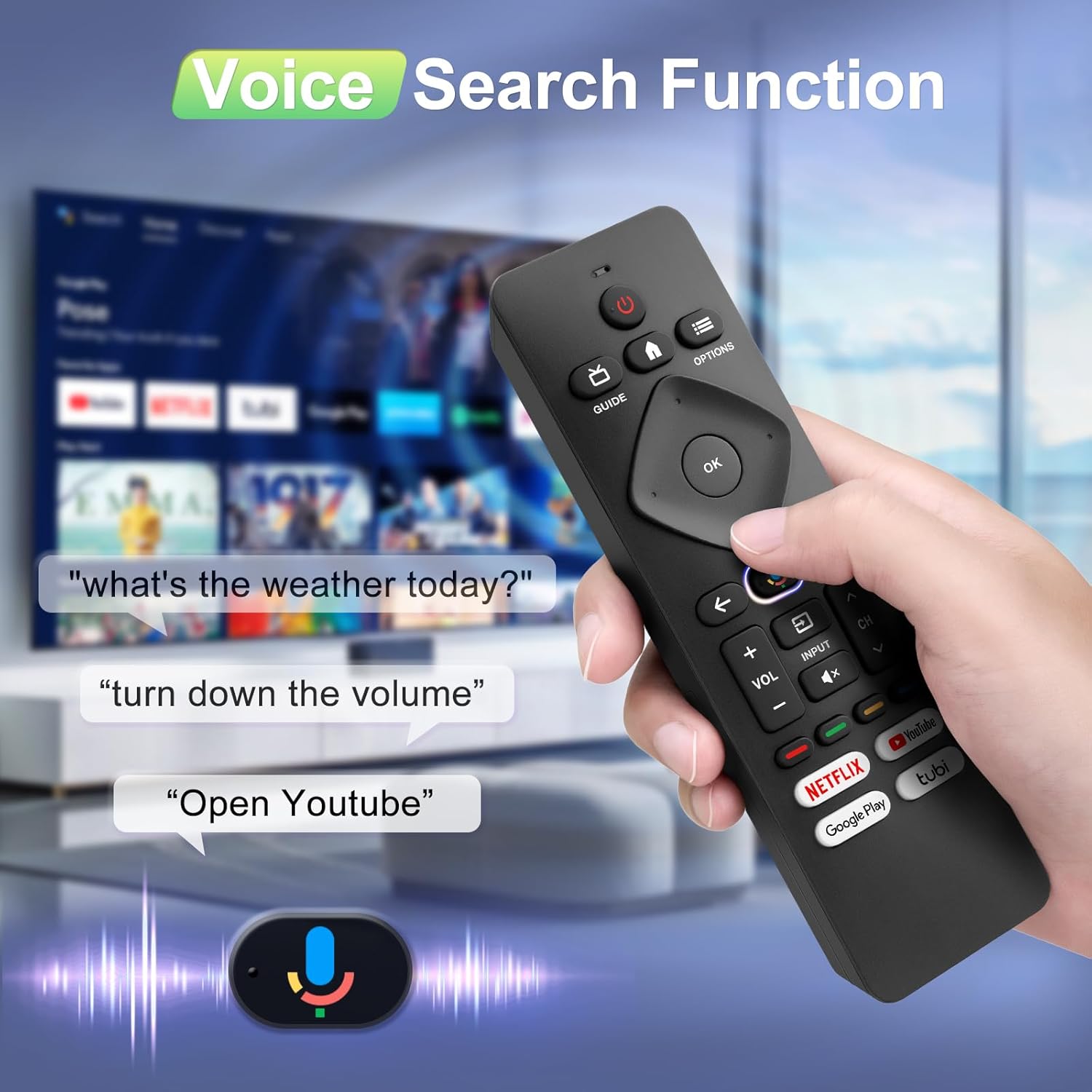
Image: A hand holding the remote, with speech bubbles showing example voice commands like "what's the weather today?" and "Open Youtube", demonstrating the voice search capability.
3.3 Buttuni ta 'Shortcut
The remote features four dedicated shortcut buttons for quick access to popular streaming channels:
- Netflix
- YouTube
- Google Play
- Tubi
Pressing these buttons will directly launch the respective application on your TV, provided they are installed and configured.

Image: The remote control highlighting the four dedicated shortcut buttons for Netflix, YouTube, Google Play, and Tubi, with their respective logos.
4. Manutenzjoni
Biex tiżgura l-lonġevità u l-prestazzjoni ottimali tal-kontroll remot tiegħek, segwi dawn il-linji gwida ta' manutenzjoni:
- Tindif: Imsaħ ir-remote b'ċarruta ratba u niexfa. Tużax prodotti tat-tindif likwidi jew materjali li joborxu.
- Sostituzzjoni tal-batterija: Ibdel il-batteriji meta r-rispons tar-remote isir kajman jew jieqaf jaħdem. Dejjem ibdel iż-żewġ batteriji fl-istess ħin b'oħrajn ġodda.
- Ħażna: Aħżen il-kontroll remot f'post frisk u niexef 'il bogħod mix-xemx diretta u minn temperaturi estremi.
- Evita Qtar: Ipproteġi r-remote minn impatt fiżiku, għax il-waqgħat jistgħu jagħmlu ħsara lill-komponenti interni.
5 Issolvi l-problemi
Jekk tiltaqa' ma' problemi bil-kontroll remot tiegħek, jekk jogħġbok irreferi għas-soluzzjonijiet komuni li ġejjin:
- Remote Mhux Jirrispondi:
- Iċċekkja jekk il-batteriji humiex imdaħħla sew bil-polarità t-tajba.
- Ibdel il-batteriji qodma b'batteriji AAA ġodda.
- Kun żgur li m'hemm l-ebda ostaklu bejn ir-remote u r-riċevitur IR tat-TV.
- Funzjoni tal-Vuċi Mhux Taħdem:
- Ensure the remote is properly paired with your TV via Bluetooth. Refer to Section 2.2.
- Make sure you are pressing and holding the Google Assistant button while speaking.
- Iċċekkja s-settings tat-TV tiegħek biex tiżgura li l-kontroll tal-vuċi huwa attivat.
- Buttons Unresponsive or Sticky:
- Clean the remote surface, especially around the buttons, to remove any dirt or debris.
- If buttons remain unresponsive after cleaning and battery replacement, the remote may require replacement.
- Short Remote Distance:
- The remote supports infrared and Bluetooth. Ensure no physical obstructions are blocking the signal.
- The remote is designed for optimal performance within 10 meters (approximately 33 feet) and is available up to 12 meters (approximately 39 feet).
6. Speċifikazzjonijiet
| Brand | Angrox |
| Numru tal-Mudell | URMT26CND002 |
| Apparati Kompatibbli | Philips Google Smart TVs (7000 & 7600 Series) |
| Teknoloġija tal-Konnettività | Infra-aħmar, Bluetooth |
| Karatteristiċi Speċjali | Ergonomic, Voice Search, Shortcut Buttons |
| Sors tal-Enerġija | 2 x Batteriji AAA (mhux inklużi) |
| Piż tal-oġġett | 2.39 uqija (madwar 67.7 gramma) |
| Dimensjonijiet tal-Pakkett | 6.73 x 1.93 x 1.02 pulzieri |
| Durabilità tal-Buttuni | Tested for 5,000-8,000 clicks per button |
7. Garanzija u Appoġġ
Angrox is committed to providing excellent after-sale service. We focus on the compatibility and quality of our replacement remotes. If you have any questions or concerns regarding your order or the product, please do not hesitate to contact us directly. Our professional after-sale service team is available to assist you.
For support, please refer to the contact information provided with your purchase or visit the Angrox store on Amazon.
