Introduzzjoni
This user manual provides comprehensive instructions for the setup, operation, maintenance, and troubleshooting of your Hewlett Packard HP Pavilion 16-ag00 laptop. Please read this manual thoroughly before using your device to ensure optimal performance and longevity.
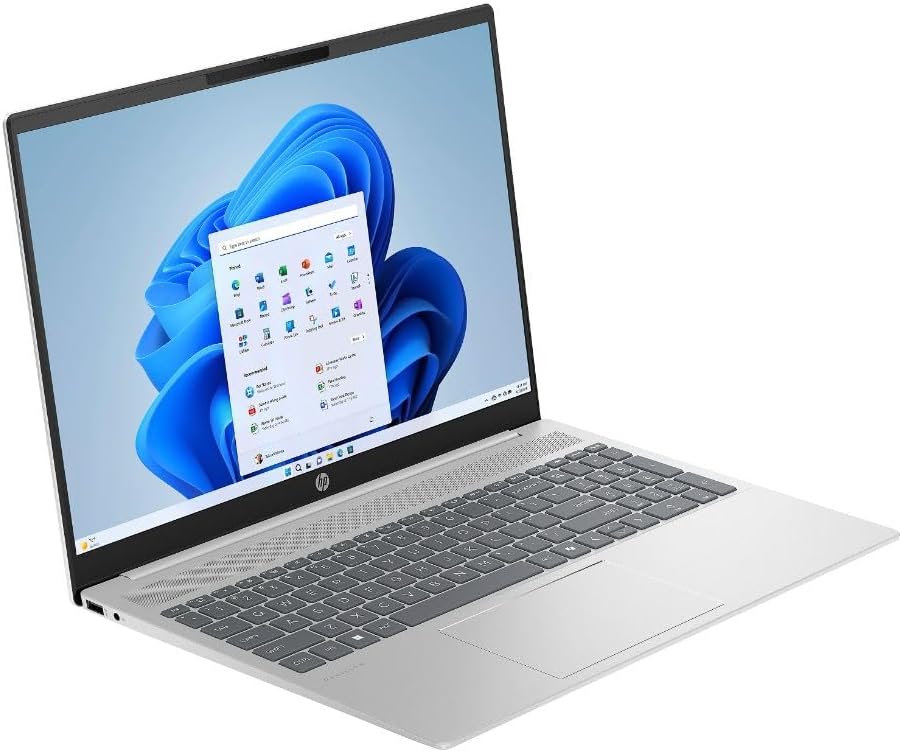
Figura 1: Quddiem view of the HP Pavilion 16-ag00 laptop displaying the Windows 11 operating system.
X'hemm fil-Kaxxa
Iċċekkja li l-oġġetti kollha huma preżenti fl-imballaġġ:
- HP Pavilion 16-ag00 Laptop
- AC Power Adapter and Cord
Setup Inizjali
- Iftaħ il-Laptop mill-pakkett: Oħroġ il-laptop u l-aċċessorji kollha mill-imballaġġ bir-reqqa.
- Qabbad l-Enerġija: Ipplaggja l-adapter tal-enerġija AC fil-port tal-enerġija tal-laptop u mbagħad f'sokit tal-ħajt. Huwa rakkomandat li tiċċarġja l-batterija kompletament qabel l-ewwel użu.
- Qawwa Mixgħul: Iftaħ l-għatu tal-laptop u agħfas il-buttuna tal-qawwa, li tipikament tinsab fuq it-tastiera.
- Konfigurazzjoni Inizjali tal-Windows 11: Follow the on-screen prompts to complete the Windows 11 setup process. This includes selecting your region, language, connecting to a Wi-Fi network, and creating a user account.
- Installa Aġġornamenti: After setup, connect to the internet and allow Windows Update to download and install any pending operating system and driver updates. This ensures optimal performance and security.
It-Tħaddim tal-Laptop Tiegħek
Ġestjoni tal-Enerġija
- Power On/Off: Agħfas il-buttuna tal-qawwa biex tixgħel. Biex titfi, ikklikkja l-buttuna Start fil-Windows, imbagħad Power > Shut down.
- Modalità Sleep: Close the lid or select Power > Sleep from the Start menu to enter sleep mode.
- Ibda mill-ġdid: Select Power > Restart from the Start menu to restart the system.
Tastiera u Touchpad
The laptop features a full-size keyboard and a precision touchpad for navigation. Familiarize yourself with common keyboard shortcuts and touchpad gestures for efficient use.
Portijiet u Konnettività
Your HP Pavilion 16-ag00 is equipped with various ports for connecting external devices:
- Port HDMI: Għall-konnessjoni ma' displays jew projetturi esterni.
- Portijiet USB 2.0: Għall-konnessjoni ta' apparati USB bħal ġurdien, tastieri, jew ħażna esterna.
- Port USB-C: A versatile port for data transfer, display output, and power delivery (depending on specific port capabilities).
- Jack tal-Headphone/Mikrofonu Combo: Għall-konnessjoni ta' headphones, kelliema esterni, jew headset b'mikrofonu.

Figura 2: Ġenb view illustrating the available ports on the HP Pavilion 16-ag00 laptop.
Sistema Operattiva Windows 11
The laptop comes pre-installed with Windows 11 Home. Explore the Start menu, Taskbar, and Settings app to customize your experience and manage applications.

Figura 3: Fuq view of the HP Pavilion 16-ag00 laptop, showcasing the Windows 11 user interface.
Manutenzjoni u Kura
- Tindif: Uża drapp artab u mingħajr suf biex tnaddaf l-iskrin u l-barra. Għal marki iebsa, neħħi ftit.ampNaddaf id-drapp bl-ilma jew b'prodott tat-tindif tal-iskrin. Evita kimiċi ħarxa.
- Kura tal-batterija: To prolong battery life, avoid extreme temperatures. If storing the laptop for extended periods, ensure the battery is charged to about 50%.
- Aġġornamenti tas-Software: Regularly check for and install Windows updates and driver updates from the HP support websit biex tiġi żgurata l-istabbiltà u s-sigurtà tas-sistema.
- Ġestjoni tal-Ħażna: Naddaf perjodikament dak li mhux meħtieġ files and applications to maintain optimal performance of the 512GB SSD.
- Ventilazzjoni: Kun żgur li l-ventijiet tal-laptop mhumiex imblukkati biex tevita li jisħon iżżejjed. Uża l-laptop fuq wiċċ iebes u ċatt.
Issolvi l-problemi
| Problema | Soluzzjoni Possibbli |
|---|---|
| Il-laptop ma jixgħelx. | Ensure the power adapter is securely connected to both the laptop and a working electrical outlet. Try a different outlet. If the battery is completely drained, it may take a few minutes to respond after plugging in. |
| L-iskrin huwa vojt jew iswed. | Check if the laptop is powered on. Press Fn + F2 (or the corresponding display toggle key) to ensure the display is not turned off. Connect to an external monitor via HDMI to check if the issue is with the laptop's internal display. |
| Problemi bil-konnessjoni tal-Wi-Fi. | Restart your router and modem. Ensure Wi-Fi is enabled on the laptop (check network settings). Update Wi-Fi drivers from the HP support websit. |
| Prestazzjoni bil-mod. | Close unnecessary applications. Check for background processes in Task Manager. Ensure sufficient free space on the SSD. Run a disk cleanup. Install all pending Windows updates. |
Speċifikazzjonijiet Tekniċi
| Karatteristika | Dettall |
|---|---|
| Isem tal-Mudell | HP Pavilion Laptop 16-ag00 |
| Proċessur | AMD Ryzen 7 8840U (sa 4.7 GHz massimu ta' spinta tal-arloġġ, 8 qlub, 16-il thread) |
| Grafika | Grafika AMD Radeon (Integrata) |
| Wiri | 16.0" diagonal, WUXGA (1920 x 1200) |
| RAM | 16GB DDR5 RAM |
| Ħażna | 512GB PCIe NVMe TLC M.2 SSD |
| Sistema Operattiva | Windows 11 Home |
| Portijiet | HDMI, USB 2.0 (x3), USB-C, Headphone/Microphone Combo |
| Kulur | Fidda |
| Piż tal-oġġett | 7 liri |
| Dimensjonijiet (LxWxH) | 16 x 1 x 11 pulzieri |
| Ħajja Medja tal-Batterija | 6 Sigħat |
Garanzija u Appoġġ
This product is sold as a renewed item. For specific warranty details and support, please refer to the terms provided by the seller, Amazon Renewed, at the time of purchase. Typically, renewed products come with a limited warranty from the refurbisher or seller.
For technical assistance, driver downloads, and further product information, please visit the official Hewlett Packard (HP) support website. You may need your product's serial number, usually found on a sticker on the bottom of the laptop or in the system information within Windows.
For inquiries related to your purchase or return policy, please contact Amazon customer service or the specific Amazon Renewed seller directly.


