1. Introduzzjoni
This manual provides essential information for the safe and effective use of your boAt Aavante Bar Quake 2.1 Channel Soundbar with Wired Subwoofer. Please read this manual thoroughly before operating the device and retain it for future reference. The boAt Aavante Bar Quake is designed to enhance your audio experience with its 200W RMS output and versatile connectivity options.
Il-karatteristiċi ewlenin jinkludu:
- 200W RMS boAt Signature Sound: Jipprovdi awdjo qawwi u ċar.
- 2.1 Channel Soundbar with Wired Subwoofer: Provides immersive sound with enhanced bass.
- Multichannel Connectivity: Supports Bluetooth v5.3, AUX, USB, Optical, and HDMI-ARC.
- Modi EQ: Offers tailored audio profiles for Movies, Music, News, and 3D content.
- Bass & Treble Controls: Allows for personalized audio adjustments.
2. Informazzjoni Importanti dwar is-Sigurtà
Biex tiżgura tħaddim sikur u tevita ħsara, jekk jogħġbok osserva l-prekawzjonijiet li ġejjin:
- Tesponix l-apparat għax-xita, umdità, jew temperaturi estremi.
- Tiftaħx is-casing. Irreferi s-servizz kollu lil persunal kwalifikat.
- Aċċerta ruħek li jventila sew madwar is-soundbar u s-subwoofer.
- Uża biss l-adapter tal-enerġija fornut mal-unità.
- Żomm l-apparat 'il bogħod minn sorsi ta' sħana u dawl tax-xemx dirett.
- Avoid placing heavy objects on the soundbar or subwoofer.
- Skonnettja l-plagg tal-enerġija waqt maltempati bis-sajjetti jew meta ma jintużax għal perjodi twal.
3. Kontenut tal-Pakkett
Ivverifika li l-oġġetti kollha huma preżenti fil-pakkett:
- boAt Aavante Bar Quake Soundbar
- Subwoofer bil-fili
- Remote Control (with 2 x 12V Alkaline batteries included)
- Manwal għall-Utent (dan id-dokument)
- Karta ta' Garanzija
- Adapter tal-Enerġija
4. Prodott Aktarview
Familiarize yourself with the components of your boAt Aavante Bar Quake sound system.
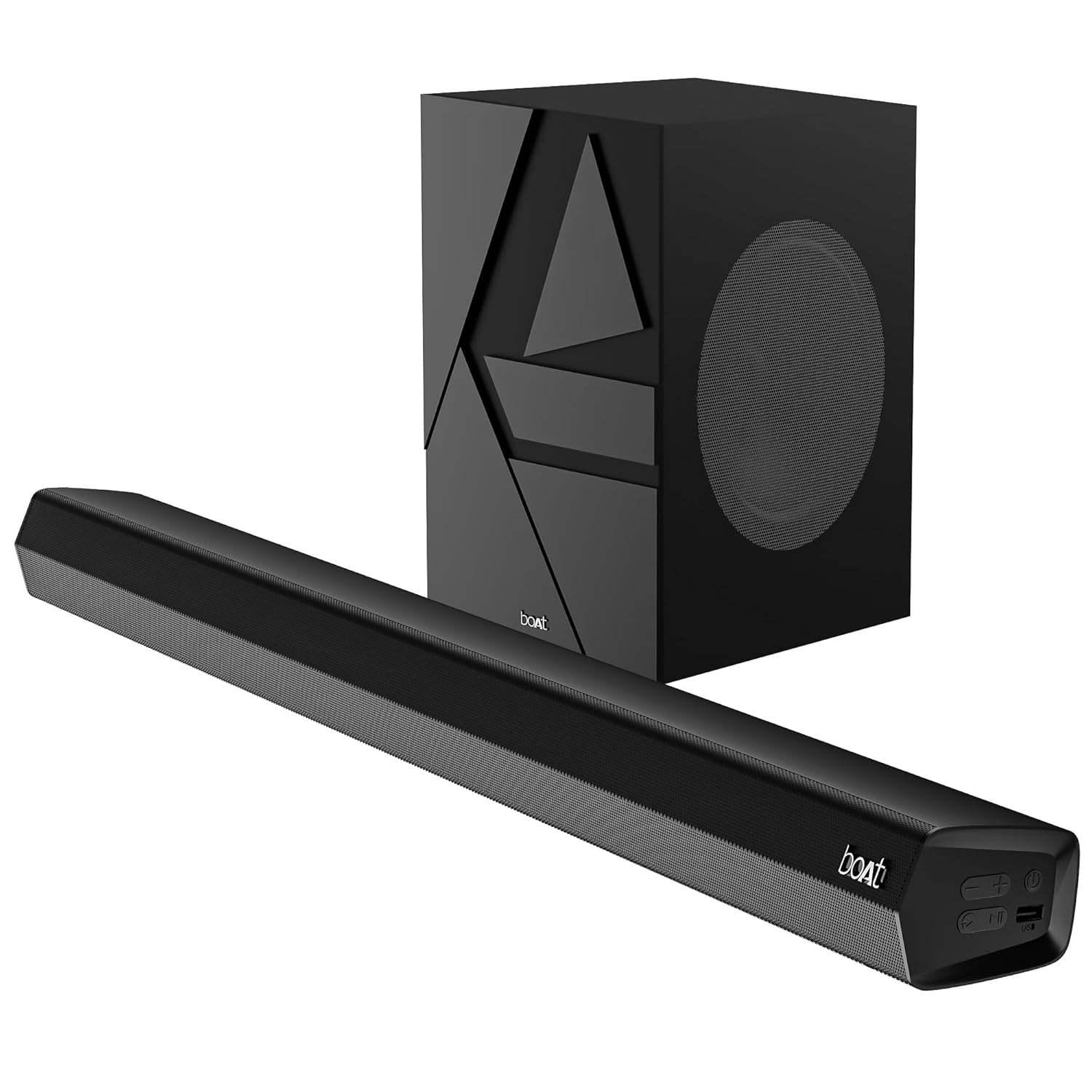
Image 1: The boAt Aavante Bar Quake soundbar and its accompanying wired subwoofer, showcasing their design and relative sizes.
4.1 Karatteristiċi tas-Soundbar

Immaġni 2: Close-up view of the boAt Aavante Bar Quake soundbar, highlighting its sleek design and the '200W RMS boAt Signature Sound' feature.
The soundbar houses the main speakers and control interface. It delivers 200W RMS boAt Signature Sound for a powerful audio experience.
4.2 Subwoofer bil-fili

Image 3: An illustration showing the boAt Aavante Bar Quake soundbar and its wired subwoofer integrated into a home entertainment setup, emphasizing the 2.1 channel configuration.
The wired subwoofer provides deep, rich bass, complementing the soundbar for a full-range audio output.
4.3 Portijiet tal-Konnettività

Immaġni 4: Stampa dettaljata view of the rear panel of the boAt Aavante Bar Quake soundbar, clearly showing the various input ports including USB, HDMI (ARC), AUX, and Optical, along with Bluetooth connectivity.
The soundbar features multiple input options for connecting various devices:
- Port USB: Għad-daqq tal-awdjo minn drives USB.
- Port HDMI (ARC): For high-quality audio connection to compatible TVs.
- Bluetooth: For wireless audio streaming from mobile devices.
- Input AUX: Għall-konnessjoni ta' apparati permezz ta' kejbil awdjo ta' 3.5mm.
- Input ottiku: For digital audio connection from TVs or other sources.
4.4 Kontroll mill-Bogħod

Image 5: The master remote control for the boAt Aavante Bar Quake, illustrating buttons for power, mute, input selection, volume, playback, EQ modes (Music, Movies, News, 3D), and dedicated bass and treble controls.
The included remote control allows full command over the soundbar's functions, including power, volume, input selection, EQ modes, and bass/treble adjustments.
5. Setup
5.1 Tqegħid
- Soundbar: Place the soundbar on a stable, flat surface directly in front of your television, or mount it on the wall below your TV. Ensure there are no obstructions in front of the soundbar.
- Subwoofers: Position the subwoofer on the floor, preferably in a corner or near a wall, to enhance bass response. Ensure it is within reach of the soundbar for the wired connection.
5.2 Konnessjoni tas-Subwoofer
Connect the wired subwoofer to the dedicated subwoofer output port on the soundbar using the integrated cable.
5.3 Konnessjoni tal-Enerġija
- Qabbad l-adapter tal-enerġija mal-port DC IN fuq is-soundbar.
- Ipplaggja t-tarf l-ieħor tal-adapter tal-enerġija f'iżbokk tal-ħajt.
- Ensure the subwoofer is also connected to a power source if it has a separate power cable (for this model, it's wired to the soundbar).
5.4 Konnessjonijiet tal-Awdjo
Agħżel wieħed mill-metodi li ġejjin biex tqabbad is-sors tal-awdjo tiegħek:
- HDMI ARC (Rakkomandat): Connect an HDMI cable from the HDMI ARC port on your TV to the HDMI ARC port on the soundbar. This allows audio to be sent from the TV to the soundbar and often enables TV remote control of the soundbar volume.
- Ottiċi: Connect an optical cable from your TV's optical output to the OPTICAL IN port on the soundbar.
- AUX: Connect a 3.5mm audio cable from your device's audio output to the AUX IN port on the soundbar.
- USB: Insert a USB drive into the USB port on the soundbar to play audio files direttament.
- Bluetooth: See Section 6.2 for Bluetooth pairing instructions.
6. Istruzzjonijiet Operattivi
6.1 Power On/Off
Agħfas il- Qawwa buttuna fuq is-soundbar jew ir-remote control biex tixgħel jew titfi l-unità.
6.2 Tqabbil tal-Bluetooth
- Turn on the soundbar and select Bluetooth mode using the Input button on the remote or soundbar. The LED indicator will flash.
- Ippermetti Bluetooth fuq it-tagħmir mobbli tiegħek u fittex tagħmir disponibbli.
- Select "boAt Aavante Bar Quake" from the list.
- Ladarba jkun imqabbad, l-indikatur LED jieqaf iteptep u jibqa' solidu.
6.3 L-Għażla tas-Sors tal-Input
Agħfas il- Input button on the remote control or soundbar repeatedly to cycle through the available input sources: Bluetooth, AUX, Optical, HDMI ARC, and USB.
6.4 Kontroll tal-Volum
Uża l- Volum + u Volum - buttons on the remote control or soundbar to adjust the volume level.
6.5 Modi EQ
The soundbar offers four preset equalizer modes to optimize audio for different content types. Press the corresponding button on the remote control to select:
- Films: Ittejjeb id-djalogu u l-effetti ċinematiċi.
- Mużika: Jipprovdi professjonist awdjo bilanċjatfile għall-daqq tal-mużika.
- Aħbarijiet: Optimizes vocal clarity for news and spoken content.
- 3D: Creates a wider, more immersive soundstage.
6.6 Bass & Treble Controls
Uża l- BASS+ / BASS- u TREB+ / TREB- buttons on the remote control to fine-tune the bass and treble levels according to your preference.
7. Manutenzjoni
7.1 Tindif
- Wipe the surfaces of the soundbar and subwoofer with a soft, dry cloth.
- Tużax prodotti tat-tindif likwidi, aerosols, jew kimiċi li joborxu, għax dawn jistgħu jagħmlu ħsara lill-finitura.
- Kun żgur li l-apparat ikun splaggjat qabel it-tindif.
7.2 Ħażna
Jekk taħżen l-unità għal perjodu estiż, aqlagħha mill-plagg tal-elettriku u aħżenha f'post frisk u niexef, 'il bogħod mix-xemx diretta u minn temperaturi estremi.
8 Issolvi l-problemi
| Problema | Kawża Possibbli | Soluzzjoni |
|---|---|---|
| Ebda qawwa | Kejbil tal-enerġija mhux imqabbad; Sokit tal-enerġija mhux attiv | Kun żgur li l-kejbil tal-enerġija huwa konness sew; Ipprova sokit tal-enerġija differenti |
| L-ebda ħoss | Incorrect input source; Volume too low; Mute activated; Incorrect cable connection | Select correct input source; Increase volume; Deactivate mute; Check audio cable connections |
| Tqabbil Bluetooth ifalli | Is-soundbar mhux fil-modalità ta' tqabbil; L-apparat wisq 'il bogħod; Interferenza | Ensure soundbar is in Bluetooth pairing mode; Move device closer; Avoid interference from other devices |
| Il-kontroll mill-bogħod ma jaħdimx | Batteriji eżawriti; Ostruzzjoni bejn ir-remote u s-soundbar | Replace remote control batteries; Remove any obstructions |
9. Speċifikazzjonijiet
| Isem tal-Mudell | Aavante Bar Quake |
| Tip ta' Kelliem | Soundbar |
| Surround Sound Channel Konfigurazzjoni | 2.1 |
| Qawwa tal-Ħruġ Massimu tal-Ispeaker | 200 Watt RMS |
| Teknoloġija tal-Konnettività | Bluetooth v5.3, AUX, USB, Optical, HDMI-ARC |
| Rispons ta' Frekwenza | 40 Hz |
| Modalità tal-Ħruġ tal-Awdjo | Stereo, Movies, Music, News, 3D |
| Metodu ta' Kontroll | Remote |
| Tip ta 'Immuntar | Table & Wall |
| Dimensjonijiet tal-Prodott | 90.3D x 6.5W x 8.6H Ċentimetri |
| Piż tal-oġġett | 6.5 kg |
| Komponenti Inklużi | User Manual, Warranty Card, Soundbar, Wired Subwoofer, Remote Control |
| Sors tal-Enerġija | Elettriku bil-fili |
| Batteriji Meħtieġa | Yes (2 x 12V Alkaline for remote, included) |
| Manifattur | Immaġina Kummerċjalizzazzjoni Limitata |
10. Garanzija u Appoġġ
10.1 Informazzjoni dwar Garanzija
The boAt Aavante Bar Quake comes with a Garanzija limitata ta 'sena from the date of purchase. This warranty covers manufacturing defects. Please retain your purchase receipt and warranty card for any warranty claims.
10.2 Appoġġ għall-Klijent
For technical assistance, troubleshooting, or warranty claims, please contact boAt customer support. Refer to the contact information provided on your warranty card or visit the official boAt website for the latest support details.


