1. Prodott Aktarview
The Nokia G310 5G Smartphone (Model TA-1573) offers lightning-fast 5G connectivity and modern mobile technology. It features a vibrant display for various tasks, a powerful processor for smooth performance, and an advanced camera system for detailed photos. Designed for daily use, it provides a comfortable grip and durable build quality. Enjoy extensive network compatibility, ample storage, a long-lasting battery with quick charging, and a user-friendly interface with regular software updates.
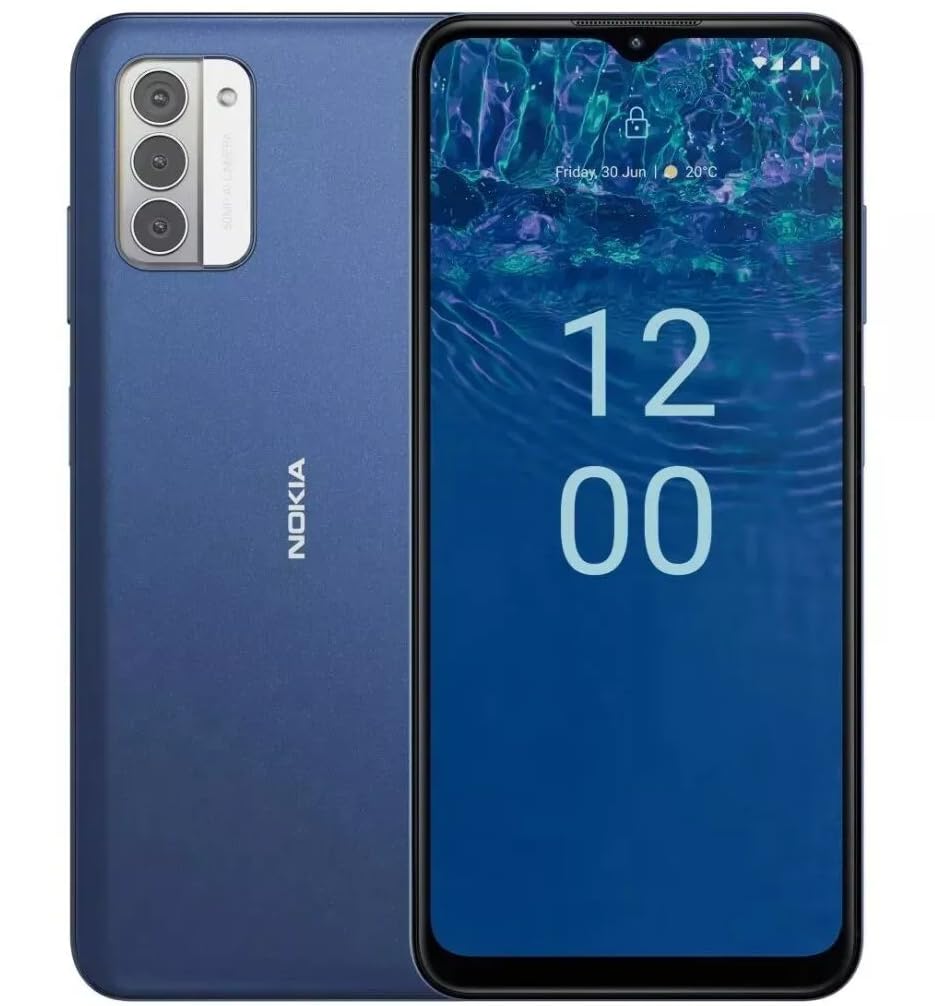
Immaġni: Wara view of the Nokia G310 5G Smartphone, showcasing the triple camera module and Nokia branding.
Karatteristiċi Ewlenin
- Konnettività 5G: Experience ultra-fast mobile data speeds and low latency.
- Wirja vibranti: Large touchscreen display delivers vibrant colors and sharp visuals.
- Prestazzjoni Effiċjenti: Processor handles everyday tasks smoothly, from browsing to gaming.
- Disinn Durabbli: Sleek and modern smartphone design with durable construction.
2. Nibdew
X'hemm fil-Kaxxa
- Nokia G310 5G Smartphone
- Ċarġer tal
SIM and MicroSD Card Installation
Locate the SIM/MicroSD card tray on the side of your device. Use the provided SIM ejector tool to open the tray. Insert your Nano-SIM card(s) and/or MicroSD card into the designated slots. Ensure the cards are correctly oriented. Gently push the tray back into the device until it clicks into place.
Tixgħel/Jitfi
To power on your Nokia G310, press and hold the Power/Fingerprint Sensor button located on the right side of the device until the Nokia logo appears. To power off, press and hold the Power/Fingerprint Sensor button, then select 'Power off' from the options that appear on the screen.
3. Layout tal-Apparat
Buttuni u Portijiet Fiżiċi
- Buttuni tal-Volum: Located on the right side, above the Power/Fingerprint Sensor button, for adjusting media and call volume.
- Power/Fingerprint Sensor Button: Located on the right side, used for powering the device on/off, locking/unlocking the screen, and fingerprint authentication.
- Port USB-C: Jinsab fil-qiegħ, użat għall-iċċarġjar u t-trasferiment tad-dejta.
- Jack tal-Awdjo ta' 3.5 mm: Located at the bottom, for connecting wired headphones.
- Kelliem: Jinsab fil-qiegħ għall-ħruġ tal-awdjo.
- Mikrofonu: Integrated for calls and voice commands.
Modulu tal-Kamera
The rear of the device features a multi-lens camera module, including a main camera, along with a flash for low-light photography. The front-facing camera is discreetly placed within a notch at the top of the display.
4. Istruzzjonijiet Operattivi
Navigazzjoni Bażika
The Nokia G310 operates on the Android operating system, offering an intuitive touchscreen interface. Swipe up from the bottom of the screen to access the app drawer, swipe down from the top for notifications and quick settings, and use gestures or navigation buttons (configurable in settings) to move between apps and screens.
Konnettività
- 5G Cellular Data: The device supports 5G connectivity for ultra-fast mobile data speeds. Ensure your SIM card and plan support 5G.
- Wi-Fi: Qabbad ma' netwerks mingħajr fili għal aċċess għall-internet. Mur f'Settings > Netwerk u internet > Wi-Fi biex timmaniġġja l-konnessjonijiet.
- Bluetooth: Pair with other Bluetooth-enabled devices like headphones or speakers. Go to Settings > Connected devices > Bluetooth.
- GPS: Utilize built-in GPS for location services and navigation.
5. Użu tal-kamera
The Nokia G310 features an advanced camera system designed to capture memorable moments. Access the camera app from your home screen or app drawer.
Jieħdu Ritratti
Open the Camera app, frame your shot, and tap the shutter button on the screen to take a picture. The advanced AI camera assists in optimizing settings for various scenes.
Reġistrar Vidjows
In the Camera app, switch to video mode, then tap the record button to start and stop recording. The phone supports various video resolutions.
Modi tal-Kamera
Explore different camera modes available in the camera app, such as Portrait, Panorama, and Night mode, to enhance your photography experience.
6. Ġestjoni tal-batterija
Iċċarġja l-Apparat Tiegħek
The Nokia G310 is equipped with a 5000 Milliamp Hours (5000.0 Battery Power Rating) battery. Connect the provided USB-C charger to the port at the bottom of the device. The phone supports quick charging for reduced downtime.
Ottimizzazzjoni tal-Ħajja tal-Batterija
- Aġġusta l-luminożità tal-iskrin għal livell komdu.
- Ippermetti l-modalità Battery Saver meta l-batterija tkun baxxa.
- Agħlaq l-apps mhux użati li jaħdmu fl-isfond.
- Iddiżattiva l-Wi-Fi, il-Bluetooth, jew il-GPS meta ma tkunx qed tużahom.
7. Speċifikazzjonijiet Tekniċi
| Numru tal-Mudell | TA-1573 |
| Sistema Operattiva | Android |
| Mudell tas-CPU | MediaTek Helio P60T |
| Teknoloġija Ċellulari | 5G |
| Trasportatur Wireless | Jinfetaħ |
| Kapaċità tal-Ħżin tal-Memorja | 4 GB |
| Riżoluzzjoni | 1080 x 2340 |
| Input tal-Interface tal-Bniedem | Touchscreen |
| Kapaċità tal-batterija | 5000 Milliamp Sigħat |
| Awdjo Jack | 3.5 mm |
| Kulur | Blu |
| Manifattur | Nokia |
| Data L-Ewwel Disponibbli | 31 ta’ Jannar, 2025 |
8 Issolvi l-problemi
If you encounter issues with your Nokia G310, try the following common troubleshooting steps:
- L-apparat ma jirrispondix: Agħfas u żomm il-buttuna tal-Qawwa għal madwar 10-15-il sekonda biex terġa' tibda.
- Kwistjonijiet ta' konnettività: Toggle Wi-Fi or Bluetooth off and on. Restart your device. Check network settings.
- L-app mhux qed taħdem: Neħħi l-cache u d-dejta tal-app minn Settings > Apps. Jekk il-problema tippersisti, iddiżinstalla u erġa' installa l-app.
- Batterija tisbat malajr: Review battery usage in Settings > Battery to identify power-hungry apps. Adjust screen brightness and enable Battery Saver.
- Ħażna mimlija: Ħassar bla bżonn files, photos, or apps. Transfer media to a computer or cloud storage. Consider using a MicroSD card for additional storage.
9. Manutenzjoni u Kura
- Tindif: Uża drapp artab u mingħajr suf biex tnaddaf l-apparat tiegħek. Evita kimiċi ħarxa jew materjali li joborxu.
- Aġġornamenti tas-Software: Regularly check for and install software updates to ensure your device runs optimally and has the latest security features. Go to Settings > System > System update.
- Ġestjoni tal-Ħażna: Perjodikament mill-ġdidview your device's storage to free up space and maintain performance.
- Kundizzjonijiet Ambjentali: Avoid exposing your device to extreme temperatures, direct sunlight, or excessive moisture.
10. Garanzija u Appoġġ
For warranty information, please refer to the warranty card included in your product packaging or visit the official Nokia support website. For further assistance, contact Nokia customer support.


