1. Introduzzjoni
The Fanvil V66 is a professional IP videophone designed for business environments, offering advanced communication features and a modern design. It features a 7-inch color touchscreen, Bluetooth, and WiFi 6 connectivity, ensuring versatile and high-quality communication.
X'hemm fil-Kaxxa
- Fanvil V66 IP Phone
2. Prodott Aktarview
Familiarize yourself with the components of your Fanvil V66 Prime Business Phone.
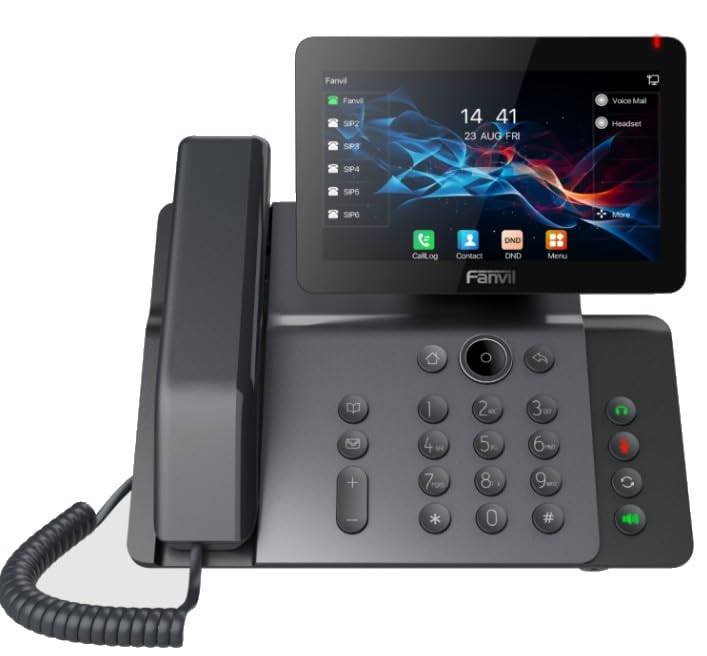
Figura 1: Quddiem view of the Fanvil V66 Prime Business Phone, showing the 7-inch color display, numeric keypad, and function keys.
Karatteristiċi Ewlenin
- 7-inch HD Color LCD Screen: Inclinable design for optimal viewing.
- Bluetooth & WiFi 6 Connectivity: For fast and stable wireless connections.
- 116-Key Numeric Keypad: Provides comprehensive control over phone functions.
- Integrated Audio and Video System: Supports high-quality professional calls and videoconferences.
- Interface tal-Utent Intuwittiv: Quick menu access for calls, contacts, and main functions.
3. Setup
3.1 L-Immuntar tat-Telefon
- Waħħal l-Istand tal-Iskrivanija: Allinja l-istand mas-slots fuq wara tat-telefon u imbotta sakemm tikklikkja f'postu.
- Qabbad il-Handset: Ipplaggja tarf wieħed tal-korda mkebba tal-handset fil-handset u t-tarf l-ieħor fil-port tal-handset fuq il-bażi tat-telefon.
3.2 Konnessjoni man-Netwerk u l-Enerġija
- Konnessjoni Ethernet: Plug one end of the Ethernet cable into the LAN port on the back of the phone and the other end into your network switch or router.
- Power Connection (Choose one):
- Qawwa fuq Ethernet (PoE): If your network switch supports PoE, the phone will power on automatically once connected via the Ethernet cable. No separate power adapter is needed.
- Adapter tal-Enerġija: If PoE is not available, connect a compatible power adapter to the DC 12V port on the phone and then plug it into a power outlet.
- The phone will automatically power on and begin the boot-up sequence.
3.3 Konfigurazzjoni Inizjali
Upon first boot, the phone may prompt you for initial network settings or firmware updates. Follow the on-screen instructions. For advanced network settings or SIP account configuration, consult your network administrator or IT support.
4. Istruzzjonijiet Operattivi
4.1 Nagħmlu Telefonati
- Tisselezzjona: Pick up the handset, press the Speaker button, or press the New Call soft key. Dial the desired number using the keypad.
- Speed Dial: If configured, press the assigned speed dial key.
- Mill-Kuntatti: Tap the "Contacts" icon on the display, select a contact, and tap the call icon.
4.2 Irċeviment ta' Telefonati
When an incoming call rings, you can:
- Tweġiba: Pick up the handset, press the Speaker button, or tap the "Answer" soft key on the display.
- Tnaqqis: Tap the "Decline" soft key.
4.3 Using the 7-inch Color Display
The touchscreen display provides access to various functions and settings:
- Skrin tad-dar: Displays time, date, line status, and quick access icons.
- Navigazzjoni: Swipe left/right or tap icons to navigate through menus.
- Soft Keys: Context-sensitive buttons displayed at the bottom of the screen.
- Settings: Access phone settings, network configuration, and user preferences.
4.4 Bluetooth and WiFi Connectivity
- Bluetooth: Go to "Settings" > "Bluetooth" to enable and pair with Bluetooth headsets or other devices.
- WiFi 6: Go to "Settings" > "Wi-Fi" to enable, scan for available networks, and connect. Enter the password if required.
5. Manutenzjoni
5.1 Tindif tat-Telefon
- Use a soft, dry, anti-static cloth to clean the phone's surface.
- For the screen, use a screen-specific cleaning solution and a microfiber cloth.
- Evita li tuża kimiċi ħarxa, prodotti tat-tindif li joborxu, jew umdità eċċessiva.
5.2 Aġġornamenti tas-Software
Periodically check for firmware updates to ensure optimal performance and security. Updates can usually be found in the phone's "Settings" menu under "System" or "Firmware Update," or provided by your IT department.
6 Issolvi l-problemi
| Problema | Kawża Possibbli | Soluzzjoni |
|---|---|---|
| It-telefon ma jixgħelx. | L-ebda konnessjoni tal-enerġija jew sors tal-enerġija difettuż. | Check power adapter connection or Ethernet cable for PoE. Ensure power outlet is functional. |
| Ma nistax nikkonnettja man-netwerk. | Ethernet cable disconnected, incorrect network settings, or Wi-Fi issues. | Verify Ethernet cable is securely connected. Check Wi-Fi settings and password. Contact network administrator for IP configuration. |
| No dial tone or audio during calls. | Handset/headset not connected properly, volume too low, or SIP registration issue. | Ensure handset/headset is plugged in correctly. Adjust volume. Verify SIP account registration status on the display. |
| Id-displej ma jirrispondix. | Problema temporanju tas-softwer. | Restart the phone by disconnecting and reconnecting power. If issue persists, contact support. |
7. Speċifikazzjonijiet
| Karatteristika | Dettall |
|---|---|
| Brand | Fanvil |
| Numru tal-Mudell | V62 PRO (Note: Product series is V66) |
| Kulur | Iswed |
| Wiri | 7-inch HD Color LCD, Inclinable |
| Konnettività | Bluetooth, WiFi 6, Ethernet (PoE support) |
| Tastiera | 116 ċwievet |
| Materjal | Plastik |
| Sors tal-Enerġija | Adapter tal-Enerġija / PoE |
| Dimensjonijiet (L x W x H) | 20 x 20 x 15 ċm |
| Piż tal-oġġett | 600 Gramm |
| Apparati Kompatibbli | EHS (Electronic Hook Switch) headsets |
8. Garanzija u Appoġġ
For warranty information, please refer to the warranty card included with your product or visit the official Fanvil website. If you encounter any issues not covered in this manual or require further assistance, please contact your vendor or Fanvil technical support.
- Appoġġ onlajn: Visit the Fanvil official websit għal FAQs, dokumentazzjoni, u riżorsi ta' appoġġ.
- Assistenza Teknika: Contact your authorized Fanvil reseller or service provider.


