Introduzzjoni
The Gravity C29 Rugged Smart Watch is designed for durability and performance in challenging environments. This manual provides comprehensive instructions for setting up, operating, and maintaining your smartwatch, ensuring you get the most out of its advanced features, including health tracking, sports modes, and smart connectivity.
X'hemm fil-Kaxxa
- Gravity C29 Smart Watch
- Iċċarġjar Cable
- Manwal għall-Utent (dan id-dokument)
Prodott Overview
The Gravity C29 features a robust design with a 1.52-inch HD TFT display, built to withstand shock, dust, and water. It includes physical buttons for power and sport modes, alongside a responsive touchscreen for navigation.

Immaġni: Quddiem view of the Gravity C29 Rugged Smart Watch, showcasing its robust design, circular display, and side buttons.

Image: The Gravity C29 Smart Watch display, highlighting its 1.52-inch HD screen with clear visibility even in bright conditions.
Setup
1. Iċċarġjar tal-Arloġġ Intelliġenti
Before first use, fully charge your Gravity C29 Smart Watch. Connect the magnetic charging cable to the charging points on the back of the watch and plug the USB end into a power adapter (not included) or a computer's USB port. A full charge typically takes approximately 2 hours.
2. Downloading the Da Fit App
To unlock all features and synchronize data, download the "Da Fit" app from your smartphone's app store (App Store for iOS, Google Play Store for Android). The watch is compatible with Android 9.0+ and iOS 9.0+.
3. It-tqabbil mal-Ismartphone Tiegħek
- Kun żgur li l-Bluetooth huwa attivat fuq l-ismartphone tiegħek.
- Iftaħ l-app Da Fit u segwi l-istruzzjonijiet fuq l-iskrin biex toħloq kont jew tidħol.
- In the app, navigate to the "Device" section and tap "Add Device" or "Bind Device".
- Select "C29" from the list of available devices.
- Ikkonferma t-talba ta' tqabbil kemm fuq l-arloġġ kif ukoll fuq l-ismartphone tiegħek.
Once paired, the watch will automatically synchronize time and data with your phone.
Istruzzjonijiet Operattivi
Navigazzjoni Bażika
- Touchscreen: Swipe left/right, up/down to navigate through menus and notifications. Tap to select.
- Buttuna tal-Enerġija (Fuq il-Lemin): Press to wake/sleep the screen, long press to power on/off.
- Sport Mode Button (Bottom Right): Press to quickly access sports modes.
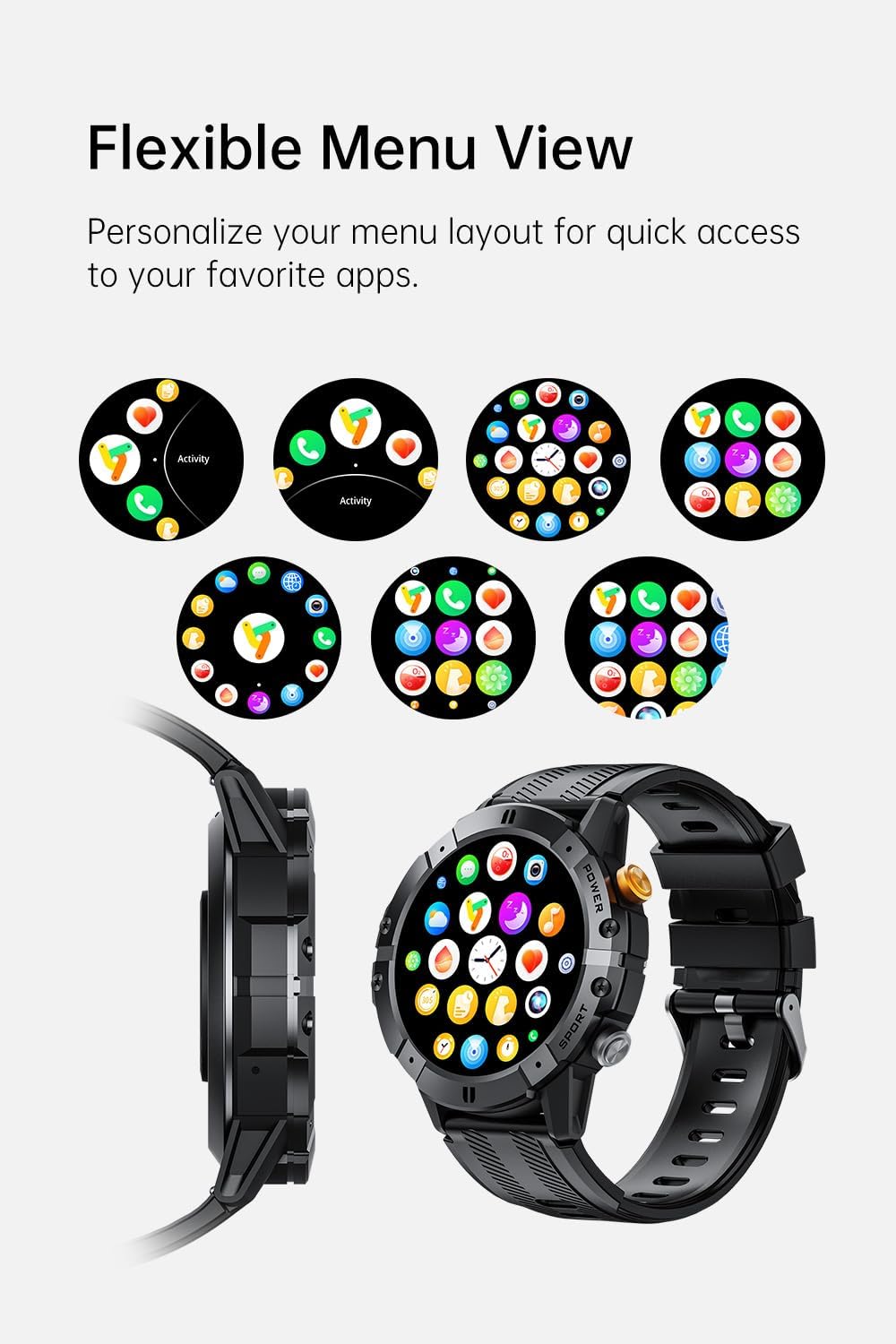
Image: Various menu layouts and app icons displayed on the Gravity C29 Smart Watch screen, demonstrating the flexible menu view.
Bluetooth Calling & Smart Notifications
Once paired, the C29 allows you to make and receive calls directly from your wrist. You will also receive real-time notifications for calls, messages, and app alerts.

Image: A hand wearing the Gravity C29 Smart Watch, showing an incoming call notification and message alerts on the watch screen.
Assistent tal-Vuċi AI
Activate the AI Voice Assistant on your watch to perform tasks hands-free, such as setting alarms, checking weather, or controlling music, using simple voice commands.

Image: The Gravity C29 Smart Watch displaying the AI Voice Assistant interface, with examples of voice commands like "Turn on the alarm" and "Call my mom."
Traċċar tas-Saħħa
The C29 monitors your heart rate 24/7 and provides detailed sleep analysis. Access these metrics through the watch interface or the Da Fit app for comprehensive health insights.

Image: The Gravity C29 Smart Watch displaying a heart rate graph, illustrating its precision sensors for accurate health monitoring.
Modi sportivi
With over 100 sports modes, the C29 accurately tracks various activities like running, cycling, hiking, and swimming. Select your desired sport mode before starting an activity for precise data collection.

Image: Icons representing various sports activities such as swimming, cycling, running, and hiking, indicating the Gravity C29 Smart Watch's support for over 120 sports modes.
Karatteristiċi Smart oħra
The Gravity C29 offers additional functionalities including weather updates, music control, and camera remote control. Access these features through the watch's menu.

Image: The Gravity C29 Smart Watch displaying a weather forecast, surrounded by icons representing other convenient functions like music control, camera remote, and settings.
Manutenzjoni
Tindif
Imsaħ l-arloġġ u ċ-ċinga regolarment b'ċarruta ratba uamp drapp. Evita li tuża kimiċi ħarxa jew materjali li joborxu. Kun żgur li l-kuntatti tal-iċċarġjar huma nodfa u niexfa qabel ma tiċċarġja.
Reżistenza għall-Ilma
The Gravity C29 is 1 ATM waterproof, meaning it can withstand splashes, rain, and brief immersion. It is suitable for everyday wear and light water activities. Do not use it for diving, hot showers, or prolonged submersion.

Image: The Gravity C29 Smart Watch being splashed with water, illustrating its 1 ATM waterproof rating suitable for handling splashes and rain.
Kura tal-batterija
To prolong battery life, avoid extreme temperatures. Charge the watch fully before long periods of inactivity. The 410mAh battery provides up to 7-10 days of active use and up to 25 days on standby.
Issolvi l-problemi
- L-arloġġ ma jixgħelx: Kun żgur li l-arloġġ ikun iċċarġjat kompletament. Qabbad mal-ċarġer u stenna ftit minuti qabel ma tipprova tixgħelu.
- Ma tistax tqabbad mat-telefon:
- Kun żgur li l-Bluetooth huwa attivat fuq it-telefon tiegħek u li l-arloġġ jinsab fil-firxa tiegħu.
- Erġa' ibda kemm l-arloġġ kif ukoll it-telefon tiegħek.
- Check if the Da Fit app is updated to the latest version.
- If previously paired, try unpairing from your phone's Bluetooth settings and re-pairing through the app.
- Dejta dwar is-saħħa mhux preċiża: Kun żgur li l-arloġġ jintlibes sew fuq il-polz tiegħek, la issikkat wisq u lanqas maħlul wisq. Naddaf is-sensor fuq wara tal-arloġġ.
- Notifiki li ma jidhrux: Check notification permissions for the Da Fit app in your phone's settings. Ensure the app is running in the background.
Speċifikazzjonijiet
| Karatteristika | Dettall |
|---|---|
| Brand | Gravità |
| Mudell | C29 |
| Daqs tal-Iskrin | 1.52 Pulzier |
| Tip ta 'Wiri | HD TFT |
| Riżoluzzjoni | 360x360 |
| Kapaċità tal-batterija | 410 mAh |
| Battery Life (Active) | 7-10 Jiem |
| Ħajja tal-batterija (Standby) | Sa 25 Jum |
| Reżistenza għall-Ilma | 1 ATM (Shockproof, Dustproof) |
| Konnettività | Bluetooth 5.2 |
| Kompatibilità | Android 9.0+ / iOS 9.0+ |
| Modi sportivi | 100+ |
| Temperatura operattiva | -24°C sa 60°C |
| Piż tal-oġġett | 4.6 uqija |
Garanzija u Appoġġ
For product support, troubleshooting assistance, or warranty inquiries, please refer to the contact information provided with your purchase or visit the official Gravity websit. Żomm il-prova tax-xiri tiegħek għal talbiet ta' garanzija.
Protection plans are available for extended coverage. Please check your purchase details for more information on available protection plans.


