1. Introduzzjoni
Thank you for choosing the THOMSON WS302 Cosy Wooden Home Speaker. This manual provides essential information for the safe and efficient operation of your new speaker. Please read it thoroughly before use and retain it for future reference.

Image 1.1: The THOMSON WS302 speaker in a home setting, showcasing its wooden design.
2. Informazzjoni dwar is-Sigurtà
- Sors tal-Enerġija: Only use the provided power cable and connect the speaker to a 230V AC power outlet.
- Ilma u Umdità: Tesponix l-ispiker għall-ilma, xita, jew umdità eċċessiva. Dan il-prodott mhuwiex reżistenti għall-ilma.
- Sorsi tas-Sħana: Żomm l-ispiker 'il bogħod minn sorsi ta' sħana bħal radjaturi, reġistri tas-sħana, stufi, jew apparat ieħor (inkluż amplifiers) li jipproduċu sħana.
- Ventilazzjoni: Aċċerta ruħek li jkun hemm ventilazzjoni xierqa. Timblokkax xi fetħiet tal-ventilazzjoni.
- Tindif: Unplug the speaker from the power outlet before cleaning. Use a dry, soft cloth. Do not use liquid cleaners or aerosol cleaners.
- Servizzi: Tippruvax isservi dan il-prodott int stess. Irreferi l-manutenzjoni kollha lil persunal tas-servizz kwalifikat.
3. Kontenut tal-Pakkett
Carefully unpack your speaker and check that all items are present and in good condition. If any item is missing or damaged, contact your retailer.
- THOMSON WS302 Cosy Wooden Home Speaker
- Kejbil tal-Enerġija

Image 3.1: The THOMSON WS302 product packaging.
4. Karatteristiċi tal-prodott
The THOMSON WS302 speaker offers a blend of classic design and modern audio technology:
- Bluetooth 5.3: Għal streaming awdjo mingħajr fili stabbli u effiċjenti.
- 50 Watts Musical Power: Delivers rich and powerful sound.
- Removable Front Grille: Allows for aesthetic customization and easy cleaning of the speaker drivers.
- Separate Treble and Bass Adjustment: Fine-tune your audio experience to your preference.
- Input Awżiljarju ta' 3.5mm: Connect non-Bluetooth devices easily.
- Port USB: For additional connectivity options.

Image 4.1: Detail of the THOMSON logo on the speaker grille.
5. Setup
5.1 Tqegħid
Place the speaker on a stable, flat surface. For optimal sound quality, avoid placing it in enclosed spaces or directly against a wall, which can affect bass response. Ensure there is adequate space around the speaker for ventilation.
5.2 Konnessjoni tal-Enerġija
- Connect the provided power cable to the power input port on the back of the speaker.
- Ipplaggja t-tarf l-ieħor tal-kejbil tal-enerġija f'sokit standard tal-ħajt ta' 230V AC.
- Flip the power switch on the speaker to the 'ON' position.
6. Istruzzjonijiet Operattivi
6.1 Tqabbil tal-Bluetooth
- Kun żgur li l-ispiker huwa mixgħul. Id-dawl indikatur tal-Bluetooth jibda jteptep, u jindika li qiegħed fil-modalità ta' tqabbil.
- On your audio device (smartphone, tablet, laptop), enable Bluetooth and search for available devices.
- Select "THOMSON WS302" from the list of devices.
- Ladarba tkun konness, id-dawl indikatur tal-Bluetooth fuq l-ispiker jixgħel b'mod solidu, u tisma' ton ta' konferma.
- Issa tista' tistrimja l-awdjo mingħajr fili lill-ispiker tiegħek.
6.2 Input Awżiljarju (AUX)
- Qabbad tarf wieħed ta' kejbil awdjo ta' 3.5mm (mhux inkluż) mal-port tad-dħul AUX fuq l-ispiker.
- Connect the other end of the 3.5mm audio cable to the headphone jack or audio output of your device.
- The speaker will automatically switch to AUX mode, or you may need to select it using a mode button if available.
6.3 Kontrolli tal-Awdjo
The top panel of the speaker features controls for adjusting the audio output:
- Buttuna tal-Volum: Dawwar lejn l-arloġġ biex iżżid il-volum, kontra l-arloġġ biex tnaqqas.
- Pum tal-bass: Adjusts the low-frequency audio output. Rotate to increase or decrease bass levels.
- Pum tat-Triple: Adjusts the high-frequency audio output. Rotate to increase or decrease treble levels.
- Swiċċ tal-Enerġija: Toggles the speaker on or off.
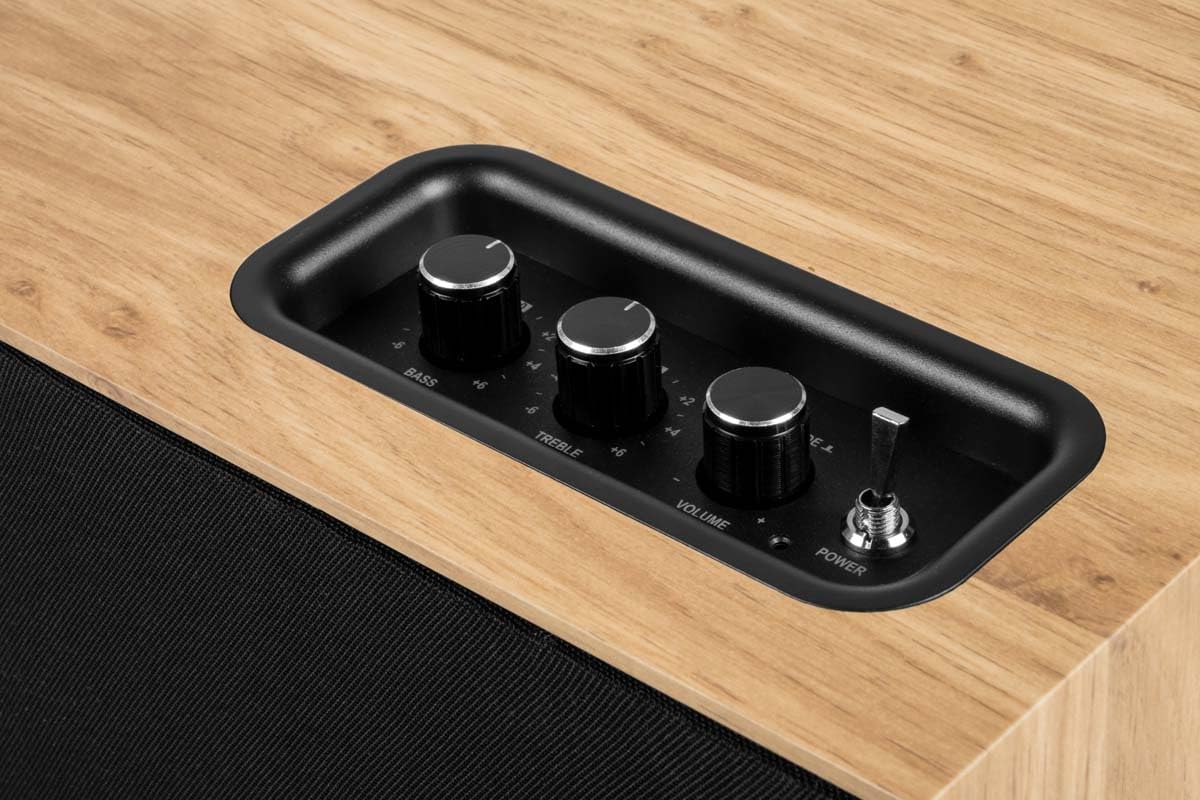
Image 6.1: Top control panel with Bass, Treble, Volume, and Power controls.
7. Manutenzjoni
- Tindif: Always unplug the speaker before cleaning. Use a soft, dry, lint-free cloth to wipe the exterior surfaces. Do not use abrasive cleaners, waxes, or solvents.
- Trab: Regularly dust the speaker, especially the grille, to prevent accumulation that could affect sound quality. The front grille is removable for easier cleaning.
- Ħażna: If storing the speaker for an extended period, unplug it and store it in a cool, dry place, away from direct sunlight and extreme temperatures.
8 Issolvi l-problemi
| Problema | Kawża Possibbli | Soluzzjoni |
|---|---|---|
| Ebda qawwa | Power cable not connected; Power switch off; Outlet not working. | Ensure power cable is securely connected; Turn power switch ON; Test outlet with another device. |
| L-ebda ħoss | Volume too low; Incorrect input mode; Device not playing audio; Bluetooth not connected. | Increase volume; Select correct input (Bluetooth/AUX); Ensure audio is playing on source device; Re-pair Bluetooth. |
| Bluetooth mhux pairing | L-ispiker mhux fil-modalità ta' tqabbil; L-apparat wisq 'il bogħod; Interferenza; Diġà konness ma' apparat ieħor. | Ensure speaker is flashing (pairing mode); Move device closer; Turn off other Bluetooth devices; Disconnect from other devices. |
| Ħoss distort | Volume too high (speaker or source); Poor audio source quality; Treble/Bass settings too high. | Reduce volume on speaker and/or source device; Use a higher quality audio source; Adjust Bass/Treble knobs. |
9. Speċifikazzjonijiet
| Isem tal-Mudell | WS302 |
| Brand | THOMSON |
| Teknoloġija tal-Konnettività | Bluetooth 5.3, Auxiliary (3.5mm) |
| Qawwa tal-Ħruġ tal-Ispeaker | 50 Watts |
| Rispons ta' Frekwenza | 40 Hz |
| Modalità tal-Ħruġ tal-Awdjo | Stereo |
| Metodu ta' Kontroll | Tactile (Knobs) |
| Materjal | Injam |
| Kulur | Kannella |
| Dimensjonijiet (L x W x H) | 30 ċm x 25 ċm x 15 ċm |
| Piż tal-oġġett | 1150 Gramm |
| Sors tal-Enerġija | Electric Cable (230 Volts Input) |
| Apparati Kompatibbli | Smartphone, Tablet, Laptop, MP3 Player, Television |
| Karatteristiċi Speċjali | USB Port, Removable Front Grille, Bass/Treble Adjustment |
10. Garanzija u Appoġġ
10.1 Informazzjoni dwar Garanzija
This THOMSON WS302 speaker comes with a Garanzija Limitata. Please refer to the warranty card included in your package or contact your retailer for specific terms and conditions. Spare parts availability is guaranteed for 3 snin mid-data tax-xiri.
10.2 Appoġġ għall-Klijent
If you encounter any issues not covered in the troubleshooting section or require further assistance, please contact THOMSON customer support or your authorized retailer. Have your product model number (WS302) and purchase details ready when contacting support.


