1. Introduzzjoni
This manual provides comprehensive instructions for the installation, operation, and maintenance of your Sapphire Nitro+ AMD Radeon RX 9070 Gaming OC Graphics Card. Please read this manual thoroughly before installation and retain it for future reference. Proper installation and usage ensure optimal performance and longevity of your product.

Figure 1: Sapphire Nitro+ AMD Radeon RX 9070 Gaming OC Graphics Card and Packaging
2. Informazzjoni dwar is-Sigurtà
Observe the following safety precautions to prevent damage to the graphics card or personal injury:
- Dejjem skonnettja l-enerġija mill-kompjuter tiegħek qabel ma tinstalla jew tneħħi xi komponenti.
- Wear an anti-static wrist strap or frequently touch a grounded metal object to discharge static electricity before handling the graphics card.
- Immaniġġja l-karta grafika mit-truf tagħha biex tevita li tmiss komponenti sensittivi.
- Żgura ventilazzjoni adegwata fil-kaxxa tal-kompjuter tiegħek biex tevita li jisħon iżżejjed.
- Keep the graphics card away from moisture and extreme temperatures.
3. Kontenut tal-Pakkett
Ivverifika li l-oġġetti kollha huma preżenti fil-pakkett tal-prodott tiegħek:
- Sapphire Nitro+ AMD Radeon RX 9070 Gaming OC Graphics Card
- Manwal ta 'Istruzzjoni (dan id-dokument)
- Additional accessories may vary by region or retailer.
4. Rekwiżiti tas-Sistema
Before installing your graphics card, ensure your system meets the following minimum requirements:
- Motherboard konformi mal-PCI Express b'slott grafika wieħed x16.
- Minimum 750W power supply with appropriate PCIe power connectors (e.g., 8-pin + 8-pin).
- Minimu ta' 16GB ta' memorja tas-sistema (RAM).
- Operating System: Windows 10/11 64-bit or Linux 64-bit.
- Konnessjoni tal-internet għall-installazzjoni tas-sewwieq.
- Sufficient space within the PC case for a card with dimensions of approximately 13.02 x 5.06 x 0.04 inches.
5. Setup u Installazzjoni
Segwi dawn il-passi biex tinstalla l-karta grafika tiegħek:
- Ipprepara s-Sistema Tiegħek: Turn off your computer and disconnect the power cable. Open your computer case.
- Sib is-Slott tal-PCIe: Identifika slot PCI Express x16 disponibbli fuq il-motherboard tiegħek. Neħħi kwalunkwe għata tas-slots ta' espansjoni li tostakola s-slot.
- Installa l-Karta tal-Grafika: Carefully align the graphics card with the PCIe x16 slot. Press down firmly and evenly until the card is securely seated. A click may be heard.
- Sikura l-Kard: Use the screw or latch mechanism on your case to secure the graphics card to the chassis.
- Qabbad Kejbils tal-Enerġija: Connect the required PCIe power cables from your power supply to the graphics card. This model typically requires two 8-pin PCIe power connectors. Ensure connections are firm.
- Agħlaq il-Kaxxa u Qabbad il-Periferali: Close your computer case, reconnect the power cable, and connect your display cable (HDMI or DisplayPort) to the graphics card.
- Ixgħel u Installa s-Sewwieqa: Turn on your computer. Once the operating system loads, download and install the latest AMD Radeon drivers from the official AMD websit (www.amd.com/en/support).

Figure 2: Graphics Card Seated in PCIe Slot

Figure 3: STEALTH Hidden Power Cable Routing
6. Istruzzjonijiet Operattivi
After successful installation and driver setup, your graphics card is ready for use. The AMD Radeon software provides various settings for optimizing performance, display, and other features.
- Aġġornamenti tas-sewwieq: Regularly check for and install the latest graphics drivers from AMD to ensure optimal performance and compatibility with new games and applications.
- Konfigurazzjoni tal-Wiri: Use the AMD Radeon software or your operating system's display settings to configure resolution (up to 3840x2160), refresh rate, and multiple monitors.
- Performance Tuning: The AMD Radeon software allows for performance tuning, including fan speed control and power limit adjustments. Exercise caution when modifying these settings.
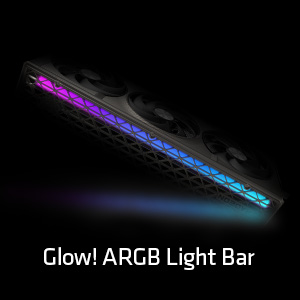
Figure 4: Customizable ARGB Light Bar
7. Manutenzjoni
Proper maintenance helps extend the lifespan and maintain the performance of your graphics card.
- Tneħħija tat-Trab: Periodically clean dust from the heatsink fins and fan blades using compressed air. Ensure the fans are held stationary during cleaning to prevent damage.
- Fan Care: The Sapphire Nitro+ series features Quick Connect Fans, allowing for easy removal and cleaning. Refer to the manufacturer's guidelines for specific fan removal instructions.
- Pejst Termali: Replacing thermal paste is generally not recommended for end-users and should only be performed by qualified technicians if necessary.

Figure 5: Graphics Card Cooling Fans
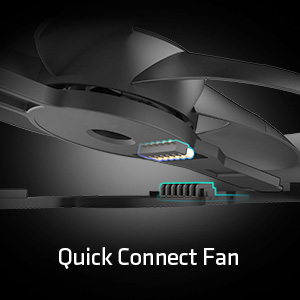
Figure 6: Quick Connect Fan Feature
8 Issolvi l-problemi
Jekk tiltaqa' ma' problemi bil-karta grafika tiegħek, ikkunsidra s-soluzzjonijiet komuni li ġejjin:
- L-ebda Output tal-Wiri:
- Kun żgur li l-kejbil tad-displej huwa konness sew kemm mal-karta grafika kif ukoll mal-monitor.
- Verify that the PCIe power cables are correctly connected to the graphics card.
- Iċċekkja jekk il-karta grafika hijiex imdaħħla sew fl-islott tal-PCIe.
- Ittestja b'kejbil tad-displej jew monitor differenti jekk possibbli.
- Instabbiltà/Ħsarat tas-Sistema:
- Kun żgur li s-sewwieqa tal-grafika tiegħek huma aġġornati.
- Check your power supply unit (PSU) to ensure it meets the recommended wattage.
- Monitor GPU temperatures using software like AMD Radeon software. Excessive heat can cause instability.
- Prestazzjoni Fqira fil-Logħob/Applikazzjonijiet:
- Kun żgur li s-sewwieqa tal-grafika tiegħek huma aġġornati.
- Iċċekkja s-settings fil-logħba; naqqas ir-riżoluzzjoni jew il-kwalità tal-grafika jekk meħtieġ.
- Verify that your system meets the recommended specifications for the application.
9. Speċifikazzjonijiet
| Karatteristika | Speċifikazzjoni |
|---|---|
| Numru tal-Mudell | 11349-01-20G |
| Koproċessur tal-Grafika | AMD Radeon RX 9070 |
| Chipset Brand | AMD |
| Daqs tar-RAM tal-Karta tal-Grafika | 16 GB GDDR6 |
| Interface tal-memorja | 256-bit |
| Veloċità tal-Memorja | 20 GHz |
| Veloċità tal-Arloġġ tal-GPU | 2700 MHz (Spinta) |
| Riżoluzzjoni Massima tal-Iskrin | 3840x2160 |
| Interface tal-Output tal-Vidjo | 2 x HDMI, 2 x DisplayPort |
| Dimensjonijiet tal-Prodott (LxWxH) | 13.02 x 5.06 x 0.04 pulzieri |
| Piż tal-oġġett | 5.99 liri |
10. Garanzija u Appoġġ
For warranty information and technical support, please refer to the documentation included with your product or visit the official Sapphire websit. It-termini u l-kundizzjonijiet tal-garanzija jistgħu jvarjaw skont ir-reġjun u l-bejjiegħ bl-imnut.
Riżorsi onlajn:
- Uffiċjal taż-Żaffir Websit: www.sapphiretech.com
- Appoġġ tal-AMD: www.amd.com/en/support


