Introduzzjoni
This manual provides essential information for the safe and efficient operation, maintenance, and troubleshooting of your Leitz IQ Slim Paper Shredder. Please read this manual thoroughly before using the shredder and retain it for future reference.
The Leitz IQ Slim Paper Shredder is designed for home and home office use, offering P4 cross-cut security for confidential documents. It features a compact design, quiet operation, and anti-jam technology to ensure a smooth shredding experience.
Informazzjoni dwar is-Sigurtà
TWISSIJA: Nuqqas li ssegwi dawn l-istruzzjonijiet ta’ sigurtà jista’ jirriżulta f’nar, xokk elettriku, jew korriment.
- Żomm idejk, xagħar, u ħwejjeġ maħlula 'l bogħod mis-slott tad-dħul tal-karta.
- Żomm it-tfal u l-annimali domestiċi 'l bogħod mit-shredder.
- Skonnettja t-tqattigħ tal-karti meta ma tkunx qed tużah jew qabel ma ċċaqlaq, tnaddaf, jew tbattal il-bin tal-iskart.
- Do not shred metal objects, adhesive labels, or wet paper.
- Tħaddimx it-tqattigħ tal-karti jekk il-korda tal-enerġija tkun bil-ħsara.
- Tippruvax tagħmel manutenzjoni fuq ix-shredder int stess. Irreferi għal kull manutenzjoni lil persunal tas-servizz kwalifikat.
- Kun żgur li t-tqattigħ tal-karti jitqiegħed fuq wiċċ stabbli u livellat.
Setup
- Spakkjar: Carefully remove the shredder from its packaging. Ensure all components are present, including the shredder head, waste bin, and power cord.
- Pjazzament: Position the shredder on a flat, stable surface in your desired home or office location. Ensure there is adequate space around the unit for ventilation and access to the power outlet.
- Bin Installation: Place the waste bin securely into the shredder base. The shredder head should sit firmly on top of the bin. The unit will not operate if the head is not correctly seated.
- Konnessjoni tal-Enerġija: Ipplaggja l-korda tad-dawl fi żbokk elettriku standard.

Figura 1: Quddiem view of the Leitz IQ Slim Paper Shredder, illustrating its compact design suitable for home or office environments.
Istruzzjonijiet Operattivi
Control Panel Matulview
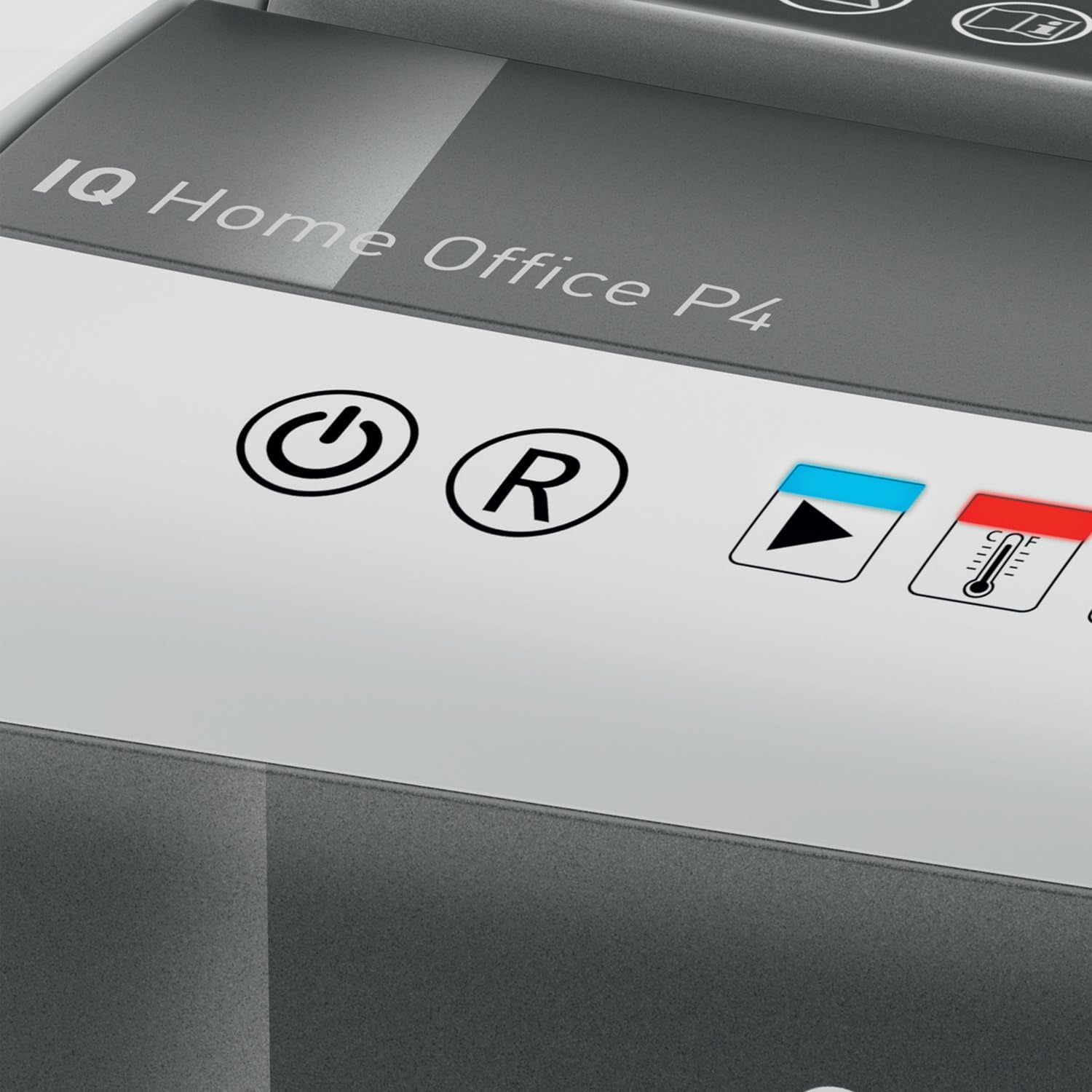
Figura 2: Close-up of the shredder's touch control panel, showing the power, reverse, and status indicators.
The shredder features intuitive touch controls for easy operation.
- Power Button (⌛): Press to turn the shredder ON or OFF.
- Reverse Button (R): Press to reverse the shredding mechanism, useful for clearing minor paper jams.
- Overload Indicator (Red LED): Illuminates if too much paper is inserted, indicating a potential jam.
- Overheat Indicator (Red LED with Thermometer): Illuminates when the shredder has reached its maximum continuous run time and needs to cool down.
Tqattigħ Dokumenti
- Ensure the shredder is plugged in and powered ON.
- Insert up to 10 folja of letter-size (8.5" x 11") paper into the paper entry slot. The shredder will automatically begin shredding.
- The shredder can also process staples and small paper clips.
- Għal prestazzjoni ottimali u biex tevita l-imblukkar tal-karta, evita li taqbeż il-kapaċità massima tal-folji.

Figura 3: The shredder in operation, demonstrating the secure cross-cut shredding of a confidential document.

Figura 4: Visual representation of the shredder's capacity, capable of shredding up to 10 letter-size sheets simultaneously.
Continuous Run Time and Cool Down
The shredder has a continuous run time of approximately minuti 6. After this period, the overheat indicator LED will illuminate, and the shredder will automatically shut off to prevent damage. Allow the shredder to cool down for at least 30 minutes before resuming operation. This helps prolong the life of the motor.
Manutenzjoni
It-tbattil tal-Waste Bin
Regolarment vojta l- 6-gallon (225 sheet capacity) waste bin to prevent paper jams and maintain optimal shredder performance. The transparent window on the bin allows for easy monitoring of the shredded paper level.
- Ensure the shredder is turned OFF and unplugged from the power outlet.
- Erfa’ r-ras tat-tqattigħ bir-reqqa mill-kontenitur tal-iskart.
- Empty the shredded paper into a suitable recycling container.
- Erġa’ poġġi r-ras tax-shredder sew fuq il-kontenitur tal-iskart.

Figura 5: The shredder head lifted from the waste bin, revealing the shredded paper inside and demonstrating the bin's capacity.
Tindif
To clean the exterior of the shredder, wipe it with a soft, dry cloth. Do not use abrasive cleaners or solvents. For optimal performance, consider using shredder oil sheets periodically to lubricate the cutting blades. Follow the instructions provided with the shredder oil sheets.
Issolvi l-problemi
| Problema | Kawża Possibbli | Soluzzjoni |
|---|---|---|
| It-tqattigħ tal-karti ma jixgħelx. | Not plugged in; shredder head not properly seated; power switch off. | Ensure power cord is securely plugged in. Re-seat the shredder head firmly onto the waste bin. Turn the power switch ON. |
| Ġamm tal-karta. | Wisq karta mdaħħla; karta mitwija jew imkemmxa. | Agħfas il- Reverse (R) button to clear the paper. If necessary, unplug the shredder, carefully remove the shredder head, and manually clear the paper. Do not force paper. |
| Shredder stops during operation and Overheat LED is on. | Exceeded continuous run time. | Allow the shredder to cool down for at least 30 minutes. The LED will turn off when it is ready for use again. |
| It-tqattigħ huwa storbjuż. | Blades require lubrication; waste bin is full. | Use shredder oil sheets to lubricate the blades. Empty the waste bin. |
Speċifikazzjonijiet
| Karatteristika | Speċifikazzjoni |
|---|---|
| Numru tal-Mudell | 170004 |
| Tip imqatta | Qatgħa maqtugħa |
| Livell ta' Sigurtà | DIN P4 |
| Kapaċità tal-folja | Up to 10 sheets (8.5" x 11" paper) |
| Kapaċità Bin | 6 Galluni (madwar 225 folja) |
| Ħin ta' Mexxi Kontinwu | minuti 6 |
| Ħin Kessaħ | Appross. 30 minuti |
| Veloċità Shred | 6 pied fil-minuta |
| Ritiri | Paper, staples, paper clips |
| Teknoloġija Kontra l-Ġamm | Automatic stop and reverse |
| Kontrolli | Kontrolli touch |
| Dimensjonijiet tal-Prodott (W x H x D) | 10 x 14.7 x 14.5 pulzieri |
| Piż tal-oġġett | 15.12 liri |
| Manifattur | Brands ACCO |
Garanzija u Appoġġ
Garanzija Limitata
Your Leitz IQ Slim Paper Shredder is covered by a Garanzija Limitata ta' Sena from the date of purchase. This warranty covers defects in materials and workmanship under normal use. It does not cover damage resulting from misuse, abuse, accident, unauthorized service, or normal wear and tear.
Jekk jogħġbok żomm il-prova tax-xiri tiegħek għal pretensjonijiet ta' garanzija.
Appoġġ għall-Klijent
For technical assistance, warranty inquiries, or to order replacement parts, please contact Leitz customer support. Refer to the contact information provided on the official Leitz webis-sit jew l-imballaġġ tal-prodott tiegħek.
Online resources and FAQs may also be available on the Leitz brand websit: Visit the Leitz Store on Amazon


