1. Introduzzjoni
This manual provides comprehensive instructions for the installation, operation, and maintenance of your gearelec Portable Wireless Apple Carplay and Android Auto system (Model: CP8-US). Please read this manual thoroughly before using the product to ensure proper functionality and safety.
The CP8-US is designed to enhance your in-car entertainment and navigation experience by seamlessly integrating your smartphone's features onto a high-resolution touch screen. It supports wireless Apple CarPlay and Android Auto, Mirror Link, and offers multiple audio output options.

Image: The gearelec Portable Wireless Carplay and Android Auto System, featuring a foldable screen and a base unit with controls and a digital clock.
2. Kontenut tal-Pakkett
Jekk jogħġbok ivverifika li l-oġġetti kollha elenkati hawn taħt huma inklużi fil-pakkett tiegħek. Jekk xi oġġetti huma neqsin jew bil-ħsara, jekk jogħġbok ikkuntattja l-appoġġ għall-klijenti.
- 1 x Host Unit (Portable Carplay Screen)
- 1 x AUX Cable Awdjo
- 1 x Reversing Video Input Cable
- 1 x Instruction Manual (English, French, Spanish)
- 1 x Kejbil tal-Enerġija tal-Lajter tas-Sigaretti
- Double-sided Adhesive Stickers (2 spares included)

Image: A visual representation of all items included in the product package, such as the main unit, user manual, cables, and adhesive.
3. Setup u Installazzjoni
The gearelec CP8-US is designed for easy, non-destructive installation. No need to disassemble your car's console or seek professional assistance.
3.1 Tqegħid
- Agħżel wiċċ ċatt adattat fuq id-dashboard tiegħek li ma jostakolax il-vista tiegħek. view jew jinterferixxu mal-kontrolli tas-sewqan.
- Ensure there is enough space when the Carplay screen is unfolded (approximately 3.98 x 4.02 x 5.12 inches).
3.2 Immuntar
- Clean the chosen dashboard surface thoroughly to ensure proper adhesion.
- Peel off the protective film from the self-adhesive stickers provided.
- Firmly press the base of the unit onto the cleaned surface for several seconds.
3.3 Konnessjoni tal-Enerġija
- Connect the cigarette lighter power cable to the unit's power input port.
- Insert the other end of the cigarette lighter power cable into your vehicle's 12V cigarette lighter socket.
- L-unità se tixgħel awtomatikament.

Image: A visual comparison showing the simple installation of the portable CarPlay unit versus the complex wiring of a traditional car stereo.
4. Istruzzjonijiet Operattivi
The CP8-US features a 1560x720 high-resolution touch screen for intuitive control.
4.1 Nota ta' Kompatibbiltà
Before connecting, please note that this Carplay system is compatible with iOS 12 or later (iPhone) and Android 10 or later.

Image: A graphic indicating the required iOS 12+ and Android 10+ versions for smartphone compatibility with the unit.
4.2 Konnessjoni bla fili tal-Apple CarPlay
- On the CP8-US screen, choose the "Carplay" mode.
- On your iPhone, turn on Wi-Fi and Bluetooth. Go to Bluetooth settings, search for and select the device named "CP8" to connect.
- Select "Pair" on your iPhone when prompted.
- Select "Allow" for contacts and favorite sync.
- Select "Use CarPlay" when prompted, and the connection will be successful.

Image: A step-by-step visual guide demonstrating how to connect an iPhone to the unit for Wireless Apple CarPlay functionality.
4.3 Konnessjoni bla fili ta' Android Auto
- On the CP8-US screen, choose the "Android Auto" mode.
- On your Android phone, turn on Wi-Fi and Bluetooth. Go to Bluetooth settings, search for and select the device named "CP8" to connect.
- Select "Pair" on your Android phone when prompted.
- Select "Allow" for access to messages.
- The connection will be successful.

Image: A step-by-step visual guide demonstrating how to connect an Android phone to the unit for Wireless Android Auto functionality.
4.4 Mirror Link Function (Screen Mirroring)
The unit supports mirroring your smartphone screen for both iOS and Android devices.
For iPhone (Apple Mirror Link):
- On the CP8-US screen, choose the "Mirror" mode.
- On your iPhone, turn on Wi-Fi and connect to the Wi-Fi network named "Carplay-wifi-xxxx" using the provided password on the unit's screen.
- Open the Control Center on your iPhone, tap "Screen Mirroring," and select "Car."
- The connection will be successful.

Image: A step-by-step visual guide demonstrating how to connect an iPhone for screen mirroring (Apple Mirror Link).
For Android (Android Mirror Link):
- On the CP8-US screen, choose the "Mirror" mode.
- Select "AutoLink" on the unit's screen.
- Scan the QR code displayed on the screen to download the screen mirroring app on your Android phone.
- Open your phone's hotspot, setting the name to "Car" and using the password displayed on the unit.
- Use the app and follow the on-screen instructions to cast your phone screen.

Image: A step-by-step visual guide demonstrating how to connect an Android phone for screen mirroring (Android Mirror Link).
4.5 Audio Output Modes
The CP8-US offers flexible audio output options:
- Built-in 3W Dual-Chamber Speaker: For direct audio output from the unit.
- Bluetooth: Wirelessly transmit audio to your car's stereo speakers for louder sound.
- Konnessjoni AUX: Use the provided AUX audio cable to connect to your car's AUX input.
- Transmiter FM: Transmit audio to your car's FM radio by tuning both the unit and your car radio to the same empty FM frequency.
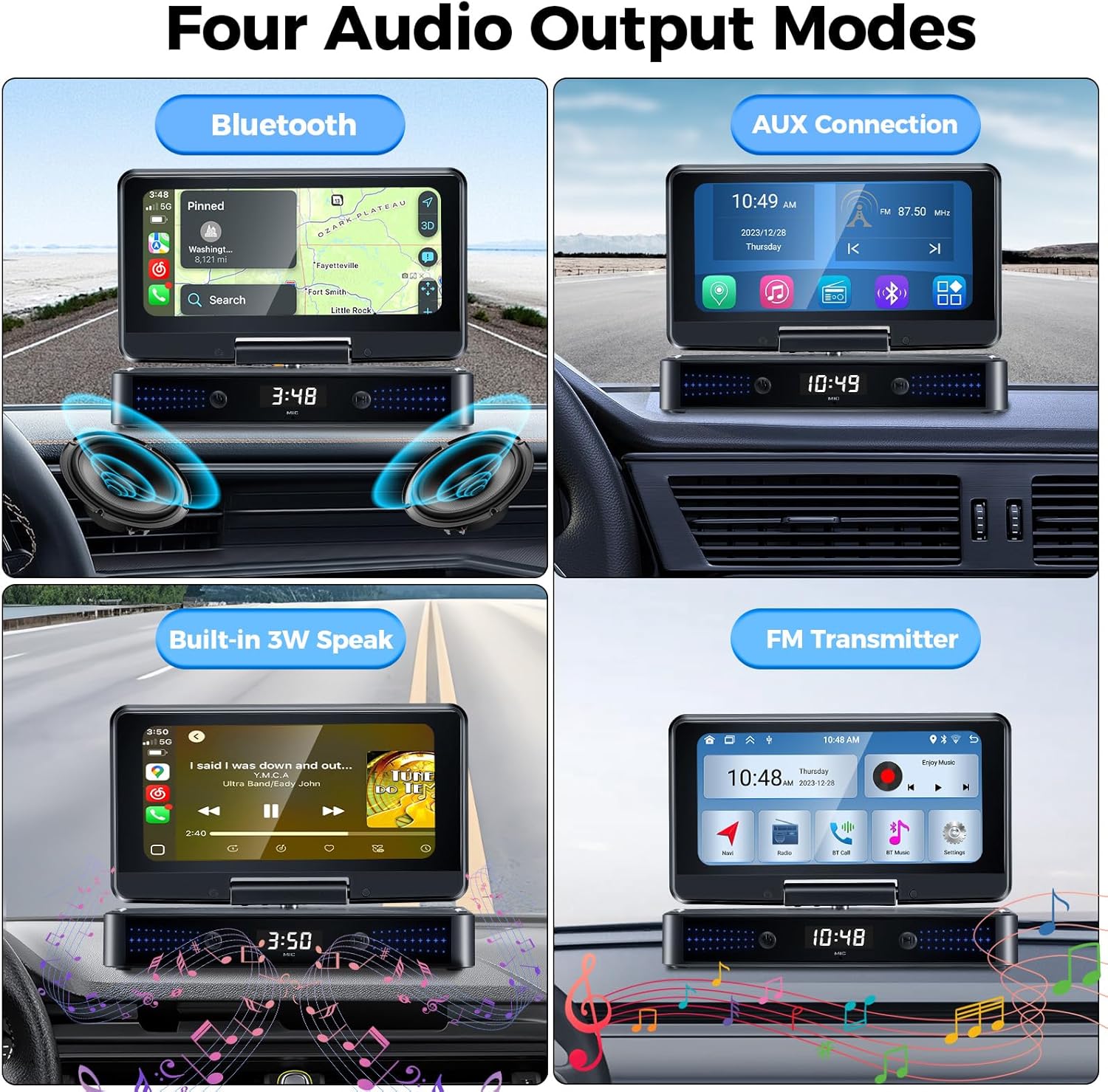
Image: A graphic illustrating the four available audio output methods: Bluetooth, AUX connection, built-in speaker, and FM transmitter.

Image: A visual highlighting the unit's built-in 3W dual-chamber speakers, designed for enhanced stereo surround sound.
4.6 Siri/Google Voice Control
Once connected via Apple CarPlay or Android Auto, you can utilize Siri or Google Assistant for voice commands. This allows for hands-free control of navigation, music playback, calls, and more.
- To activate, simply say "Hey Siri" or "Hey Google" (if enabled on your phone).
- Alternatively, tap the voice assistant icon on the screen.

Image: A graphic demonstrating the use of Siri and Google Voice Control for hands-free operations like making calls or navigating.
4.7 Navigazzjoni GPS
When connected to your phone via CarPlay or Android Auto, you can use popular map applications (e.g., Google Maps, Waze) directly on the CP8-US screen for accurate real-time location and navigation.

Image: The unit's 1560x720 high-resolution screen displaying navigation, with a smartphone mirroring content below it.
4.8 Reversing Image / Dash Cam (Optional)
The unit supports external reversing cameras and dash cams. Connect the reversing video input cable to the appropriate port on the unit and your camera. Refer to your camera's manual for specific installation details.
5. Manutenzjoni
- Tindif: Uża drapp artab u niexef biex tnaddaf l-iskrin u l-unità. Tużax prodotti tat-tindif jew solventi li joborxu.
- Temperatura: Avoid exposing the unit to extreme temperatures (hot or cold) for prolonged periods.
- Ħażna: Jekk se taħżen l-unità għal perjodu estiż, skonnettjaha mill-elettriku u aħżenha f'post frisk u niexef.
6 Issolvi l-problemi
| Problema | Kawża Possibbli | Soluzzjoni |
|---|---|---|
| L-unità ma tixgħelx. | L-ebda enerġija mis-sokit tal-lajter tas-sigaretti; konnessjoni maħlula. | Iċċekkja l-fjus tal-lajter tas-sigaretti; kun żgur li l-kejbil tal-enerġija huwa mdaħħal sew. |
| Ma nistax nikkonnettja ma' Apple CarPlay/Android Auto. | Incorrect phone settings; incompatible phone OS version; Bluetooth/Wi-Fi issues. | Ensure phone's Bluetooth and Wi-Fi are on; verify phone OS is iOS 12+ or Android 10+; restart both phone and unit. |
| L-ebda awdjo jew kwalità tal-awdjo fqira. | Incorrect audio output mode selected; low volume; FM interference. | Adjust volume; try different audio output modes (Bluetooth, AUX, FM); if using FM, find a clear frequency. |
| Mirror Link connection unstable. | Weak Wi-Fi signal; phone hotspot issues (for Android). | Ensure strong Wi-Fi connection; verify Android hotspot settings are correct. |
| Time/settings reset after power off. | No built-in battery for data retention. | This is normal behavior as there is no built-in battery to save settings. Settings will need to be reconfigured after power cycle. |
If the problem persists after attempting these solutions, please contact gearelec customer support.
7. Speċifikazzjonijiet
| Karatteristika | Dettall |
|---|---|
| Numru tal-Mudell | CP8-US |
| Riżoluzzjoni tal-Iskrin | 1560 x 720 pixel |
| Dimensjonijiet tal-Prodott | 4.02"D x 7.24"W x 1.57"H |
| Piż tal-oġġett | 1.04 liri |
| Teknoloġija tal-Konnettività | Bluetooth, USB |
| Tip ta' Kontrollur | Android, iOS |
| Karatteristiċi Speċjali | Apple CarPlay, Android Auto, Mirror Link, Reversing Image, Dash Cam, Siri, GPS, BT, AUX |
| Modalità tal-Ħruġ tal-Awdjo | Stereo (Built-in 3W Dual-Chamber Speaker, Bluetooth, AUX, FM Transmitter) |
| Kulur | Iswed |
| Manifattur | GEARELEC |
8. Garanzija u Appoġġ
gearelec is committed to providing professional technical support and customer service. For any questions regarding installation, operation, or product issues, please contact us directly.
- Informazzjoni dwar il-garanzija: Please refer to the warranty card included in your package or visit the official gearelec websit għal termini u kundizzjonijiet dettaljati tal-garanzija.
- Servizz tal-Klijent: For assistance, please reach out to gearelec customer support through the contact information provided on the product packaging or the official brand websit.


