1. Introduzzjoni
This manual provides detailed instructions for the setup, operation, and maintenance of your artfone G3 Flip Cell Phone. Designed with ease of use in mind, this phone features large buttons, a clear display, and essential functions for seniors, including an SOS button and speed dial capabilities. Please read this manual thoroughly to ensure proper use and to maximize your phone's functionality.
2. Kontenut tal-Pakkett
Malli tiftaħ il-kaxxa, jekk jogħġbok ivverifika li l-oġġetti kollha li ġejjin huma inklużi fil-pakkett tiegħek:
- 1x artfone G3 Flip Phone
- 1x 1300mAh Lithium-ion Battery
- 1x USB-C Iċċarġjar Cable
- 1x Adapter tal-Enerġija
- 1x Charging Station (Cradle)
- 1x Manwal ta 'Istruzzjoni

Image: Contents of the artfone G3 Flip Phone package.
3. Prodott Aktarview
The artfone G3 is a clamshell-design flip phone featuring a 2.4-inch color display and a large, backlit keypad for easy dialing and navigation. It is equipped with a rear camera and a dedicated SOS button for emergencies.

Image: The artfone G3 Flip Phone in its open position, alongside its charging cradle.

Image: Detail of the phone's large fonts, symbols, and backlit buttons for enhanced visibility.
4. Setup
4.1. Installazzjoni tal-Karta SIM u l-Karta Micro SD
The artfone G3 supports Nano SIM cards and Micro SD cards (up to 64GB) for expanded storage. To install:
- Neħħi bir-reqqa l-għatu ta' wara tat-telefon.
- Insert your Nano SIM card(s) into the designated slot(s). Ensure the gold contacts face downwards.
- If desired, insert a Micro SD card into its slot.
- Insert the 1300mAh battery into the battery compartment, aligning the contacts.
- Erġa' poġġi l-għatu ta' wara sakemm tikklikkja sew f'postu.

Image: Diagram illustrating the placement of Nano SIM, Micro SD card, and battery.
4.2. Iċċarġjar tal-batterija
Before first use, fully charge the phone's battery. The artfone G3 offers two charging methods:
- L-użu tal-Bniena tal-Iċċarġjar: Place the phone into the charging station. Ensure the phone is seated correctly and the charging indicator appears on the screen.
- Direct USB-C Cable Charging: Connect the USB-C cable directly to the phone's charging port and then to the power adapter. Plug the adapter into a wall outlet.
A full charge typically takes several hours. The phone features a 1300mAh battery, providing extended standby time.

Image: Illustration of direct cable charging and charging via the desktop cradle.
5. Operazzjoni Bażika
5.1. Power On/Off
- Biex Tixgħel: Open the flip and press and hold the red 'End Call' button (power button) until the screen illuminates.
- Biex Tifi: Open the flip and press and hold the red 'End Call' button until the power-off options appear. Select 'Power Off'.
5.2. Tagħmel u Riċeviment Sejħiet
- Biex Tagħmel Sejħa: Open the flip, dial the number using the keypad, and press the green 'Call' button.
- Biex Tirċievi Sejħa: When the phone rings, open the flip or press the green 'Call' button to answer.
- Biex Intemm Sejħa: Close the flip or press the red 'End Call' button.
5.3. Aġġustament tal-Volum
Use the dedicated volume buttons on the side of the phone to adjust the call volume or ringtone volume.
6. Karatteristiċi ewlenin
6.1. Buttuna ta 'Emerġenza SOS
The SOS button is located on the back of the phone. It allows you to quickly contact up to five pre-programmed emergency contacts. In a crisis, press and hold the SOS button for 3 seconds. The phone will sequentially call each contact until one answers. It will also send an emergency text message to these contacts.

Image: Visual representation of the SOS button functionality and emergency contact setup.
6.2. Speed Dial
The phone features dedicated A/B keys and numbers 2-9 for speed dial. You can assign frequently called contacts to these keys for quick access. Refer to the phone's menu for instructions on setting up speed dial contacts.
6.3. Photo Contacts
For users with visual or memory impairment, the phone supports photo contacts, making it easier to identify and call loved ones by associating their picture with their contact entry.
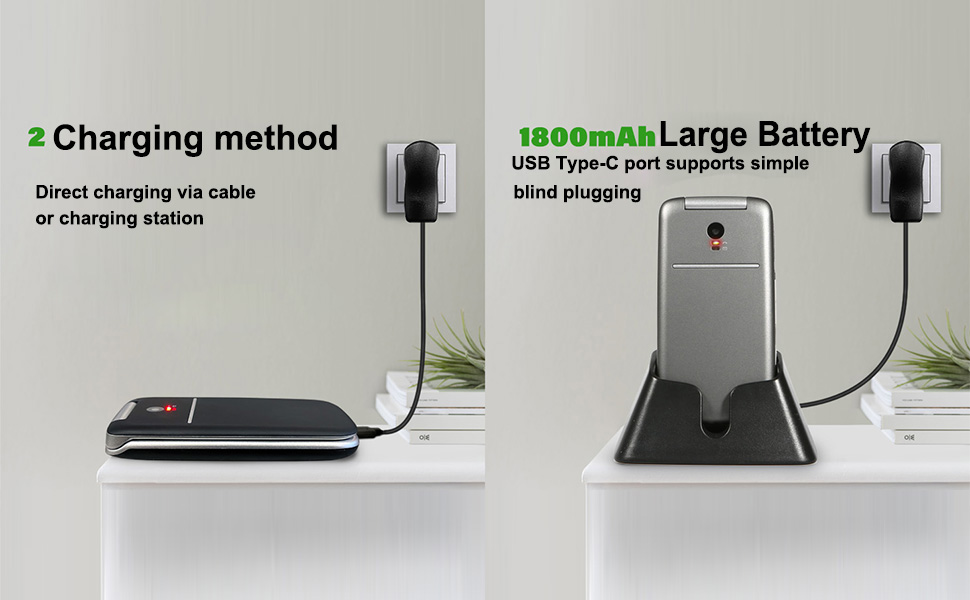
Image: The photo contacts feature, simplifying calling by visual recognition.
6.4. Talking Numbers
For the visually impaired, the phone can announce numbers as they are dialed. Additionally, long-pressing the volume button can activate a real-time voice broadcast function to read out the current time.
6.5. Other Practical Features
The artfone G3 includes several other useful features:
- Radju FM: Enjoy radio broadcasts without needing headphones.
- Flashlight: A built-in flashlight for convenience.
- Bluetooth: For wireless connectivity with compatible devices.
- Kalendarju: Keep track of dates and appointments.
- Kalkulatur: Basic arithmetic functions.
- Arloġġ ta 'allarm: Issettja allarmi għal tfakkiriet.
- Serratura taċ-Ċavetta: Prevent accidental presses.

Immaġni: Fuqview of the phone's practical features.
7. Manutenzjoni
- Żomm it-telefon niexef. L-umdità tista’ tagħmel ħsara liċ-ċirkwiti elettroniċi.
- Avoid extreme temperatures. High temperatures can shorten the life of electronic devices and warp or melt certain plastics.
- Do not use harsh chemicals, cleaning solvents, or strong detergents to clean the phone. Wipe it with a soft, damp drapp.
- Handle the phone gently. Dropping, knocking, or shaking it can damage internal circuit boards.
- Do not attempt to disassemble the phone. Unauthorized disassembly voids the warranty.
8 Issolvi l-problemi
If you encounter issues with your artfone G3, please refer to the following common solutions:
| Problema | Kawża Possibbli | Soluzzjoni |
|---|---|---|
| It-telefon ma jixgħelx | Il-batterija hija eżawrita jew mhux installata sew. | Charge the battery fully. Ensure the battery is correctly inserted and contacts are clean. |
| Ma nistax nagħmel jew nirċievi telefonati | No SIM card, SIM card not properly inserted, or no network signal. | Ensure SIM card is correctly installed. Check for network coverage. Contact your service provider if issues persist. |
| Kwistjonijiet ta' ċċarġjar | Charging cable/adapter faulty, phone not properly seated in cradle, or charging port obstruction. | Try a different USB-C cable or power adapter. Ensure the phone is correctly placed in the charging cradle. Check the charging port for debris. |
| Il-buttuna SOS mhux qed taħdem | Emergency contacts not set up or incorrect numbers. | Verify that emergency contacts are correctly programmed in the phone's settings. |
Jekk il-problema tippersisti wara li tipprova dawn is-soluzzjonijiet, jekk jogħġbok ikkuntattja l-appoġġ għall-klijenti.
9. Speċifikazzjonijiet
- Mudell: ARF-G3+001
- Dimensjonijiet: 4.02 x 2.01 x 0.73 pulzieri (102 x 50 x 18 mm)
- Piż: 3.17 uqija (88g)
- Wiri: 2.4 Inches, 240 x 320 Resolution
- Sistema Operattiva: Nucleus OS
- Mudell tas-CPU: MTK 8121
- Veloċità tas-CPU: 128 MHz
- Memorja RAM: 48 MB
- Ħażna Interna: 0.2 GB
- Ħażna espansibbli: Supports Micro SD cards up to 64GB
- Batterija: 1300mAh Lithium-ion (included)
- Ħin tat-Taħdit tat-Telefon: Sa 6-il Siegħa
- Konnettività: 4G, 3G, 2G, Bluetooth, USB-C
- Awdjo Jack: 3.5 mm
- Karatteristiċi Speċjali: SOS Button, Speed Dial, Photo Contact, Talking Numbers, FM Radio, Flashlight, Calendar, Calculator, Alarm Clock

Image: Physical dimensions and weight of the artfone G3 Flip Phone.
10. Garanzija u Appoġġ
For warranty information and customer support, please refer to the documentation included with your purchase or contact the seller directly. Keep your proof of purchase for any warranty claims.


