1. Introduzzjoni
This manual provides comprehensive instructions for the setup, operation, maintenance, and troubleshooting of the Feasycom FSC-BP103B Bluetooth Low Energy (BLE) Beacon. The FSC-BP103B is a compact, programmable beacon designed for various location-based services and asset tracking applications.
2. Prodott Aktarview
The Feasycom FSC-BP103B is a mini Bluetooth 5.1 beacon featuring a DA14531 chipset. Its small, triangular design makes it suitable for discreet placement and various tracking needs. It supports iBeacon and Eddystone protocols, offering flexibility for different applications.

Figura 1: Quddiem view of the Feasycom FSC-BP103B beacon in white. This compact, triangular device is designed for various tracking and proximity applications.
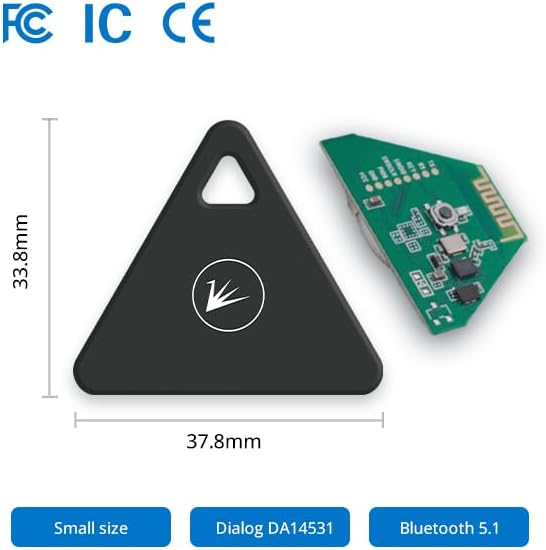
Figura 2: Sploda view of the FSC-BP103B, showing the black triangular casing alongside its internal circuit board. Dimensions are indicated as 37.8mm (L) x 33.8mm (W).
3. Karatteristiċi
- Konnettività Bluetooth 5.1: Offers stable connections, faster data transfer, and an extended transmission range for enhanced device compatibility.
- Extended Advertising Distance: Supports an advertising range of up to 160 meters in open environments, ensuring wide coverage.
- Ħajja twila tal-batterija: Provides up to 3 years of battery life under default configuration, with actual lifespan varying based on usage.
- Multiple Advertising Frames: Supports up to 10 broadcast slots for simultaneous transmission of various signals, reducing interference.
- Free SDK & Application: Resources are available for quick testing and development of beacon functionalities.
- Applikazzjonijiet versatili: Suitable for Asset Tracking, Real-Time Location Systems (RTLS), Proximity Marketing, Digital Signage, Indoor/Outdoor Location, and Vehicle Tracking.
- Sensuri Fakultattivi: Can be equipped with a G-sensor or motion sensor (optional).

Figura 3: Aktarview of the FSC-BP103B Keychain Beacon's key features, including Bluetooth 5.1, built-in CR2032 battery, mini size (37.8x33.8x7.9mm), and 3-year battery life.
4. Setup
4.1 Installazzjoni tal-batterija
The FSC-BP103B beacon comes with a built-in CR2032 battery. The battery is replaceable, ensuring long-term use of the device.
Video 1: This video demonstrates the internal components of the Feasycom FSC-BP103B beacon, including the replaceable CR2032 battery, and shows the device's compact size and packaging. It highlights the Bluetooth 5.1 capability and the 3-year battery life.
4.2 Tixgħel Inizjali
The beacon is typically activated upon battery installation. Ensure the battery is correctly seated. The device will begin broadcasting signals shortly after power-on.
4.3 Connecting via FeasyBeacon App
To configure the beacon, download the official FeasyBeacon application from your device's app store (available for iOS and Android). The app allows you to manage beacon settings, including advertising intervals, power levels, and broadcast data.

Figure 4: Screenshots of the FeasyBeacon mobile application interface, demonstrating how to view nearby beacons, check signal strength (RSSI), and access detailed settings for configuration.
5. Istruzzjonijiet Operattivi
5.1 Beacon Broadcasting
The FSC-BP103B broadcasts signals using Bluetooth Low Energy (BLE) 5.1. It supports various protocols, including iBeacon, AltBeacon, and Eddystone (URL, UID, TLM). These signals can be detected by compatible mobile applications or gateways for location-based services.

Figure 5: Illustration of the FSC-BP103B beacon's broadcasting capability, highlighting its support for up to 10 advertising slots and compatibility with iBeacon, AltBeacon, and Eddystone protocols.
5.2 Configuration via App
Use the FeasyBeacon app to customize the beacon's parameters:
- Advertising Interval: Adjust how frequently the beacon broadcasts its signal. Shorter intervals provide more real-time data but consume more battery.
- Qawwa tat-Trażmissjoni: Modify the signal strength to control the advertising range.
- Beacon Type: Select between iBeacon, Eddystone (URL/UID/TLM), or AltBeacon formats.
- UUID, Major, Minor (for iBeacon): Set unique identifiers for your specific application.
- URL (for Eddystone-URL): Ikkonfigura l- URL broadcast by the beacon.
- Password: Change the default password for secure access to beacon settings.
5.3 Applikazzjonijiet Tipiċi
The FSC-BP103B beacon can be deployed in various scenarios:
- Traċċar tal-Assi: Monitor the location of valuable assets within a defined area.
- Traċċar tal-annimali domestiċi: Help locate pets within a certain range.
- Ġestjoni tal-Inventarju: Improve efficiency in warehouses by tracking goods.
- Car Positioning: Assist in locating vehicles in large parking areas.
- Proximity Marketing: Deliver targeted content to users based on their proximity to the beacon.
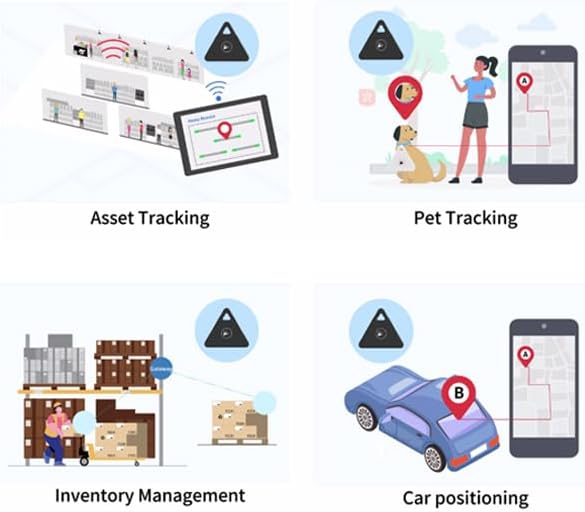
Figure 6: Visual representation of common applications for the FSC-BP103B beacon, including asset tracking in stores, pet tracking, inventory management in warehouses, and car positioning.
6. Manutenzjoni
6.1 Sostituzzjoni tal-batterija
When the battery life diminishes, the CR2032 coin cell battery can be replaced. Carefully open the beacon casing, remove the old battery, and insert a new CR2032 battery, ensuring correct polarity. Refer to Video 1 for a visual guide on accessing the battery compartment.
6.2 Tindif
Clean the beacon's exterior with a soft, dry cloth. Avoid using harsh chemicals or abrasive materials that could damage the casing.
7 Issolvi l-problemi
- Beacon not broadcasting or detectable:
- Iċċekkja l-livell tal-batterija u ibdel jekk meħtieġ.
- Ensure Bluetooth is enabled on the receiving device.
- Verify the beacon is not blocked by metal, water, or large objects, which can interfere with signal transmission.
- Confirm the beacon's advertising interval is not set too long.
- Cannot connect to beacon via app:
- Ensure the beacon is powered on and within range.
- If you have forgotten the password, re-power the beacon device. Within 1 minute of power-on, connect to the beacon using the default password (000000) in the FeasyBeacon app settings. Then, change to a new password and save it.
- Inaccurate location tracking:
- Consider the placement of the beacon. For optimal signal, place beacons above 2.5 meters high on walls or ceilings, avoiding obstructions.
- Environmental factors like metal structures or dense materials can affect signal accuracy.
8. Speċifikazzjonijiet
| Karatteristika | Dettall |
|---|---|
| Brand | FEASYCOM |
| Numru tal-Mudell | FSC-BP103B |
| Verżjoni Bluetooth | Bluetooth 5.1 |
| Chipset | DA14531 |
| Sors tal-Enerġija | Battery Powered (CR2032) |
| Ħajja tal-batterija | Up to 3 years (default configuration) |
| Medda Massimu | 160 Meters |
| Dimensjonijiet tal-Prodott | 0.32"D x 1.34"W x 1.49"Għ (madwar 8.1mm D x 34mm W x 37.8mmGħ) |
| Piż tal-oġġett | 3.2 uqija (madwar 90.7 gramma) |
| Tip ta 'Immuntar | Hang / Paste |
| Apparati Kompatibbli | iOS & Android devices, Asset Tracking Systems, Vehicle Tracking Systems |
| Ċertifikazzjonijiet | FCC, CE, IC (as indicated on packaging) |
9. Garanzija u Appoġġ
For technical support, software development kits (SDKs), and application assistance, please refer to the official Feasycom website or contact their customer support. Feasycom provides iOS and Android system SDKs for developers.
Information regarding specific warranty terms and conditions can typically be found on the product packaging or the official Feasycom websit. Jekk jogħġbok żomm il-prova tax-xiri tiegħek għal talbiet ta' garanzija.
For further inquiries, visit the FEASYCOM Store on Amazon.


