Introduzzjoni
The My Arcade Casino Player (Model DGUN-3945) is an all-in-one handheld gaming device designed for portable entertainment. It comes pre-loaded with over 30 exciting casino and puzzle games, offering a diverse range of entertainment options. This manual provides essential information for setting up, operating, and maintaining your device.
X'hemm fil-Kaxxa
- My Arcade Casino Player Device
- Gwida għall-Utent
Setup
It-Tħaddim tal-Apparat
The My Arcade Casino Player can be powered by either 4 AA batteries (not included) or a USB-C cable (not included).
Installazzjoni tal-batterija
- Sib il-kompartiment tal-batterija fuq wara tal-apparat.
- Iftaħ l-għatu tal-kompartiment tal-batterija.
- Daħħal 4 batteriji AA, filwaqt li tiżgura polarità korretta (+/-).
- Ibdel l-għatu tal-kompartiment tal-batterija b'mod sikur.

Immaġni: Wara view of the My Arcade Casino Player, highlighting the battery compartment. The compartment is designed to hold 4 AA batteries.
USB-C Power (Optional)
To power the device using a USB-C cable, connect one end to the USB-C port on the device and the other end to a compatible USB power source (e.g., wall adapter, computer USB port). The device will operate without batteries when connected via USB-C.
Istruzzjonijiet Operattivi
Tixgħel/Jitfi
Locate the power switch, typically on the side or back of the device. Slide it to the 'ON' position to power on the device. Slide it to 'OFF' to power down.
Kontrolli
Il-Casino Player features a variety of controls for game interaction, including a working metal lever for slot games, buttons for casino and puzzle games, and a high-resolution 3.5" full-color display.
Image: A hand is shown interacting with the controls of the My Arcade Casino Player, demonstrating the tactile experience of gameplay.
L-aġġustament tal-luminożità tal-iskrin
The 3.5" full-color display has adjustable screen brightness. Refer to the on-screen menu or dedicated buttons (if available) to adjust the brightness to your preference.
Għażliet Awdjo
The device includes a built-in speaker with volume control. For private listening, a 3.5 mm headphone port is available to connect your headphones.
Għażla tal-Logħba
Upon powering on, you will typically be presented with a main menu to select from the over 30 included games. Use the directional controls and action buttons to navigate and select your desired game.
Logħob Inkluż
The My Arcade Casino Player features a diverse collection of over 30 casino and puzzle games. Below is a list of some of the included titles:
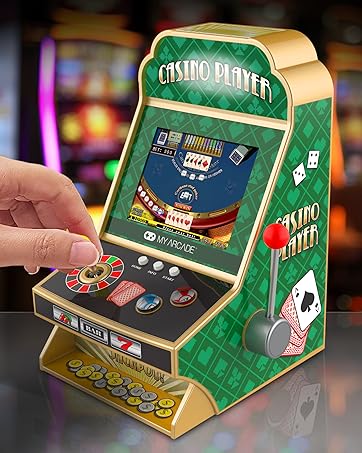
Image: The My Arcade Casino Player screen showing a partial list of the included casino and puzzle games.
Casino Games
- Texas Hold 'em Poker
- Baccarat
- Caribbean Stud Poker
- Show Hand
- Fruit Slot Machine
- Blackjack
- Change Cup
- Roulette
- Mahjong Nadif
- Odd Even Number
- Polar Slot Machine
- Retro Slot
Logħob Puzzle
- Backgammon
- Freecell
- Sokoban
- Big Shot Checkers
- Ċess
- Gobang
- Sudoku
- Flight Chess
- Colored Squares
- Precipice
- Mix Match
- Mine Clearance
- Linji ta' Konnessjoni
- Memorja Diġitali
- Shape Switcher
- Push Color
- Match Cartoon
- Brain Challenge
- Bumber Balls
Manutenzjoni
To ensure the longevity of your My Arcade Casino Player, keep the device clean and dry. Use a soft, dry cloth to wipe down the exterior. Avoid using harsh chemicals or abrasive cleaners. Store the device in a cool, dry place away from direct sunlight and extreme temperatures when not in use.
Issolvi l-problemi
Ebda Qawwa
- Kun żgur li l-batteriji huma installati b'mod korrett b'polarità xierqa.
- Replace old batteries with new AA alkaline batteries.
- If using USB-C, ensure the cable is securely connected and the power source is active.
Kwistjonijiet tal-Wiri
- Check screen brightness settings and adjust if necessary.
- If the screen is frozen, try turning the device off and on again.
Ebda Ħsejjes jew Volum Baxx
- Adjust the volume control on the device.
- If using headphones, ensure they are properly plugged into the 3.5 mm port.
Speċifikazzjonijiet
- Dimensjonijiet tal-Prodott: 4"T x 4"W x 7"Għ
- Tip ta 'Kontrollur: Kontroll tal-buttuna
- Piż tal-oġġett: 1.08 Liri
- Daqs tal-iskrin: 3.5 Pulzier
- Sors tal-Enerġija: Battery Powered (4 AA batteries required, not included) or USB-C (cable not included)
- Firxa ta' Età (Deskrizzjoni): Adult (Rakkomandat għal etajiet ta' 18-il sena 'l fuq)
- Tip ta' wiri: LCD
- Materjal: Plastik
- Kapaċità tal-Ħżin tal-Memorja: 8 MB
- Fattur tal-Formola: Mejda
- Numru tal-Mudell: DGUN-3945
Informazzjoni dwar is-Sigurtà
Recommended for ages 18 and up. This device is not a toy for children. Adult supervision is advised. Do not mix old and new batteries. Do not mix alkaline, standard (carbon-zinc), or rechargeable (nickel-cadmium) batteries. Remove batteries if the device is not to be used for an extended period.
Garanzija u Appoġġ
For warranty information or technical support, please refer to the contact details provided on the product packaging or visit the official My Arcade websit. Żomm l-irċevuta tax-xiri tiegħek bħala prova tax-xiri għal kwalunkwe talba ta' garanzija.


