1. Introduzzjoni
This manual provides detailed instructions for setting up, operating, and maintaining your BenQ EW2790U 27-inch 4K monitor. Please read this manual thoroughly before using the monitor to ensure proper functionality and to prevent damage.
2. Informazzjoni dwar is-Sigurtà
Dejjem segwi dawn il-prekawzjonijiet bażiċi ta’ sigurtà biex tnaqqas ir-riskju ta’ nar, xokk elettriku, u korriment:
- Tesponix il-monitor għax-xita jew għall-umdità.
- Tiftaħx il-monitor casing; irreferi għas-servizz lil persunal kwalifikat.
- Żgura ventilazzjoni xierqa madwar il-monitor.
- Uża biss il-korda tal-enerġija u l-adapter ipprovduti minn BenQ.
- Skonnettja l-monitor waqt maltempati bis-sajjetti jew meta ma jintużax għal perjodi twal.
3. Kontenut tal-Pakkett
Ivverifika li l-oġġetti kollha huma preżenti fil-pakkett tiegħek:
- BenQ EW2790U 27-inch 4K Monitor
- Korda tal-Enerġija
- Cable HDMI
- USB-C Cable
- Gwida Quick Start
- Karta ta' Garanzija
4. Setup
4.1 Armar tal-Istand
- Poġġi l-monitor wiċċu 'l isfel fuq wiċċ artab u nadif biex tevita l-grif.
- Attach the stand base to the stand neck and secure it with the provided screw.
- Align the stand assembly with the mounting slot on the back of the monitor and push until it clicks into place.

Figure 4.1: Assembled BenQ EW2790U monitor.
4.2 Kejbils tal-Konnessjoni
Qabbad il-kejbils meħtieġa mal-monitor u l-kompjuter tiegħek:
- Qawwa: Qabbad il-korda tal-enerġija mad-dħul tal-enerġija tal-monitor u mbagħad ma' sokit tal-enerġija.
- Vidjow:
- HDMI: Connect an HDMI cable from your computer's HDMI output to one of the monitor's HDMI ports (HDMI 1, 2, or 3).
- USB-C: Connect a USB-C cable from your computer's USB-C port to the monitor's USB-C (65W) port for video, data, and power delivery.
- USB Downstream: Connect USB-A devices to the USB-A 3.2 downstream ports on the monitor.
- Awdjo: Qabbad il-headphones mal-jack tal-headphones jekk mixtieq.

Figura 4.2: Wara view of BenQ EW2790U showing connectivity ports.

Figura 4.3: Dettaljat view of BenQ EW2790U input/output ports.
4.3 Adjusting Ergonomics
The EW2790U monitor offers various adjustments for comfortable viewing:
- Aġġustament Għoli: Għolli jew baxxi l-monitor għal-livell tal-għajnejn preferut tiegħek.
- Mejjel: Adjust the screen's vertical angle.
- Dawwar: Dawwar l-iskrin orizzontalment.
- Pivot: Dawwar l-iskrin 90 grad għall-modalità ritratt.

Figure 4.4: BenQ EW2790U monitor pivot adjustment.
5. It-tħaddim tal-Monitor
5.1 Power On/Off
Press the Power key located on the bottom right of the monitor to turn it on or off.

Figure 5.1: Monitor controls: Scenario hotkey, 5-way controller, and Power key.
5.2 Menù tal-Wiri fuq l-Iskrin (OSD)
Use the 5-way controller on the bottom bezel to navigate the OSD menu and adjust settings such as brightness, contrast, color mode, and input source.
5.3 Scenario Hotkey
The Scenario hotkey allows quick access to custom or preset optimal monitor settings for various uses like work, studying, gaming, or watching movies.
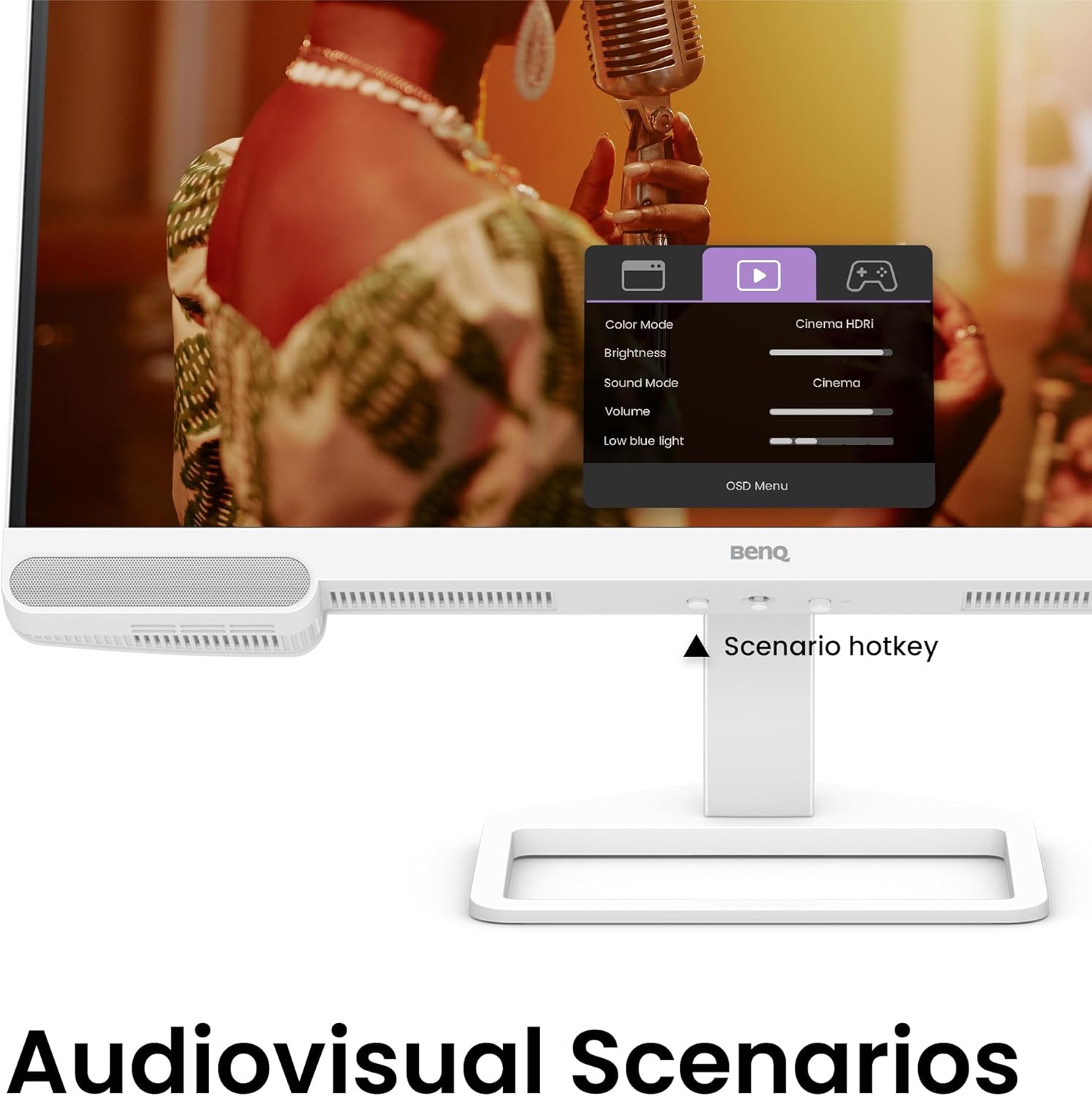
Figure 5.2: OSD menu accessed via Scenario hotkey.
5.4 AI Contrast Technology
The exclusive AI Contrast technology intelligently adjusts the contrast based on the displayed content, optimizing image quality without affecting other areas of the screen.

Figure 5.3: Demonstration of AI Contrast technology.
5.5 Kelliema Inkorporati
The monitor includes a pair of 5W built-in speakers for audio output. Adjust the volume through the OSD menu or your connected device.

Figure 5.4: BenQ EW2790U built-in 5W speakers.
6. Manutenzjoni
6.1 Tindif tal-Monitor
- Dejjem aqla l-monitor qabel it-tindif.
- Uża ċarruta ratba u mingħajr ħelu dampmaħsul bl-ilma jew b'tindif ħafif u mhux abrażiv.
- Tisprejjax it-tindif direttament fuq l-iskrin.
- Evita li tuża alkoħol, ammonja, jew prodotti tat-tindif li joborxu, għax jistgħu jagħmlu ħsara lill-iskrin jew lill-apparat.asing.
6.2 Ħażna
Store the monitor in a cool, dry place away from direct sunlight and extreme temperatures. If storing for an extended period, consider using the original packaging for protection.
7 Issolvi l-problemi
| Problema | Kawża Possibbli | Soluzzjoni |
|---|---|---|
| L-ebda immaġni fuq l-iskrin | Kejbil tal-enerġija skonnettjat; Kejbil tal-vidjo skonnettjat; Sors ta' input mhux korrett magħżul. | Ensure power and video cables are securely connected. Press the Scenario hotkey to select the correct input source. |
| L-immaġni hija mċajpra jew distorta | Riżoluzzjoni mhux korretta; Kejbil tal-vidjo maħlul. | Set the display resolution to 3840x2160. Check video cable connections. |
| L-ebda ħoss mill-kelliema | Volum baxx wisq; Sikketjat; Output awdjo mhux korrett magħżul fuq il-kompjuter. | Adjust volume via OSD menu or computer settings. Ensure monitor is selected as audio output device. |
| AI Contrast not working as expected | Feature disabled; Specific content not optimized. | Check OSD settings to ensure AI Contrast is enabled. Performance may vary with different content. |
8. Speċifikazzjonijiet
| Karatteristika | Dettall |
|---|---|
| Daqs tal-Iskrin | 27 Pulzier |
| Riżoluzzjoni | 3840x2160 (4K UHD) |
| Proporzjon ta' l-aspett | 16:9 |
| Color Coverage | 95% P3 |
| AI Contrast Technology | Iva |
| Kelliema Inkorporati | 2 x 5W |
| Konnettività | 1x USB Type-C (65W), 3x HDMI (2.0), USB-C 3.2 downstream, USB-A 3.2 downstream, Headphone Jack |
| Disinn Ergonomiku | Aġġustament tal-Għoli, Inklinazzjoni, Dawwar, Pern |
| Piż tal-oġġett | 21.4 liri |
| Dimensjonijiet tal-Prodott (LxWxH) | 17 x 8 x 21 pulzieri |
9. Garanzija u Appoġġ
Your BenQ EW2790U monitor is covered by a manufacturer's warranty. Please refer to the warranty card included in your package for specific terms and conditions. For technical support, product registration, or service inquiries, please visit the official BenQ websit jew ikkuntattja lid-dipartiment tas-servizz tal-konsumatur tagħhom.
BenQ Uffiċjali Websit: www.benq.com