1. Prodott Aktarview
The Lafocuse 10-inch Digital Wall and Desk Clock (Model ZH0152A) is a versatile device designed to display time, date, day of the week, temperature, and humidity. It features a large LCD screen for clear readability and can be used as both a wall-mounted or desktop clock. This clock is battery-operated, ensuring portability and freedom from power outlets.

Figura 1: Quddiem view of the Lafocuse 10-inch Digital Clock, displaying time, date, day, temperature, and humidity.
Karatteristiċi ewlenin:
- 10-inch LCD screen with large digits.
- Displays time (seconds included), date, day of the week, temperature, and humidity.
- Dual functionality: suitable for wall mounting or desktop placement.
- Battery-operated (3 x AAA batteries, not included) for cordless use.
- Day of the week display in 7 languages (English, Danish, Spanish, Dutch, French, Italian, German).
- Alarm function with a 5-minute snooze feature.
- 12/24-hour time format selection.

Figura 2: Visual representation of the clock's dimensions and primary functions.
2. Kontenut tal-Pakkett
Please ensure all items are present upon opening the package:
- Lafocuse 10-inch Digital Wall and Desk Clock (Model ZH0152A)
- Manwal ta 'Istruzzjoni (dan id-dokument)
Nota: 3 x AAA batteries are required for operation and are not included in the package.
3. Identifikazzjoni tal-Komponent
Familiarize yourself with the clock's components and control buttons.
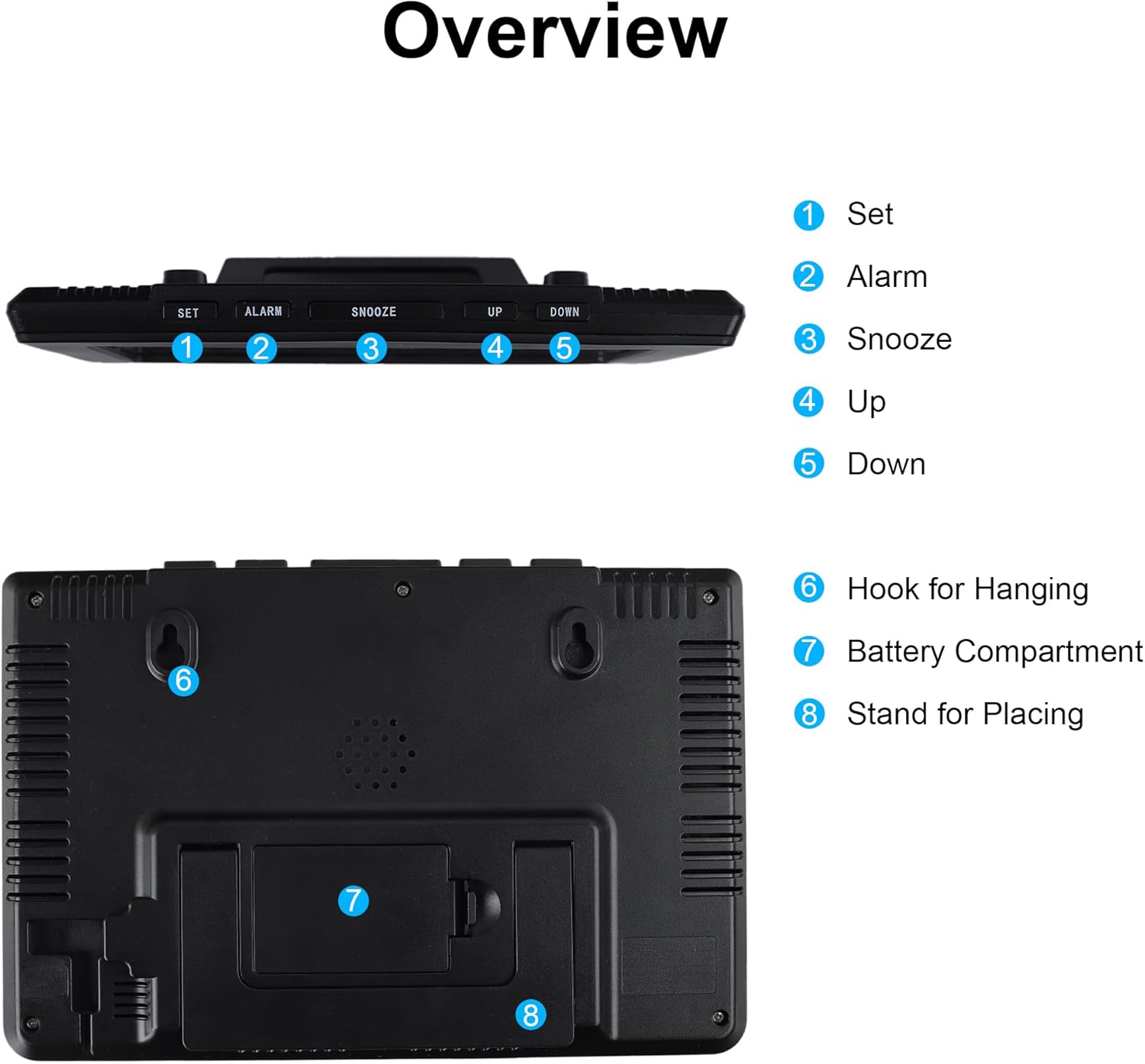
Figura 3: Fuq u wara view of the clock, showing control buttons, hanging hooks, battery compartment, and stand.
- Buttuna SET: Użat biex jiddaħħlu u jikkonfermaw is-settings.
- Buttuna ALLARM: Used to set and activate/deactivate the alarm.
- Buttuna SNOOZE: Activates the snooze function during an alarm.
- Buttuna UP: Used to increase values during settings.
- Buttuna 'l isfel: Used to decrease values during settings.
- Hooks for Hanging: Two durable hooks for wall mounting.
- Kompartiment tal-batterija: Houses 3 x AAA batteries.
- Stand for Placing: Integrated stand for desktop use.
4. Setup u Installazzjoni
4.1 Installazzjoni tal-batterija
The clock requires 3 AAA batteries (not included) for operation.
- Sib il-kompartiment tal-batterija (7) fuq wara tal-arloġġ.
- Iftaħ l-għatu tal-kompartiment tal-batterija.
- Daħħal żewġ batteriji AAA ġodda, waqt li tiżgura l-polarità korretta (+ u -).
- Agħlaq l-għatu tal-kompartiment tal-batterija sew.

Figura 4: Wara view showing the battery compartment for 3 AAA batteries.
4.2 Għażliet ta' Tqegħid
L-arloġġ joffri għażliet flessibbli ta' tqegħid:
- Poġġiment fuq id-Desktop: Use the integrated stand (8) to place the clock on any flat surface, such as a desk, table, or shelf.
- Immuntar tal-ħajt: Utilize the two hooks (6) on the back of the clock to hang it securely on a wall. Ensure appropriate wall anchors or screws are used for stability.

Figura 5: Examples of the clock being wall-mounted and placed on a desk.
5. Istruzzjonijiet Operattivi
5.1 Setting Time, Date, and Day
To adjust the time, date, and day settings:
- Agħfas u żomm il- SET button (1) for approximately 2 seconds to enter setting mode. The first adjustable item will begin to flash.
- Uża l- UP (4) jew 'L isfel (5) buttons to adjust the value.
- Agħfas il- SET button (1) briefly to confirm the current setting and move to the next adjustable item.
- Repeat steps 2 and 3 for all settings (e.g., 12/24H format, hour, minute, year, month, day, day language).
- Ladarba s-settings kollha jkunu kompluti, agħfas SET again or wait a few seconds for the clock to exit setting mode automatically.
5.2 Format ta' 12/24 Siegħa
During the time setting process, you will have the option to select either a 12-hour or 24-hour time display format. Use the UP or 'L isfel buttons to toggle between these options.
5.3 Setting the Alarm and Snooze Function
Biex tissettja l-allarm:
- Agħfas u żomm il- ALLARM button (2) for approximately 2 seconds to enter alarm setting mode. The alarm hour will begin to flash.
- Uża l- UP (4) jew 'L isfel (5) buttons to adjust the alarm hour.
- Agħfas il- ALLARM button (2) briefly to confirm the hour and move to the alarm minute setting.
- Uża l- UP (4) jew 'L isfel (5) buttons to adjust the alarm minute.
- Agħfas il- ALLARM button (2) briefly to confirm and exit alarm setting mode.
Biex tattiva/tiddiżattiva l-allarm, agħfas fil-qosor il- ALLARM button (2) outside of setting mode. An alarm icon will appear/disappear on the display.
When the alarm sounds, you can activate the SNOOZE funzjoni:
- Agħfas il-kbir SNOOZE button (3) on the top of the clock. The alarm will pause for 5 minutes and then sound again.
- To stop the alarm completely, press any other button on the top of the clock (SET, ALARM, UP, DOWN).

Figura 6: Demonstrating the use of the large snooze button.
5.4 Day of the Week Language Setting
During the initial setup or when adjusting the date, you can select the display language for the day of the week. The available languages are English, Danish, Spanish, Dutch, French, Italian, and German. Use the UP or 'L isfel buttons to cycle through the options.

Figura 7: The clock's display showing various information and examples of day abbreviations in different languages.
5.5 Wiri tat-Temperatura u l-Umdità
The clock continuously displays the current temperature and humidity. No specific action is required to view these readings. The temperature can be displayed in Celsius or Fahrenheit, which can be selected during the initial setup process.
6. Manutenzjoni
6.1 Tindif
To clean the clock, gently wipe the surface with a soft, dry cloth. Avoid using abrasive cleaners, solvents, or chemical sprays, as these can damage the display or casing.
6.2 Sostituzzjoni tal-batterija
When the display becomes dim or the clock functions irregularly, it is time to replace the batteries. Follow the steps in Section 4.1 for battery installation. Always replace all three AAA batteries at the same time with new ones to ensure optimal performance.
7 Issolvi l-problemi
| Problema | Kawża Possibbli | Soluzzjoni |
|---|---|---|
| Id-displej huwa vojt jew mudlam. | Il-batteriji huma baxxi jew installati ħażin. | Ibdel b'batteriji AAA ġodda, waqt li tiżgura l-polarità korretta. |
| Il-Ħin/Data mhumiex korretti. | Settings were not saved or incorrectly set. | Irreferi għat-Taqsima 5.1 biex tirrisettja l-ħin u d-data. |
| L-allarm ma jdoqqx. | L-allarm mhux attivat jew il-ħin tal-allarm mhux korrett. | Ensure the alarm icon is visible on the display. Refer to Section 5.3 to set and activate the alarm. |
| Humidity reading seems inaccurate. | Environmental factors or sensor calibration. | Allow the clock to stabilize in its environment for at least 30 minutes. While the temperature sensor is generally accurate, minor variations in humidity readings compared to other devices may occur due to sensor type and placement. This is generally within expected tolerances for a consumer device. |
8. Speċifikazzjonijiet
| Karatteristika | Dettall |
|---|---|
| Brand | Lafocus |
| Numru tal-Mudell | ZH0152A |
| Tip ta 'Wiri | LCD diġitali |
| Kulur | Iswed |
| Materjal | Plastik |
| Dimensjonijiet tal-Prodott (L x W x H) | 20.8 x 3.81 x 14 ċm (8.3 x 1.5 x 5.5 pulzieri) |
| Piż tal-oġġett | 310 gramma |
| Sors tal-Enerġija | 3 x Batteriji AAA (mhux inklużi) |
| Karatteristiċi Speċjali | Large LCD, Wall/Desk Clock, Multifunction Display (Time, Date, Day, Temp, Humidity, Alarm, Snooze) |
9. Garanzija u Appoġġ
Specific warranty details are not provided in the product information. For any product inquiries, technical support, or warranty claims, please contact the seller or refer to the official Lafocuse brand store for assistance.
You can visit the Lafocuse brand store at: Lafocuse Store
