1. Introduzzjoni
This manual provides essential information for the safe and effective use of your arboleaf Smart Body Composition Scale CS10E. Please read this manual thoroughly before using the device and retain it for future reference.
2. Informazzjoni dwar is-Sigurtà
Prekawzjonijiet ta' Sigurtà Importanti:
- Tużax dan l-apparat jekk għandek pacemaker jew apparat mediku ieħor impjantat.
- Pregnant women should consult a physician before using this scale.
- The scale uses Bioelectrical Impedance Analysis (BIA) technology. While generally safe, individuals with certain medical conditions should exercise caution.
- Ensure the scale is placed on a hard, flat surface for accurate measurements.
- Do not use the scale on wet or slippery surfaces to prevent falls.
- Żomm l-iskala 'l bogħod mill-ilma u minn temperaturi estremi.
3. Kontenut tal-Pakkett
Ivverifika li l-oġġetti kollha huma preżenti fil-pakkett:
- arboleaf Smart Body Composition Scale CS10E
- Batteriji AAA (3 inklużi)
- Manwal għall-Utent (dan id-dokument)
4. Prodott Aktarview
The arboleaf CS10E is an advanced smart scale designed to provide comprehensive body composition analysis. It features 8 electrodes for enhanced accuracy and segmental analysis.
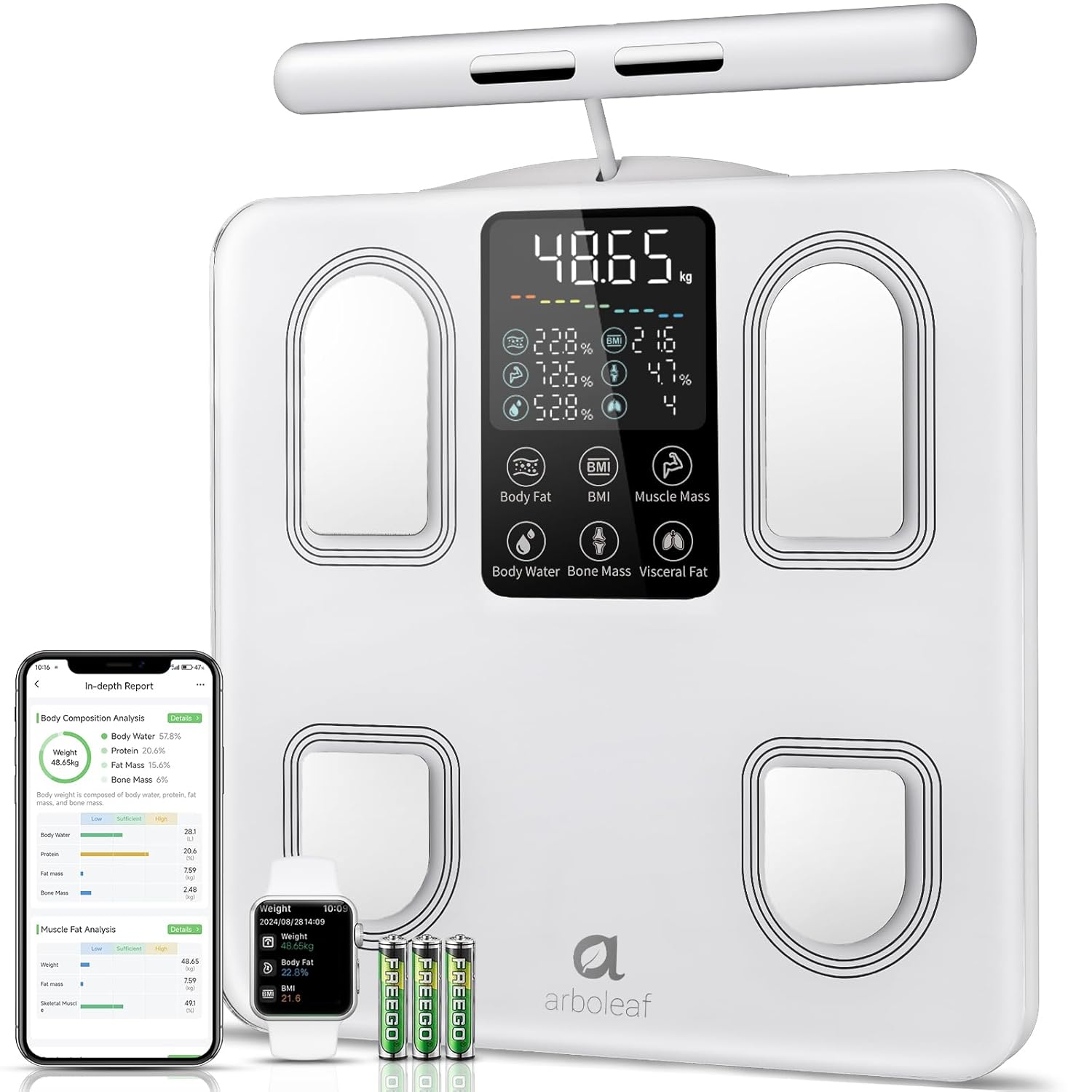
Image: arboleaf Smart Body Composition Scale CS10E, showing the scale, a smartphone displaying the app, a smartwatch, and three AAA batteries.
Karatteristiċi ewlenin:
- 8 Electrodes: Four electrodes on the scale platform for feet, and four on a retractable handle for hands, enabling full-body segmental analysis.
- Display LED Kbir: Provides clear readings of key metrics directly on the scale.
- Pjattaforma tal-Ħġieġ Ittemprat: Durabbli u faċli biex tnaddaf.
- Dual-Frequency BIA Technology: For precise and reliable body composition measurements.
- High Precision Chips: Ensures accurate data collection.
- Manku li jinġibed: Over 1.5 meters long, with a magnetic retraction system for convenient storage.
- Disinn kontra ż-żlieq: For stability and safety during use.
5. Setup
5.1. Installazzjoni tal-batterija
- Iftaħ il-kompartiment tal-batterija fuq in-naħa ta 'taħt tal-iskala.
- Daħħal it-tliet batteriji AAA, waqt li tiżgura l-polarità korretta (+/-).
- Agħlaq il-kompartiment tal-batterija sew.
5.2. Tniżżil u Installazzjoni tal-App
The arboleaf scale requires the arboleaf app for full functionality and data tracking.
- Scan the QR code provided in the packaging or search for "arboleaf" in your device's app store (Apple App Store for iOS, Google Play Store for Android).
- Download and install the arboleaf app.
- Open the app and follow the on-screen instructions to create an account and set up your personal profile.
5.3. Tqabbil mal-App
- Kun żgur li l-Bluetooth huwa attivat fuq l-ismartphone tiegħek.
- Open the arboleaf app.
- Step onto the scale barefoot. The scale display will light up.
- The app should automatically detect and connect to the scale. If not, navigate to the device pairing section within the app and follow the instructions to manually add the scale.
6. Istruzzjonijiet Operattivi
6.1. Tieħu Kejl
For accurate body composition analysis, follow these steps:
- Poġġi l-iskala fuq wiċċ iebes u ċatt.
- Step onto the scale barefoot, ensuring your feet are positioned on the four metal electrodes on the platform.
- Grasp the retractable handle with both hands, ensuring your palms are in full contact with the four metal electrodes on the handle.
- Stand still and maintain a straight posture with your arms extended slightly away from your body. Your arms should form an angle relative to your body. Do not bend your arms during measurement.
- Wait for the measurement to complete. The scale display will show your weight and other key metrics.

Image: Illustration showing the correct posture for using the arboleaf scale, emphasizing full contact with electrodes and proper arm positioning.
6.2. Nifhmu l-Qari tal-Wiri
The scale's LED display shows up to 7 key metrics in real-time:
- Weight (kg/lb/st)
- Xaħam tal-ġisem Perċentage
- BMI (Indiċi tal-Massa tal-Ġisem)
- Quddiesa tal-Muskoli
- Ilma tal-Korp Perċentwalitage
- Quddiesa tal-għadam
- Livell tax-Xaħam Vixxerali

Image: Close-up of the arboleaf scale display, highlighting the 7 real-time body metrics shown.
6.3. Segmental Analysis
The 8-electrode design allows for detailed segmental analysis, providing distinct measurements for each arm, each leg, and the torso. This offers a more granular understanding of your body composition.

Image: Diagram showing a human body divided into segments (arms, legs, torso) with data points for muscle balance and fat analysis in each segment.
6.4. Data Synchronization and Multi-User Support
Each measurement automatically synchronizes with the arboleaf app. The app supports an unlimited number of user profiles with automatic recognition, making it suitable for the entire family. For users with a weight difference of less than 2 kg, manual data assignment in the app may be required.

Image: Screenshot of the arboleaf app displaying a list of multiple user profiles, indicating support for unlimited users.
7. App Features
The arboleaf app provides a comprehensive platform for tracking and analyzing your health data.
7.1. 27 Body Composition Metrics
Beyond the basic readings on the scale, the app provides detailed analysis of 27 body composition metrics, including:
- Body Weight, BMI, Body Fat, Muscle Mass, Body Water, Bone Mass, Visceral Fat
- Protein, BMR (Basal Metabolic Rate), Subcutaneous Fat, Body Age
- Segmental Muscle Mass (left arm, right arm, torso, left leg, right leg)
- Segmental Fat Mass (left arm, right arm, torso, left leg, right leg)

Image: A woman looking at her smartphone, with an overlay showing icons representing 27 essential body composition metrics tracked by the arboleaf app.
7.2. Health Plan and Tracking
Configure your health plan within the app. It offers continuous tracking and reminders to help you achieve your fitness and wellness goals. View your progress through clear weekly, monthly, and yearly graphs.
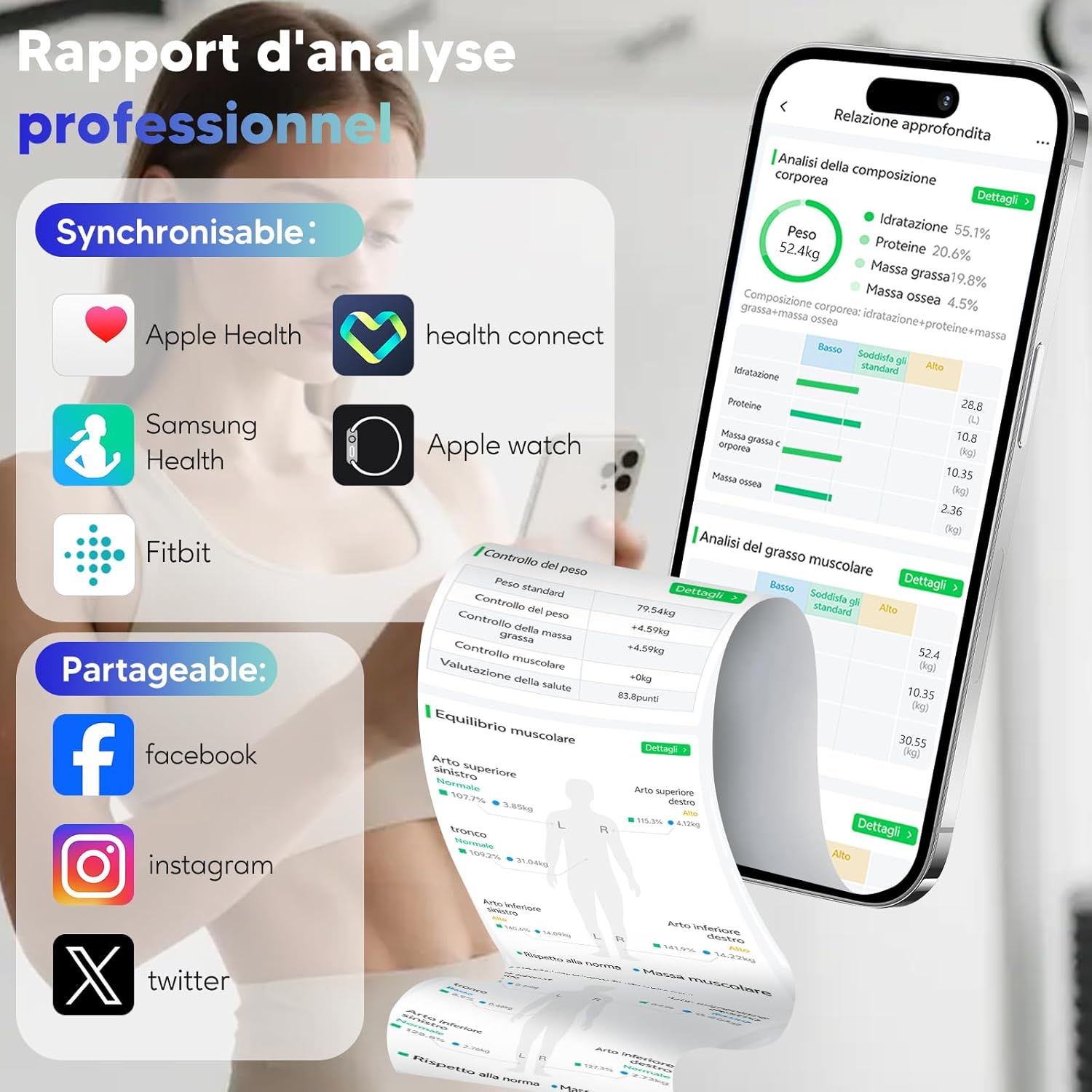
Image: A woman running on a treadmill, with an overlay showing the arboleaf app displaying weight, body fat, and BMI trends over weeks, months, and years.
7.3. Third-Party App Integration
The arboleaf app supports synchronization with popular health platforms:
- Saħħa tat-tuffieħ
- Google Fit
- Samsung Health
- Fitbit
- Apple Watch

Image: Screenshot of the arboleaf app showing support for sharing and syncing data with Apple Health, Health Connect, Samsung Health, Fitbit, and Apple Watch.
7.4. Data Sharing and Reports
Share your progress on social media platforms like Facebook, Instagram, and Twitter directly from the app. You can also generate professional analysis reports in PDF format.

Image: A smartphone displaying the arboleaf app's PDF report generation feature, alongside a printed report and a person using the scale.
8. Manutenzjoni
8.1. Tindif
Imsaħ il-wiċċ tal-iskala b'ċarruta ratba u damp drapp. Tużax prodotti tat-tindif li joborxu jew tgħaddasx l-iskala fl-ilma.
8.2. Ħażna
Aħżen l-iskala f'post frisk u niexef. Evita li tpoġġi oġġetti tqal fuq l-iskala meta ma tkunx qed tużaha.
9 Issolvi l-problemi
- No display/Scale not turning on: Iċċekkja jekk il-batteriji humiex installati sew u għandhomx biżżejjed ċarġ. Ibdel il-batteriji jekk meħtieġ.
- Qari mhux preċiż: Ensure the scale is on a hard, flat surface. Make sure your feet and hands are clean, dry, and in full contact with all electrodes. Avoid wearing excessive clothing.
- App not connecting via Bluetooth: Ensure Bluetooth is enabled on your device. Restart the app and try pairing again. If issues persist, restart your smartphone.
- Data not syncing: Check your internet connection. Ensure the app is open and running in the background during measurement.
- Weight difference less than 2kg for multi-user: Manually assign the measurement data to the correct user profile fi ħdan l-app.
10. Speċifikazzjonijiet
| Karatteristika | Dettall |
|---|---|
| Numru tal-Mudell | CS10E |
| Limitu tal-Piż | 180 Kilogrammi |
| Preċiżjoni tal-Qari | 0.1kg |
| Materjal | Ħġieġ ittemprat |
| Tip ta 'Wiri | LED |
| Sors tal-Enerġija | 3 Batteriji AAA (inklużi) |
| Dimensjonijiet tal-Prodott | 31 x 31 cm (platform) |
| Piż tal-oġġett | 1.5 Kilogrammi |
| Karatteristiċi Speċjali | Automatic shut-off, Large screen, Smart features, Anti-slip platform |
11. Vidjo Uffiċjali tal-Prodott
Vidjo: Overview of the arboleaf Smart Body Composition Scale CS10E, demonstrating its features, usage, and app integration for comprehensive health tracking.
12. Garanzija u Appoġġ
For warranty information, technical support, or further assistance, please refer to the official arboleaf website or contact their customer service directly. Contact details can typically be found on the product packaging or the brand's official online presence.


