1. Introduzzjoni
The Accsoon Como SE Wireless Headset Intercom System is designed for clear and reliable team communication over extended distances. This manual provides detailed instructions for the setup, operation, and maintenance of your Accsoon CoMo SE Host headset, ensuring optimal performance and longevity.
The system features an impressive transmission range of up to 400 meters (1312 feet), an external antenna for stable wireless connectivity, and an exceptional battery life of over 30 hours. It supports communication for up to 5 users and incorporates advanced Environmental Noise Cancellation (ENC) for crystal-clear audio in various environments. The flip-to-mute microphone offers convenient hands-free operation.

Image 1.1: The Accsoon Como SE Host Headset, showcasing its ergonomic design and integrated microphone.
2. X'hemm fil-Kaxxa
Upon unpacking your Accsoon Como SE Host headset, please verify that all components are present:
- Accsoon Como SE Host Headset
- Manwal għall-Utent (dan id-dokument)
Additional accessories may be included depending on the specific package purchased.
3. Karatteristiċi tal-prodott
- Up to 400m (1312ft) Transmission Range: Ensures reliable connectivity over extended distances, suitable for various professional applications.

Image 3.1: Visual representation of the 400-meter transmission range capability.
- External Antenna Design: Enhances wireless stability and maintains a dependable connection between host and remote headsets.

Image 3.2: Close-up of the headset highlighting the external antenna for improved signal stability.
- Exceptional Battery Life (30+ Hours): Provides extended operational time, reducing the need for frequent recharging during long sessions.

Image 3.3: Illustration of the headset's long-lasting battery, indicating over 30 hours of use.
- Supports up to 5 Users: Facilitates reliable and efficient coordination for small to medium-sized teams.

Image 3.4: Diagram showing one host headset connected to four remote headsets, totaling five users.
- Environment Noise Cancellation (ENC): Advanced technology reduces background noise for crystal-clear audio communication.

Image 3.5: Graphic illustrating the effect of ENC, showing sound waves before and after noise reduction.
- Mikrofonu Flip-to-Mute: Allows for intuitive and effortless muting of the microphone by simply flipping it up.
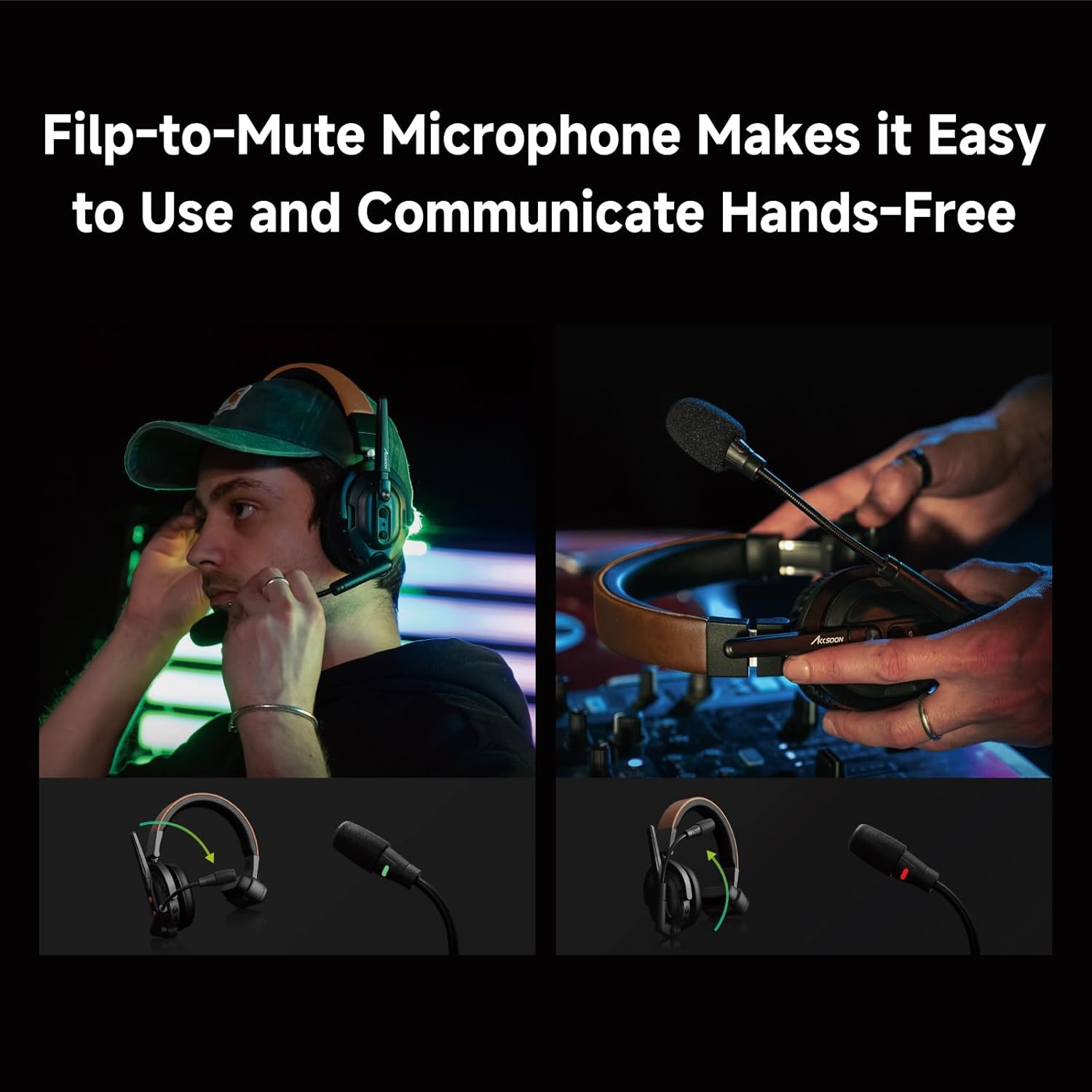
Image 3.6: Images demonstrating the flip-to-mute function of the microphone, showing its position for active and muted states.
4. Gwida ta' Setup
4.1 Iċċarġjar tal-Headset
Before initial use, fully charge the headset battery. Connect the provided charging cable to the headset's charging port and a compatible USB power adapter (not included). The charging indicator light will show the charging status.
- Ċarġ sħiħ tipikament jieħu madwar 2 sigħat.
- Ensure the headset is powered off during charging for optimal results.
4.2 Tixgħel/Jitfi
- Biex Tixgħel: Agħfas u żomm il-buttuna tal-Power għal madwar 3 sekondi sakemm id-dawl indikatur jixgħel.
- Biex Tifi: Agħfas u żomm il-buttuna tal-Power għal madwar 3 sekondi sakemm id-dawl indikatur jintefa.
4.3 Pairing Host and Remote Headsets
The Accsoon CoMo SE Host headset acts as the central unit for communication. Remote headsets (sold separately) must be paired with the Host headset to establish an intercom system.
- Ensure both the Host and Remote headsets are powered off.
- On the Host headset, press and hold the Pairing button until the indicator light flashes rapidly (e.g., blue/red alternating).
- On each Remote headset, press and hold its Pairing button until its indicator light also flashes rapidly.
- Place the Host and Remote headsets in close proximity (within 1 meter). They should automatically pair.
- Once paired, the indicator lights on both headsets will change to a steady color (e.g., solid blue) or flash slowly, indicating a successful connection.
- Repeat for all additional Remote headsets (up to 4).
Note: Refer to the specific manual for Remote headsets for their exact pairing procedure if different.
5. Istruzzjonijiet Operattivi
5.1 Komunikazzjoni Bażika
Once paired, all connected headsets can engage in full-duplex communication. Speak naturally into the microphone. The Environmental Noise Cancellation (ENC) will automatically work to reduce background noise.
5.2 Funzjoni ta' Silenzju għall-Mikrofonu
- Biex Issikket: Flip the microphone boom arm upwards. The headset will provide an audible confirmation or an indicator light will change (e.g., red).
- Biex Iċċekkja: Flip the microphone boom arm downwards to its speaking position. The headset will provide an audible confirmation or an indicator light will change (e.g., green).
5.3 Kontroll tal-Volum
The headset features dedicated volume control buttons, typically located on one of the earcups.
- Agħfas il- + button to increase listening volume.
- Agħfas il- - button to decrease listening volume.
5.4 Indikatur tal-Livell tal-Batterija
The headset includes an indicator light or a series of lights to display the current battery level. Consult the specific product diagram for your model to understand the different indications (e.g., solid green for high, flashing red for low).
6. Manutenzjoni
6.1 Tindif
- Use a soft, dry cloth to clean the exterior of the headset.
- Tużax kimiċi ħarxa, solventi tat-tindif, jew deterġenti qawwija.
- Evita li tidħol l-umdità fi kwalunkwe fetħiet.
6.2 Ħażna
- Aħżen il-headset f'post frisk u niexef 'il bogħod mix-xemx diretta u minn temperaturi estremi.
- Jekk taħżenha għal perjodu estiż, kun żgur li l-batterija tkun parzjalment iċċarġjata (madwar 50%) biex tippreserva s-saħħa tal-batterija.
6.3 Kura tal-Batterija
- Evita li tiċċarġja l-batterija kompletament ta' spiss.
- Tesponix il-batterija għal temperaturi għoljin.
- Use only approved charging methods.
7 Issolvi l-problemi
| Problema | Kawża Possibbli | Soluzzjoni |
|---|---|---|
| Ebda qawwa | Il-batterija hija eżawrita | Iċċarġja l-headset kompletament. |
| Cannot connect/pair | Out of range; pairing mode not activated; interference | Ensure headsets are within 1 meter during pairing. Re-enter pairing mode on both Host and Remote headsets. Move away from other wireless devices. |
| Kwalità awdjo fqira/statika | Out of range; interference; microphone muted or improperly positioned | Move closer to the Host headset. Check microphone position and ensure it's not muted. Reduce environmental interference. |
| Mikrofonu mhux qed jaħdem | Microphone is muted (flipped up); faulty microphone | Flip the microphone boom arm down to unmute. If problem persists, contact support. |
8. Speċifikazzjonijiet
| Karatteristika | Dettall |
|---|---|
| Isem tal-Mudell | Accsoon CoMo SE Host |
| Teknoloġija tal-Konnettività | Wireless |
| Firxa tat-Trażmissjoni | Sa 400m (1312-il pied) |
| Ħajja tal-batterija | 30+ Siegħa |
| Utenti Appoġġjati | Up to 5 (1 Host + 4 Remote) |
| Kanċellazzjoni tal-Ħoss | Kanċellazzjoni tal-Ħsejjes Ambjentali (ENC) |
| Tip ta 'mikrofonu | Flip-to-Mute Boom Mic |
| Tqegħid tal-widnejn | Fuq il-widnejn |
| Fattur tal-Formola | Fuq il-widnejn |
| Impedenza | 1 Ohm |
| Piż tal-oġġett | 1 lira |
| UPC | 717328761895 |
9. Garanzija u Appoġġ
Il-prodotti Accsoon huma ddisinjati għall-affidabbiltà u l-prestazzjoni. Għal informazzjoni dwar il-garanzija, jekk jogħġbok irreferi għall-karta tal-garanzija inkluża mal-prodott tiegħek jew żur is-sit uffiċjali ta' Accsoon. websit. Żomm l-irċevuta tax-xiri tiegħek bħala prova tax-xiri għal talbiet ta' garanzija.
For technical support, troubleshooting assistance, or service inquiries, please contact Accsoon customer support through their official channels. You can often find contact information on the Accsoon webis-sit jew fl-imballaġġ tal-prodott.
Riżorsi onlajn:
- Żur il- Ħanut Accsoon fuq Amazon għal informazzjoni u aġġornamenti dwar il-prodott.
- Check the official Accsoon website for the latest firmware, FAQs, and support contact details.


