1. Introduzzjoni
Grazzi tax-xiriasing the Kinglucky Wireless Bluetooth Speaker (Model: BTM-V1). This speaker is designed to provide high-fidelity audio with versatile playback options and a unique aesthetic. Featuring a vibrant LED screen and a stable stand, it seamlessly integrates into various home environments, including living rooms, bedrooms, offices, and kitchens. This manual provides detailed instructions for setup, operation, maintenance, and troubleshooting to ensure optimal performance and longevity of your device.
2. X'hemm fil-Kaxxa
Jekk jogħġbok iċċekkja l-kontenut tal-pakkett tiegħek biex tiżgura li l-oġġetti kollha huma preżenti:
- Kinglucky Wireless Bluetooth Speaker (BTM-V1) x1
- Kejbil tal-Iċċarġjar (Tip Ċ) x1
- Manwal għall-Utent x1

Image: The Kinglucky BTM-V1 speaker, charging cable, and user manual laid out, indicating the package contents.
3. Prodott Aktarview
3.1. Karatteristiċi ewlenin
- Unique Bracket Design: Versatile placement for bedroom, living room, or desktop.
- Vivid Animation Screen: Colorful display with 14 dynamic lighting animation modes.
- Għażliet ta' Daqq versatili: Supports Bluetooth, USB, TF card, MIC, and AUX inputs.
- Kwalità tal-Ħoss Superjuri: Expertly tuned acoustic system with 25W rated power for high-fidelity audio.
- Large-Sized Speaker: Measures 11.4 x 4.3 x 13.8 inches (29 x 11 x 35 cm) and weighs 3.26 pounds (1.48 kg).
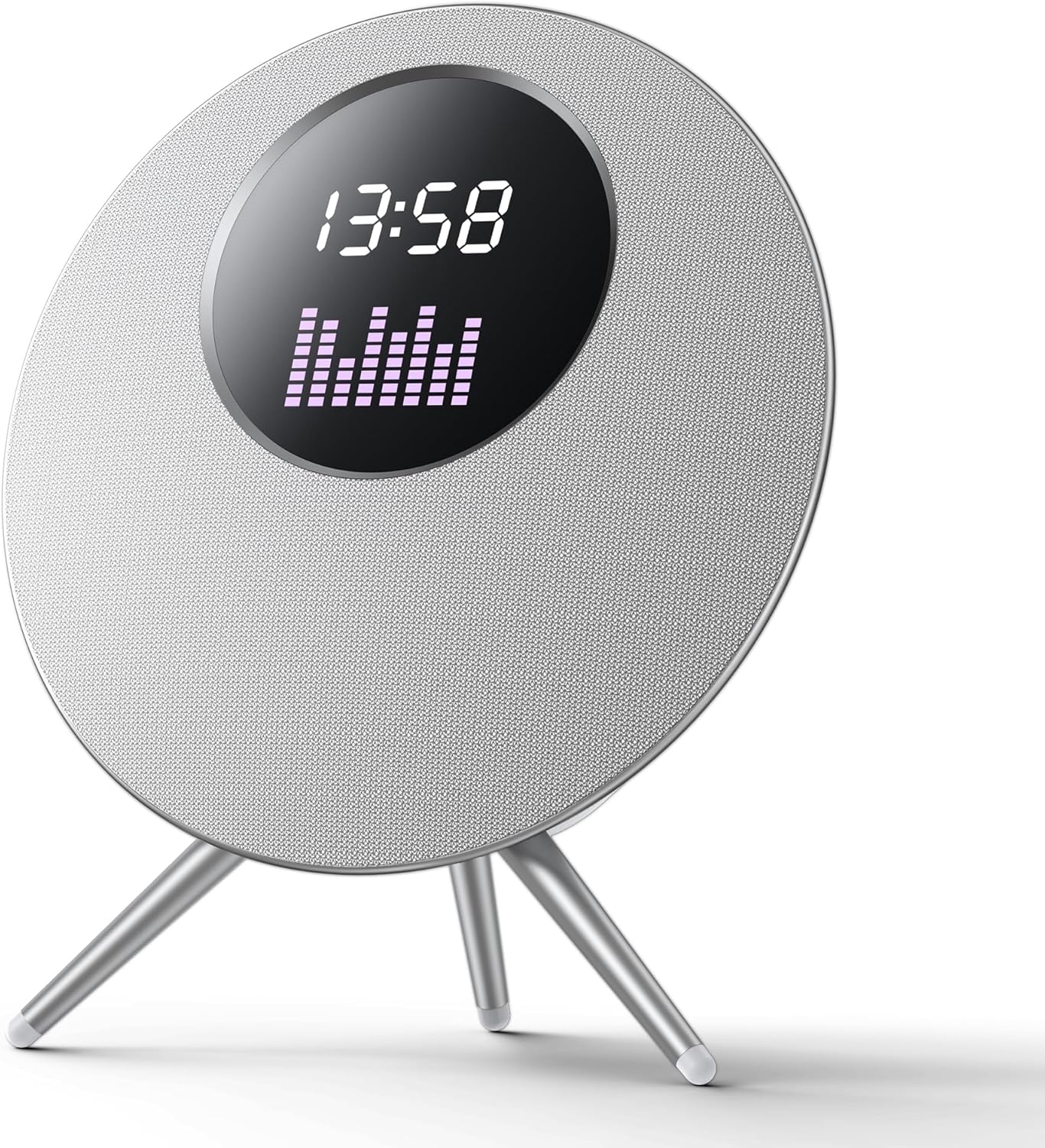
Immaġni: Faċċata view of the Kinglucky BTM-V1 Wireless Bluetooth Speaker, showcasing its circular design, LED screen displaying time and an equalizer, and its three-legged stand.

Image: Diagram illustrating the dimensions of the Kinglucky BTM-V1 speaker, showing its height of 432mm, width of 405mm, and depth of 172mm, with icons suggesting placement in fireplaces, bedrooms, and study rooms.
3.2. Kontrolli u Portijiet

Image: A close-up diagram of the top-mounted control buttons on the Kinglucky BTM-V1 speaker, with labels indicating their functions: Previous song/Volume down, Mode switching (Bluetooth/TF card/USB drive), Power on/off/Pause/Play, Next song/Volume increase, and LED lighting effects/Turn off LED light effect.
- Buttuna M: Switches between playback modes (Bluetooth, TF Card, USB, AUX).
- Buttuna '-': Short press for previous song, long press to decrease volume.
- Buttuna tal-Qawwa: Long press to power on/off, short press to play/pause.
- Buttuna '+': Agħfas qasir għall-kanzunetta li jmiss, agħfas twil biex iżżid il-volum.
- Buttuna tad-Dawl: Switches between multiple LED lighting effects, long press to turn off/on LED light effect.

Image: A detailed diagram of the rear panel of the Kinglucky BTM-V1 speaker, highlighting and explaining each port: Charging Port (Type-C 5V), Pilot Lamp (indicator for connection/charging), AUX (3.5mm audio input), MIC (dynamic microphone interface), USB Port (for MP3 audio files), and TF Card Slot (for MP3 audio files).
- Port tal-Iċċarġjar (Tip Ċ): For 5V power input.
- Pilota Lamp: Blue light flashes when no device is connected, stays solid when successfully connected. Red light stays on during charging and goes out when fully charged.
- Port AUX: 3.5mm quad band audio cable input for connecting external devices.
- Port tal-MIC: Dynamic microphone interface.
- Port USB: Automatically switches to USB mode when inserting MP3 audio files.
- Slott tal-Karta TF: Automatically switches to TF card mode when inserting MP3 audio files.
4. Setup
4.1. Iċċarġjar Inizjali
Before first use, fully charge the speaker. Connect the provided Type-C charging cable to the speaker's charging port and the other end to a 5V USB power adapter (not included). The pilot lamp will illuminate red during charging and turn off once fully charged. A full charge typically takes 3-4 hours.
4.2. Power On/Off
- Biex Tixgħel: Long press the Power button (U) for 3 seconds. You will hear an audible prompt.
- Biex Tifi: Long press the Power button (U) for 3 seconds. You will hear an audible prompt.
4.3. Tqabbil tal-Bluetooth
The speaker will automatically enter Bluetooth pairing mode when powered on if no other input source is connected. The pilot lamp se jteptep blu.
- Ensure the speaker is powered on and in Bluetooth pairing mode (blue pilot lamp iteptep).
- Fuq l-apparat mobbli tiegħek (smartphone, tablet, laptop), attiva l-Bluetooth.
- Fittex għal available Bluetooth devices. The speaker will appear as "BTM-V1" or "Kinglucky Speaker".
- Select the speaker from the list to pair.
- Once successfully paired, the pilot lamp will stop flashing and remain solid blue, and you will hear a connection confirmation sound.
Note: The speaker supports Bluetooth 5.3 technology for stable connection up to 33 feet (10 meters).
5. Istruzzjonijiet Operattivi
5.1. Daqq tal-mużika
- Play/Pawsa: Agħfas qasir il-buttuna tal-Enerġija (U).
- Kontroll tal-Volum: Long press the '+' button to increase volume, long press the '-' button to decrease volume.
- Track Li jmiss / Preċedenti: Short press the '+' button for the next track, short press the '-' button for the previous track.
5.2. Qlib tal-Modalità
Press the 'M' button to cycle through the available playback modes:
- Modalità Bluetooth: For wireless audio streaming from paired devices.
- Modalità TF Card: Automatically activated when a TF card with MP3 audio files hija mdaħħla.
- Modalità USB: Automatically activated when a USB drive with MP3 audio files hija mdaħħla.
- Modalità AUX: Għal konnessjoni bil-fili bl-użu ta' kejbil awdjo ta' 3.5mm.
5.3. LED Screen Effects
The speaker features 14 dynamic lighting animation modes on its LED screen.
- Change Effect: Short press the Light button (☀) to cycle through the animation modes.
- Turn On/Off LED: Long press the Light button (☀) to turn the LED screen effects on or off.
5.4. Użu tal-mikrofonu
Connect a dynamic microphone to the MIC port on the rear of the speaker. The speaker will automatically detect the microphone input. Adjust microphone volume as needed through the connected microphone's controls or the speaker's main volume.
6. Manutenzjoni
- Tindif: Uża drapp artab u niexef biex timsaħ il-wiċċ tal-ispiker. Tużax prodotti tat-tindif li joborxu, alkoħol, jew solventi kimiċi, għax dawn jistgħu jagħmlu ħsara lill-finitura.
- Ħażna: Aħżen l-ispiker f'post frisk u niexef 'il bogħod mix-xemx diretta u minn temperaturi estremi.
- Kura tal-batterija: Biex ittawwal il-ħajja tal-batterija, evita li tiċċarġja kompletament l-ispiker ta' spiss. Iċċarġjah regolarment, anke jekk ma jkunx qed jintuża għal perjodi twal.
- Reżistenza għall-Ilma: While the speaker features splash-proof technology, it is not fully waterproof. Do not submerge it in water or expose it to heavy rain.
7 Issolvi l-problemi
| Problema | Kawża Possibbli | Soluzzjoni |
|---|---|---|
| L-ispiker ma jixgħelx. | Il-batterija hija baxxa jew eżawrita. | Connect the speaker to a power source using the charging cable and allow it to charge for at least 30 minutes before attempting to power on again. |
| L-ebda ħoss mill-ispiker. | Il-volum huwa baxx wisq; Il-modalità magħżula mhix korretta; L-apparat mhux imqabbad sew. | Increase the speaker's volume and the volume on your connected device. Press the 'M' button to ensure the correct input mode is selected. Re-pair your Bluetooth device or re-insert the AUX/USB/TF card. |
| Tqabbil Bluetooth ifalli. | Speaker is not in pairing mode; Device is out of range; Interference. | Ensure the speaker's blue pilot lamp is flashing. Move your device closer to the speaker (within 10 meters). Turn off other Bluetooth devices nearby to reduce interference. Try restarting both the speaker and your device. |
| LED screen is off or not changing effects. | LED effects are turned off; Malfunction. | Short press the Light button (☀) to cycle through effects. Long press the Light button (☀) to ensure the LED is turned on. If the issue persists, contact customer support. |
8. Speċifikazzjonijiet
| Karatteristika | Speċifikazzjoni |
|---|---|
| Isem tal-Mudell | Kelliem Bluetooth |
| Numru tal-Mudell tal-Oġġett | BTM-V1 |
| Brand | Kinglucky |
| Tip ta' Kelliem | Outdoor (also suitable for Indoor) |
| Karatteristika Speċjali | Waterproof (Splash-proof) |
| Teknoloġija tal-Konnettività | Wireless (Bluetooth) |
| Teknoloġija tal-Komunikazzjoni mingħajr Fili | Bluetooth 5.3 |
| Qawwa tal-Ħruġ Massimu tal-Ispeaker | 25 Watts |
| Modalità tal-Ħruġ tal-Awdjo | Stereo |
| Sinjal-mal-ħoss Ratio | 88 dB |
| Tip ta' Sewwieq Awdjo | Sewwieq Dinamika |
| Metodu ta' Kontroll | Mess |
| Sors tal-Enerġija | Mħaddma bil-batterija |
| Dimensjonijiet tal-Prodott | 4.3"D x 11.4"W x 13.8"Għ (11cm D x 29cm W x 35cmGħ) |
| Piż tal-oġġett | 4.94 liri (2.24 kg) |
| Kulur | White (Silver) |
| Ħin tal-logħob | Up to 6-8 hours at 50% volume |
9. Garanzija u Appoġġ
Kinglucky products come with a limited warranty. For detailed warranty information, product support, or technical assistance, please refer to the warranty card included in your package or visit the official Kinglucky website. You can also contact Kinglucky customer service through the retailer where you purchased the product.
For further inquiries, please visit the Kinglucky Store on Amazon.


