
1. Kompatibilità
This keyboard case is specifically designed for the iPad Pro 11-inch (M4) 2024. To ensure proper fit, verify your iPad's model numbers. Compatible model numbers include A2836, A2837, u A3006. This case is mhux kompatibbli with the iPad Air 11-inch (M2) 2024 or any other iPad models.

Image: A visual guide illustrating the compatible iPad Pro 11 (M4) 2024 model and its corresponding model numbers (A2836, A2837, A3006), alongside an incompatible iPad Air 11 (M2) 2024 model.
2. X'hemm fil-Kaxxa
Malli tiftaħ il-pakkett tiegħek, jekk jogħġbok kun żgur li l-oġġetti kollha li ġejjin huma preżenti:
- 1 x CHESONA Rugged Case for iPad Pro 11 (M4) (Tablet NOT included)
- 1 x tastiera bla fili
- 1 x USB Charging Cable (No Charger)
- 1 x Manwal għall-Utent

Immaġni: Ritratt minn fuq view displaying the CHESONA keyboard, magnetic case, USB charging cable, user manual, and product packaging box.
3. Gwida ta' Setup
Follow these steps to set up your CHESONA Rugged Keyboard Case:
3.1. Step 1: Adjust the Kickstand
Bend the integrated kickstand to achieve your desired viewing angle. The stand is designed to be adjustable from 15° to 180° for optimal comfort.
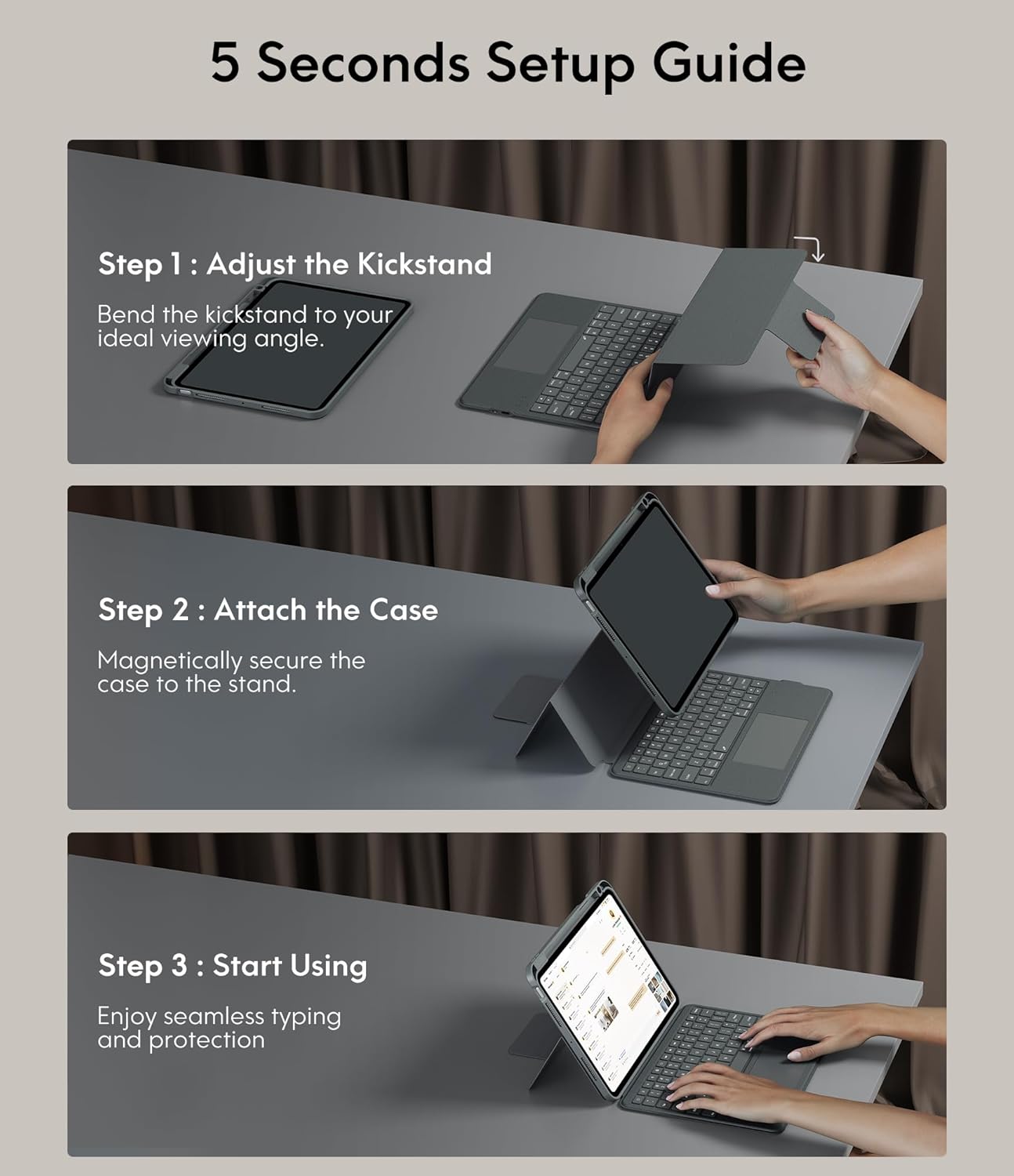
Image: A three-step visual guide showing how to adjust the kickstand, attach the iPad to the magnetic case, and begin using the keyboard.
3.2. Step 2: Attach the Case
Securely place your iPad into the protective case. The case features strong magnets that will hold the iPad firmly in place on the stand.
3.3. Step 3: Start Using
Once the iPad is securely attached and the kickstand is adjusted, you can begin using your keyboard case for typing and protection.
3.4. Tqabbil tal-Bluetooth
- Kun żgur li t-tastiera hija ċċarġjata.
- Ixgħel it-tastiera billi tuża l-iswiċċ tal-enerġija.
- Fuq l-iPad tiegħek, mur fuq Settings > Bluetooth u ixgħel il-Bluetooth.
- Select the keyboard from the list of available devices (it may appear as 'CHESONA Keyboard' or similar).
- Confirm the pairing code if prompted. The keyboard will now be connected.
4. Istruzzjonijiet Operattivi
4.1. Magnetic Detachable Keyboard
The keyboard is magnetically attached to the case, allowing for easy detachment. This feature enables you to switch between a laptop-like setup and a standalone tablet experience. Simply pull the keyboard away from the case when not needed, or reattach it when typing is required.

Image: A hand detaching the magnetic keyboard from the iPad case, illustrating the strong magnetic connection.
4.2. Adjustable Stand and ViewModi
The case offers a wide range of adjustable angles (15°-180°) and supports multiple placement modes for various activities:
- Modalità tat-tajping: Use with the keyboard for productivity.
- Modalità tat-Tpinġija: Lay the iPad flat or at a low angle for creative tasks.
- Modalità Qari: Detach the keyboard and hold the iPad comfortably.
- ViewModalità ta' tħaddim: Adjust the stand for watching videos or video calls.

Image: A visual representation of five different usage modes: Video Call, Draw, To Read, Writing Documents, and Watch Movies, demonstrating the case's versatility.
4.3. Keyboard Backlight Control
The keyboard features 7-color backlighting and 3 levels of brightness, enhancing visibility in various lighting conditions.
- To change backlight color: Press Shift + Return.
- Biex taġġusta l-luminożità: Agħfas Shift + Shift (or dedicated brightness keys if available).

Image: The keyboard illuminated with various backlight colors, demonstrating the 7-color options and the keys used to adjust brightness and color.
4.4. Funzjonalità tat-Trackpad
The integrated multi-touch trackpad provides precise navigation and supports various gestures for enhanced productivity:
- Iddreggja: Tap and hold an item, then drag to move it.
- Swipe: Uża żewġ swaba' biex tiskrollja 'l fuq/'l isfel jew lejn ix-xellug/il-lemin.
- Żomm In/Out: Pinch with two fingers to zoom.
- App Publication (App Switcher): Swipe up with three fingers to reveal open applications.
- Swipe between full screen apps: Swipe left or right with three fingers to switch between full-screen applications.

Image: A close-up of the trackpad with illustrations of common multi-touch gestures like drag, swipe, zoom in/out, app publication, and switching between full-screen apps.
4.5. Ċwievet tal-Funzjoni u Shortcuts
The keyboard includes a dedicated row of function keys for quick access to common iPad features:
- Dar: Irritorna għall-iskrin tad-dar.
- Fittex: Activate iPad search.
- Kontroll tal-luminożità: Aġġusta l-luminożità tal-iskrin.
- Kontrolli tal-Midja: Play/pause, previous track, next track.
- Kontroll tal-Volum: Mute, volume down, volume up.
- Lock Screen: Lock your iPad.

Immaġni: Dettaljata view of the keyboard's top row, highlighting the function keys for media control, volume, brightness, and other shortcuts.
5. Karatteristiċi ta 'protezzjoni
The CHESONA Rugged Keyboard Case provides comprehensive protection for your iPad Pro 11 (M4) 2024:
- Hard-Shell Design: The premium hard-shell design protects all sides of your tablet.
- Protezzjoni 360°: The included compatible camera case ensures 360° protection against accidental drops, scratches, and dust.
- Slott tal-Pinna: A dedicated pen slot securely holds your Apple Pencil, preventing loss and allowing for convenient charging.
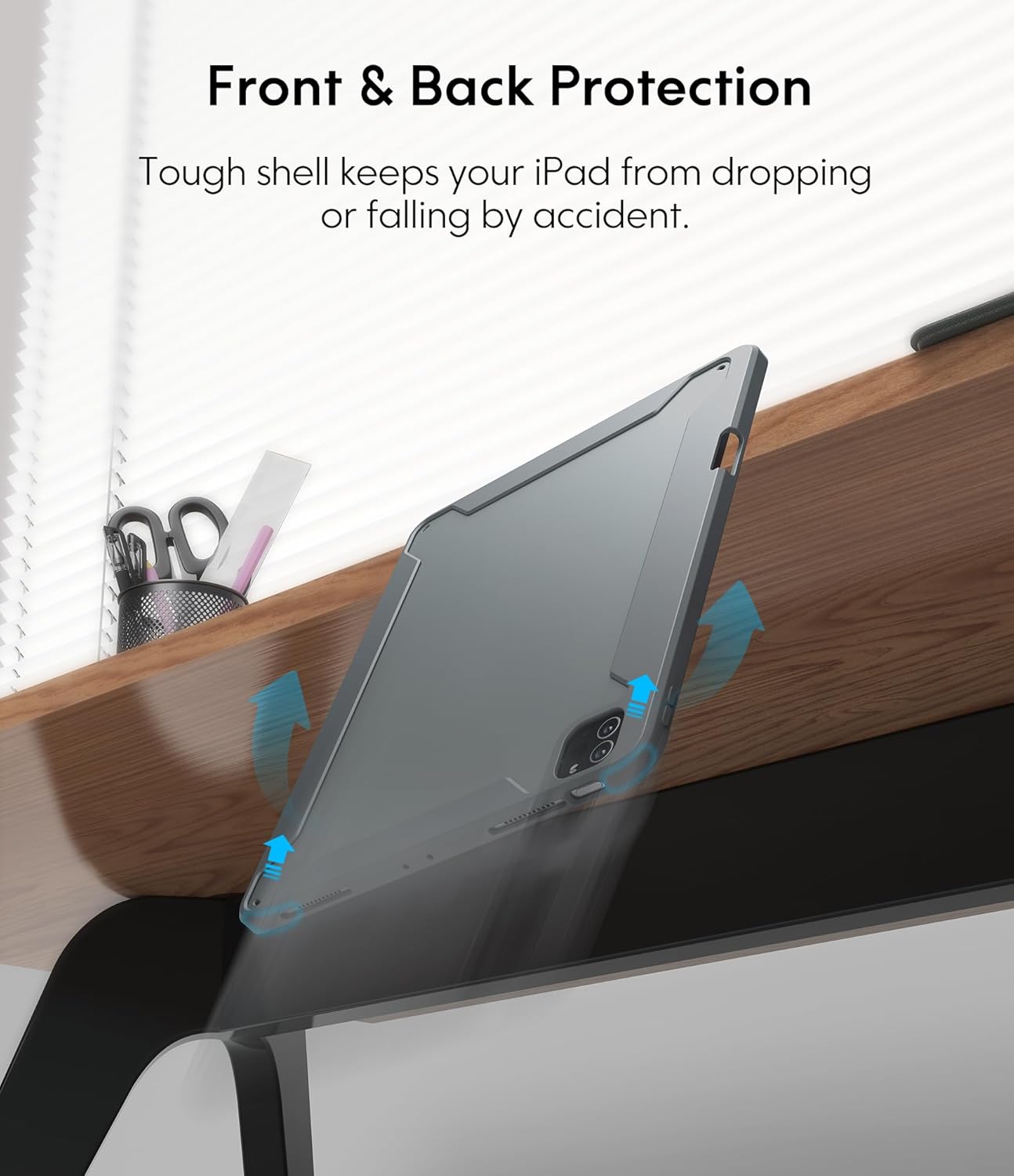
Image: An illustration showing the iPad case protecting the device from a fall, emphasizing its tough shell and front and back protection.
6. Battery and Power Management
The keyboard features a built-in rechargeable battery designed for extended use:
- Ħajja tal-batterija: A full charge provides over 50 hours of working time.
- Ħin tal-Iċċarġjar: Approximately 2-3 hours for a full charge using the provided USB charging cable.
- Modalità Sleep: If the keyboard is inactive for 10 minutes, it will enter sleep mode and disconnect from your iPad to conserve power. Press any key to wake it up and automatically reconnect.
7. Manutenzjoni
Biex tiżgura l-lonġevità u l-prestazzjoni ottimali tal-kaxxa tat-tastiera tiegħek, segwi dawn il-linji gwida ta' manutenzjoni:
- Tindif: Uża artab, damp drapp biex timsaħ il-barra tal-kaxxa u t-tastiera. Evita kimiċi ħarxa jew materjali li joborxu.
- Ħażna: Meta ma tkunx qed tużaha għal perjodi twal, aħżen il-kaxxa tat-tastiera f'post frisk u niexef.
- Evita Likwidi: Keep the keyboard away from liquids to prevent damage to electronic components.
8 Issolvi l-problemi
If you encounter any issues, refer to the following troubleshooting tips:
- It-Tastiera Mhux Qed Tikkonnettja:
- Kun żgur li t-tastiera hija ċċarġjata u mixgħula.
- Verify Bluetooth is enabled on your iPad.
- Insieh l-apparat fis-settings tal-Bluetooth tal-iPad tiegħek u pprova erġa' waħħalh.
- Erġa' ibda kemm l-iPad kif ukoll it-tastiera tiegħek.
- Trackpad Not Responding:
- Kun żgur li t-tastiera hija konnessa permezz tal-Bluetooth.
- Check if the trackpad is enabled in your iPad's settings (Settings > Accessibility > Touch > AssistiveTouch).
- Clean the trackpad surface for any debris.
- Backlight Mhux Taħdim:
- Kun żgur li l-batterija tat-tastiera għandha biżżejjed ċarġ.
- Press the backlight adjustment keys (Shift + Shift or dedicated keys) to cycle through brightness levels.
- Iċ-Ċwievet Ma Jirrispondux:
- Iċċekkja l-konnessjoni Bluetooth.
- Ensure the keyboard is not in sleep mode.
- Iċċarġja mill-ġdid it-tastiera.
9. Speċifikazzjonijiet tal-Prodott
| Dimensjonijiet tal-Prodott | 10.04 x 7.68 x 0.83 pulzieri |
| Piż tal-oġġett | 1.72 liri |
| Brand | CHESONA |
| Apparati Kompatibbli | iPad Pro 11 (M4) 2024 |
| Teknoloġija tal-Konnettività | Wireless (Bluetooth) |
| Deskrizzjoni tat-Tastiera | Multi Funzjonali |
| Karatteristika Speċjali | Dawl minn wara, Trackpad |
| Kulur | Griż |
| Sors tal-Enerġija | Mħaddma bil-batterija |
| Batteriji | 1 P76 battery (included) |
10. Garanzija u Appoġġ
CHESONA products are designed for durability and performance. For information regarding warranty coverage, product support, or to report any issues, please refer to the contact information provided with your purchase or visit the official CHESONA websit. Jekk jogħġbok żomm il-prova tax-xiri tiegħek għal talbiet ta' garanzija.


