1. Introduzzjoni
This manual provides essential instructions for the setup, operation, and maintenance of your TMY Projector. Please read this manual thoroughly before using the product to ensure proper functionality and to maximize your viewing esperjenza. Żomm dan il-manwal għal referenza futura.
2. Prodott Aktarview
2.1 Kontenut tal-Pakkett
Ivverifika li l-oġġetti kollha huma preżenti fil-pakkett:
- TMY Projector Unit
- Kontroll mill-bogħod
- Cable HDMI
- Korda tal-Enerġija
- Karta ta' Garanzija
2.2 Karatteristiċi ewlenin
- Netflix Liċenzjat Uffiċjalment: Access streaming services directly without external devices.
- Riżoluzzjoni 1080P: Jagħti immaġni ċari u dettaljati.
- Fokus Elettriku u Keystone Awtomatiku: Automatic image adjustment for optimal clarity and shape.
- Stand li Jdur 270°: Flexible projection angles, including ceiling projection.
- Upgraded WiFi 6 Connectivity: Ensures stable and fast wireless streaming.
- Dual-Mode Bluetooth 5.2: Connects to external speakers or functions as a standalone Bluetooth speaker.
- Għażliet ta' Konnettività Multipli: HDMI, USB, Phone/PC mirroring.
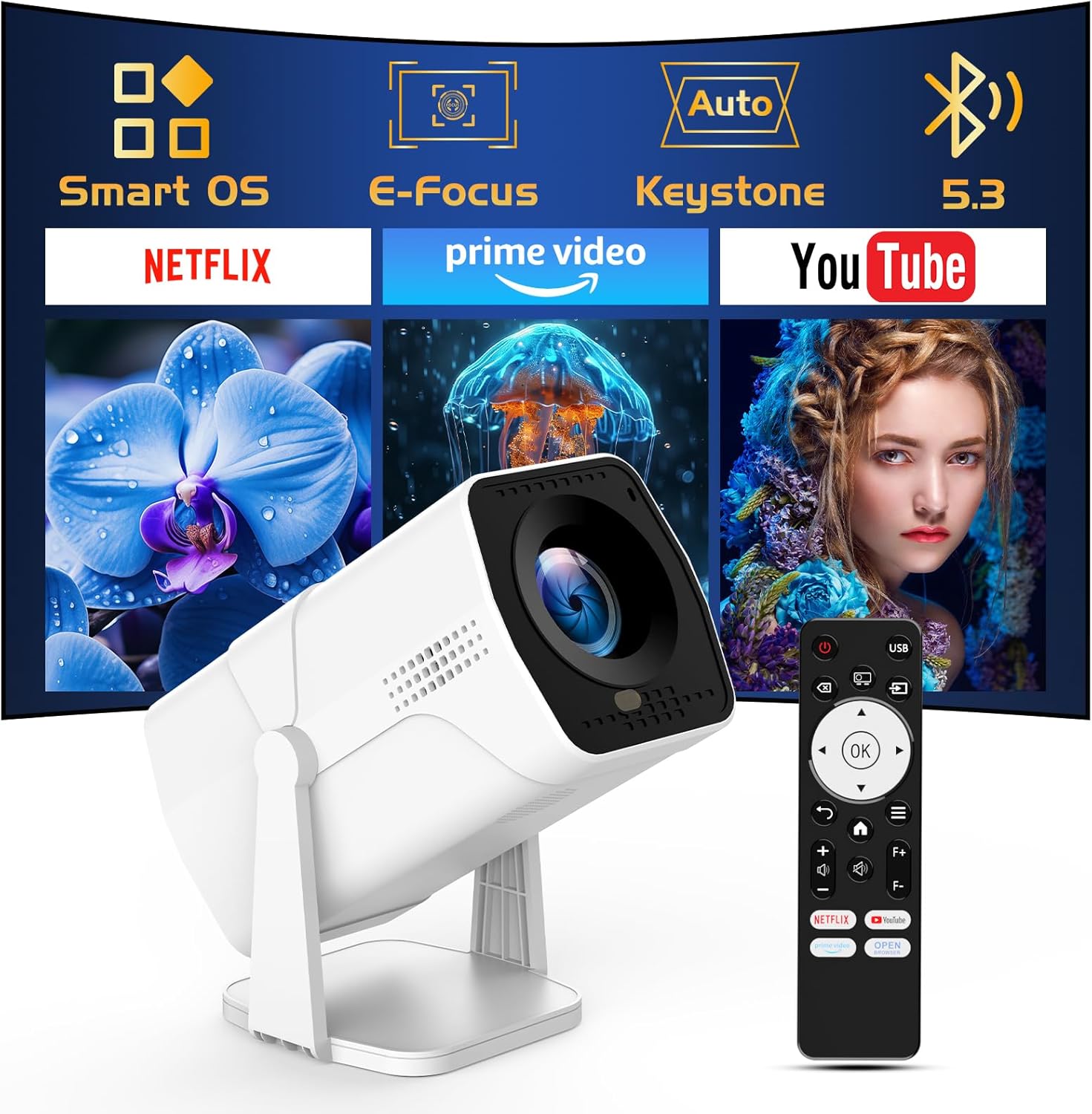
Image: The TMY Projector unit, its remote control, and a projected screen displaying logos for Smart OS, E-Focus, Auto Keystone, Bluetooth 5.3, Netflix, Prime Video, and YouTube.
3. Setup
3.1 Tqegħid
Position the projector on a stable, flat surface. The 270° rotatable stand allows for versatile placement, including projecting onto walls or ceilings. Ensure adequate ventilation around the projector.

Image: A TMY Projector positioned on a bedside table, projecting an image onto the ceiling, demonstrating its 270° rotatable stand for multi-angle viewing.
3.2 Konnessjoni tal-Enerġija
- Qabbad il-korda tal-enerġija mal-port tad-dħul tal-enerġija tal-proġettazzjoni.
- Ipplaggja t-tarf l-ieħor tal-korda tal-enerġija f'sokit elettriku standard.
3.3 L-Ewwel Tixgħel u l-Aġġustament tal-Fokus
- Agħfas il-buttuna tal-qawwa fuq il-proġekter jew il-kontroll mill-bogħod biex tixgħel l-apparat.
- Il-karatteristiċi tal-proġettazzjoni Focus Elettriku u Auto Keystone correction. The image will automatically adjust for clarity and a rectangular shape within approximately 2 seconds.
- If further adjustment is needed, use the remote control to fine-tune the focus.

Image: A TMY Projector projecting a vibrant image onto a screen, with an overlay illustrating the 'FOCUS' function and icons for Auto Keystone and 50%-100% Zoom.
3.4 Network Connection (WiFi)
The projector supports WiFi 6 for a fast and stable internet connection.
- Innaviga lejn il-menù 'Settings' billi tuża l-kontroll remot.
- Agħżel 'Netwerk' jew 'Settings tal-WiFi'.
- Choose your desired WiFi network from the list and enter the password.
- Ikkonferma l-konnessjoni.

Image: A TMY Projector wirelessly connected to a tablet, smartphone, and laptop, illustrating its WiFi 6 connectivity for faster streaming with no lagging.
3.5 Konnessjoni Bluetooth
The projector features Dual-Mode Bluetooth 5.2 for audio connectivity.
- Projector Mode (Output): To connect to external Bluetooth speakers or soundbars: Navigate to 'Bluetooth Settings', enable Bluetooth, and pair with your audio device.
- Speaker Mode (Input): To use the projector's built-in speakers as a standalone Bluetooth speaker: Select 'Speaker Mode' in the Bluetooth settings. Your phone or other device can then connect to the projector to play audio.

Image: A TMY Projector illustrating its two-way Bluetooth 5.2 functionality, showing connections to a soundbar (Projector Mode) and a smartphone (Speaker Mode).
4. Operazzjoni
4.1 Navigating the Smart OS
The projector runs on a smart TV operating system. Use the provided remote control to navigate menus, select applications, and control playback.

Image: The TMY Projector unit with a projected screen showing a grid of built-in smart OS applications, including Netflix, YouTube, Prime Video, TikTok, and others.
4.2 Accessing Built-in Apps
The projector comes with pre-installed and officially licensed applications such as Netflix, Prime Video, and YouTube. Access these directly from the home screen or through the 'App Store' for additional content.

Image: A TMY Projector projecting a screen filled with content from officially licensed apps like Netflix, Prime Video, and YouTube, with the remote control in the foreground.
4.3 Konnessjoni ta' Apparati Esterni
The projector offers multiple ports for connecting external devices:
- HDMI: Connect TV sticks, TV boxes, PCs/Laptops, or gaming consoles (e.g., PS).
- USB: Daqq tal-midja files directly from USB drives or connect other USB accessories.
- Phone/PC Mirroring: Wirelessly mirror content from your smartphone or PC (refer to the on-screen instructions for specific mirroring protocols).
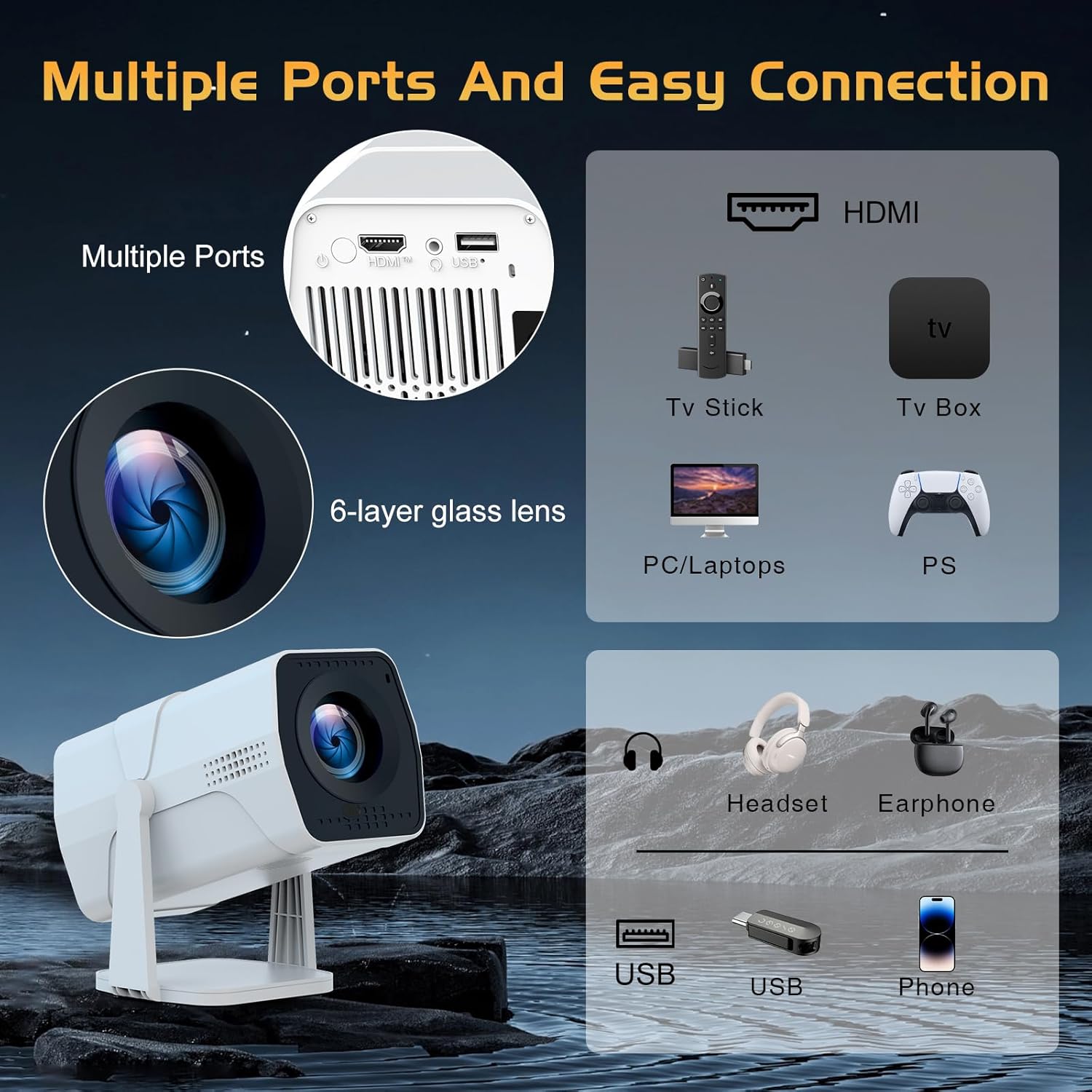
Image: A detailed diagram showing the multiple ports on the TMY Projector (HDMI, USB) and various connection possibilities, including TV sticks, PCs, gaming consoles, headsets, and phones.
4.4 Screen Zoom Function
The projector includes a 50%-100% zoom function, allowing you to adjust the screen size without moving the projector. This feature can be accessed via the remote control or settings menu.
5. Manutenzjoni
To ensure the longevity and optimal performance of your TMY Projector, follow these maintenance guidelines:
- Tindif tal-Lenti: Uża drapp artab u mingħajr suf iddisinjat speċifikament għal lentijiet ottiċi. Evita materjali li jobrox jew kimiċi ħarxa.
- Tindif ta' barra: Imsaħ il-barra tal-proġettazzjoni b'ċarruta ratba u niexfa. Tużax prodotti tat-tindif likwidi direttament fuq l-apparat.
- Ventilazzjoni: Kun żgur li l-fetħiet tal-ventilazzjoni ma jkunux imblukkati biex tevita sħana żejda.
- Ħażna: When not in use for extended periods, store the projector in a cool, dry place, away from direct sunlight and dust.
6 Issolvi l-problemi
If you encounter issues with your TMY Projector, refer to the following common problems and solutions:
- Ebda Qawwa:
- Ensure the power cord is securely connected to both the projector and a working electrical outlet.
- Iċċekkja jekk l-iżbokk tad-dawl huwiex funzjonali.
- Ebda Immaġni / Immaġni Mċajpra:
- Verify the projector is powered on and the lens cap is removed.
- Allow the automatic focus and keystone correction to complete. If still blurry, manually adjust focus using the remote.
- Ensure the projection surface is suitable and the projector is within the recommended distance.
- If using an external source (HDMI), ensure the correct input source is selected.
- Ebda Ħsejjes:
- Check the volume level on the projector and any connected external audio devices.
- If using Bluetooth speakers, ensure they are properly paired and connected.
- If using internal speakers, ensure external Bluetooth output is not selected.
- Il-Kontroll mill-bogħod ma Jirrispondix:
- Ensure the batteries are correctly inserted and not depleted.
- Ipponta r-remote direttament lejn ir-riċevitur IR tal-proġettazzjoni.
- Kwistjonijiet ta' Konnessjoni WiFi:
- Ensure your WiFi network is active and within range.
- Iċċekkja l-password tal-WiFi darbtejn.
- Erġa' ibda l-proġettazzjoni u r-router tal-WiFi tiegħek.
- If the connection times out, try moving the projector closer to the router or reducing interference.
7. Speċifikazzjonijiet
| Karatteristika | Speċifikazzjoni |
|---|---|
| Brand | TMY |
| Mudell | B0DRFF5KMF |
| Piż tal-oġġett | 2.79 liri |
| Dimensjonijiet tal-Prodott | 5.35 x 4.84 x 7.09 pulzieri |
| Kulur | Abjad |
| Karatteristiċi Speċjali | Speakers, Electric Focus, Auto Keystone, 270° Rotatable Stand |
| Teknoloġija tal-Konnettività | HDMI, USB, WiFi 6, Bluetooth 5.2 |
| Riżoluzzjoni tal-Wiri | 1920 x 1080 (1080P Full HD) |
| Użi Rakkomandati | Ġewwa |

Image: A visual comparison showing the TMY Projector's 1080P Full HD image quality, emphasizing that it is recommended for use in dark environments for optimal viewing, contrasted with daytime or light-on conditions.
8. Garanzija u Appoġġ
TMY is committed to providing excellent customer service and product support.
- Garanzija: Dan il-prodott jiġi b'garanzija ta' 3 snin.
- Politika ta' Ritorn: Enjoy a 30-day return period.
- Appoġġ Tekniku: Lifetime after-sale service and technical support are available.
- Ħin ta' Rispons: Expect a quick reply within 24 hours for support inquiries.
Għal aktar assistenza, jekk jogħġbok żur l-uffiċjal TMY Store on Amazon or contact customer support through the provided channels in your warranty card.


