Introduzzjoni
This manual provides instructions for the MOFII Bluetooth Wireless Keyboard, Model B0DR2NLFYW. This keyboard is designed for multi-device compatibility, featuring a retro typewriter-style design with round keys and Bluetooth 5.1 connectivity.
Jekk jogħġbok aqra dan il-manwal bir-reqqa qabel ma tuża l-prodott biex tiżgura li jaħdem sew u biex tevita l-ħsara.
Kontenut tal-Pakkett
- MOFII Bluetooth Wireless Keyboard
- Manwal għall-Utent
- Puller tal-Keycap (għall-manutenzjoni)
Setup
1. Installazzjoni tal-batterija
The keyboard requires batteries for operation. Locate the battery compartment on the underside of the keyboard. Insert the required batteries, ensuring correct polarity.

Image: Underside of the MOFII keyboard, showing the battery compartment and adjustable feet.
2. Aġġustament tal-Angolu tat-Tastiera
For ergonomic comfort, you can adjust the keyboard's typing angle. Flip the keyboard over and extend the two small feet located at the top corners of the underside.
Refer to the image above for the location of the adjustable feet.
3. Pairing with Devices (Bluetooth)
The MOFII Bluetooth Wireless Keyboard supports connecting up to three Bluetooth devices simultaneously. Follow these steps to pair your keyboard:
- Kun żgur li t-tastiera tkun mixgħula.
- Press and hold one of the Bluetooth channel buttons (BT1, BT2, or BT3) for 3 seconds until the indicator light flashes, indicating pairing mode.
- On your device (iPad, Laptop, PC, Mac, Smartphone), navigate to Bluetooth settings.
- Fittex għal "CANDY BT" or a similar device name and select it to connect.
- Once connected, the indicator light for the selected channel will stop flashing and remain solid.

Image: The MOFII keyboard illustrating the Bluetooth pairing process with indicator lights for BT1, BT2, and BT3.
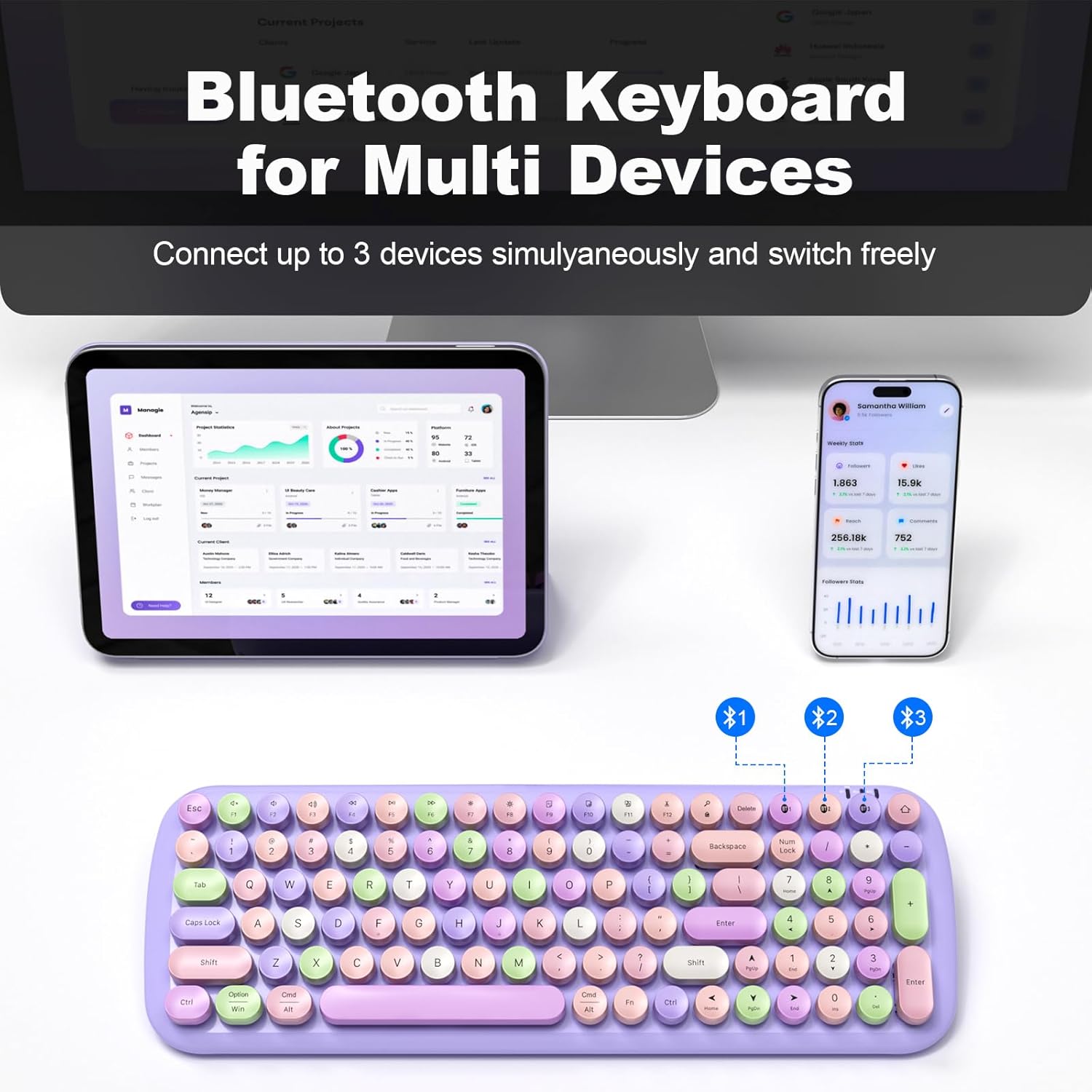
Image: The MOFII keyboard demonstrating multi-device connectivity via Bluetooth, with indicators for three paired devices.
Istruzzjonijiet Operattivi
1. Tibdil bejn Apparati Konnessi
To switch between your three paired Bluetooth devices, simply press the corresponding BT1, BT2, or BT3 button. The keyboard will automatically connect to the selected device.
2. Keyboard Layout and Special Functions
The keyboard features a full-size layout with round, retro-style keys. It includes standard alphanumeric keys, a numeric keypad, and function keys (F1-F12) with additional multimedia and system control functions accessible via the Fn ċavetta.

Immaġni: Fuqview of the full-size MOFII keyboard layout, highlighting the function keys and their secondary actions.
3. Modalità Iffrankar tal-Enerġija
To conserve battery life, the keyboard will automatically enter sleep mode after 5 minutes of inactivity. To wake it up, press any key.
4. Kompatibilità
This keyboard is compatible with a wide range of operating systems and devices, including:
- Windows
- Mac OS
- iOS (iPad, iPhone)
- Android (Tablets, Smartphones)

Image: The MOFII keyboard wirelessly connected to a Smart TV, illustrating its use for controlling smart devices from a distance.
Manutenzjoni
1. Tindif tat-Tastiera
Biex tnaddaf it-tastiera, imsaħ il-wiċċ bil-mod b'ċarruta ratba u damp drapp. Evita li tuża kimiċi ħarxa jew materjali li joborxu.
2. Detachable Keycaps
The keycaps are detachable for easier cleaning. Use the provided keycap puller to carefully remove individual keycaps. Reattach them by aligning and pressing firmly until they click into place.

Immaġni: Close-up view of the MOFII keyboard showing detachable keycaps and the keycap puller tool for easy cleaning.
3. Sostituzzjoni tal-batterija
When the keyboard's performance diminishes or it fails to power on, it may be time to replace the batteries. Open the battery compartment on the underside and replace with new batteries of the correct type and size.
Issolvi l-problemi
It-Tastiera Mhux Qed Tikkonnettja/Tqabbad:
- Ensure the keyboard has fresh batteries and is powered on.
- Kun żgur li l-Bluetooth huwa attivat fuq it-tagħmir tiegħek.
- Confirm the keyboard is in pairing mode (indicator light flashing) by pressing and holding a BT channel button for 3 seconds.
- Ipprova neħħi l-akkoppjar u erġa' qabbad it-tastiera mis-settings tal-Bluetooth tat-tagħmir tiegħek.
- Ensure the keyboard is within the 33-foot (10-meter) operating range of your device.
Iċ-Ċwievet Ma Jirrispondux:
- Iċċekkja l-livell tal-batterija u ibdel jekk meħtieġ.
- Kun żgur li t-tastiera hija konnessa sew mat-tagħmir tiegħek.
- Clean under the keycaps if debris is suspected to be interfering with key presses.
Keyboard Enters Sleep Mode Too Quickly:
- This is a power-saving feature. Press any key to wake the keyboard. This setting is not user-adjustable.
Speċifikazzjonijiet
| Brand | MOFII |
| Mudell | B0DR2NLFYW |
| Teknoloġija tal-Konnettività | Bluetooth 5.1 |
| Apparati Kompatibbli | iPad, Laptop, PC, iPhone, Tablets, Smartphone (Windows, Mac OS, iOS, Android) |
| Medda Operattiva | Sa 33 pied (10 metri) |
| Sors tal-Enerġija | Mħaddma bil-batterija |
| Dimensjonijiet tal-Prodott | 15.35 x 5.31 x 1.38 pulzieri |
| Piż tal-oġġett | 1.63 liri |
| Materjal | Plastik |
| Karatteristika Speċjali | Round Key, Multi-Device Connectivity |
Garanzija u Appoġġ
For warranty information and technical support, please refer to the official MOFII webis-sit jew ikkuntattja lis-servizz tal-konsumatur tagħhom direttament. Żomm l-irċevuta tax-xiri tiegħek għal talbiet ta' garanzija.
Manufacturer: MOFII


