1. Introduzzjoni
This manual provides essential instructions for the proper setup, operation, and maintenance of your OnePlus Nord N30 5G smartphone. Please read this guide thoroughly before using your device to ensure optimal performance and longevity.
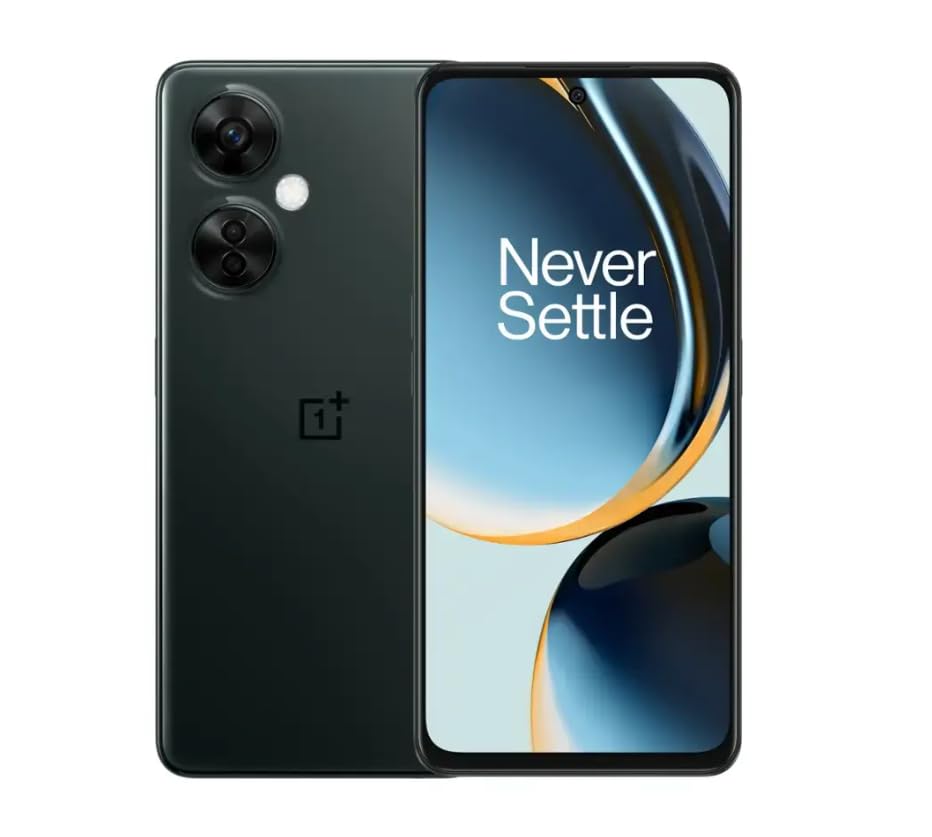
Image 1.1: OnePlus Nord N30 5G smartphone. This image displays the overall design of the device, highlighting its screen and camera module.
2. X'hemm fil-Kaxxa
Ivverifika li l-oġġetti kollha huma preżenti fil-pakkett:
- Smartphone OnePlus Nord N30 5G
- Adapter tal-Enerġija
- Cable USB
Nota: L-aċċessorji jistgħu jvarjaw skont ir-reġjun.
3. Setup
3.1. Daħħal is-SIM Card
- Sib it-trej tal-kard SIM fuq il-ġenb tal-apparat.
- Insert the SIM ejector tool (not included, use a paperclip if necessary) into the small hole next to the tray to open it.
- Place your Nano-SIM card(s) into the tray with the gold contacts facing down. The device supports a single SIM card and a microSDXC card for expandable storage.
- Imbotta t-trej lura fl-islott bir-reqqa sakemm ikun laħlaħ mal-qafas tat-telefon.
3.2. Iċċarġjar Inizjali u Tixgħel
Qabel l-ewwel użu, huwa rakkomandat li l-apparat jiġi ċċarġjat kompletament.
- Connect the USB cable to the power adapter and then to the phone's USB-C port.
- Plug the power adapter into a wall outlet. The device supports 50W SUPERVOOC fast charging.
- Once sufficiently charged, press and hold the Power button (located on the side) until the OnePlus logo appears.
3.3. Konfigurazzjoni Inizjali tal-Apparat
Segwi l-istruzzjonijiet fuq l-iskrin biex tlesti s-setup inizjali:
- Agħżel il-lingwa preferuta tiegħek.
- Qabbad ma 'netwerk Wi-Fi.
- Review u taċċetta t-termini u l-kundizzjonijiet.
- Idħol bil-kont Google tiegħek jew oħloq wieħed ġdid.
- Set up security features such as fingerprint unlock or face unlock.
4. Istruzzjonijiet Operattivi
4.1. Wiri u Navigazzjoni
The OnePlus Nord N30 5G features a 6.72-inch LCD display with a 120Hz refresh rate for smooth visuals. Navigate the OxygenOS interface using gestures or traditional navigation buttons.
- Swipe 'l fuq: Aċċessa l-kexxun tal-app.
- Swipe' l isfel: Access notifications and quick settings.
- Tektek: Agħżel oġġetti.
- Oqros: Zoom in jew out.
4.2. Użu tal-kamera
The device is equipped with a triple rear camera system and a front camera.
- Kamera Prinċipali: 108 MP, f/1.7 (wide) for high-resolution photos.
- Makro Kamera: 2 MP, f/2.4 for close-up shots.
- Kamera tal-Fond: 2 MP, f/2.4 for portrait mode effects.
- Kamera ta' quddiem: 16 MP, f/2.4 for selfies and video calls.
Open the Camera app and select your desired mode (Photo, Video, Portrait, Macro, etc.) from the interface. Tap the shutter button to capture images or start/stop video recording.
4.3. Ġestjoni tal-Ħażna
The phone comes with 128GB of internal storage. You can expand this up to 1TB using a microSDXC card inserted into the SIM tray.
- To check storage usage: Go to Settings > Ħażna.
- Biex timxi files to microSD: Use the File App tal-maniġer.
4.4. Konnettività
The device supports 5G cellular technology, Wi-Fi, and Bluetooth 5.1.
- 5G: Ensure your SIM card and plan support 5G for faster mobile data speeds.
- Wi-Fi: Qabbad ma' netwerks mingħajr fili permezz ta' Settings > Wi-Fi.
- Bluetooth: Imqabbad ma' headphones mingħajr fili jew apparati oħra permezz ta' Settings > Bluetooth.
4.5. Karatteristiċi tas-Sigurtà
Secure your device using the side-mounted fingerprint sensor or face unlock.
- To set up fingerprint unlock: Go to Settings > Sigurtà u privatezza > Marki tas-swaba' nisfruttaw.
- To set up face unlock: Go to Settings > Sigurtà u privatezza > Wiċċ nisfruttaw.
4.6. Awdjo
The device features dual stereo speakers for enhanced audio experience. It also includes a 3.5 mm audio jack for wired headphones.
5. Manutenzjoni
5.1. Kura tal-batterija
Il-batterija ta' 5000mAh tipprovdi użu estiż. Biex ittawwal il-ħajja tal-batterija:
- Evita temperaturi estremi.
- Use the provided 50W SUPERVOOC charger for optimal charging speed and battery health.
- Evita li l-batterija tixxotta kompletament ta' spiss.
5.2. Aġġornamenti tas-Software
Keep your OxygenOS (based on Android 13) updated to ensure optimal performance, security, and access to new features.
- Biex tiċċekkja għal aġġornamenti: Mur fuq Settings > Dwar l-apparat > Verżjoni tal-OxygenOS.
5.3. Tindif tal-Apparat
Uża drapp artab u mingħajr suf biex tnaddaf l-iskrin u l-qafas tat-telefon. Evita li tuża kimiċi ħarxa jew materjali li joborxu.
6 Issolvi l-problemi
Din it-taqsima tindirizza kwistjonijiet komuni li tista’ tiltaqa’ magħhom.
6.1. L-Apparat Mhux Qed Jixgħel
- Kun żgur li l-batterija hija ċċarġjata. Qabbad l-apparat mal-ċarġer għal mill-inqas 15-il minuta.
- Agħfas u żomm il-buttuna tal-Power għal 10-15-il sekonda biex terġa' tibda.
6.2. Kwistjonijiet ta' Konnettività tan-Netwerk
- Iċċekkja jekk il-kard tas-SIM hijiex imdaħħla sew.
- Verify that mobile data is enabled in Settings > Netwerk mobbli.
- Ibda mill-ġdid l-apparat.
- Contact your carrier (T-Mobile) to confirm service availability in your area.
6.3. L-Applikazzjonijiet Jiġġarraf jew Jiffriża
- Agħlaq u terġa' tiftaħ l-app.
- Neħħi l-cache tal-app: Settings > Apps > [Isem tal-App] > Storage usage > Ċar il-cache.
- Ensure the app and OxygenOS are updated to the latest versions.
6.4. Il-Batterija Tiskula Malajr
- Naqqas il-luminożità tal-iskrin.
- Iddiżattiva karatteristiċi mhux użati bħal Bluetooth, GPS, jew Wi-Fi meta ma tkunx meħtieġa.
- Iċċekkja l-użu tal-batterija f' Settings > Batterija biex tidentifika applikazzjonijiet li jikkunsmaw ħafna enerġija.
- Ensure background app refresh is limited for non-essential apps.
7. Speċifikazzjonijiet
| Isem tal-Mudell | OnePlus Nord N30 5G |
| Sistema Operattiva | OxygenOS (based on Android 13) |
| Proċessur | Qualcomm Snapdragon 695 Octa-core |
| RAM | 8GB |
| Ħażna Interna | 128GB (Expandable up to 1TB via microSDXC) |
| Wiri | 6.72 inches LCD, 2400 x 1080 resolution, 120Hz Refresh Rate |
| Kamera ta' wara | 108 MP (wide), 2 MP (macro), 2 MP (depth) |
| Kamera ta' Quddiem | 16 MP |
| Kapaċità tal-batterija | 5000 mAh |
| Iċċarġjar | 50W SUPERVOOC Fast Charging (approx. 47 minutes for full charge) |
| Konnettività | 5G, Wi-Fi, Bluetooth 5.1, USB-C |
| Awdjo Jack | 3.5 mm |
| Dimensjonijiet | 6 x 4 x 4 pulzieri |
| Piż | 10.8 uqija |
| Karatteristiċi Speċjali | Dual SIM, Side-mounted Fingerprint Sensor, Face Unlock, Dual Stereo Speakers |
8. Renewed Product Information
This OnePlus Nord N30 5G is an Amazon Renewed product. Renewed products are pre-owned and professionally inspected, tested, and cleaned to work like new. They come with generic or original accessories and packaging.
8.1. Amazon Renewed Conditions
Amazon Renewed products are categorized based on their cosmetic condition and battery life. All renewed products are fully functional and have a battery life greater than 80% of a new equivalent.

Image 8.1: Amazon Renewed conditions overview. This image illustrates the criteria for Excellent, Good, and Acceptable cosmetic conditions for renewed products.

Immaġni 8.2: Eżempju viżwaliamples of renewed product cosmetic conditions. This image provides visual examples of what 'Excellent', 'Good', and 'Acceptable' cosmetic conditions might look like on a phone's back.

Image 8.3: Customer feedback on Amazon Renewed. This image presents testimonials from customers regarding their positive experiences with Amazon Renewed products.
9. Garanzija u Appoġġ
9.1. Informazzjoni dwar Garanzija
As an Amazon Renewed product, this device is backed by the Amazon Renewed Guarantee. Please refer to the Amazon Renewed program terms and conditions for specific warranty details and coverage. This typically includes a limited warranty for a specified period from the date of purchase, covering defects in materials and workmanship.
9.2. Appoġġ għall-Klijent
For technical assistance, troubleshooting, or warranty claims, please contact Amazon Customer Service or refer to the official OnePlus support websit għal riżorsi addizzjonali u FAQs.
- Servizz tal-Klijent Amazon: Żur amazon.com/ikkuntattjana
- OnePlus Support: Visit the official OnePlus support websit għar-reġjun tiegħek.


