1. Prodott Aktarview
The Ulefone Armor X31 Pro 5G is a rugged smartphone designed for durability and high performance. It features a powerful MediaTek Dimensity 6300 Octa-Core processor, a large 6050mAh battery, and advanced camera capabilities including a 64MP main camera and a 25MP night vision camera. Built to withstand harsh environments, it is IP68/IP69K waterproof, shockproof, and dustproof.
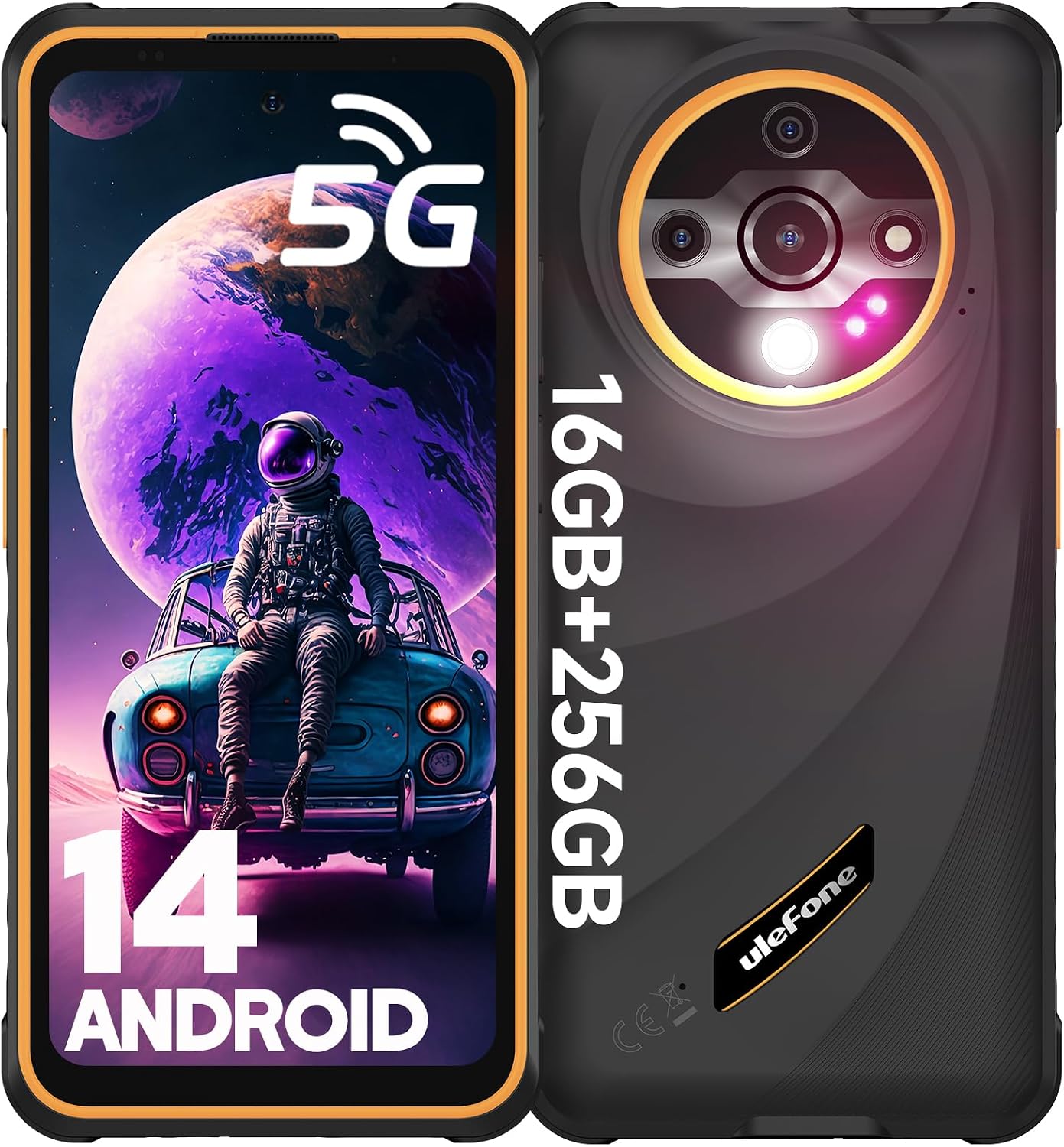
Figura 1: Quddiem u wara view of the Ulefone Armor X31 Pro 5G Smartphone, highlighting its rugged design and camera module.
2. X'hemm fil-Kaxxa
- Ulefone Armor X31 Pro 5G Phone
- Ċarġer tal-Enerġija AC (100~240V)
- Kejbil tad-Data tat-Tip-Ċ għal tat-Tip-Ċ (100cm)
- Protettur tal-Iskrin (installat minn qabel)
- SIM Trej Ejector
- Lanyard
- Manwal tal-Utent b'ħafna lingwi
- Multi-function Instruction Card
- Karta ta' Istruzzjonijiet għall-Iċċarġjar
- Karta ta' Prompt tas-Sigurtà
- Accessories Ecosystem Brochure
- Service Center APP Instructions
3. Gwida ta' Setup
3.1. Daħħal il-Kards tas-SIM u l-Kard tal-MicroSD
The Armor X31 Pro 5G supports dual Nano SIM cards and one microSD card for storage expansion up to 2TB. Use the provided SIM tray ejector tool to open the SIM card slot on the side of the device.
- Sib it-trej tas-SIM fuq il-ġenb tat-telefon.
- Daħħal l-għodda tal-ejecter tat-trej tas-SIM fit-toqba ż-żgħira ħdejn it-trej u imbotta bil-mod sakemm it-trej joħroġ 'il barra.
- Place your Nano SIM cards and/or microSD card into the designated slots on the tray, ensuring correct orientation.
- Imbotta t-trej lura fit-telefon bir-reqqa sakemm ikun laħlaħ mal-qafas tal-apparat.

Figure 2: Illustration of the 3-card slot for dual SIM and microSD card insertion.
3.2. Initial Power On and Android 14 Setup
To power on your device for the first time, press and hold the power button located on the side until the Ulefone logo appears. Follow the on-screen prompts to complete the initial setup of Android 14, including language selection, Wi-Fi connection, Google account login, and security settings.

Figure 3: The Android 14 operating system interface on the Ulefone Armor X31 Pro 5G.
4. Istruzzjonijiet Operattivi
4.1. Wiri u Navigazzjoni
The device features a 6.56-inch 120Hz display with up to 800 nits brightness for clear outdoor visibility. Navigate the interface using touch gestures. The 120Hz refresh rate provides smooth scrolling and responsiveness.
Vidjo 1: Wirja uffiċjali tal-vidjo tal-prodottasing the Ulefone Armor X31 Pro 5G's features, including display clarity and ruggedness. This video is provided by the seller, SMART TECH PHONE.
4.2. Funzjonijiet tal-Kamera
The Armor X31 Pro 5G is equipped with a versatile camera system:
- Kamera Prinċipali Ultra-ċara ta' 64MP: For high-resolution photos with a Sony IMX682 sensor.
- Kamera tal-Viżjoni bil-Lejl ta' 25MP: Allows capturing images and videos in low-light or no-light conditions.
- Kamera ta' Quddiem ta' 16MP: Għal selfies u sejħiet bil-vidjo ċari.
- Kamera Makro ta' 2MP: Għal ritratti dettaljati mill-qrib.
To access the camera, tap the camera icon on the home screen or app drawer. Switch between modes (Photo, Video, Night Vision, Macro) using the options at the bottom of the camera interface.

Figura 4: Dettaljat view of the multi-camera system on the Ulefone Armor X31 Pro 5G.

Figure 5: The independent 120 lumen flashlight feature of the Ulefone Armor X31 Pro 5G.
4.3. Batterija u Iċċarġjar
The device is powered by a 6050mAh battery. Use the provided 18W fast charger and Type-C cable for optimal charging. The phone also supports reverse charging, allowing it to act as a power bank for other devices (OTG cable not included).

Figure 6: Visual representation of the 6050mAh battery and its reverse charging capability.
4.4. Konnettività u Sensuri
The Armor X31 Pro 5G offers comprehensive connectivity and sensor features:
- Appoġġ għan-Netwerk 5G: For high-speed data.
- Dual SIM Dual Standby: Supports 5G/4G/3G/2G networks.
- NFC: Għal ħlasijiet mingħajr kuntatt u trasferiment tad-dejta.
- Fingerprint ID & Face Unlock: Għal ftuħ sigur u konvenjenti.
- GPS, GLONASS, BEIDOU, GALILEO: For accurate navigation.
- Ċavetta tad-dwana: Programmable button for quick access to functions.
- Radju FM: Requires a 3.5mm headphone jack as an antenna.
- Jack tal-headphones ta' 3.5mm: Standard audio port.
- LED ta' notifika: Provides visual alerts for notifications.
- Modalità tal-Ingwanti: Ittejjeb is-sensittività għall-mess għall-użu bl-ingwanti.
The device is not compatible with AT&T, Cricket, or CDMA carriers such as Sprint & Verizon.

Figure 7: The Ulefone Armor X31 Pro 5G's support for 5G network connectivity.
Figura 8: Aktarview of additional functionalities including NFC, Fingerprint ID, GPS, and audio jack.
5. Manutenzjoni u Kura
The Ulefone Armor X31 Pro 5G is built to be rugged, but proper care will extend its lifespan and maintain its performance.
- Tindif: Imsaħ l-apparat b'artab, damp cloth. For stubborn dirt, use a mild soap solution. Ensure all ports are dry before charging.
- Espożizzjoni għall-Ilma: While waterproof (IP68/IP69K), ensure all port covers are securely closed before exposing the phone to water. After water exposure, dry the device thoroughly, especially the charging port, before plugging in any cables.
- Temperatura: Evita li tesponi t-telefon għal temperaturi estremi (sħana kbira jew kesħa kbira) għax dan jista' jaffettwa l-ħajja tal-batterija u l-komponenti interni.
- Protezzjoni tal-Impatt: Despite being shockproof, avoid unnecessary drops or impacts.

Figure 9: The Ulefone Armor X31 Pro 5G's robust protection against water, dust, and drops.
6 Issolvi l-problemi
| Problema | Kawża Possibbli | Soluzzjoni |
|---|---|---|
| It-telefon ma jixgħelx | Batterija baxxa; softwer jiġġarraf. | Iċċarġja t-telefon għal mill-inqas 30 minuta. Agħfas u żomm il-buttuna tal-qawwa għal 10-15-il sekonda biex terġa' tibda. |
| Cannot connect to network (AT&T, Cricket, CDMA) | Incompatibility with specific carriers. | The device is not compatible with AT&T, Cricket, or CDMA carriers such as Sprint & Verizon. Please use compatible GSM carriers. |
| Prestazzjoni bil-mod | Too many apps running in background; low storage. | Close unused apps. Clear cache. Free up storage by deleting unnecessary files or moving them to microSD. Restart the device. |
| Kwistjonijiet ta' ċċarġjar | Dirty charging port; faulty cable/charger. | Ensure charging port is clean and dry. Try a different Ulefone-approved cable and charger. |
7. Speċifikazzjonijiet
| Karatteristika | Dettall |
|---|---|
| Mudell | Armor X31 Pro 5G Phone-Orange |
| Sistema Operattiva | Android 14 |
| Proċessur | MediaTek Dimensity 6300 Octa-Core 2.4GHz |
| RAM | 16GB (8GB fiżiku + 8GB virtwali) |
| Ħażna Interna | 256GB ROM |
| Ħażna espansibbli | Up to 2TB with microSD card |
| Wiri | 6.56-inch, 120Hz, 800 nits Max Brightness, Corning Gorilla Glass 5 |
| Kamera Prinċipali | 64MP (Sony IMX682 sensor) |
| Kamera tal-Viżjoni ta 'Lejl | 25MP |
| Kamera ta' Quddiem | 16MP |
| Kapaċità tal-batterija | 6050mAh |
| Iċċarġjar | 18W Fast Charge, Reverse Charging (OTG) |
| Durabilità | IP68/IP69K Waterproof, Shockproof (2m drop), Dustproof, MIL-STD-810H Certified |
| Konnettività | 5G, Dual SIM, Wi-Fi, Bluetooth 5.2, NFC, GPS |
| Sigurtà | ID tal-Marki tas-Swaba', Wiċċ Miftuħ |
| Awdjo Jack | 3.5 mm |
| Dimensjonijiet | 6.84 x 3.23 x 0.54 pulzieri |
| Piż | 10.8 uqija |
8. Garanzija u Appoġġ
For warranty information and technical support, please refer to the official Ulefone website or the "Exclusive Service Center App" pre-installed on your device. Keep your purchase receipt for warranty claims.
The product comes with a standard return policy of 30 days for refund/replacement, as per the buybox winner information.
Manufacturer: Ulefone
Seller: SMART TECH PHONE


