1. Introduzzjoni
The Hanwha ARN-810S Series 8-Channel PoE NVR is designed to provide seamless surveillance solutions for small to medium-scale security systems. This network video recorder supports up to 8 PoE cameras, simplifying installation and reducing the need for additional power supplies. It is equipped with a 2TB HDD, offering ample storage for high-definition video recordings. This NVR supports a variety of video codecs, including H.265, ensuring efficient compression and storage optimization without compromising video quality. With its user-friendly interface, the ARN-810S provides convenient access to live video feeds and playback from anywhere via a PC or mobile device. Whether for residential or commercial use, the Hanwha ARN-810S delivers reliable, high-performance surveillance, helping you monitor your property with confidence.
2. Prodott Aktarview
2.1 Karatteristiċi ewlenin
- 8-Channel PoE Support: Simplifies installation by powering up to 8 PoE cameras, eliminating the need for additional power sources.
- 2TB HDD Storage: Provides substantial storage capacity for video recordings, ensuring reliable data retention.
- Efficient Video Compression: Supports H.265, offering reduced file sizes and optimized storage while maintaining high video quality.
- Aċċess mill-bogħod: Enables remote monitoring and playback via PC or mobile app, offering convenience and flexibility.
- Interface faċli għall-utent: Easy-to-use interface for seamless operation and management of your surveillance system.
- Kompatt u Affidabbli: Designed for small to medium-scale security systems, ensuring robust performance in various environments.
2.2 Kontenut tal-Pakkett
- Reġistratur tal-vidjo
2.3 Dijagramma tal-Prodott
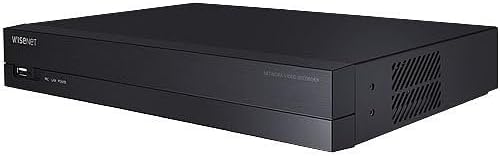
Figura 1: Quddiem view of the Hanwha Vision ARN-810S NVR, showing the compact black design with a USB port and indicator lights on the left, and ventilation on the right side.
3. Setup
3.1 Setup Inizjali
- Unpack the NVR: Carefully remove the NVR and all accessories from the packaging. Inspect for any signs of damage.
- Qabbad l-Enerġija: Connect the provided power adapter to the NVR's power input port and then plug it into a suitable power outlet. The NVR will power on automatically.
- Connect Monitor (Optional): For local setup and viewing, connect a monitor to the NVR's HDMI or VGA output port.
- Qabbad il-Kameras: Connect your PoE IP cameras to the NVR's PoE ports. The NVR will automatically detect and power the cameras.
- Qabbad man-Netwerk: Connect the NVR's LAN port to your network router or switch using an Ethernet cable. This is required for remote access and network features.
- First-Time Configuration: Follow the on-screen prompts (if a monitor is connected) or use the Hanwha Vision setup tool on a connected PC to complete the initial network and system settings, including setting up an administrator password.
4. Operazzjoni
4.1 Ħaj View
Ladarba l-NVR u l-kameras ikunu ssettjati, tista' view live video feeds. Access the live view through a connected monitor, a web browser on a PC, or the dedicated mobile application. Select the desired camera channels to display their live streams.
4.2 Daqq
Biex terġa 'view irreġistrat footage, navigate to the playback section of the NVR interface. Select the date and time range, and the specific camera channel you wish to view. Use the timeline and control buttons (play, pause, fast forward, rewind) to navigate through the recordings.
4.3 Aċċess mill-Bogħod
The Hanwha ARN-810S supports remote access, allowing you to monitor your property from anywhere. Download the official Hanwha Vision mobile app or access the NVR via a web browser on your PC. Ensure your NVR is connected to the internet and properly configured for remote access (e.g., port forwarding or P2P cloud service enabled).
5. Manutenzjoni
- Tindif regolari: Keep the NVR free from dust and debris. Use a soft, dry cloth to clean the exterior. Ensure ventilation openings are not blocked.
- Aġġornamenti tal-Firmware: Periodically check the Hanwha Vision official websit għal aġġornamenti tal-firmware. Iż-żamma tal-firmware aġġornat tiżgura prestazzjoni ottimali, sigurtà, u aċċess għal karatteristiċi ġodda.
- Backup tad-Data: Agħmel backup regolarment tal-vidjows importanti tiegħektage għal apparat ta' ħażna estern (eż., USB drive) biex tevita t-telf tad-dejta.
- Saħħa tal-Hard Drive: Immonitorja s-saħħa tal-hard drive intern permezz tas-settings tas-sistema tal-NVR. Ibdel l-HDD jekk jinstabu xi problemi.
6 Issolvi l-problemi
| Problema | Kawża Possibbli | Soluzzjoni |
|---|---|---|
| NVR does not power on. | Power cable loose; power adapter faulty; power outlet issue. | Check power connections; try a different power outlet; test power adapter. |
| L-ebda wiri tal-vidjo fuq il-monitor. | HDMI/VGA cable loose; incorrect input selected on monitor; NVR display settings. | Ensure cable is secure; select correct input on monitor; restart NVR. |
| Cameras not detected. | PoE cable issue; camera faulty; network configuration. | Check PoE cable connections; ensure cameras are compatible; restart NVR and cameras. |
| Ma nistax naċċessa l-NVR mill-bogħod. | Network connection issue; incorrect port forwarding; P2P service not enabled/configured. | Verify NVR has internet access; check router settings for port forwarding; ensure P2P is enabled and connected. |
| Il-plejbek tal-vidjo huwa mqatta '. | Network bandwidth; HDD performance; high resolution/bitrate. | Check network speed; verify HDD health; consider lowering camera resolution/bitrate if necessary. |
7. Speċifikazzjonijiet
| Karatteristika | Dettall |
|---|---|
| Numru tal-Mudell | SQ-ARN810S2T |
| Kanali | 8-Channel PoE (Supports up to 16 channels based on product specifications, but primary feature is 8-channel PoE) |
| Daqs tal-Hard Disk | 2 TB |
| Kompressjoni tal-vidjo | H.265 supported |
| Dimensjonijiet tal-Prodott (L x W x H) | 11.8" x 11.8" x 1.9" (madwar 30cm x 30cm x 4.8cm) |
| Manifattur | Viżjoni Hanwha |
| ASIN | B0DQQF2G63 |
8. Garanzija u Appoġġ
For warranty information and technical support, please refer to the documentation included with your product or visit the official Hanwha Vision website. You can typically find FAQs, driver downloads, and contact information for customer service there. Keep your purchase receipt as proof of purchase for warranty claims.


