1. Introduzzjoni
This manual provides detailed instructions for the proper use and maintenance of your SMSL PL100PRO CD Player. Please read this manual thoroughly before operating the device to ensure optimal performance and longevity. The PL100PRO is a high-fidelity CD player featuring advanced DAC chips, multiple output options, and compatibility with various disc formats.
2. Kontenut tal-Pakkett
Carefully unpack your SMSL PL100PRO CD Player and verify that all items listed below are included:
- SMSL PL100PRO CD Player Unit
- Kejbil tal-USB (USB-A għal USB-C)
- Kejbil tal-USB (USB-C għal USB-C)
- Kontroll mill-bogħod
- Manwal ta' Istruzzjoni
Deskrizzjoni tal-Vidjo: This video demonstrates the unboxing process of the SMSL PL100PRO CD Player, showing the contents of the package including the main unit, cables, remote control, and user manual.
3. Prodott Aktarview
Familiarize yourself with the components and controls of your PL100PRO CD Player.

Deskrizzjoni tal-Immaġni: A detailed diagram illustrating the front and rear panels of the SMSL PL100PRO CD Player. The front panel shows the disc slot, IPS LCD display, and control buttons. The rear panel displays various input and output ports, including XLR, RCA, optical, coaxial, and headphone jacks, each with corresponding numerical labels.
Kontrolli tal-Panew ta' Quddiem:
- Volum 'il fuq: Increases output volume.
- Volum 'l isfel: Decreases output volume.
- Next/Fast Reverse: Skips to the next track or fast reverses within a track.
- Previous/Fast Forward: Skips to the previous track or fast forwards within a track.
- Play/Pause / Power On/Off: Toggles playback or powers the unit on/off.
- STOP / Open_Close: Stops playback or opens/closes the disc tray.
- Remote Window: Riċevitur infrared għall-kontroll mill-bogħod.
- Wiri: Full-color IPS LCD screen showing track information and settings.
- Slott tad-Diska: Insert CDs here.
Konnessjonijiet tal-Panew ta' wara:
- Ħruġ Bilanċjat XLR (R/L): For balanced audio connection to compatible amplifiers or DACs.
- Ħruġ tal-headphones ta' 4.4mm: Balanced headphone output.
- Ħruġ tal-headphones ta' 3.5mm: Single-ended headphone output.
- RCA Output (R/L): For unbalanced audio connection to compatible amplifiers or DACs.
- Output ottiku: Ħruġ awdjo ottiku diġitali.
- Output koassjali: Ħruġ awdjo koassjali diġitali.
- USB Input (5V/2A): Input tal-enerġija għall-apparat.
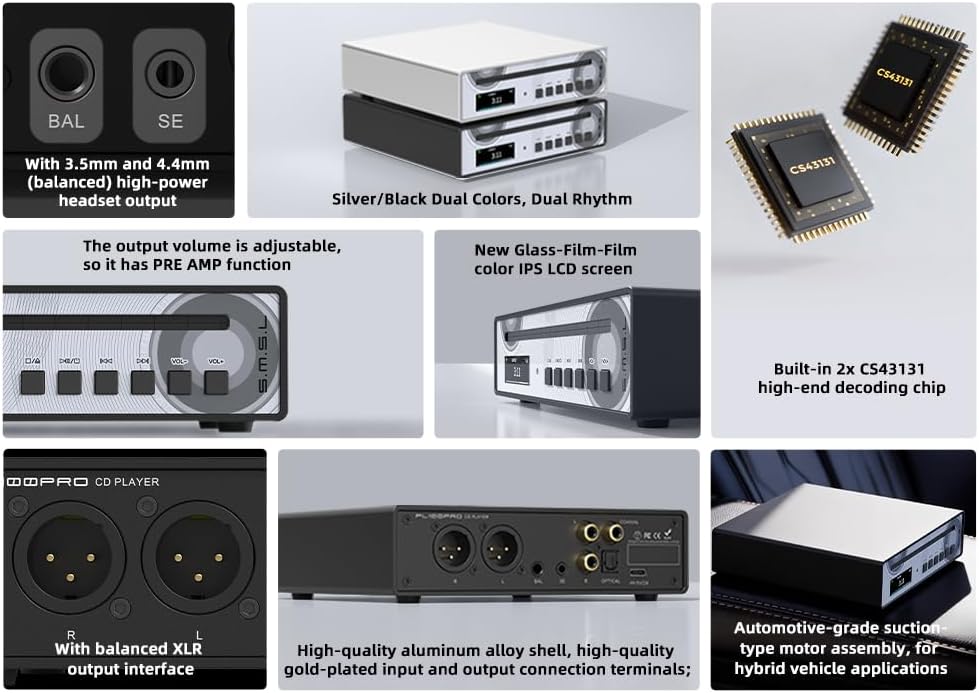
Deskrizzjoni tal-Immaġni: Wirja ta' collageasing key features of the SMSL PL100PRO. It highlights the 3.5mm and 4.4mm headphone outputs, silver/black dual colors, adjustable output volume (PRE AMP function), new glass-film-film color IPS LCD screen, built-in 2x CS43131 high-end decoding chips, balanced XLR output interface, high-quality aluminum alloy shell, gold-plated terminals, and automotive-grade suction for hybrid vehicle applications.
4. Setup
4.1 Konnessjoni tal-Enerġija
Connect the provided USB cable to the USB input (5V/2A) on the rear panel of the PL100PRO. Connect the other end to a compatible 5V/2A USB power adapter (not included). Ensure the power adapter provides at least 2 amps for correct functionality.
4.2 Konnessjoni tal-Ħruġ Awdjo
Choose your preferred audio output method:
- Headphones: Connect your headphones to either the 3.5mm (single-ended) or 4.4mm (balanced) headphone output on the rear panel.
- Analog Output (RCA/XLR): Connect RCA cables to the RCA outputs or XLR cables to the XLR balanced outputs on the rear panel, then connect to your amplifier jew kelliema powered.
- Digital Output (Optical/Coaxial): Connect an optical cable to the optical output or a coaxial cable to the coaxial output, then connect to an external DAC or digital audio system.
4.3 Qawwa Inizjali
After connecting power and audio outputs, press the Play/Pause / Power On/Off button on the front panel or the remote control to power on the device. The IPS LCD display will illuminate.
Deskrizzjoni tal-Vidjo: This short video demonstrates the SMSL PL100PRO CD Player being used in an outdoor camping setting, highlighting its portability and robust design suitable for various environments.
5. Istruzzjonijiet Operattivi
5.1 Daqq tad-Diska
- Kun żgur li l-unità tkun mixgħula.
- Gently insert a CD (CD/CD-R/CD-RW/MP3 disc) into the disc slot. The player will automatically load the disc.
- The display will show track information. Press the Play/Pause button to begin playback.
- Use the Next/Fast Reverse and Previous/Fast Forward buttons to navigate between tracks or fast scan within a track.
- Agħfas il-buttuna STOP biex tieqaf daqq.
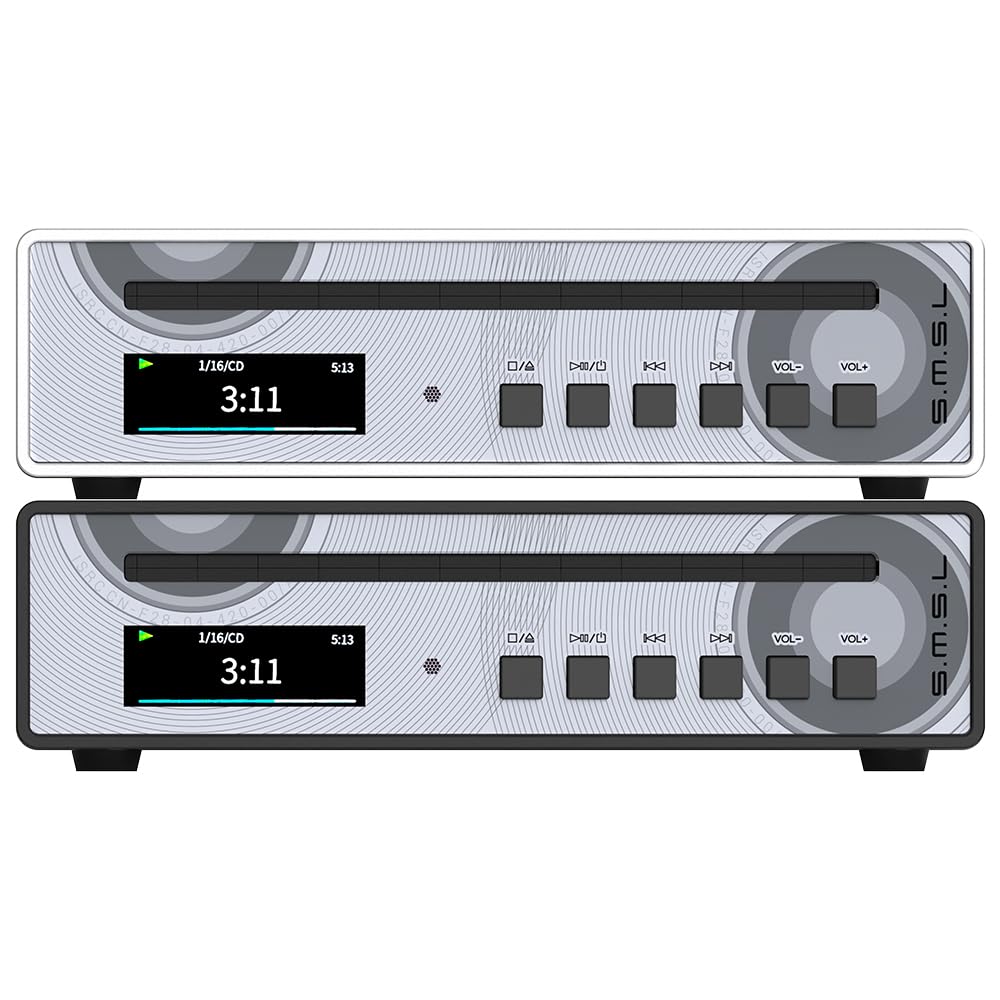
Deskrizzjoni tal-Immaġni: A close-up view of a hand inserting a compact disc into the slot-loading mechanism of the SMSL PL100PRO CD Player. The player's display shows track information, indicating readiness for playback.
5.2 Funzjonijiet ta' Kontroll mill-bogħod
The included full-function remote control allows for convenient operation from a distance.

Deskrizzjoni tal-Immaġni: An image displaying the remote control for the SMSL PL100PRO, with various buttons labeled for functions such as Power ON/OFF, Mute, Volume +/-, Play/Pause, Previous/Fast reverse, Next/Fast forward, Stop, Open_Close, FN, DISP, and numerical track selection buttons (0-9), Random, and Repeat.
- Qawwa ON/OFF: Ixgħel jew jitfi l-unità.
- Siekta: Ijattiva l-output tal-awdjo.
- Volum +/-: Adjusts the output volume (when preamplifier function is active).
- Play/Pawsa: Jibda jew iwaqqaf il-plejbek tad-diska.
- Previous/Fast Reverse: Skips to the previous track or fast reverses.
- Li jmiss/Fast Forward: Skips to the next track or fast forwards.
- Waqqaf: Iwaqqaf il-plejbek tad-diska.
- Iftaħ/Agħlaq: Ejects or retracts the disc.
- Buttuni Numeriċi (0-9): Directly select track numbers.
- Bl-addoċċ: Enables random playback.
- Irrepeti: Repeats the current track or entire disc.
5.3 Preamplifier Funzjoni
The PL100PRO includes a preamplifier function, allowing you to adjust the output volume directly from the unit or remote control. This is particularly useful when connecting directly to powered speakers or a power amplifier without its own volume control.
6. Għażliet ta' Konnettività
The PL100PRO offers a wide range of connectivity options to integrate into various audio setups.

Deskrizzjoni tal-Immaġni: A diagram titled 'Bit-Stream Direct Output' showing the rear panel of the PL100PRO. Arrows indicate digital signal output from the optical and coaxial ports leading to an external Audio DAC (SMSL D200) or an Integrated Amplifier (SMSL RAW-HA1). Text explains that this allows lossless transmission of original digital audio signals to external systems.
- Outputs Analoġiċi: XLR Balanced (4Vrms) and RCA (2Vrms) for direct connection to ampliifikaturi.
- Outputs tal-headphones: 3.5mm single-ended and 4.4mm balanced, providing up to 200mW (32Ω) for balanced and 58mW (32Ω) for single-ended, compatible with a wide range of headphones.
- Riżultati diġitali: Optical and Coaxial for bit-stream direct output to external DACs or digital audio systems, supporting lossless MQA playback.
7. Speċifikazzjonijiet
Detailed technical specifications for the SMSL PL100PRO CD Player.

Deskrizzjoni tal-Immaġni: An image displaying the dimensions of the SMSL PL100PRO (160mm x 44.5mm x 160mm) and a table of its technical specifications. The table includes Input (CD), Output (XLR/RCA/4.4 or 3.5mm headphone/Optical/Coaxial), CD Type (CD/CD-R/CD-RW/MP3 CD), Output Level (RCA: 2Vrms, XLR: 4Vrms), Headphone output power (Balanced and Unbalanced for various impedances), THD+N (0.001%), SNR (110dB), Power consumption (4W), Standby power (<0.1W), Size, and Weight (953.5g/2.1lbs).
| Karatteristika | Speċifikazzjoni |
|---|---|
| Input | CD |
| Output | XLR/RCA/4.4 or 3.5mm headphone/Optical/Coaxial |
| Tip ta' CD | CD/CD-R/CD-RW/MP3 CD |
| Livell ta' Output RCA | 2Vrms |
| XLR Output Level | 4Vrms |
| Headphone Output Power (Balanced) | 100mW(16Ω), 200mW(32Ω), 160mW(64Ω), 85mW(150Ω), 53mW(300Ω), 25mW(600Ω) |
| Headphone Output Power (Unbalanced) | 58mW(16Ω), 58mW(32Ω), 45mW(64Ω), 23mW(150Ω), 12mW(300Ω), 6mW(600Ω) |
| THD+N | 0.001% |
| SNR | 110dB |
| Konsum tal-Enerġija | 4W |
| Qawwa Standby | <0.1W |
| Dimensjonijiet (WxHxD) | 160x44.5x160mm |
| Piż | 953.5g / 2.1lbs |
| Ċipep tad-DAC | 2 x CS43131 |
| MQA Playback | Appoġġjati |
8 Issolvi l-problemi
If you encounter issues with your PL100PRO, please refer to the following common solutions:
- Ebda Qawwa: Ensure the USB power cable is securely connected and the power adapter provides the required 5V/2A. Try a different power outlet or adapter.
- Ebda Ħsejjes: Check all audio cable connections (RCA, XLR, Optical, Coaxial, Headphone). Verify the correct input is selected on your amplifier or external DAC. Ensure the volume is not muted or set too low.
- Id-Diska Mhux Qed Tilgħab/Taqra: Ensure the disc is clean and free of scratches. Verify the disc is inserted correctly. The PL100PRO supports CD, CD-R, CD-RW, and MP3 discs.
- Il-Kontroll mill-bogħod Mhux Jaħdem: Check the remote control's battery. Ensure there are no obstructions between the remote and the unit's remote window.
- Intermittent Playback: Ensure the unit is placed on a stable surface. While the PL100PRO has automotive-grade shock absorption, excessive vibration can still affect playback.
If the issue persists, please contact S.M.S.L customer support for further assistance.
9. Manutenzjoni
To maintain the performance and appearance of your PL100PRO CD Player:
- Tindif: Uża drapp artab u niexef biex tnaddaf il-barra tal-unità. Tużax prodotti tat-tindif likwidi jew materjali li joborxu.
- Kura tad-Diska: Handle discs by their edges. Store them in their cases to prevent scratches and dust accumulation. Use a soft, lint-free cloth to clean discs if necessary, wiping from the center outwards.
- Pjazzament: Poġġi l-unità fuq wiċċ stabbli u livellat 'il bogħod mix-xemx diretta, sorsi ta' sħana, u umdità eċċessiva. Kun żgur li jkun hemm ventilazzjoni adegwata madwar l-unità.
- Itfi: Meta ma tkunx qed tużah għal perjodi twal, skonnettja l-adapter tal-enerġija.
10. Garanzija u Appoġġ
The SMSL PL100PRO CD Player comes with a standard manufacturer's warranty. Please refer to the warranty card included in your package for specific terms and conditions. For technical support, service, or warranty claims, please contact your authorized S.M.S.L dealer or visit the official S.M.S.L websit.


