1. Introduzzjoni
Thank you for choosing the Keenstar Conical Burr Coffee Grinder. This manual provides essential information for the safe and efficient operation, maintenance, and troubleshooting of your new coffee grinder. Please read it thoroughly before first use and retain it for future reference.
The Keenstar CG-180 is designed to provide consistent and precise coffee grounds for various brewing methods, from espresso to French press, enhancing your coffee experience.
2. Istruzzjonijiet tas-Sigurtà
- Aqra l-istruzzjonijiet kollha qabel ma tħaddem l-apparat.
- Tgħaddix il-bażi tal-mutur fl-ilma jew likwidi oħra.
- Spluggja mill-iżbokk meta ma tkunx qed tuża, qabel ma tgħaqqad jew tiżżarma l-partijiet, u qabel it-tindif.
- Evita kuntatt ma 'partijiet li jiċċaqilqu.
- Tħaddim l-ebda apparat b'korda jew plagg bil-ħsara, jew wara li l-apparat ma jaħdimx jew ikun waqa' jew ġie mħassar b'xi mod.
- L-użu ta 'aċċessorji mhux rakkomandati jew mibjugħa mill-manifattur jista' jikkawża nar, xokk elettriku, jew korriment.
- Tużax barra.
- Tħallix il-korda tistrieħ fuq it-tarf tal-mejda jew tal-bank, jew tmiss uċuħ sħan.
- Tpoġġix fuq jew ħdejn burner tal-gass sħun jew elettriku, jew f'forn imsaħħan.
- Always check the bean hopper for the presence of foreign objects before use.
- Dan l-apparat huwa għall-użu fid-dar biss.
3. Prodott Aktarview
The Keenstar Conical Burr Coffee Grinder features premium stainless steel conical burrs for consistent grinding, 34 adjustable grind settings, upgraded anti-static technology, and a user-friendly touchscreen interface.

Image: The Keenstar Conical Burr Coffee Grinder, showcasing its main components including the bean hopper, control panel, portafilter cradle, and ground coffee container.
Karatteristiċi ewlenin:
- Premium Stainless Steel Conical Burrs: 40-millimeter burrs minimize grinding heat to preserve coffee bean essential oils, ensuring uniform grounds.
- 34 Precise Grind Settings: Adjustable settings from ultra-fine for espresso to coarse for French press.
- Teknoloġija Anti-statika Aġġornata: Prevents coffee grounds from scattering, keeping your workspace clean.
- Precision Timer & Touchscreen: Allows for accurate grind time selection (1-50 seconds) and cup selection.
- Portafilter Cradle: Grind directly into your portafilter for convenience (two sizes included).
- Disinn kompatt: Measures 5.2"L x 7.3"W x 14.2"H, fitting easily on kitchen countertops.
4. Setup
Follow these steps to set up your Keenstar coffee grinder for first use:
- Ippakkja: Neħħi bir-reqqa l-komponenti kollha mill-imballaġġ.
- Naddaf: Wash the bean hopper, ground coffee container, and lid with warm, soapy water. Rinse thoroughly and dry completely before assembly.
- Installa l-Fażola Hopper:
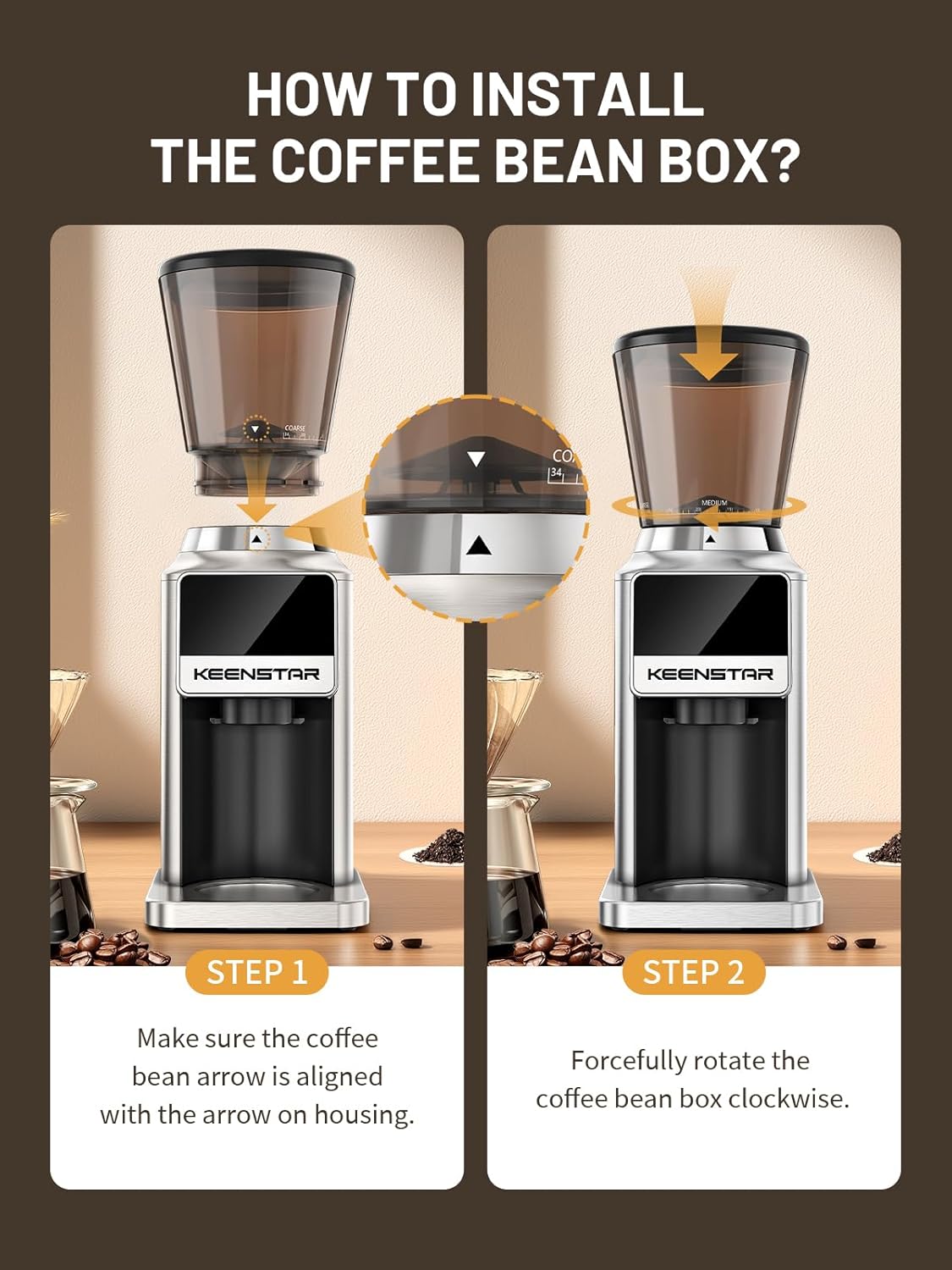
Image: Visual guide for installing the bean hopper. Step 1 shows aligning the arrow on the hopper with the arrow on the housing. Step 2 shows rotating the hopper clockwise to secure it.
- Ensure the coffee bean arrow on the hopper is aligned with the arrow on the grinder housing.
- Forcefully rotate the coffee bean box clockwise until it locks into place.
- If the bean hopper cannot be installed, turn the turntable counter-clockwise until it stops moving. Ensure the two white buckles are aligned with the triangle symbol on the outside, then attempt installation again.
- Insert Cradle: Choose the appropriate portafilter cradle (51-54mm or 58mm) and insert it into the designated slot, or place the grinding chamber if using the ground coffee container.
- Żid il-Fażola tal-Kafè: Pour whole coffee beans into the bean hopper. Do not overfill.
- Ipplaggja: Qabbad il-korda tad-dawl ma' żbokk elettriku adattat.
5. Istruzzjonijiet Operattivi
Your Keenstar grinder offers precise control over your coffee grinding process.
5.1. Aġġustament tas-Settings tat-Tħin

Image: The grind setting dial with numbers from 1 to 34, indicating fine, medium, and coarse settings for various brewing methods.
The grinder features 34 adjustable grind settings. Rotate the grind setting ring located below the bean hopper to select your desired fineness:
- Fine (1-8): Ideal for Cezve, Espresso.
- Medium (9-24): Suitable for Moka Pot, Drip Coffee, Pour Over.
- Coarse (25-34): Best for French Press.
5.2. Using the Touchscreen Control Panel

Image: The intelligent touchscreen display showing time and cup selection options.
The intuitive touchscreen allows you to select grind time or the number of cups:
- Time Selection (1-50s): Long press the "+" or "-" buttons to increase or decrease the grinding time in 0.1-second increments.
- Għażla tat-Tazza: Touch the cup icon to toggle between single or double cup modes, or select from 1 to 12 cups.
5.3. Proċess tat-Tħin
- Ensure the ground coffee container or your portafilter (with the appropriate cradle) is securely in place.
- Select your desired grind setting by rotating the ring.
- Set the grinding time or cup quantity using the touchscreen.
- Press the start button (power icon) on the touchscreen to begin grinding. The grinder will automatically stop once the set time or quantity is reached.
- Remove the ground coffee container or portafilter.
6. Manutenzjoni
Tindif u manutenzjoni regolari jiżguraw il-lonġevità u l-prestazzjoni ottimali tal-grinder tiegħek.
6.1. Tindif tal-Grinder

Image: A brush being used to clean the upper burr and grinding chamber, with the lower burr assembly held separately.
- Spluggja: Dejjem aqla’ l-grinder mill-plagg tal-elettriku qabel ma tnaddaf.
- Neħħi Bean Hopper: Rotate the bean hopper counter-clockwise and lift it off.
- Neħħi l-Burr ta' Fuq: Gently lift out the upper conical burr.
- Tindif bil-Pinzell: Use the included cleaning brush to remove any residual coffee grounds from the upper and lower burrs, as well as the grinding chamber.
- Aħsel Komponenti: The bean hopper, ground coffee container, and their lids can be washed with warm, soapy water. Rinse thoroughly and dry completely. Do not wash the motor base or burrs with water.
- Bażi tal-Imsaħ: Wipe the exterior of the grinder base with a damp drapp. Tużax prodotti tat-tindif li joborxu jew tgħaddasx il-bażi fl-ilma.
- Erġa' arma: Once all parts are dry, reassemble the grinder by placing the lower burr back, then the upper burr, and finally the bean hopper.
6.2. Anti-static Technology
The upgraded anti-static technology helps prevent coffee grounds from clinging to surfaces and scattering. This feature minimizes mess and simplifies the cleaning process after each use.
7 Issolvi l-problemi
If you encounter any issues with your Keenstar coffee grinder, please refer to the following common problems and solutions:
- Il-grinder ma jixgħelx:
- Kun żgur li l-korda tad-dawl hija pplaggjata sew f'ħanut tax-xogħol.
- Check if the bean hopper is correctly installed and locked into place. The grinder has a safety mechanism that prevents operation if the hopper is not properly secured.
- Il-grinder jieqaf waqt l-operazzjoni:
- The grinder may have reached its set grinding time or cup quantity.
- Check for blockages in the burrs or grinding chamber. Unplug the unit and clean thoroughly.
- The unit may have overheated. Unplug and allow it to cool down for at least 30 minutes before attempting to use it again.
- Tħin inkonsistenti:
- Ensure the burrs are clean and free of old coffee residue.
- Verify that the grind setting is appropriate for the type of coffee beans being used.
- Coffee grounds scattering:
- While the grinder has anti-static technology, some static may still occur depending on humidity and bean type. Ensure the ground coffee container or portafilter is properly seated.
- Bean hopper cannot be installed:
- Refer to the "Setup" section (Step 3) for detailed instructions on aligning and locking the bean hopper. Ensure the turntable is not obstructed.
Jekk il-problema tippersisti wara li ssegwi dawn il-passi, jekk jogħġbok ikkuntattja l-appoġġ għall-klijenti.
8. Speċifikazzjonijiet
| Numru tal-Mudell | CG-180 |
| Brand | KEENSTAR |
| Stil | Grinder tal-Kafè Burr Koniku |
| Kulur | Fidda |
| Dimensjonijiet tal-Prodott | 6"T x 8.5"W x 15"Għ (15.24 ċm T x 21.59 ċm W x 38.1 ċm Għ) |
| Piż tal-oġġett | 4.5 liri (2.04 kg) |
| Wattage | 180 watt |
| Voltage | 120 Volts |
| Itħan Settings | 34 Settings Preċiżi |
| Tip ta' Burr | Stainless Steel Burrs Konikali |
| Tip ta' Kontroll | Touchscreen with Digital Timer |
9. Garanzija u Appoġġ
Keenstar is committed to providing high-quality products and customer satisfaction.
- Garanzija ta' Flus lura: Igawdi garanzija ta' flus lura ta' 30 jum mid-data tax-xiri.
- Sostituzzjoni b'xejn: A free replacement is offered within 1 year of purchase for any manufacturing defects.
- Lifetime After-Customer Service: Keenstar provides lifetime customer service support for your product.
For warranty claims, technical assistance, or any other inquiries, please contact Keenstar customer support through the retailer where you purchased the product or visit the official Keenstar websit għal informazzjoni ta' kuntatt.