1. Introduzzjoni
This manual provides comprehensive instructions for the installation, operation, maintenance, and troubleshooting of your Xigmatek Bano EN44250 computer case. Please read this manual thoroughly before beginning assembly to ensure proper setup and optimal performance.
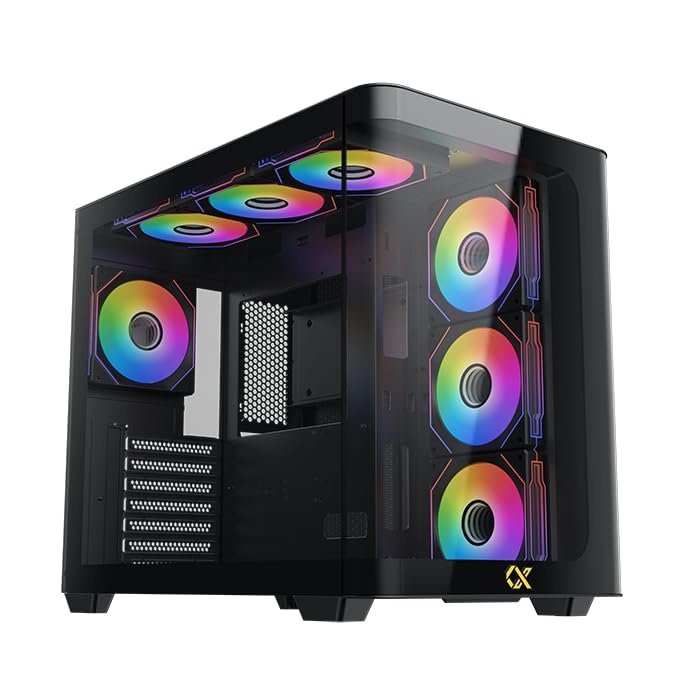
Figure 1: Xigmatek Bano EN44250 Computer Case (Exterior View)
2. Karatteristiċi
- Materjal: Constructed from high-quality steel alloy for durability and long-term use.
- Appoġġ għall-Motherboard: Compatible with E-ATX, ATX, Micro ATX, and Mini ITX motherboards.
- Sistema tat-tkessiħ: Supports both air and liquid cooling solutions, with multiple fan and radiator mounting options.
- Drive Bays: Features five internal drive bays compatible with both 2.5-inch and 3.5-inch hard drives/SSDs.
- Panel I/O: Equipped with one USB 3.0 port, two USB 2.0 ports, and HD audio jacks for seamless connectivity.
- Disinn: Stylish black finish with a curved tempered glass panel for showcasing internal components and superior airflow.
- Slots ta' Espansjoni: Includes 7 expansion slots.
- Immuntar tal-PSU: Supports rear-mounted power supplies.

Figure 2: Internal Layout of the Case
3. Istruzzjonijiet ta' Setup
3.1 Tħejjija tal-Każ
- Iftaħ il-kaxxa u neħħi l-materjali kollha tal-ippakkjar.
- Carefully remove the tempered glass side panel by unscrewing the thumb screws. Place it on a soft, flat surface to prevent scratches.
- Identify the accessory box inside the case, which contains screws, standoffs, and cable ties.
3.2 Installazzjoni tal-Motherboard
- Installa l-ilqugħ tal-I/O (jekk mhux installat minn qabel) fil-ftuħ ta' wara tal-kaxxa.
- Align your motherboard with the pre-installed standoffs. If your motherboard form factor (E-ATX, ATX, Micro ATX, Mini ITX) requires additional standoffs, install them in the appropriate holes.
- Poġġi l-motherboard bir-reqqa fuq l-istandoffs u waħħalha bil-viti pprovduti.
3.3 Installazzjoni tal-Unità tal-Provvista tal-Enerġija (PSU).
- Mount the PSU into the designated rear compartment of the case.
- Waħħal il-PSU bil-viti minn wara tal-kaxxa.
- Għaddi l-kejbils tal-enerġija meħtieġa mill-qtugħ tal-immaniġġjar tal-kejbils sal-motherboard u komponenti oħra.
3.4 Storage Drive Installation (2.5"/3.5" HDDs/SSDs)
- Locate the internal drive bays. The case supports five drive bays compatible with 2.5-inch and 3.5-inch drives.
- For 3.5-inch drives, slide the drive into the tool-less tray (if applicable) or secure it with screws.
- For 2.5-inch drives, secure them to the designated mounting points or adapters.
- Qabbad il-kejbils tad-dejta u tal-enerġija SATA ma' kull drajv installat.
3.5 Installazzjoni tas-Sistema tat-Tkessiħ (Fannijiet/Radjaturi)
The Xigmatek Bano EN44250 supports various fan and radiator configurations for optimal airflow. Refer to the diagrams below for compatible sizes and locations.

Figure 3: Fan and Radiator Mounting Options (Side View)

Figure 4: Fan and Radiator Mounting Options (Top View)
- Install case fans or liquid cooling radiators into the desired mounting positions using the appropriate screws.
- Connect fan power cables to the motherboard fan headers or a fan controller.
3.6 Konnessjonijiet tal-Panel I/O ta' Quddiem
Connect the front I/O panel cables to the corresponding headers on your motherboard. These include:
- Header USB 3.0
- Intestaturi USB 2.0
- HD Audio header
- Power switch, reset switch, HDD LED, and power LED headers

Figura 5: Il-Panel tal-I/O ta' Quddiem
4. Linji Gwida Operattivi
Once all components are installed and connected, replace the side panel. Ensure all cables are neatly managed to avoid obstructing airflow. Power on your system using the front panel power button. Monitor temperatures and fan speeds to ensure optimal cooling performance.
5. Manutenzjoni
Regular maintenance helps prolong the life of your computer components and ensures efficient cooling.
- Tindif tat-Trab: Naddaf il-filtri tat-trab (jekk preżenti) u l-komponenti interni perjodikament bl-użu ta' arja kkompressata. Kun żgur li s-sistema tkun mitfija u skonnettjata qabel ma tnaddaf.
- Ġestjoni tal-Kejbil: Review cable routing periodically to ensure no cables are obstructing fan blades or airflow paths.
- Tindif ta' barra: Imsaħ l-uċuħ ta 'barra b'artab, damp drapp. Evita prodotti tat-tindif jew solventi li joborxu.
6 Issolvi l-problemi
Jekk tiltaqa' ma' problemi waqt jew wara l-assemblaġġ, ikkunsidra l-passi komuni li ġejjin għas-soluzzjoni tal-problemi:
- Is-Sistema Mhux Tixgħel:
- Check all power connections, including the PSU to wall outlet, PSU to motherboard (24-pin and CPU 8-pin), and front panel power switch header.
- Kun żgur li s-swiċċ tal-PSU jkun fil-pożizzjoni 'ON'.
- L-ebda Output tal-Wiri:
- Verify that your monitor is connected to the graphics card (not the motherboard I/O if using a dedicated GPU).
- Erġa' poġġi l-karta grafika u l-moduli tar-RAM.
- Kwistjonijiet ta' sħana żejda:
- Ensure all case fans are spinning and correctly oriented for optimal airflow (intake/exhaust).
- Check CPU cooler installation and thermal paste application.
- Clean any dust buildup from fans and radiators.
- Il-USB/Awdjo tal-Pannell ta' Quddiem Mhux Jaħdem:
- Verify that the front panel USB and audio headers are correctly connected to the motherboard.
7. Speċifikazzjonijiet
| Karatteristika | Dettall |
|---|---|
| Manifattur | XIGMATEK Co., Ltd. |
| Numru tal-Mudell | EN44250 |
| Dimensjonijiet tal-Prodott (L x W x H) | 45 x 53.3 x 25.8 ċm |
| Piż | 9.44 kg |
| Kompatibbiltà tal-motherboard | E-ATX, ATX, Mikro ATX, Mini ITX |
| Tip ta' Każ | Torri |
| Kulur | Iswed |
| Materjal | Liga tal-Azzar |
| Immuntar tal-Provvista tal-Enerġija | Muntatura ta 'wara |
| Metodu tat-tkessiħ | Arja, Ilma |
| Clearance tal-CPU Cooler | Sa 16 ċm |
| VGA Card Length Support | Sa 41 ċm |
| PSU Length Support | Sa 22 ċm |
| Slots ta 'Espansjoni | 7 |
| Bajja ta' Drive Interni | 5 (compatible with 2.5" and 3.5" drives) |
| Portijiet I / O ta 'quddiem | 1x USB 3.0, 2x USB 2.0, HD Audio |
8. Garanzija u Appoġġ
For warranty information and technical support, please refer to the official Xigmatek webis-sit jew ikkuntattja lill-bejjiegħ lokali tiegħek. Żomm il-prova tax-xiri tiegħek għal talbiet ta' garanzija.
Riżorsi onlajn: www.xigmatek.com


