1. Introduzzjoni
Thank you for choosing the OMAIC Rechargeable Voice Remote Control. This manual provides detailed instructions for the setup, operation, and maintenance of your new remote controls (models BN59-01432A and BN59-01312A). These remotes are designed to be compatible with a wide range of Samsung Smart TVs, offering convenient control and voice functionality.

Image: The OMAIC BN59-01432A and BN59-01312A remote controls.
2. Kontenut tal-Pakkett
Il-pakkett tiegħek għandu jkun fih l-oġġetti li ġejjin:
- 1 x OMAIC BN59-01432A Rechargeable Voice Remote Control
- 1 x OMAIC BN59-01312A Voice Remote Control
- 1 x Manwal tal-Utent (dan id-dokument)
3. Speċifikazzjonijiet
| Karatteristika | Deskrizzjoni |
|---|---|
| Brand | OMAIC |
| Numri tal-Mudell | BN59-01432A, BN59-01312A |
| Karatteristika Speċjali | Tiftix bil-Vuċi |
| Kulur | Iswed |
| Apparati Max Appoġġjati | 2 (per remote) |
| Apparati Kompatibbli | Samsung Televisions, Samsung Smart TVs |
| Konnettività | Wireless |
| Rechargeable (BN59-01432A) | Port USB Type-C |
| Distanza Operattiva | Sa 45 pied (madwar 13.7 metri) |
| Ħin ta' Rispons | 0.1 sekonda |

Image: Key features and specifications of the OMAIC remote controls.
4. Twaqqif u Tqabbil
Before first use, please ensure the BN59-01432A rechargeable remote is fully charged. Charging typically takes 1-2 hours via its USB Type-C port.
4.1. Tqabbil tal-Kontroll mill-bogħod
Both BN59-01432A and BN59-01312A remotes use the same pairing method:
- Kun żgur li t-TV Smart Samsung tiegħek huwa mixgħul.
- Ipponta l-kontroll remot lejn it-TV tiegħek.
- Agħfas u żomm il- Lura (
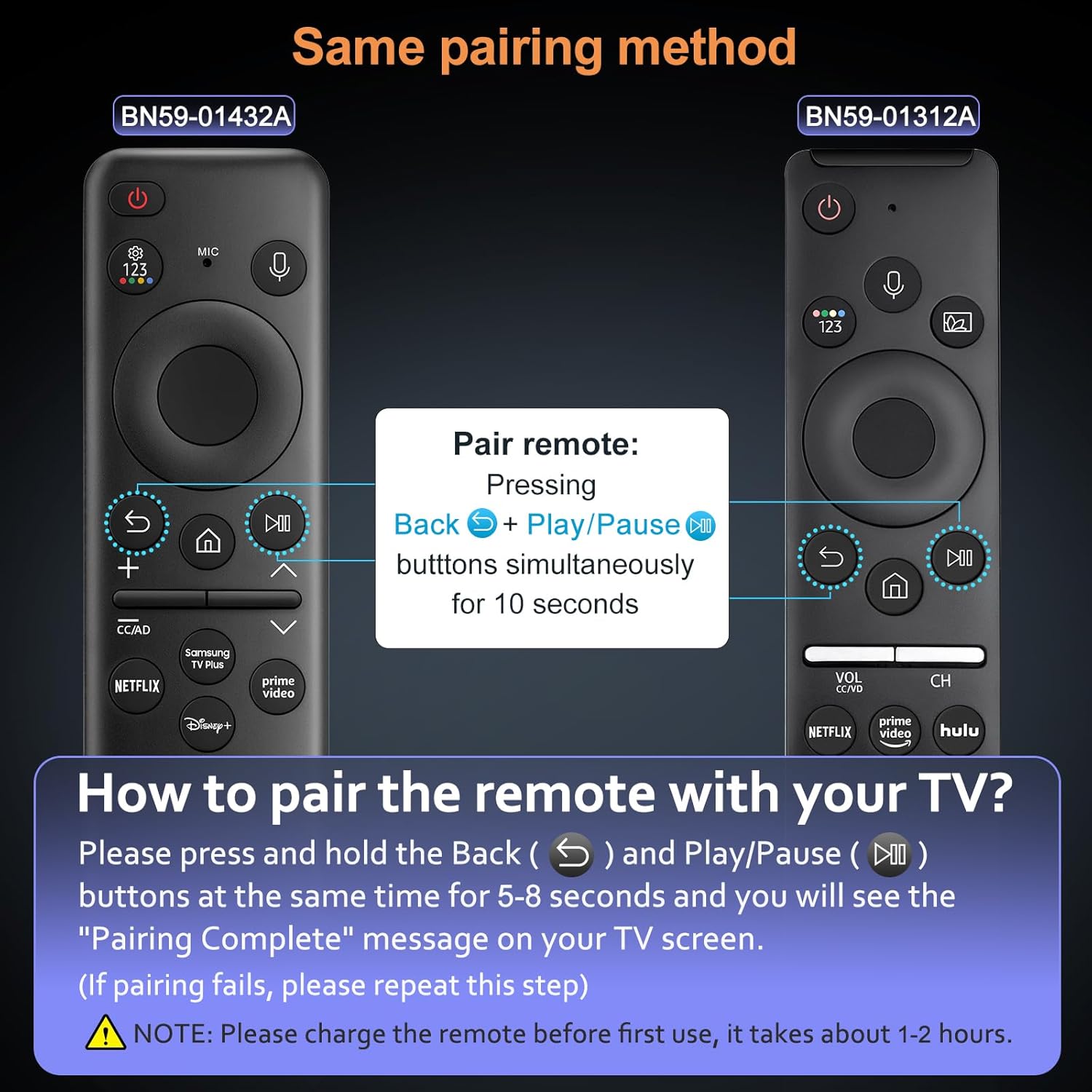 ) u Play/Pawsa () buttons simultaneously for 5-8 seconds.
 - A "Pairing Complete" message should appear on your TV screen, indicating successful pairing.
Nota:
- If pairing fails, please repeat the steps.
- The voice function requires your TV to support this feature. Please check your TV settings if the voice function does not work after pairing.
Image: Visual guide for pairing the OMAIC remote control with a Samsung TV.
5. Istruzzjonijiet Operattivi
5.1. Funzjoni tal-Vuċi
The voice function allows you to control your TV using voice commands. To use this feature:
- Agħfas u żomm il- Mikrofonu buttuna (
 ) fuq il-kontroll mill-bogħod.
 - Speak your command clearly into the remote. For example, "Turn the volume up to 20" or "Open Netflix."
- Release the Microphone button when you are finished speaking.
Ensure your TV's voice assistant is enabled and configured for optimal performance.
Image: User demonstrating the voice control feature of the remote.
5.2. Buttuni ta' shortcut
Both remote models feature dedicated shortcut buttons for quick access to popular streaming services:
- Netflix: Directly opens the Netflix application.
- Prim Video: Directly opens the Amazon Prime Video application.
- Hulu: Directly opens the Hulu application.
- Samsung TV Plus / Disney+: Depending on the remote model, one of these buttons will directly open the respective application.

Image: Shortcut buttons for popular streaming services on the OMAIC remote controls.
6. Charging (BN59-01432A Only)
The BN59-01432A remote control is rechargeable via a USB Type-C port, eliminating the need for frequent battery replacements.
6.1. Proċedura tal-Iċċarġjar
- Locate the USB Type-C port on the bottom edge of the BN59-01432A remote control.
- Connect a standard USB Type-C charging cable (not included) to the remote's port.
- Qabbad it-tarf l-ieħor tal-kejbil ma' sors ta' enerġija USB (eż., adapter tal-ħajt, port USB tal-kompjuter).
- The remote's indicator light (if present) may show charging status.
- Ċarġ sħiħ tipikament jieħu 1-2 sigħat.
It is recommended to fully charge the remote before its first use to ensure optimal battery life.

Image: The USB Type-C charging port on the BN59-01432A remote control.
7. Kompatibilità
These OMAIC remote controls are compatible with a wide range of Samsung Smart TVs. The voice function specifically requires your TV to support voice commands.
7.1. Compatible Samsung TV Models (Partial List)
- QE1C, QN990C, LST9C, S90C, Q80C, Q80CD, CU8000D, Q70CD, QN85CD, QN90CD, Q60C, QN800C, QN900C, CU8000, QN850C, Q70C, QN85C, QN90C, S95C
- Q80D, Q70D, Q60D, DU8000, QN90D, QN85D, S90D, S95D, QN800D, QN900D, LS03D, LS03B, LS03C
- M70C, S9, M80C, M50C, LSP3B, G85SB, G7, G70B, G65B, M70B, M8
- And other Samsung Smart TV models that support BN59-01330A, BN59-01312B, BN59-01312D, BN59-01312E, BN59-01312F, BN59-01330B, BN59-01330C, BN59-01330N, BN59-01330Q, BN59-01329A, BN59-01329C, BN59-01329F, BN59-01455A, BP59-00149A, BN59-01456A, BN59-01385A, BN59-01391A, BN59-01330H, BN59-01363A, BN59-01357A remotes.
Please verify your TV's model number and voice function support for full compatibility.

Image: OMAIC remotes compatible with various Samsung Smart TV models.
8 Issolvi l-problemi
| Problema | Kawża Possibbli | Soluzzjoni |
|---|---|---|
| Il-bogħod mhux qed jitqabbad | Incorrect pairing procedure, low battery (BN59-01432A) | Ensure BN59-01432A is charged. Repeat pairing steps (hold Back and Play/Pause for 5-8 seconds). Ensure TV is on. |
| Voice function not working | TV does not support voice function, remote not paired correctly, microphone blocked | Verify your TV model supports voice control. Re-pair the remote. Ensure nothing is obstructing the microphone on the remote. |
| Remote ma jirrispondix | Low battery (BN59-01432A), remote out of range, interference | Charge BN59-01432A. Move closer to the TV (within 45 feet). Remove any obstructions between the remote and TV. |
| Shortcut buttons not working | App not installed on TV, TV not connected to internet | Ensure the respective app (Netflix, Prime Video, Hulu, etc.) is installed and updated on your Samsung TV. Verify your TV has an active internet connection. |
9. Manutenzjoni
- Tindif: Uża drapp artab u niexef biex tnaddaf il-kontroll remot. Tużax prodotti tat-tindif likwidi jew materjali li joborxu.
- Ħażna: Aħżen il-kontroll remot f'post frisk u niexef 'il bogħod mix-xemx diretta u minn temperaturi estremi.
- Battery Care (BN59-01432A): For optimal battery life, avoid fully discharging the remote frequently. Charge it when the battery indicator is low.
- Evita Qtar: Ipproteġi r-remote minn waqgħat u impatti, li jistgħu jagħmlu ħsara lill-komponenti interni.
10. Garanzija u Appoġġ
OMAIC provides a 90-day after-sales service for this product. If you encounter any issues or have questions regarding your remote controls, please contact our customer support team.
We are committed to responding within 12 hours and will endeavor to resolve any problems as quickly as possible.
For support, please refer to the contact information provided with your purchase or visit the OMAIC brand store on Amazon.


