1. Introduzzjoni
Thank you for choosing the OKP Life K5 Robot Vacuum. This intelligent cleaning device is designed to provide efficient and convenient floor cleaning for your home. Featuring Wi-Fi connectivity and remote control capabilities, the K5 offers multiple cleaning modes and smart navigation to ensure a thorough clean. Please read this manual carefully before using the product to ensure proper operation and maintenance.
2. Kontenut tal-Pakkett
Iċċekkja li l-oġġetti kollha huma preżenti u f'kundizzjoni tajba meta tiftaħ il-pakkett.
- OKP Life K5 Robot Vacuum Cleaner (1 unit)
- Kontroll mill-bogħod (unità waħda)
- Charging Dock (1 unit)
- Adapter tal-Enerġija (unità 1)
- Side Brushes (4 units, 2 for immediate use, 2 spares)
- Cleaning Tool (1 unit)
- Manwal għall-Utent (Dan id-dokument)

Image: The OKP Life K5 Robot Vacuum, its remote control, and a set of four side brushes, illustrating the typical package contents.
3. Prodott Aktarview
3.1 Komponenti tal-Vakwu Robotiku
Familiarize yourself with the main parts of your K5 Robot Vacuum.

Immaġni: Minn fuq għal isfel view of the OKP Life K5 Robot Vacuum, highlighting its sleek, disc-shaped design and central power button.
- Main Body: Contains the motor, dustbin, and navigation sensors.
- Power Button/Indicator Light: For manual operation and status indication.
- Dustbin: 550ml capacity for collecting debris.
- Side Brushes: Two rotating brushes to sweep debris into the suction path.
- Driving Wheels: For movement across various floor types.
- Charging Contacts: For automatic recharging at the charging dock.
- Sensors: Anti-drop and anti-collision sensors for safe navigation.
3.2 Kontroll mill-Bogħod
The remote control provides convenient access to various cleaning functions.

Image: A close-up of the white remote control for the OKP Life K5 Robot Vacuum, showing its various function buttons for control and mode selection.
- Power Button: Turns the robot on/off or starts/pauses cleaning.
- Directional Buttons: Manually control the robot's movement.
- Home Button: Sends the robot back to the charging dock.
- Mode Selection Buttons: Switch between Auto, Spot, Edge, and Zigzag cleaning modes.
- Suction Power Adjustment: Adjusts the vacuum's suction strength.
4. Setup
4.1 Tħejjija tar-Robot
- Neħħi l-films u l-istikers protettivi kollha mir-robot u mid-dock tal-iċċarġjar.
- Attach the side brushes by pressing them onto the square posts until they click into place.
4.2 Tqegħid tal-Baċir tal-Iċċarġjar
- Poġġi l-istazzjon tal-iċċarġjar ma' ħajt fuq wiċċ iebes u livellat.
- Kun żgur li hemm mill-inqas 0.5 metri (1.6 piedi) ta' spazju vojt fuq iż-żewġ naħat tal-moll u 1.5 metri (4.9 piedi) quddiemu.
- Plug the power adapter into the charging dock and then into a wall outlet.
4.3 Iċċarġjar inizjali
For optimal performance, fully charge the robot before its first use.
- Manually place the robot onto the charging dock, ensuring the charging contacts align.
- The indicator light on the robot will show charging status (e.g., breathing light).
- Ċarġ sħiħ tipikament jieħu 4-5 sigħat.

Image: The OKP Life K5 Robot Vacuum automatically navigating back to its charging dock, demonstrating its self-charging capability when the battery is low.
4.4 Konnessjoni mal-Wi-Fi u l-App
The OKP Life App allows for advanced control and scheduling.
- Download the "OKP Life" app from the App Store (iOS) or Google Play Store (Android).
- Irreġistra kont u illoggja.
- Follow the in-app instructions to add your K5 robot vacuum. Ensure your Wi-Fi network is 2.4GHz.
- The robot can also be connected to Amazon Alexa and Google Assistant for voice control. Refer to the app for detailed instructions on integrating with these smart home platforms.

Image: A user interacting with the OKP Life K5 Robot Vacuum via a smartphone app, with icons indicating compatibility with Google Assistant and Amazon Alexa, and a note about 2.4GHz Wi-Fi connectivity.
5. Istruzzjonijiet Operattivi
5.1 Tibda Tindif
- Minn Robot: Agħfas il-buttuna tal-qawwa fuq ir-robot darba.
- Mill-Kontroll mill-Bogħod: Agħfas il-buttuna tal-enerġija fuq ir-remote.
- Mill-App: Tap the "Start Cleaning" button in the OKP Life app.
- Kmand tal-Vuċi: Use a connected smart assistant (e.g., "Alexa, turn on Robot Vacuum").
5.2 Pausing/Resuming a Clean
- Press the power button on the robot or remote, or use the app/voice command.
- Press again to resume cleaning.
5.3 Sending Robot to Charging Dock
- Press the "Home" button on the remote control or in the app.
- The robot will automatically return to its charging dock when the battery is low.
5.4 Modi tat-Tindif
The K5 offers multiple cleaning modes to suit different needs, selectable via the remote control or app.
- Tindif Awtomatiku: The robot intelligently navigates and cleans the entire accessible area. This is the default mode.
- Tindif tal-Post: The robot cleans a concentrated area in a spiral pattern, ideal for localized dirt or spills.
- Tindif tax-Xfer: Ir-robot inaddaf tul il-ħitan u t-truf tal-għamara biex jiżgura kopertura bir-reqqa.
- Tindif biż-Żigżag: The robot cleans in a systematic back-and-forth pattern, covering the maximum area and reducing missed spots.

Image: The OKP Life K5 Robot Vacuum cleaning a room, with an overlay illustrating its efficient Z-Shape (zigzag) cleaning path, designed to maximize coverage and minimize missed areas.
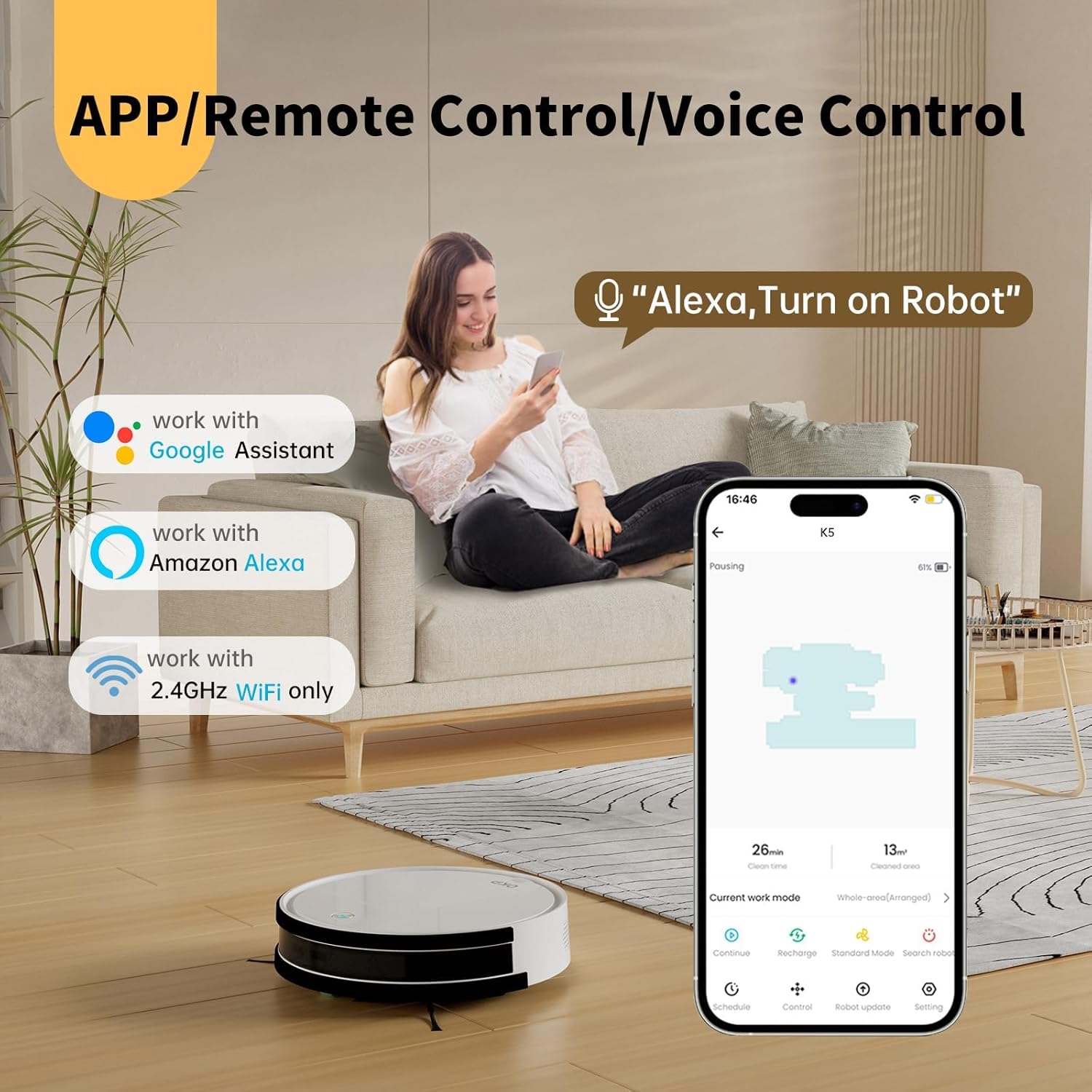
Image: The OKP Life K5 Robot Vacuum demonstrating its suction power, with illustrations of various debris types (debris, dust, beans, hair) being effectively vacuumed, indicating its versatility for different cleaning scenarios.
6. Manutenzjoni
Manutenzjoni regolari tiżgura prestazzjoni ottimali u testendi l-ħajja tal-vacuum cleaner robot tiegħek.
6.1 Tbattil tal-landa taż-żibel
- Agħfas il-buttuna tal-ftuħ tal-kontenitur tat-trab u iġbed il-kontenitur tat-trab 'il barra.
- Iftaħ l-għatu tal-landa taż-żibel u vojta l-kontenut tiegħu ġo landa taż-żibel.
- Rinse the dustbin with water if necessary (ensure it is completely dry before reinserting).
6.2 Tindif tal-Filtru
- Neħħi l-filtru mill-kontenitur tat-trab.
- Tektek il-filtru bil-mod biex tneħħi t-trab. Taħsilx il-filtru HEPA bl-ilma.
- Replace the filter every 3-6 months, depending on usage.
6.3 Tindif tal-Pniezel tal-Ġenb
- Neħħi l-ixkupilji tal-ġenb billi tiġbedhom 'il fuq.
- Neħħi kwalunkwe xagħar jew debris imgeżwer madwar il-pniezel.
- Reattach the brushes. Replace if worn or damaged.
6.4 Tindif tas-Sensuri u l-Kuntatti tal-Iċċarġjar
- Wipe the anti-drop sensors, anti-collision sensors, and charging contacts on both the robot and the charging dock with a clean, dry cloth.
- Keep these areas clean to ensure proper navigation and charging.
7 Issolvi l-problemi
If your robot vacuum encounters issues, refer to the following common problems and solutions.
| Problema | Kawża Possibbli | Soluzzjoni |
|---|---|---|
| Robot ma jixgħelx. | Batterija baxxa; Mitfi l-iswiċċ tal-enerġija. | Charge the robot; Ensure the main power switch (if present) is ON. |
| Ir-robot ma jistax jiċċarġja. | Kuntatti tal-iċċarġjar maħmuġin; Id-dock tal-iċċarġjar mhux imħaddem. | Clean charging contacts; Ensure charging dock is plugged in and has power. |
| Ir-robot jeħel spiss. | Obstacles; Sensors dirty. | Clear cables, rugs, or small objects; Clean sensors. |
| Prestazzjoni fqira tat-tindif. | Kontenitur tat-trab mimli; Filtru misdud; Xkupilji mikulin. | Vojta l-kontenitur tat-trab; Naddaf/ibdel il-filtru; Naddaf/ibdel ix-xkupilji tal-ġenb. |
| Ma nistax nikkonnettja mal-Wi-Fi/App. | Incorrect Wi-Fi band (only 2.4GHz supported); Incorrect password; Robot too far from router. | Kun żgur li għandek Wi-Fi ta' 2.4GHz; Erġa' daħħal il-password; Mexxi r-robot eqreb lejn ir-router. |
Jekk il-problema tippersisti, jekk jogħġbok ikkuntattja l-appoġġ għall-klijenti.
8. Speċifikazzjonijiet
| Brand | OKP Ħajja |
| Isem tal-Mudell | K5 |
| Qawwa tal-ġbid | 2100 PA |
| Kapaċità ta 'Dustbin | 550 ml |
| Sors tal-Enerġija | Mħaddma bil-batterija |
| Fattur tal-Formola | Forma ta' diska |
| Karatteristiċi Speċjali | Smart, Edge Cleaning, Obstacle Avoidance, Selective Room Cleaning, Bagless, Wi-Fi Connectivity, Remote Control, Voice Control (Alexa, Google Assistant), Automatic Charging, Multiple Cleaning Modes (Auto/Spot/Edge/Zigzag) |
| Dimensjonijiet (Approx.) | 280mm (width) x 77mm (height) / 11.02 inches (width) x 3 inches (height) |
9. Garanzija u Appoġġ
OKP Life products come with a standard manufacturer's warranty. Please refer to the warranty card included in your package or visit the official OKP Life websit għal termini u kundizzjonijiet dettaljati tal-garanzija.
For technical support, troubleshooting assistance, or to order replacement parts, please contact OKP Life customer service through the contact information provided on their official website or within the OKP Life app.


