1. Introduzzjoni
This manual provides detailed instructions for the installation, operation, and maintenance of your Xigmatek Aqua V AIR Arctic Mid-Tower PC Case. Please read this manual thoroughly before beginning any installation to ensure proper setup and safe operation. Retain this manual for future reference.
2. Informazzjoni dwar is-Sigurtà
Osserva l-prekawzjonijiet ta' sigurtà li ġejjin waqt l-installazzjoni u t-tħaddim:
- Dejjem skonnettja l-provvista tal-enerġija mis-sokit tal-ħajt qabel ma tinstalla jew tneħħi xi komponenti.
- Ilbes ċinga tal-polz anti-statika biex tevita ħsara minn skarika elettrostatika (ESD) lil komponenti sensittivi.
- Handle components carefully. Avoid touching pins or circuit boards directly.
- Kun żgur li jkun hemm ventilazzjoni xierqa madwar il-kaxxa tal-PC biex tevita li tissaħħan iżżejjed.
- Żomm partijiet żgħar u għodda 'l bogħod mit-tfal.
- Tippruvax timmodifika l-kaxxa jew il-komponenti tagħha, għax dan jista' jannulla l-garanzija tiegħek u joħloq riskji għas-sigurtà.
3. Kontenut tal-Pakkett
Ivverifika li l-oġġetti kollha huma preżenti fil-pakkett:
- Xigmatek Aqua V AIR Arctic Mid-Tower PC Case
- Accessory kit (screws, standoffs, cable ties)
- Manwal għall-Utent (dan id-dokument)
If any items are missing or damaged, contact your retailer or Xigmatek support.
4. Prodott Aktarview
The Xigmatek Aqua V AIR Arctic is a mid-tower PC case designed for high-performance gaming configurations. It features tempered glass panels for component visibility and optimized airflow with pre-installed ARGB fans.

Figura 4.1: Quddiem-xellug view of the Xigmatek Aqua V AIR Arctic PC case, showcasing the tempered glass front and side panels, and the pre-installed ARGB fans.

Figura 4.2: Wara view of the PC case, showing the I/O shield cutout, expansion slots, and rear fan mount.
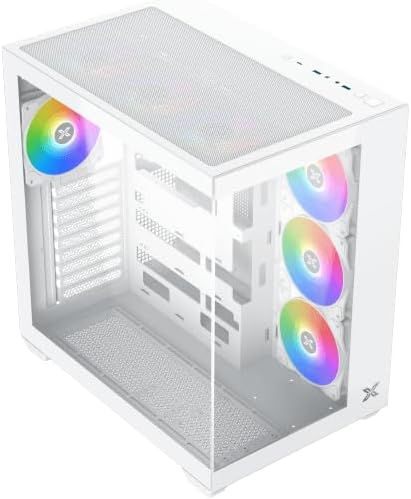
Figura 4.3: Angolat minn fuq għal isfel view, highlighting the top mesh panel for additional cooling and the internal layout.
5. Setup u Installazzjoni
Follow these steps to install your PC components into the Xigmatek Aqua V AIR Arctic case.
5.1. Tħejjija tal-Każ
- Poġġi l-kaxxa fuq wiċċ ċatt u stabbli.
- Remove the tempered glass side panel by unscrewing the thumb screws at the rear and carefully sliding it off. Place it on a soft, non-abrasive surface to prevent scratches.
- Remove the opposite steel side panel by unscrewing the thumb screws and sliding it off.
5.2. Installazzjoni tal-Motherboard
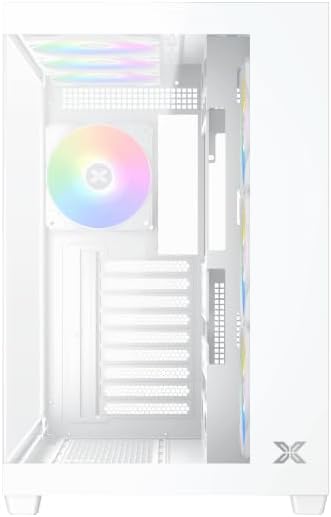
Figura 5.1: Intern view of the case, illustrating the motherboard mounting area and cable routing cutouts.
- Installa l-ilqugħ tal-I/O fil-qtugħ fuq wara tal-kaxxa.
- Align your motherboard with the pre-installed standoffs. Ensure the standoffs match your motherboard's form factor (ATX, Micro ATX).
- Secure the motherboard using the provided screws from the accessory kit. Do not overtighten.
5.3. Installazzjoni tal-Unità tal-Provvista tal-Enerġija (PSU)
- Locate the PSU mounting bracket at the bottom rear of the case.
- Żerżaq il-PSU tiegħek fil-kompartiment apposta minn wara tal-kaxxa.
- Secure the PSU to the case using the screws provided with your power supply.
5.4. Installazzjoni tad-Drajv tal-Ħażna
The case supports multiple storage drives:
- SSDs ta' 2.5": Mount directly to the SSD trays located behind the motherboard tray. Secure with screws.
- HDDs ta' 3.5": Install into the drive cage located beneath the PSU shroud. Slide the drive into the tray and secure with screws.
5.5. Installazzjoni tal-Karta tal-Grafika (GPU) u l-Karta tal-Espansjoni
- Neħħi l-għata tas-slott ta' espansjoni meħtieġa minn wara tal-kaxxa.
- Daħħal il-karta grafika tiegħek jew karti ta' espansjoni oħra fis-slots PCIe xierqa fuq il-motherboard.
- Secure the cards with the provided screws.
5.6. Ġestjoni tal-Kejbil
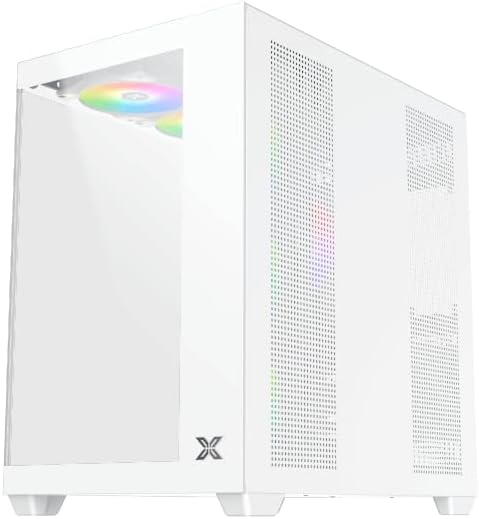
Figura 5.2: View behind the motherboard tray, illustrating the ample space and tie-down points for effective cable management.
Uża l-qtugħ tar-rotta tal-kejbils u l-punti ta' rbit wara t-trej tal-motherboard biex torganizza l-kejbils. Dan itejjeb il-fluss tal-arja u l-estetika.
- Connect all necessary power cables from the PSU to the motherboard, GPU, and storage drives.
- Connect front panel cables (USB, audio, power/reset switches, LED indicators) to the corresponding headers on your motherboard. Refer to your motherboard manual for specific header locations.
- Connect the ARGB fan cables to the integrated fan controller or directly to your motherboard's ARGB headers if available.
5.7. Appoġġ għall-Fann u r-Radjatur
The Xigmatek Aqua V AIR Arctic comes with 7 pre-installed 120mm ARGB fans. Additional cooling options are available:
- Quddiem: Supports up to 3 x 120mm or 2 x 140mm fans / 240mm, 280mm, 360mm radiators.
- Fuq: Supports up to 3 x 120mm or 2 x 140mm fans / 240mm, 280mm, 360mm radiators.
- Wara: Jappoġġja fann wieħed ta' 120mm.
- Qiegħed: Supports up to 3 x 120mm fans.
Ensure proper fan orientation for optimal airflow (intake at front/bottom, exhaust at rear/top).
6. Joperaw
Once all components are installed and cables are connected, replace the side panels. Connect your monitor, keyboard, mouse, and power cable. Press the power button on the front panel to start your system.
The pre-installed ARGB fans can be controlled via the integrated controller (if present) or through compatible motherboard software, allowing customization of lighting effects and fan speeds.
7. Manutenzjoni
Manutenzjoni regolari tgħin biex tiżgura prestazzjoni ottimali u lonġevità tal-komponenti tal-PC tiegħek.
- Tindif tat-Trab: Periodically clean dust filters (top, front, bottom) to maintain good airflow. Use compressed air to remove dust from inside the case and components.
- Tindif ta' barra: Imsaħ l-uċuħ ta 'barra b'artab, damp drapp. Evita prodotti tat-tindif jew solventi li joborxu.
- Verifika tal-Ġestjoni tal-Kejbils: Occasionally check cable routing to ensure no cables are obstructing fans or airflow.
8 Issolvi l-problemi
Jekk tiltaqa' ma' problemi, irreferi għall-passi komuni li ġejjin għas-soluzzjoni tal-problemi:
- Is-sistema mhux qed tixgħel:
- Kun żgur li l-PSU hija mixgħula u konnessa sew mas-sokit tal-ħajt.
- Verify all power cables (24-pin ATX, 8-pin CPU, PCIe, SATA) are securely connected.
- Iċċekkja l-konnessjonijiet tas-swiċċ tal-enerġija tal-pannell ta' quddiem mal-motherboard.
- L-ebda output tal-wiri:
- Ensure the monitor cable is connected to the graphics card (not the motherboard I/O if using a dedicated GPU).
- Erġa' poġġi l-karta grafika u l-moduli tar-RAM.
- Fans not spinning or ARGB not working:
- Iċċekkja l-konnessjonijiet tal-enerġija tal-fann mal-motherboard jew mal-kontrollur tal-fann.
- Verify ARGB connections to the controller or motherboard headers.
- Ensure any fan control software or BIOS settings are correctly configured.
For more complex issues, consult your component manuals or contact Xigmatek technical support.
9. Speċifikazzjonijiet
| Karatteristika | Dettall |
|---|---|
| Isem tal-Mudell | Aqua V AIR Arctic |
| Numru tal-Mudell | EN45837 |
| Tip ta' Każ | Nofs it-Torri |
| Kompatibbiltà tal-motherboard | ATX, Mikro ATX |
| Materjal | Steel Alloy, Tempered Glass |
| Kulur | Abjad |
| Fannijiet installati minn qabel | 7 x 120mm Fannijiet ARGB |
| Max GPU Tul | 410 mm |
| Portijiet USB | 3 |
| Piż | 8.8 Kilogrammi |
10. Garanzija u Appoġġ
Xigmatek products are manufactured to high quality standards. For warranty information, please refer to the warranty card included with your product or visit the official Xigmatek website. For technical support or inquiries, please contact Xigmatek customer service through their official channels.
Uffiċjali Websit: www.xigmatek.com


