Introduzzjoni
This user manual provides comprehensive instructions for the installation, operation, and maintenance of your XTRARM TiTon 120 cm TV Wall Mount. Designed for medium to large televisions and monitors, this robust wall mount supports devices up to 40 kg and is compatible with various VESA dimensions. Its extended wall distance and multiple pivot points allow for flexible placement, including corner installations. The integrated cable management system helps maintain a tidy setup. Please read this manual thoroughly before installation to ensure safe and correct usage.
Kontenut tal-Pakkett
Qabel tibda l-installazzjoni, jekk jogħġbok ivverifika li l-komponenti kollha elenkati hawn taħt huma preżenti fil-pakkett tiegħek.

Figura 1: The XTRARM TiTon 120 cm TV Wall Mount system, including the main mount assembly and a comprehensive set of mounting hardware, a drilling template, and a spirit level.
- XTRARM TiTon 120 cm TV Wall Mount Assembly
- Standard mounting hardware for TV attachment
- Standard mounting hardware for wall attachment (screws, anchors)
- Mudell tat-tħaffir
- Small spirit level
- Irbit tal-kejbil għall-ġestjoni tal-kejbil
Setup u Installazzjoni
Proper installation is crucial for the safety and stability of your television. Please follow these steps carefully. It is recommended to have at least two people for the installation process, especially when mounting the TV.
1. Kontrolli ta 'qabel l-installazzjoni
- Kompatibilità tal-ħajt: Ensure the wall can support the combined weight of the mount and your TV. Consult a professional if unsure.
- Kompatibbiltà tat-TV: Verify your TV's VESA mounting pattern (100x100mm to 400x400mm) and weight (up to 40 kg).
- Għodod Meħtieġa: Drill, stud finder (if applicable), screwdriver, pencil, measuring tape.
2. Installazzjoni tal-Immonta tal-Ħajt
- Iddetermina Post tal-Immuntar: Choose a suitable location on the wall, considering viewing angles and cable access. The mount allows for a large wall distance of 11.4 cm to 120 cm.
- Immarka t-Toqob tat-Tħaffir: Use the provided drilling template and spirit level to mark the precise locations for drilling holes on the wall.
- Drill toqob: Drill holes according to the marked locations and insert appropriate wall anchors (included).
- Waħħal il-Pjanċa tal-Ħajt: Securely attach the wall plate of the mount to the wall using the provided screws. Ensure it is level and firmly fixed.

Figura 2: Illustration of the wall mount's placement area, demonstrating its adaptability for various wall types and room layouts.
3. Installazzjoni tal-Bracket tat-TV
- Waħħal il-Brakketti mat-TV: Attach the VESA mounting brackets to the back of your TV using the appropriate screws and spacers from the included hardware kit. Ensure the brackets are securely fastened and aligned with your TV's VESA pattern.
- Immuntar tat-TV mal-Pjattaforma tal-Ħajt: Carefully lift the TV and hook the attached brackets onto the wall mount's VESA plate. Secure the TV to the mount using the locking mechanisms or screws as per the detailed instructions in the product's assembly guide.

Figura 3: A television securely mounted on the XTRARM TiTon wall mount, extended from the wall to demonstrate its reach and flexibility.

Figura 4: Angolat view of the television mounted on the XTRARM TiTon, showcasing its robust arm structure and how it supports the display.
Tħaddim tal-Muntanja
The XTRARM TiTon mount offers extensive adjustability for optimal viewing.
- Estensjoni: The mount features a 120 cm long swivel arm, allowing you to extend your TV significantly from the wall.
- Swivel/Pan: The mount can swivel 180 degrees, allowing you to adjust the TV's horizontal angle.
- Mejjel: Adjust the vertical tilt of your TV by up to 15 degrees to reduce glare and optimize viewing.
- Rotazzjoni: The mount supports rotation from landscape to portrait format, providing versatility for different content.
- Ġestjoni tal-Kejbil: Utilize the integrated cable guides and included cable ties to route and organize your TV cables neatly along the mount arm.
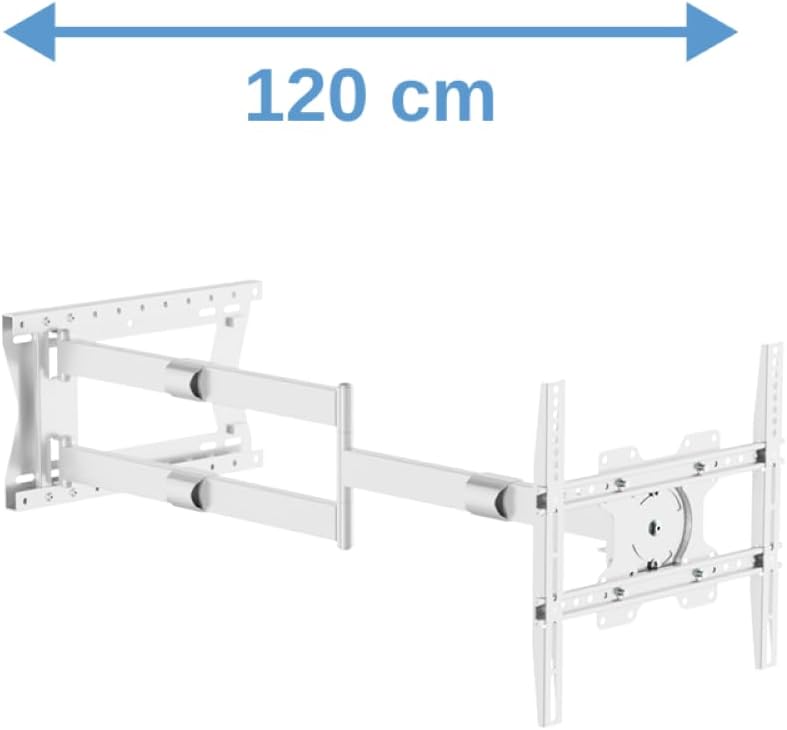
Figura 5: The wall mount fully extended, illustrating its impressive 120 cm reach from the wall.

Figura 6: A close-up of the VESA plate demonstrating the tilt and rotation capabilities of the mount.

Figura 7: The wall mount in its retracted position, demonstrating how it can be folded close to the wall for a compact profile.
Manutenzjoni
To ensure the longevity and safe operation of your XTRARM TiTon wall mount, follow these maintenance guidelines:
- Tindif regolari: Dust the mount periodically with a soft, dry cloth. Avoid abrasive cleaners or solvents.
- Iċċekkja l-Konnessjonijiet: Annually, or if you notice any instability, check all screws and bolts securing the mount to the wall and the TV to the mount. Tighten any loose connections.
- Lubrikazzjoni: The moving parts are designed for smooth operation. If any movement becomes stiff over time, a small amount of silicone-based lubricant can be applied to the pivot points, avoiding contact with electrical components.
Issolvi l-problemi
If you encounter any issues with your XTRARM TiTon wall mount, refer to the following common problems and solutions:
| Problema | Kawża Possibbli | Soluzzjoni |
|---|---|---|
| It-TV mhux livellat wara l-installazzjoni. | Wall plate or TV brackets are not perfectly level. | Adjust the fine-tuning level adjustment on the VESA plate (if available) or slightly loosen and re-level the wall plate/TV brackets before re-tightening. Use the included spirit level. |
| Mount is difficult to move or adjust. | Il-ġonot huma ssikkati wisq jew jeħtieġu lubrikazzjoni. | Check for any adjustment screws on the joints and loosen slightly if necessary. Apply a small amount of silicone-based lubricant to the pivot points. |
| It-TV ma joqgħodx mal-muntatura. | Mudell VESA mhux korrett jew il-piż tat-TV jaqbeż il-kapaċità. | Verify your TV's VESA pattern is within 100x100mm to 400x400mm and its weight is under 40 kg. If not, the mount is incompatible. |
| Cables are messy. | Cable management not utilized. | Use the integrated cable guides on the mount arm and the provided cable ties to bundle and route cables neatly. |
Speċifikazzjonijiet
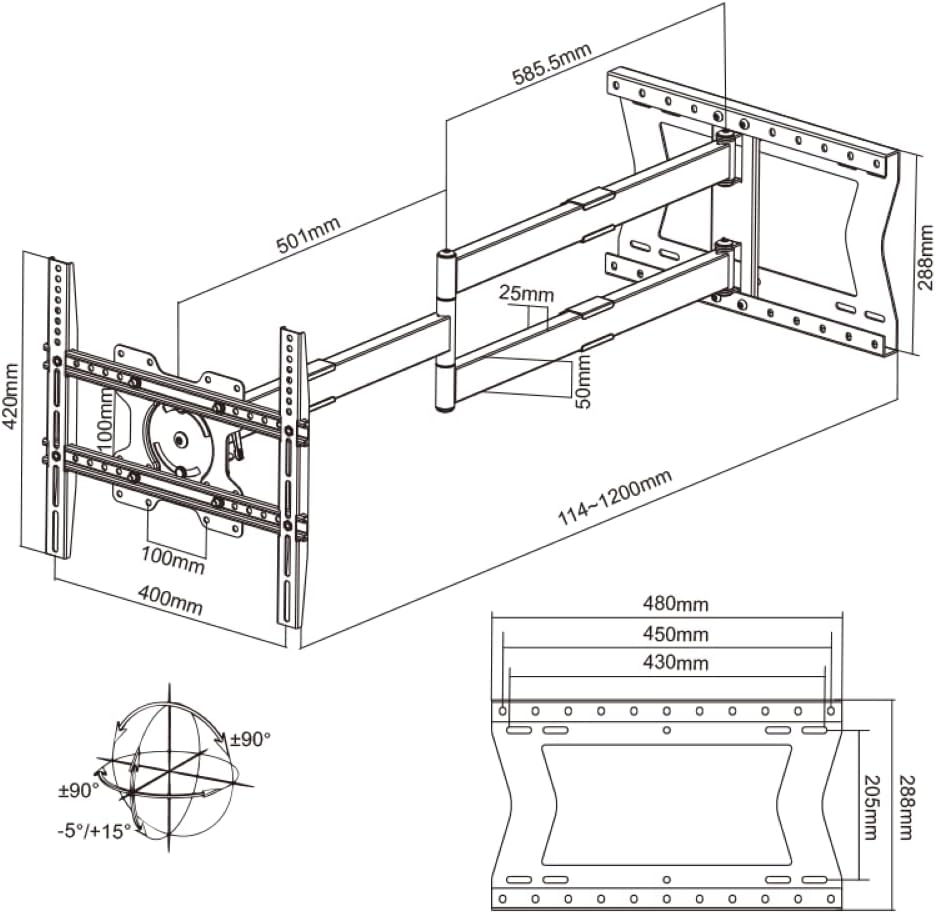
Figura 8: Detailed technical drawing showing the dimensions, VESA compatibility, and range of motion for the XTRARM TiTon wall mount.
| Karatteristika | Dettall |
|---|---|
| Brand | XTRARM |
| Numru tal-Mudell | XTR-LA2075 |
| Kulur | Abjad |
| Materjal | Metall |
| Apparati Kompatibbli | TV, Television, Monitor, LCD (Samsung, Sony, LG, Panasonic, Philips, Sharp, etc.) |
| Daqs Minimu Kompatibbli | 42 Pulzier |
| Daqs Massimu Kompatibbli | 75 Pulzier |
| Kapaċità massima tal-piż | 40 kg |
| Kompatibilità VESA | 100x100mm sa 400x400mm |
| Tip ta' Moviment | Articulate, Swivel, Pan, Tilt, Rotate |
| Angolu ta 'Mejjel Massimu | 15 grad |
| Angolu li jdur | 180 grad |
| Wall Distance (Min-Max) | 11.4-il ċm - 120 ċm |
| Manifattur | usa2nl B.V. |
| Pajjiż ta' Oriġini | Iċ-Ċina |
Garanzija u Appoġġ
Your XTRARM TiTon TV Wall Mount comes with the following warranty and support information:
- Garanzija tal-Manifattur: 5 snin.
- Disponibbiltà ta' Spare Parts: 2 snin.
- For further assistance or inquiries, please visit the official XTRARM store: XTRARM Official Store.
Vidjows Uffiċjali tal-Prodott
There are no official product videos available from the seller for this specific model at this time.


