1. Prodott Aktarview
The FIFINE K688CT+H8 is a complete podcasting and recording solution, featuring a high-quality dynamic microphone, a robust boom arm, and comfortable studio monitoring headphones. This kit is designed to provide clear, professional-grade audio for various applications, including podcasting, streaming, voice-overs, and music recording.

Image 1.1: Complete FIFINE K688CT+H8 Podcast Microphone Kit, including the dynamic microphone, boom arm, and studio headphones.
Karatteristiċi ewlenin:
- Authentic Sound Integrity: The dynamic microphone delivers natural sound reproduction with a high SPL of 130dB, ensuring original and consistent recordings without distortion.
- Mudell Polari Kardjojde: Effectively reduces ambient noise, focusing on the sound source directly in front of the microphone for clear vocal capture.
- Kontrolli Intuwittivi: Features a tap-to-mute button for instant muting and a gain knob for precise audio level adjustments.
- Monitoraġġ tal-headphones: Integrated headphone jack and volume knob allow for real-time audio monitoring, optimizing recording effectiveness.
- Comfortable Studio Headphones: The included H8 headphones feature a supportive adjustable headband and soft padded ear cushions, weighing 265g for extended comfortable wear during long sessions.
- Robust Boom Arm: Crafted from durable metal, the boom arm ensures secure and stable microphone placement, minimizing collisions and vibrations for smooth audio quality.
- Konnettività versatili: Supports both XLR and USB connections for compatibility with various setups, including PCs, mixers, and gaming consoles (PS4/PS5).
2. Istruzzjonijiet tas-Sigurtà
Please read and understand these safety instructions before using the product to prevent damage or injury.
- Do not expose the microphone or headphones to water or excessive moisture.
- Avoid dropping or subjecting the equipment to strong impacts.
- Do not attempt to disassemble or modify the product. Repairs should only be performed by qualified personnel.
- Żomm il-prodott 'il bogħod minn sorsi ta' sħana u dawl tax-xemx dirett.
- Ensure all cables are connected securely to prevent accidental disconnections or short circuits.
- When adjusting the boom arm, ensure it is securely clamped to a stable surface to prevent tipping.
- Avoid listening at excessively high volumes with the headphones for prolonged periods to prevent hearing damage.
3. Kontenut tal-Pakkett
Iċċekkja li l-oġġetti kollha elenkati hawn taħt huma preżenti fil-pakkett tiegħek:
- FIFINE K688 Dynamic Microphone
- Studio Monitoring Headphones (H8)
- Adjustable Boom Arm with Desk Clamp
- USB-C għal USB-A Cable
- XLR Cable (Note: XLR cable may not be included in all bundles. Please check product packaging.)
- 3.5mm Audio Cable for Headphones
- 6.35mm (1/4 inch) Adapter for Headphones
- Manwal għall-Utent (dan id-dokument)
4. Gwida ta' Setup
Follow these steps to set up your FIFINE Podcast Microphone Kit:
4.1. Boom Arm Assembly and Mounting
- Waħħal l-iskrivanija clamp to a sturdy surface, such as a desk or table edge. Tighten the clamp sikur.
- Insert the base of the boom arm into the hole on the desk clamp. Ensure it is fully seated and stable.
- Adjust the boom arm's position and angle as needed. The arm offers 180° vertical and 135° horizontal adjustability for optimal microphone placement.
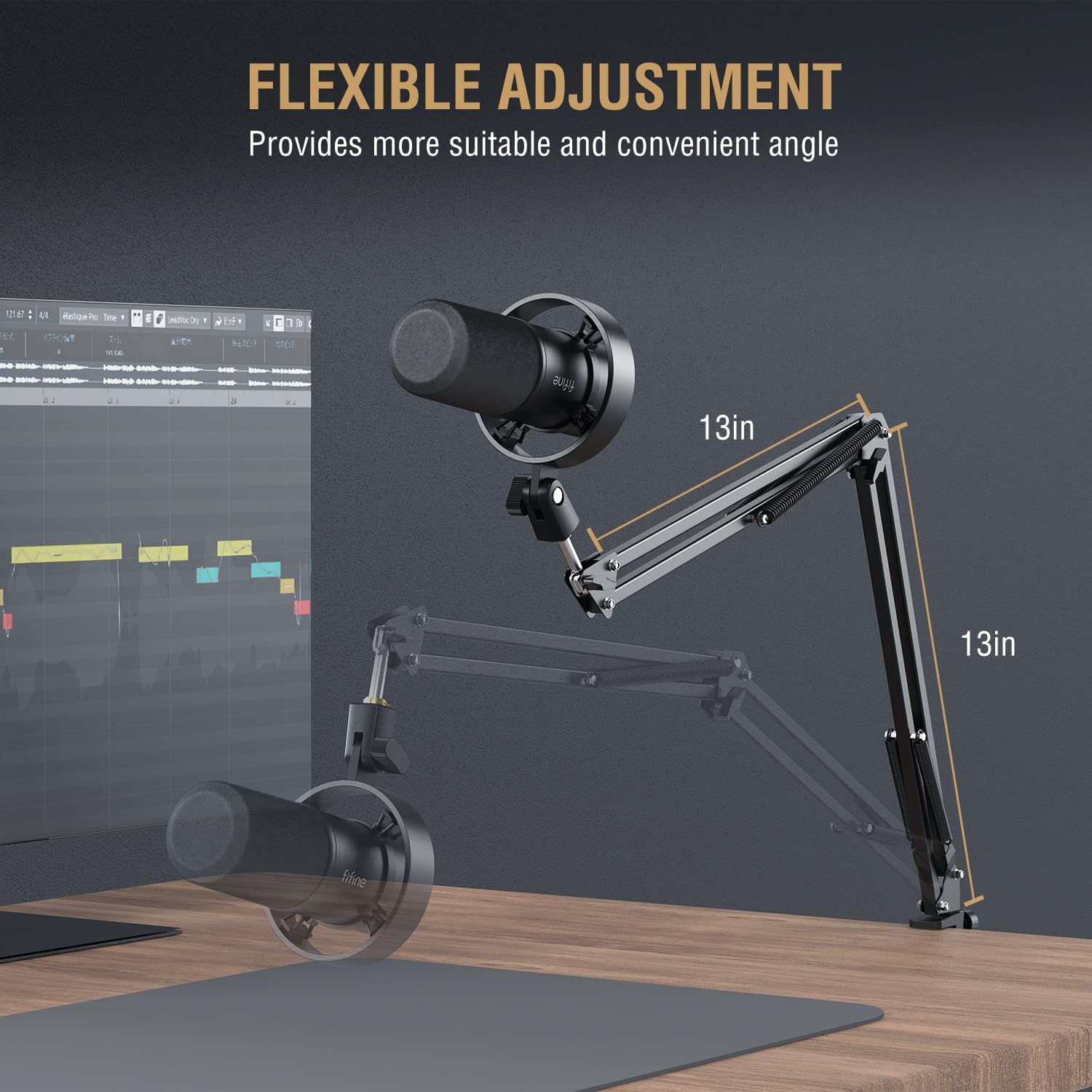
Image 4.1: The boom arm offers flexible adjustment, extending up to 13 inches vertically and horizontally from its pivot points.
4.2. Twaħħil tal-Mikrofonu
- Screw the FIFINE K688 microphone onto the threaded end of the boom arm. Ensure it is firmly attached but do not overtighten.
- Position the microphone so that the front (where the FIFINE logo is visible) faces the sound source.
4.3. Konnessjoni tal-headphone
- Connect the 3.5mm audio cable to the headphone jack on the FIFINE K688 microphone.
- If your mixer or audio interface requires a 6.35mm (1/4 inch) connection, use the provided adapter.
- Plug the other end of the headphone cable into the H8 studio headphones.

Image 4.2: The H8 headphones feature a closed-back circumaural design for immersive monitoring and sound isolation.
4.4. Connecting to Your Device (PC/Mixer)
The K688 microphone offers both USB and XLR connectivity.
USB Connection (Plug and Play):
- Connect the USB-C end of the provided USB cable to the USB port on the K688 microphone.
- Connect the USB-A end of the cable to an available USB port on your computer (desktop or laptop) or gaming console (PS4/PS5).
- The device should be automatically recognized by your operating system. Select "FIFINE K688" as your input device in your system's sound settings and recording software.
XLR Connection (Requires Audio Interface/Mixer):
- Connect a standard XLR cable (not always included) to the XLR port on the K688 microphone.
- Connect the other end of the XLR cable to an XLR input on your audio interface or mixer.
- Ensure your audio interface/mixer is properly connected to your computer and configured.


Image 4.3: The K688 microphone features both XLR and USB interfaces for versatile connectivity.
5. Operazzjoni
Understanding the controls on your FIFINE K688 microphone and H8 headphones is essential for optimal performance.
5.1. Microphone Controls (K688)

Immaġni 5.1: Dettaljata view of the microphone's gain and monitoring volume controls.
- Buttuna Tap-to-Mute: Located on the top of the microphone. A single tap will instantly mute or unmute the microphone. The LED indicator will change color to show mute status (e.g., green for active, red for muted).
- Mic Gain Knob: Adjusts the input sensitivity of the microphone. Turn clockwise to increase gain (make your voice louder), and counter-clockwise to decrease it. Adjust this to achieve a strong signal without clipping.
- Monitoring Volume Control: Adjusts the volume of the audio output to your connected headphones. This does not affect the microphone's input level.

Image 5.2: User-friendly functions like tap-to-mute and headphone monitoring are easily accessible.
5.2. Headphone Usage (H8)
The H8 headphones are designed for comfortable and accurate audio monitoring.
- Liebes: Adjust the headband to fit comfortably over your head. The earcups should fully enclose your ears for optimal sound isolation and comfort.
- Volum: Control the headphone volume using the monitoring volume knob on the K688 microphone or your connected audio device.

Image 5.3: The H8 headphones feature a lightweight design (265g) with soft filler headband and padded earmuffs for comfort during long sessions.
6. Manutenzjoni
Proper maintenance ensures the longevity and optimal performance of your FIFINE kit.
- Tindif: Use a soft, dry cloth to wipe down the microphone, headphones, and boom arm. Do not use liquid cleaners or abrasive materials.
- Ħażna: When not in use, store the kit in a clean, dry place away from extreme temperatures and humidity.
- Kura tal-Cable: Avoid sharp bends or kinks in the cables. Store them neatly to prevent tangling and damage.
- Gralja tal-mikrofonu: Periodically check the microphone grille for dust or debris. Use a soft brush if necessary to gently clean it.
7 Issolvi l-problemi
If you encounter issues with your FIFINE Podcast Microphone Kit, refer to the following common problems and solutions:
| Problema | Kawża Possibbli | Soluzzjoni |
|---|---|---|
| L-ebda ħoss mill-mikrofonu | Microphone muted; Incorrect input device selected; Loose cable connection; Gain too low. | Tap the mute button to unmute; Check system sound settings and recording software to ensure K688 is selected as input; Reconnect USB/XLR cable; Increase Mic Gain knob. |
| L-ebda ħoss mill-headphones | Headphones not connected; Monitoring volume too low; Incorrect output device selected. | Ensure headphones are fully plugged into the K688; Increase Monitoring Volume knob; Check system sound settings to ensure K688 (or connected interface) is selected as output. |
| Awdjo mgħawweġ | Mic Gain too high (clipping); Microphone too close to sound source. | Decrease Mic Gain knob; Move microphone slightly further away from the sound source. |
| Background noise/hum | Environmental noise; Ground loop (XLR); USB port interference. | Ensure recording environment is quiet; Try a different USB port; If using XLR, ensure proper grounding or use a ground loop isolator. |
| Boom arm unstable | Desk clamp not tightened; Arm joints loose. | Retighten the desk clamp; Check and tighten any adjustable joints on the boom arm. |
8. Speċifikazzjonijiet
Technical specifications for the FIFINE K688CT+H8 Podcast Microphone Kit:
| Komponent | Speċifikazzjoni |
|---|---|
| Tip ta 'mikrofonu | Dinamika |
| Mudell Polari | Kardjojdi |
| Rispons ta' Frekwenza | 50Hz - 16kHz |
| Sensittività | -58dB (±3dB) |
| Max SPL | 130dB |
| Proporzjon Sinjal-Ħsejjes (SNR) | > 80dB |
| Konnessjoni tal-Ħruġ | USB-C, XLR |
| Headphone Driver Size | Sewwieq dinamiku ta' 50mm |
| Impedenza tal-headphone | 32 ohms |
| Piż tal-headphone | 265g (9.4oz) |
| Boom Arm Material | Metall Durabbli |
| ASIN | B0DPFYH9LQ |
| Data L-Ewwel Disponibbli | 2 ta’ Diċembru 2024 |

Image 8.1: The K688 microphone features a cardioid polar pattern and a Signal-to-Noise Ratio (SNR) greater than 80dB.

Image 8.2: The H8 headphones are equipped with 50mm dynamic drivers for balanced sound quality and an impedance of 32 ohms, ideal for monitoring.
9. Garanzija u Appoġġ
FIFINE products are designed for reliability and performance. For information regarding warranty coverage, technical support, or service, please refer to the warranty card included with your product or visit the official FIFINE websit. Żomm l-irċevuta tax-xiri tiegħek bħala prova tax-xiri għal talbiet ta' garanzija.


