Introduzzjoni
This manual provides detailed instructions for the setup, operation, and maintenance of your Rongta Bluetooth Thermal Shipping Label Printer. Please read this manual thoroughly to ensure proper use and to maximize the lifespan of your device. This printer is designed for efficient and reliable thermal label printing, supporting various label sizes and connectivity options.
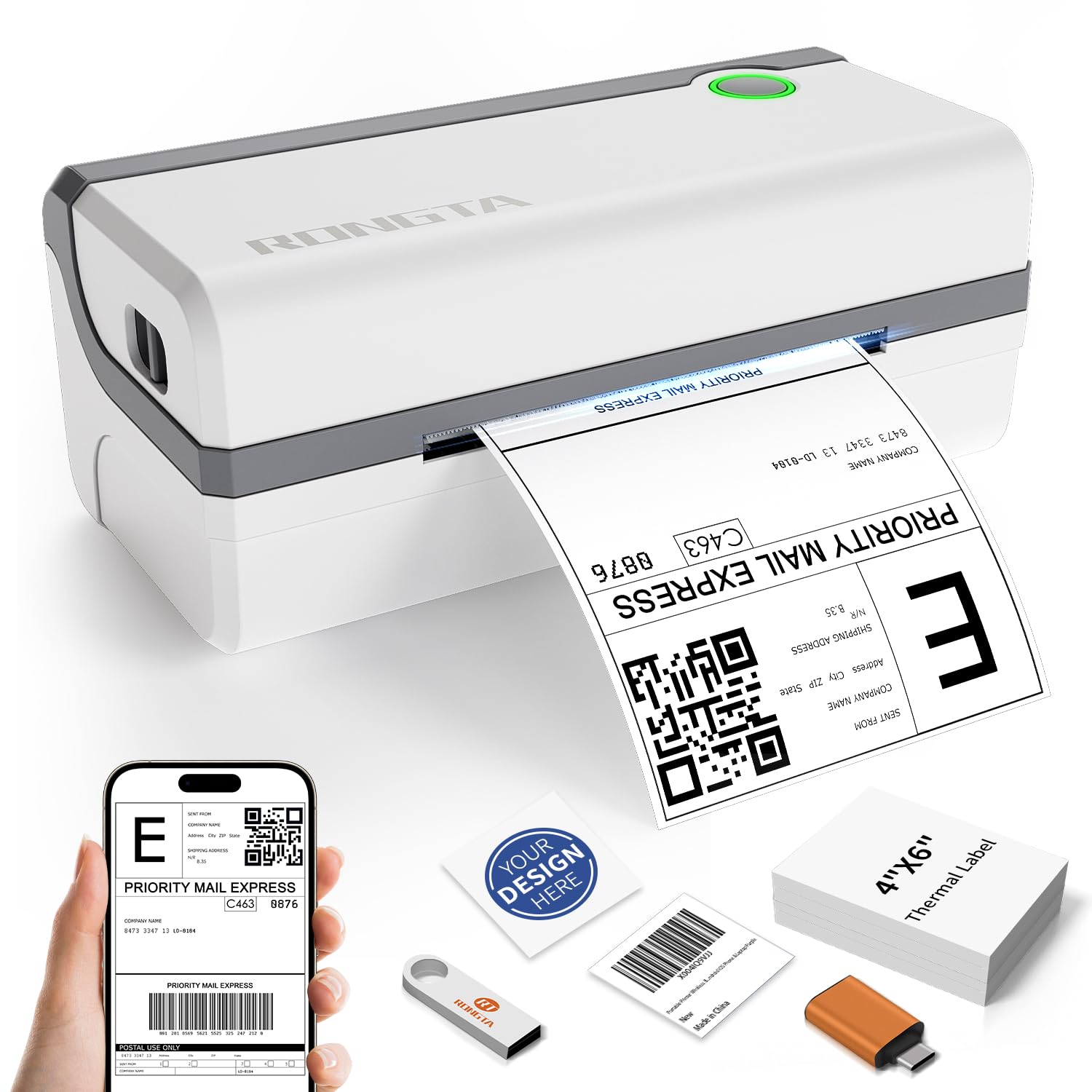
Figura 1: The Rongta thermal label printer in operation, producing a shipping label. Accompanying items include a smartphone demonstrating mobile printing, a USB drive for driver installation, and a stack of blank 4x6 inch thermal labels.
Setup
1. Tneħħija tal-kaxxa u l-komponenti
Carefully unpack your printer and verify that all components are present:
- Rongta Thermal Shipping Label Printer
- Cable USB
- Adapter tal-Enerġija
- Sample Tikketti
- USB Disk (containing Printer Driver, User Manual, How-to Videos)
2. Setup Fiżiku
- Poġġi l-istampatur fuq wiċċ stabbli u ċatt.
- Connect the power adapter to the printer and then to a power outlet.
3. It-Tagħbija tat-Tikketti
The printer supports thermal direct labels from 1.57 inches to 4.1 inches wide. It features automatic label identification for ease of use.
- Iftaħ il-qoxra ta 'fuq tal-istampatur.
- Insert the stack of thermal labels, ensuring the printable side is facing up.
- Adjust the label guides to fit the width of your labels snugly.
- Close the top cover. The printer will automatically detect and feed the label to the correct starting position.

Figura 2: This image demonstrates the printer's versatility in handling various label sizes, from 1.18 inches to 4.1 inches wide, including common shipping and product label dimensions.
4. Driver Installation (Computer)
For computer printing, install the necessary drivers from the included USB disk.
- Windows (7 and newer): Insert the USB disk, locate the Windows driver, and follow the on-screen instructions for installation.
- Mac OS (10.11 and newer): Insert the USB disk, locate the Mac OS driver, and follow the installation guide.
5. Konnessjoni Bluetooth (Apparati Mobbli)
For wireless printing from your smartphone or tablet:
- Niżżel l-uffiċjal RT Elabel app from your device's app store (available for iOS and Android).
- Kun żgur li l-Bluetooth huwa attivat fuq it-tagħmir mobbli tiegħek.
- Open the RT Elabel app and search for available Bluetooth devices.
- Select your Rongta printer from the list. If prompted for a pairing code, enter 0000 or 000000.

Figura 3: This image highlights the printer's dual connectivity options: USB for computers (laptops, desktops) and Bluetooth for mobile devices (tablets, smartphones), enabling flexible printing solutions.

Figura 4: This diagram details the printer's connectivity options, showing how it can be connected wirelessly via Bluetooth to mobile devices (Android, iOS, tablets) and via USB cable to various computer operating systems (macOS, Windows, Linux). It also shows the "RT Elabel" app interface.
Istruzzjonijiet Operattivi
1. Printing from Computer
After installing the drivers, you can print labels from various applications on your Windows or Mac computer:
- Open the document or label design you wish to print.
- Mur fuq File > Stampa.
- Select your Rongta printer from the list of available printers.
- Adjust print settings such as label size and orientation as needed.
- Ikklikkja Stampa.
2. Printing from Mobile App
The RT Elabel app allows you to design and print labels directly from your Android or iOS device:
- Kun żgur li l-istampatur tiegħek huwa konness permezz tal-Bluetooth mat-tagħmir mobbli tiegħek.
- Open the RT Elabel app.
- Select or create your label design.
- Confirm print settings and initiate printing from the app.
3. Tipi u Daqsijiet ta' Tikketti Appoġġjati
The Rongta printer is compatible with thermal direct labels ranging from 1.57 inches to 4.1 inches in width. Common supported sizes include:
- Tikketti tat-tbaħħir ta' 4x6 pulzieri
- Tikketti tal-prodott ta' 3x2 pulzieri
- tikketti tal-indirizz ta' 3x1 pulzier
- Tikketti ċirkolari ta' 2x2 pulzieri
- Tikketti tal-SKU tal-prodott ta' 2.25x1.25 pulzier
- Tikketti tal-barcode ta' 2x1 pulzier
- Tikketti tal-kodiċi QR ta' pulzier wieħed x pulzier wieħed

Figura 5: This image demonstrates the printer's ability to accommodate a wide range of label sizes, from 1.1 inches to 4.1 inches wide, and showcases different label applications like shipping, product, and decorative labels.
4. Kompatibilità tal-Pjattaforma
The printer is compatible with major shipping and e-commerce platforms, streamlining your workflow for various business needs:
- Amazon
- eBay
- Shopify
- Etsy
- FedEx
- UPS
- ShipStation
- And many more shipping and marketplace platforms.

Figura 6: This image highlights the printer's broad compatibility with popular e-commerce and shipping platforms, including Amazon, eBay, Shopify, FedEx, ShipStation, Etsy, and UPS, making it suitable for diverse business needs.

Figura 7: This collage illustrates the wide range of environments where the Rongta label printer can be utilized, including for home organization, retail product labeling, office filing, and warehouse shipping.
Manutenzjoni
1. Cleaning the Print Head and Roller
To ensure optimal print quality and prolong the life of your printer, it is recommended to clean the print head and rubber roller weekly.
- Itfi l-istampatur u skonnettja l-kejbil tal-enerġija.
- Iftaħ il-qoxra ta 'fuq.
- Gently wipe the print head with an alcohol swab or a soft, lint-free cloth dampened b'alkoħol isopropiliku.
- Clean the rubber roller with a damp cloth to remove any dust or label residue.
- Allow all components to dry completely before closing the cover and reconnecting power.
2. Konsumabbli
This thermal label printer operates without the need for ink, toner, or ribbons, reducing ongoing costs and simplifying maintenance.
Issolvi l-problemi
If you encounter issues with your Rongta printer, please refer to the following common solutions:
- Ebda Qawwa: Ensure the power adapter is securely connected to both the printer and a working power outlet.
- L-ebda Output tal-Istampar: Check if labels are loaded correctly and if the printer is connected to your device (via USB or Bluetooth). Verify that the correct printer is selected in your software's print dialogue.
- Kwalità Fqira tal-Istampar: Clean the print head and rubber roller as described in the Maintenance section. Ensure you are using high-quality thermal direct labels.
- Kwistjonijiet ta' Konnessjoni Bluetooth: Restart both the printer and your mobile device. Ensure the RT Elabel app is updated to the latest version. Re-attempt pairing with the code 0000 or 000000.
- Kwistjonijiet tas-sewwieq: Reinstall the printer drivers from the provided USB disk or download the latest version from the official Rongta support websit.
For any persistent technical issues or further assistance, please contact Rongta customer support.
Speċifikazzjonijiet
| Karatteristika | Speċifikazzjoni |
|---|---|
| Isem tal-Mudell | Bluetooth+USB |
| Teknoloġija tal-Istampar | Termali |
| Teknoloġija tal-Konnettività | Bluetooth, USB |
| Daqs Massimu tal-Midja | 4 x 6 inch (supports 1.57" to 4.1" wide) |
| Riżoluzzjoni massima tal-istampar | 203 dpi |
| Veloċità Massima tal-Istampar | 150 mm/s (approx. 59 ppm) |
| Dimensjonijiet tal-Prodott | 7.4"D x 10.24"W x 5.3"H |
| Piż tal-oġġett | 3.3 libbra (1.5 Kilogrammi) |
| Sistemi Operattivi Appoġġjati | Windows (7 and newer), Mac OS (10.11 and newer), Android, iOS, Linux |
| Komponenti Inklużi | Labels, cable |
Garanzija u Appoġġ
Rongta provides customer support for technical assistance and product inquiries. While specific warranty details are not included in this manual, please retain your proof of purchase for any warranty claims.
For technical issues or support, please refer to the contact information provided with your product packaging or visit the official Rongta websit.


