Introduzzjoni
This manual provides essential information for the setup, operation, and maintenance of your NIMO 15.6" FHD IPS Business Gaming Laptop. Designed for both productivity and light gaming, this laptop features an AMD Ryzen 5 6600H processor, 32GB DDR5 RAM, and a 1TB PCIe SSD, ensuring fast performance and ample storage. Please read this manual thoroughly to ensure proper use and longevity of your device.
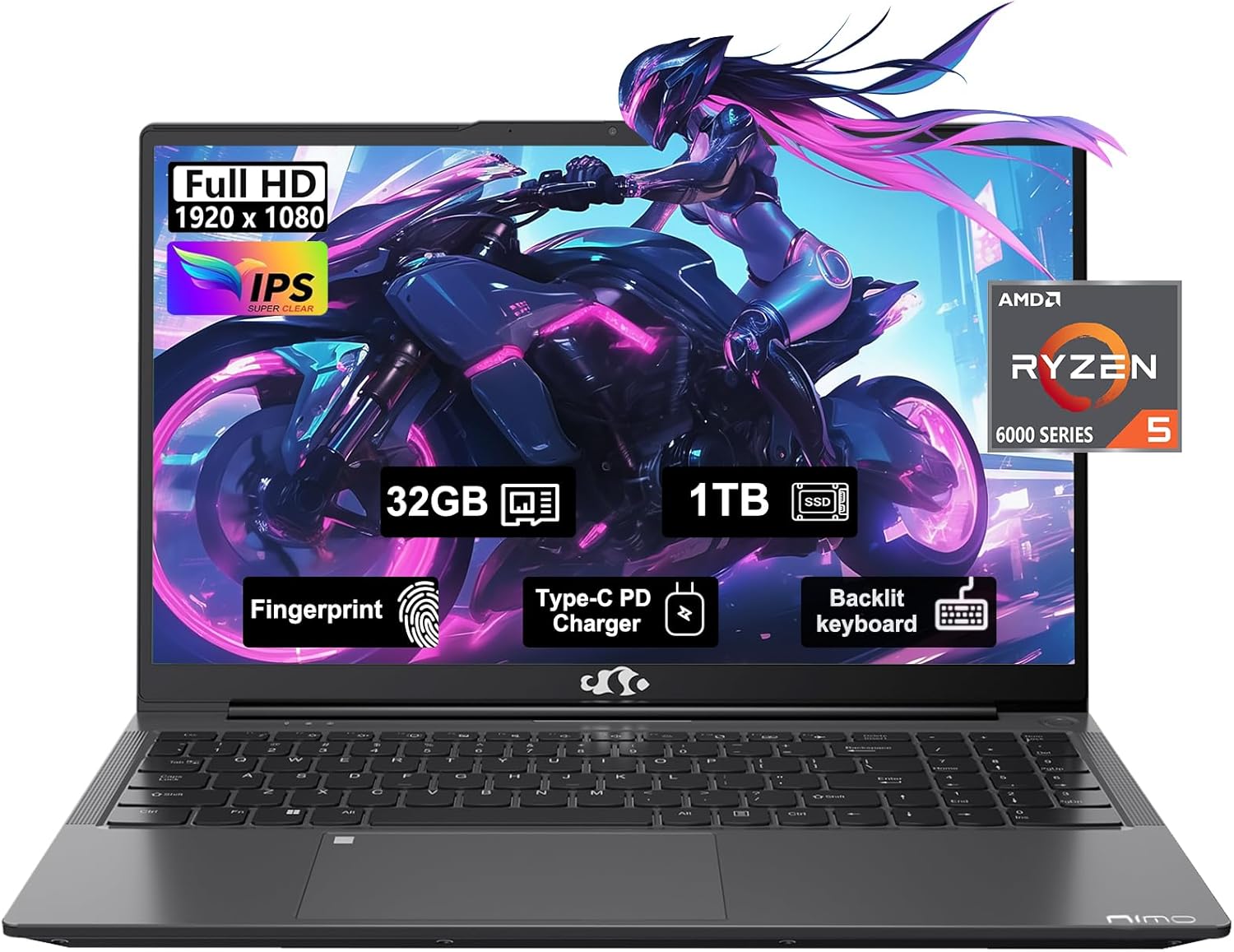
Figure 1: NIMO 15.6" FHD IPS Business Gaming Laptop overview.
Setup
1. Unboxing u Spezzjoni Inizjali
Neħħi l-komponenti kollha mill-imballaġġ bir-reqqa. Il-kaxxa għandha tinkludi:
- 1 x Laptop Nimo N153
- 1 x Ċarġer Veloċi tat-Tip Ċ 100W PD
- 1 x Manwal għall-Utent
Inspect the laptop and accessories for any signs of damage. If any components are missing or damaged, contact customer support immediately.
2. L-Ewwel Tixgħel u l-Iċċarġjar
Before first use, it is recommended to fully charge the laptop.
- Connect the Type-C 100W PD Fast Charger to the laptop's Type-C port (Multifunction) and to a power outlet.
- The charge LED indicator will illuminate. Allow the laptop to charge until the LED indicates a full charge.
- Agħfas il-buttuna tal-qawwa biex tixgħel il-laptop.

Figure 2: Connecting the Type-C 100W PD Fast Charger.
3. Konfigurazzjoni tas-Sistema Operattiva (Windows 11)
Follow the on-screen prompts to complete the initial setup of Windows 11. This typically includes:
- L-għażla tar-reġjun u d-disinn tat-tastiera tiegħek.
- Konnessjoni ma 'netwerk Wi-Fi.
- Idħol b'kont tal-Microsoft jew toħloq kont wieħed.
- Issettjar ta' PIN jew password.
- Konfigurazzjoni tas-settings tal-privatezza.
It-Tħaddim tal-Laptop Tiegħek
1. Tastiera u Touchpad
The NIMO laptop features a full-size backlit keyboard and a large touchpad for comfortable and efficient input.
- Tastiera backlit: Use the function keys (Fn + F-key combination, typically F3 or F4) to adjust keyboard backlight brightness.
- Touchpad: Jappoġġja ġesti multi-touch għan-navigazzjoni. Irreferi għas-settings tal-Windows għall-adattament.
- Qarrej tal-marki tas-swaba': Located on the touchpad, allows for secure login via Windows Hello.

Figure 3: Laptop keyboard layout with backlit keys and integrated fingerprint reader.
2. Portijiet u Konnettività
Your NIMO laptop is equipped with various ports for versatile connectivity:
- Portijiet USB 2.0: 1 port for connecting peripherals.
- Portijiet USB 3.0: 2 portijiet għal trasferiment ta' dejta b'veloċità għolja.
- Type-C Ports (Multifunction): 2 ports supporting power delivery (PD) and data.
- Port HDMI: Għall-konnessjoni ma' displays esterni.
- Jack tal-headphone: Għall-output tal-awdjo.
- Slott tal-Karta Mikro SD: Għall-espansjoni tal-ħażna jew it-trasferiment tad-dejta minn memory cards.
- Slot Kensington Lock: Għas-sigurtà fiżika.
- Konnettività Wireless: Supports Wi-Fi 802.11a/b/g/n/ac and Bluetooth 5.2.

Figura 4: Aktarview of laptop ports for various connections.
3. Wiri
The laptop features a 15.6" FHD IPS (1920x1080) Anti-Glare Display with an 85% screen-to-body ratio. This display is designed to provide clear visuals and reduce eye strain during extended use.

Figure 5: The 15.6-inch Full HD IPS display.
4. Prestazzjoni
Powered by an AMD Ryzen 5 6600H processor (6 Cores, 12 Threads, up to 4.5 GHz) and 32GB DDR5 RAM, the laptop delivers robust performance for business tasks, content creation, and light gaming. The integrated AMD Radeon 660M GPU handles graphics processing efficiently.

Figure 6: AMD Ryzen 5 6600H processor, central to the laptop's performance.
The 1TB PCIe SSD provides fast boot times and rapid data access, enhancing overall system responsiveness.
Manutenzjoni
1. Tindif tal-Laptop Tiegħek
- Uża drapp ratba u mingħajr ħelu ftit dampNaddaf bl-ilma jew b'prodott tat-tindif tal-iskrin biex tnaddaf id-displej.
- Għat-tastiera u x-chassis, uża drapp artab. Evita kimiċi ħarxa jew materjali li joborxu.
- Use compressed air to clear dust from vents and ports periodically.
2. Aġġornamenti tas-Software
Iċċekkja u installa regolarment aġġornamenti tal-Windows u aġġornamenti tad-drajver biex tiżgura prestazzjoni u sigurtà ottimali.
- Mur fuq Settings > Aġġornament tal-Windows to check for OS updates.
- Visit the NIMO support websit għall-aħħar aġġornamenti tas-sewwieq.
3. Ġestjoni tal-Ħażna
To maintain performance, regularly manage your 1TB SSD storage:
- Ħassar bla bżonn files u applikazzjonijiet.
- Uża l-ħażna tas-sħab għal kompiti kbar files.
- Periodically run Disk Cleanup (built-in Windows tool).
4. Kura tal-batterija
Biex timmassimizza l-ħajja tal-batterija:
- Evita temperaturi estremi.
- Do not leave the laptop plugged in at 100% charge for extended periods if not in use.
- Calibrate the battery occasionally by fully discharging and recharging it.
5. Aġġornamenti tal-Memorja u l-Ħażna
The NIMO laptop supports dual-channel memory upgrades (up to 2 x 16GB DDR5 RAM) and features an upgradable PCIe SSD. Consult a qualified technician for hardware upgrades to avoid voiding your warranty.
Issolvi l-problemi
Din it-taqsima tindirizza kwistjonijiet komuni li tista’ tiltaqa’ magħhom.
Il-laptop ma jixgħelx
- Kun żgur li l-ċarġer huwa konness sew kemm mal-laptop kif ukoll ma' sokit tal-elettriku li jaħdem.
- Ivverifika li s-sokit tal-enerġija jaħdem billi tqabbad apparat ieħor.
- Ipprova żomm il-buttuna tal-qawwa għal 15-20 sekonda biex tagħmel hard reset.
- Jekk il-batterija tkun ixxotta kompletament, ħalliha tiċċarġja għal mill-inqas 30 minuta qabel ma tipprova tixgħelha.
Screen Remains Blank
- Check if the laptop is powered on (listen for fan noise or look for indicator lights).
- Connect an external monitor via the HDMI port to check if the display output works.
- Ibda mill-ġdid il-laptop.
Prestazzjoni Bil-mod
- Agħlaq l-applikazzjonijiet bla bżonn li jkunu qed jaħdmu fl-isfond.
- Iċċekkja u installa kwalunkwe aġġornament pendenti tal-Windows.
- Ensure there is sufficient free space on your SSD.
- Mexxi skenn tal-virus.
Problemi ta' Konnettività tal-Wi-Fi
- Kun żgur li l-Wi-Fi huwa attivat fis-settings tal-Windows.
- Erġa' ibda r-router u l-modem tiegħek.
- Aġġorna s-sewwieqa tal-adapter tan-netwerk mingħajr fili tiegħek.
- Insieh in-netwerk u erġa' qabbad.
Għal kwistjonijiet li mhumiex koperti hawn, jekk jogħġbok irreferi għat-taqsima tal-Garanzija u l-Appoġġ għal informazzjoni ta' kuntatt.
Speċifikazzjonijiet
| Karatteristika | Dettall |
|---|---|
| Brand | NIMO |
| Isem tal-Mudell | Nimo N153G |
| Daqs tal-Iskrin | 15.6 Pulzier |
| Riżoluzzjoni tal-Iskrin | 1920 x 1080 pixel (FHD IPS Kontra d-Dija) |
| Proċessur | AMD Ryzen 5 6600H (6 Qlub, 12-il Ħjut, sa 4.5 GHz) |
| RAM | 32GB DDR5 (Dual-channel, upgradable to 2x16GB) |
| Hard Drive | 1TB PCIe SSD |
| Koproċessur tal-Grafika | AMD Integrated graphics (Radeon 660M GPU) |
| Sistema Operattiva | Windows 11 |
| Tip bla fili | 802.11a/b/g/n/ac (Wi-Fi 5), Bluetooth 5.2 |
| Portijiet | 1x USB 2.0, 2x USB 3.0, 2x Type-C (Multifunction), 1x HDMI, 1x Headphone Jack, 1x Micro SD Slot |
| Karatteristiċi Speċjali | Fingerprint Reader, HD Audio, Backlit Keyboard, Numeric Keypad |
| Sors tal-Enerġija | Battery Powered, Type-C 100W PD Fast Charger |
| Ħajja Medja tal-Batterija | 5 Sigħat |
| Piż tal-oġġett | 6 liri |
| Dimensjonijiet tal-Prodott | 14.07 x 8.98 x 0.76 pulzieri |
| Kulur | Griż Spazjali |
Garanzija u Appoġġ
Garanzija tal-Manifattur
Your NIMO laptop is covered by a comprehensive Garanzija tal-Manifattur ta' Sena offered by Nimo Direct Inc. This warranty covers defects in materials and workmanship under normal use.
Additionally, Nimo Direct Inc. offers 90-Day Hassle-Free Returns. If you encounter any concerns or issues with your product within this period, please contact customer support for assistance with resolution or replacement.
Ikkuntattja l-Appoġġ
For technical assistance, warranty claims, or return inquiries, please contact NIMO customer support. Refer to the contact information provided on the official NIMO webis-sit jew id-dokumentazzjoni inkluża mal-prodott tiegħek.
Please have your product model number (Nimo N153) and purchase details ready when contacting support.


