1. Introduzzjoni
This manual provides comprehensive instructions for the installation, operation, maintenance, and troubleshooting of your Fanvil 8-Port 2-Wire PoE Switch (Model PN8). Please read this manual thoroughly before using the device to ensure proper functionality and to prevent damage.
2. Prodott Aktarview
The Fanvil PN8 is an 8-port 2-wire Power over Ethernet (PoE) switch designed to transmit both power and data over existing 2-wire cables. This unique capability simplifies installation, especially in environments where traditional Ethernet cabling is not feasible or cost-effective. It supports up to 8 PoE-enabled devices and can transmit data and power over distances up to 300 meters.
2.1 Karatteristiċi ewlenin
- 8 PoE ports for data and power transmission.
- Supports power and data over 2-wire connections.
- Long transmission distance of up to 300 meters.
- User-friendly setup with no complex configuration required.
2.2 Layout tal-Apparat
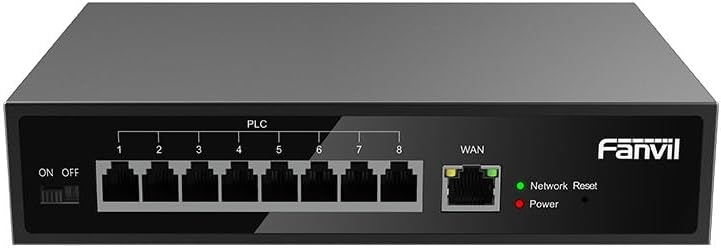
Figura 1: Quddiem view of the Fanvil PN8 switch, showing 8 PLC ports, a WAN port, ON/OFF switch, and LED indicators for Network Reset and Power.

Figura 2: Angolat view of the Fanvil PN8 switch, highlighting the side ventilation and port layout.
2.3 Indikaturi LED
- Network Reset (Green LED): Indicates network activity or status. A steady light typically means a stable connection, while blinking indicates data transmission.
- Power (Red LED): Illuminates when the device is powered on and receiving electrical current.
3. Istruzzjonijiet ta' Setup
3.1 Kontenut tal-Pakkett
Qabel l-installazzjoni, jekk jogħġbok ivverifika li l-oġġetti kollha huma preżenti fil-pakkett:
- Fanvil 8-Port 2-Wire PoE Switch (PN8)
- Adapter tal-Enerġija
- Manwal għall-Utent (dan id-dokument)
- Aċċessorji tal-Immuntar (jekk inklużi)
3.2 Konnessjoni tas-Swiċċ
- Konnessjoni tal-Enerġija: Connect the provided power adapter to the power input port on the switch and then plug it into a standard electrical outlet (100-240V AC). Ensure the ON/OFF switch is in the OFF position before connecting power.
- Konnessjoni WAN: Connect your main network router or modem to the WAN port on the Fanvil PN8 switch using a standard Ethernet cable.
- Konnessjoni tal-Apparat PoE: Connect your 2-wire PoE-enabled devices (e.g., IP phones, cameras) to any of the 8 PLC ports on the switch. The switch will automatically detect and provide power and data to these devices.
- Qawwa Mixgħul: Flip the ON/OFF switch to the ON position. The Power LED should illuminate, indicating the switch is operational.
4. Tħaddim tas-Swiċċ
Once connected, the Fanvil PN8 switch operates automatically. It provides power and data to connected PoE devices without requiring additional configuration. The LED indicators provide visual feedback on the device's status.
4.1 Tixgħel/Jitfi
- To power on the switch, ensure the power adapter is connected and flip the ON/OFF switch to the 'ON' position. The red Power LED will light up.
- To power off the switch, flip the ON/OFF switch to the 'OFF' position. The red Power LED will turn off.
5. Manutenzjoni
To ensure optimal performance and longevity of your Fanvil PN8 switch, follow these maintenance guidelines:
- Tindif: Uża drapp artab u niexef biex tnaddaf il-barra tas-swiċċ. Tużax prodotti tat-tindif likwidi jew aerosol. Kun żgur li l-apparat ikun mitfi qabel ma tnaddaf.
- Ventilazzjoni: Ensure the switch is placed in a well-ventilated area. Do not block the ventilation openings on the sides of the device.
- Ambjent: Evita li tesponi s-swiċċ għal temperaturi estremi, umdità għolja, jew dawl tax-xemx dirett.
6 Issolvi l-problemi
If you encounter issues with your Fanvil PN8 switch, refer to the following table for common problems and solutions:
| Problema | Kawża Possibbli | Soluzzjoni |
|---|---|---|
| No power (Power LED off) | Power adapter not connected or faulty; ON/OFF switch is off. | Check power adapter connection and outlet. Ensure ON/OFF switch is in the 'ON' position. |
| Ebda konnettività tan-netwerk | WAN cable disconnected; faulty cable; upstream network issue. | Verify WAN cable connection. Test with a different cable. Check your router/modem. |
| PoE device not receiving power/data | Device not PoE-compatible; faulty 2-wire cable; device drawing too much power. | Ensure device is PoE-compatible. Test with a different 2-wire cable. Check device power requirements. |
| Veloċità tan-netwerk bil-mod | Cable quality; network congestion; device limitations. | Ensure high-quality 2-wire cables are used. Reduce network traffic if possible. |
7. Speċifikazzjonijiet Tekniċi
| Speċifikazzjoni | Valur |
|---|---|
| Numru tal-Mudell | PN8 |
| Tip ta' Prodott | 2-Wire PoE Switch |
| Portijiet | 8 |
| Input Voltage | 100 ~ 240V AC |
| Vol Operattivtage | 28 Volts |
| Distanza ta' Trażmissjoni twila | 300-il metru |
| Dimensjonijiet tal-Prodott | 5.91 x 78.74 x 5.91 pulzieri |
| Piż tal-oġġett | 2.49 liri |
| Batteriji Meħtieġa | 1 AAAA batteries (included) |
| ASIN | B0DP5HXVQJ |
| UPC | 6937295605105 |
| Data L-Ewwel Disponibbli | 27 ta’ Novembru, 2024 |
8. Garanzija u Appoġġ
Għal informazzjoni dwar il-garanzija u appoġġ tekniku, jekk jogħġbok irreferi għad-dokumentazzjoni pprovduta max-xiri tiegħek jew żur is-sit uffiċjali ta' Fanvil. website. Contact their customer service for assistance with product issues, repairs, or further inquiries.


