Prodott Overview
The COMICA Revo S Wireless Handheld Microphone is engineered for professional audio capture, offering advanced wireless digital output for direct connection to various devices. Its design prioritizes high-fidelity sound quality and ease of use, making it suitable for a wide range of recording applications.
Key features include a 14mm condenser mic capsule with a cardioid polar pattern, ensuring precise sound capture. It supports 48kHz/24bit recording for superior clarity and detail, complemented by a one-key denoise function to filter out background noise. The microphone is powered by a built-in lithium battery, providing extended operational time, and offers three adjustable gain levels for optimal audio sensitivity.
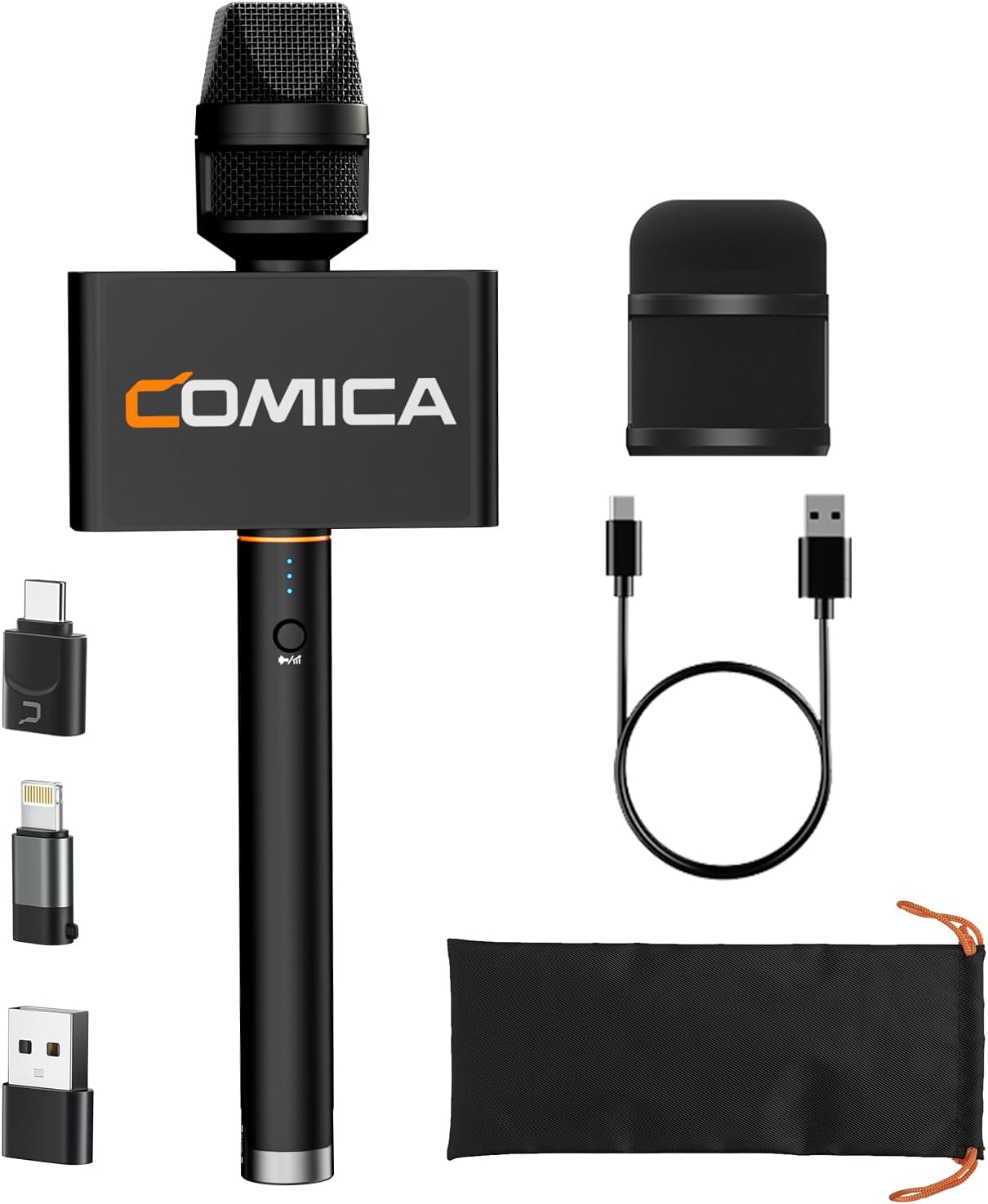
Image: The COMICA Revo S Wireless Handheld Microphone with its included accessories, including various adapters and charging cable.
X'hemm fil-Kaxxa?
- Handheld Microphone (TX) x 1
- Type-C Receiver (RX) x 1
- Adapter tas-sajjetti x 1
- Type-A Adapter x 1
- Cable tal-Iċċarġjar USB-C x 1
- Microphone Flag x 1
- Microphone Sponge x 1
- Bag tal-Ġarr x 1
- Manwal għall-Utent x 1

Image: A visual representation of all components included in the COMICA Revo S package.
Setup
The COMICA Revo S is designed for plug-and-play convenience. To set up your microphone:
- Iċċarġja l-Mikrofonu: Before first use, ensure the microphone is fully charged using the provided USB-C charging cable. The charging port is located on the side of the microphone.
- Qabbad ir-Riċevitur: Identify the appropriate adapter for your device (USB Type-C, Lightning, or USB Type-A). Attach the Type-C Receiver (RX) to the chosen adapter.
- Plug into Device: Insert the receiver-adapter assembly into the corresponding port on your smartphone, tablet, laptop, or PC. The system is designed to automatically connect.
- Qawwa Mixgħul: Press and hold the power button on the microphone for a few seconds to turn it on. The indicator lights will illuminate, signifying it is ready for use.
The microphone is widely compatible with various devices, including iPhone 16/15, Android smartphones, iPads, laptops, and computers. For Lightning port devices, ensure you use a USB-C to Lightning adapter that supports OTG function.
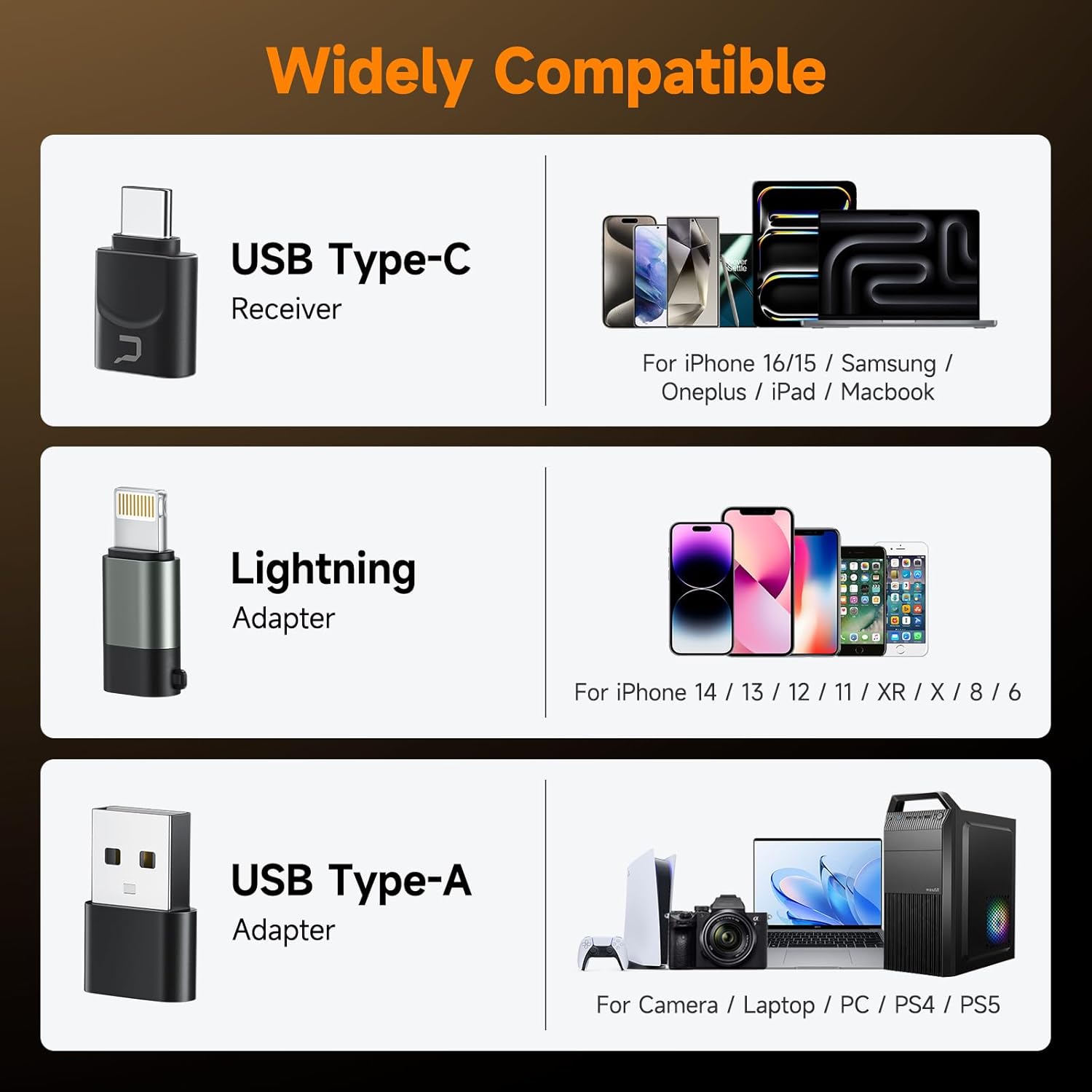
Image: The COMICA Revo S receiver and adapters, demonstrating compatibility with USB Type-C, Lightning, and USB Type-A devices.
Istruzzjonijiet Operattivi
The COMICA Revo S offers intuitive controls for optimal audio recording.
Aġġustament tal-gwadann
The microphone features a 3-level gain adjustment function. A short press of the function button (located on the microphone body) allows you to cycle through the three gain levels. Higher gain settings increase the microphone's sensitivity, amplifying audio details and dynamic range. Adjust the gain according to your recording environment and desired audio level.

Image: Close-up of the microphone showing the function button for 3-level gain adjustment.
One-Key Denoise
To activate the noise reduction feature, press and hold the function button for approximately 2 seconds. The indicator light will change color (e.g., to green) to confirm that noise cancellation is active. This feature automatically filters out ambient background noise, ensuring clearer and more professional sound, especially in noisy environments. To deactivate noise reduction, press and hold the function button again.

Image: Illustration of the CalMix Denoise chip and its function in reducing background noise.
Ħajja tal-batterija
The microphone is equipped with a 350mAh built-in lithium battery, providing up to 15 hours of continuous operation. This extended battery life supports long recording sessions without frequent recharging, making it reliable for professional use.

Image: Visual representation highlighting the 15-hour long duration battery life of the microphone.
Manutenzjoni
To ensure the longevity and optimal performance of your COMICA Revo S microphone, follow these maintenance guidelines:
- Tindif: Use a soft, dry cloth to clean the microphone body and accessories. Avoid using harsh chemicals, solvents, or abrasive cleaners.
- Ħażna: When not in use, store the microphone and its accessories in the provided carrying bag to protect them from dust, moisture, and physical damage.
- Kura tal-batterija: For optimal battery health, avoid fully discharging the battery frequently. If storing for an extended period, charge the battery to about 50-70% before storage.
- Immaniġġja b'Kura: The microphone features an all-metal structure for durability, but avoid dropping or subjecting it to strong impacts, which could damage internal components.
Issolvi l-problemi
If you encounter issues with your COMICA Revo S microphone, consider the following common solutions:
- Ebda Ħoss/Volum Baxx:
- Ensure the microphone is powered on and fully charged.
- Verify the receiver is securely plugged into your device.
- Check the gain level on the microphone and adjust it upwards.
- Confirm your device's audio input settings are correctly configured to use the external microphone.
- Interferenza/Storbju:
- Activate the one-key denoise function on the microphone.
- Kun żgur li m'hemm l-ebda sorsi qawwija ta' interferenza elettromanjetika fil-qrib.
- Maintain a clear line of sight between the microphone and the receiver, and stay within the effective wireless range (up to 50 meters).
- Apparat Mhux Qed Jirrikonoxxi l-Mikrofonu:
- Restart your recording device (smartphone, laptop, etc.).
- Ensure you are using the correct adapter for your device's port.
- For Lightning port devices, confirm your adapter supports OTG function.
Speċifikazzjonijiet
| Karatteristika | Dettall |
|---|---|
| Fattur tal-Forma tal-Mikrofonu | Jinżamm fl-idejn |
| Dimensjonijiet tal-oġġett (L x W x H) | 13.3 x 4.7 x 3.1 pulzieri |
| Sors tal-Enerġija | Mħaddma bil-batterija |
| Numru ta' Batteriji | Meħtieġa batterija C waħda (inkluża) |
| Materjal | Metall, plastik |
| Pjattaforma tal-Ħardwer | Laptop, PC, Smartphone |
| Numru ta 'Kanali | 1 |
| Piż tal-oġġett | 13.4 uqija |
| ASIN | B0DP4S4MZR |
| Numru tal-Mudell tal-Oġġett | Revo S |
| Data L-Ewwel Disponibbli | 27 ta’ Novembru, 2024 |
| Isem tal-Kulur | Iswed |
| Tip ta 'batterija | Polimeru tal-litju |
| Użi Rakkomandati | News Report, Interview, Video Recording, Podcasting, Live Streaming |
| Teknoloġija tal-Konnettività | USB |
| Tip ta' Konnettur | USB Tip-Ċ |
| Karatteristika Speċjali | 14mm Condenser Mic Capsule, Cardioid Polar Pattern, 3-level Gain Adjustment, 48kHz/24bit Recording, One-key Calmix® Denoise, Built-in Lithium Battery, Duration Up to 15 Hours, wireless handheld microphone for smartphone |
| Apparati Kompatibbli | Laptop, Smartphone, Tablet |
| Mudell Polari | Unidirezzjonali |
Garanzija u Appoġġ
COMICA products are designed for reliability and performance. For specific warranty details and support information, please refer to the warranty card included in your product packaging or visit the official COMICA website. You may also contact COMICA customer service for assistance with product registration, technical support, or warranty claims.
Għal aktar mistoqsijiet jew appoġġ, jekk jogħġbok żur il- COMICA Store on Amazon.


