1. Introduzzjoni
This manual provides detailed instructions for the setup, operation, and maintenance of your THOMSON 8-inch Digital Photo Frame (Model: TRDF-8001C). Please read this manual thoroughly before using the device to ensure proper functionality and to maximize your enjoyment of its features. This digital photo frame is designed to display your cherished photos and videos with an 8-inch IPS HD screen, offering a clear and vibrant viewing esperjenza.
2. X'hemm fil-Kaxxa
Meta tiftaħ il-pakkett, jekk jogħġbok kun żgur li l-oġġetti kollha elenkati hawn taħt huma preżenti u f'kundizzjoni tajba:
- THOMSON 8-inch Digital Photo Frame
- Kontroll mill-bogħod
- Adapter tal-Enerġija
- Photo Frame Stand
- Manwal għall-Utent

Figure 2.1: Contents of the THOMSON Digital Photo Frame package.
3. Setup
3.1 Konnessjoni tal-Enerġija
- Connect the power adapter to the DC-IN port on the back of the digital photo frame.
- Ipplaggja l-adapter tal-enerġija fi żbokk elettriku standard.
- Il-frejm jinxtegħel awtomatikament.
3.2 Setup Inizjali
- Upon first startup, you will be prompted to select your preferred language. Use the navigation buttons on the remote control or the physical buttons on the back of the frame to select and confirm.
- Issettja d-data u l-ħin kurrenti.
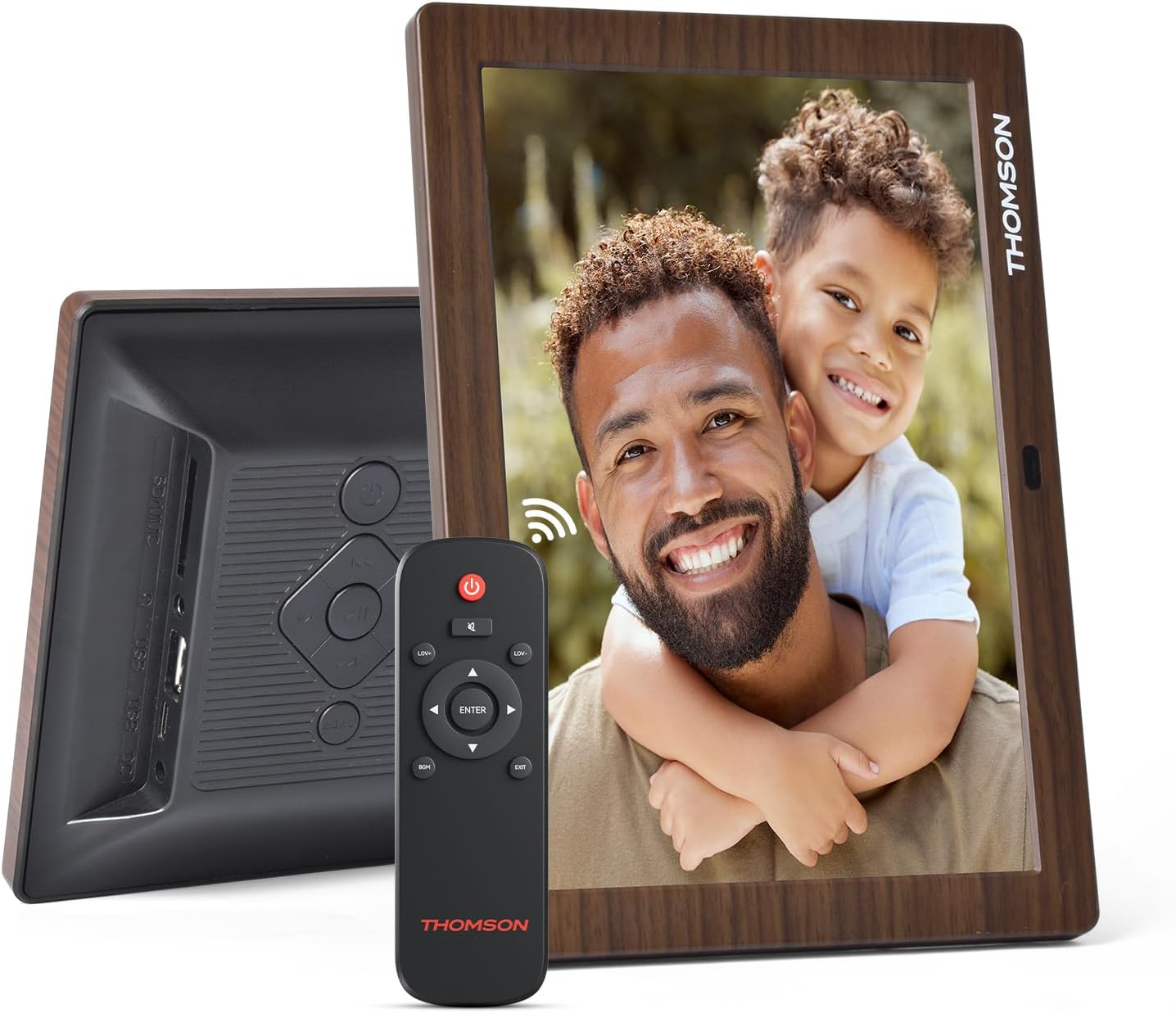
Figura 3.1: Wara view of the frame with power input and physical controls.
3.3 Installazzjoni tal-Istand
The digital photo frame can be placed on a flat surface using the included stand. Insert the stand into the designated slot on the back of the frame. The frame also supports wall mounting using the integrated mounting holes.
4. Istruzzjonijiet Operattivi
4.1 Karatteristiċi tal-Wiri
- 8-inch IPS HD Screen: Enjoy clear and vibrant images with a 1280x800 resolution from various viewangoli.
- Rotazzjoni Awtomatika: The built-in gravity sensor automatically adjusts the photo orientation (landscape or portrait) for optimal viewing.

Figure 4.1: The 8-inch IPS HD screen provides a high-quality display for your memories.
4.2 Daqq tal-Midja
The frame supports playback of photos, music, and videos. You can navigate through your media using the remote control or the physical buttons.
- Photo Slideshow: Configure slideshow intervals and transition effects in the settings.
- Daqq tal-mużika: Ildoqq mużika fl-isfond waqt li viewritratti.
- Daqq tal-Vidjo: Enjoy your favorite video clips directly on the frame.

Figure 4.2: User interface for media selection and playback options.
4.3 Remote Control and Physical Buttons
Control your digital photo frame conveniently using the included remote control or the physical buttons located on the back of the frame.
- Funzjonijiet tal-Kontroll mill-bogħod: Power on/off, adjust volume, navigate images, control background music, and access menus.
- Buttuni Fiżiċi: Provide direct control for essential functions, useful for elderly users.

Figure 4.3: Remote control for convenient operation of the frame.
4.4 Expansion Modes
The frame supports various expansion options for storing your media:
- SD/SDHC/MMC Card: Expand storage up to 32 GB.
- USB-A/Type-C/U-disk: Connect USB drives for additional media.
- Nota: This frame does not have built-in storage. An external memory card or USB drive is required for media storage.

Figure 4.4: Memory expansion slots on the back of the frame.
4.5 Mixgħul/Mitfi Awtomatiku
You can set a customized automatic start and stop time for the frame to conserve energy and manage display times.

Figure 4.5: Setting automatic power on/off times for convenience.
5. Manutenzjoni
- Tindif tal-Iskrin: Use a soft, dry, lint-free cloth to gently wipe the screen. For stubborn marks, slightly dampLaħlaħ id-drapp bl-ilma jew b'soluzzjoni għat-tindif tal-iskrin. Evita kimiċi ħarxa.
- Tindif tal-qafas: Imsaħ il-qafas b'ċarruta ratba u niexfa.
- Ħażna: When not in use for extended periods, disconnect the power adapter and store the frame in a cool, dry place away from direct sunlight.
6 Issolvi l-problemi
| Problema | Kawża Possibbli | Soluzzjoni |
|---|---|---|
| Il-qafas ma jixgħelx. | L-adapter tal-enerġija mhux imqabbad jew difettuż. | Kun żgur li l-adapter tal-enerġija huwa konness sew mal-qafas u ma' sokit tal-enerġija li jaħdem. Ipprova sokit differenti. |
| L-ebda immaġni/vidjow ma murija. | No memory card/USB drive inserted or media files are corrupted/unsupported. | Insert a memory card or USB drive with supported media files. Iċċekkja file formats (JPEG for photos, MP4 for videos). Ensure the memory card/USB drive is properly inserted. |
| Il-kontroll mill-bogħod ma jaħdimx. | Low battery or obstruction. | Replace the remote control battery. Ensure there are no obstructions between the remote and the frame's IR receiver. |
| Images are distorted or incorrect orientation. | Incorrect display settings or disabled auto-rotation. | Check display settings in the menu. Ensure the auto-rotation feature is enabled if desired. |
7. Speċifikazzjonijiet
- Numru tal-Mudell: TRDF-8001C
- Daqs tal-iskrin: 8 Pulzier
- Riżoluzzjoni: 1280x800 (WXGA)
- Proporzjon tal-aspett: 16:10
- Teknoloġija tal-Wiri: IPS HD
- Konnettività: DC-4.0, USB-A, Type-C, SD Card, 3.5MM earphone jack
- Espansjoni tal-Memorja: SD/SDHC/MMC card up to 32GB, U-disk
- Sors tal-Enerġija: Corded Elettriku
- User Interface Input: Buttons, Remote Control
- Materjal tal-qafas: Plastik
- Dimensjonijiet tal-Prodott: 24.4 x 18 x 2.51 ċm
- Piż tal-Prodott: 240 gramma
8. Garanzija u Appoġġ
For warranty information and customer support, please refer to the documentation included in your product packaging or visit the official Thomson websit. Żomm l-irċevuta tax-xiri tiegħek bħala prova tax-xiri għal kwalunkwe talba ta' garanzija.