Introduzzjoni
The MiBOXER PW5 5-in-1 LED Controller is designed for precise and convenient management of various LED lighting systems. It supports multiple LED types and offers dual wireless connectivity for seamless integration and control.
This manual provides essential information for the safe and efficient installation, operation, and maintenance of your PW5 LED Controller.
Karatteristiċi Ewlenin
- Kompatibilità 5 f'1: Supports Single Color, Dual White (CCT), RGB, RGBW, and RGB+CCT LED setups.
- Konnettività Wireless Doppja: Features WiFi and 2.4GHz technology for stable operation and smart app integration.
- High Output Capacity: Handles up to 20A output, suitable for high-power LED installations.
- Kontroll intelliġenti: Compatible with "Tuya Smart" app and third-party voice control systems like Alexa and Google Assistant.
- Color and Dimming Control: Offers 16 million colors, adjustable color temperature, brightness, and saturation.
- PUSH Dimming Support: Allows for flexible dimming control.
- Funzjoni tal-memorja: Retains the last-used settings.
- VoltagFirxa e: Operates on DC12-24V.
Kontenut tal-Pakkett
- MiBOXER PW5 5-in-1 LED Controller
- Manwal għall-Utent

Image: The MiBOXER PW5 LED Controller shown alongside its retail packaging and a small instruction manual.
Setup u Installazzjoni
Prekawzjonijiet tas-Sigurtà
- Kun żgur li l-enerġija hija skonnettjata qabel l-installazzjoni.
- Install in a dry environment, away from moisture and extreme temperatures.
- Ivverifika l-vol korretttage (DC12-24V) and current ratings for your LED strips and power supply.
- Do not exceed the maximum output current of 20A.
Dijagramma tal-Wiring
Connect your LED strips and power supply to the controller as shown in the diagram below. Ensure correct polarity for all connections.

Image: Detailed wiring diagram of the MiBOXER PW5 controller. It shows the V+ and V- input terminals, GND and PUSH dimming terminals, and output terminals labeled V+, W, WW, CW, R, G, B for various LED strip types. An indicator output mode table is also visible, showing White for Single Color, Yellow for Dual White, Red for RGB, Green for RGBW, and Blue for RGB+CCT.
- Connect the DC12-24V power supply to the INPUT V+ u V- terminali.
- Connect your LED strip(s) to the corresponding ĦRUĠ terminals based on your LED type:
- Kulur Uniku: Connect to V+ and W (White)
- Dual White (CCT): Connect to V+, WW (Warm White), and CW (Cool White)
- RGB: Connect to V+, R (Red), G (Green), and B (Blue)
- RGBW: Connect to V+, R, G, B, and W (White)
- RGB+CCT: Connect to V+, R, G, B, WW, and CW
- For PUSH dimming functionality, connect a compatible PUSH switch to the GND u IMBOTTA terminali.
Immuntar
The controller is designed for tabletop mounting. Ensure it is placed on a stable, flat surface with adequate ventilation.

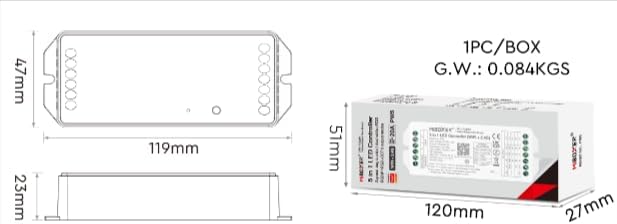
Image: Two diagrams illustrating the physical dimensions of the MiBOXER PW5 controller. The first shows a top-down view with a length of 119mm and width of 47mm. The second shows a side view with a height of 23mm, and also includes package dimensions of 120mm x 51mm x 27mm.
Operazzjoni
Tibdil tal-Modalitajiet tal-Ħruġ
The PW5 controller supports 5 different output modes. To switch between these modes:
- Agħfas il- "SET" button once to cycle through the output modes.
- The indicator light on the controller will change color to reflect the current mode:
- White: Single Color
- Yellow: Dual White
- Red: RGB
- Green: RGBW
- Blue: RGB+CCT
Kontroll mill-bogħod 2.4G RF
The controller can be linked to a compatible 2.4G RF remote control (sold separately).
- To link: Power on the controller. Within 3 seconds, press the "ON" button on the remote control 3 times. The LED strip will flash to confirm successful linking.
- To unlink: Power on the controller. Within 3 seconds, press the "ON" button on the remote control 5 times. The LED strip will flash to confirm unlinking.
WiFi and App Control (Tuya Smart)
The PW5 controller integrates with the "Tuya Smart" app for advanced control via WiFi.
- Download the "Tuya Smart" app from your device's app store.
- Irreġistra jew idħol fil-kont Tuya Smart tiegħek.
- To activate WiFi pairing mode: Long press the "SET" button for 3 seconds until the indicator flashes quickly.
- In the Tuya Smart app, follow the instructions to add a new device. Select the appropriate lighting device type.
- Once connected, you can control brightness, color, color temperature, saturation, and set up group/multi-zone control.
- The app also supports music rhythm functions.
Voice Control (Alexa, Google Assistant)
After successful integration with the Tuya Smart app, you can link your account to voice assistants like Amazon Alexa or Google Assistant for hands-free control.
- Iftaħ l-app Alexa jew Google Home.
- Innaviga lejn it-taqsima "Ħiliet" jew "Works with Google".
- Fittex għal u attiva l-ħila/servizz "Tuya Smart".
- Link your Tuya Smart account when prompted.
- Discover devices. Your MiBOXER PW5 controller should appear.
- Issa tista' tuża kmandi bil-vuċi bħal:
- "Alexa, ixgħel id-dwal tal-kamra tal-għixien."
- "Hey Google, set the kitchen lights to blue."
- "Alexa, baxxi d-dwal tal-kamra tas-sodda għal 50%."
Manutenzjoni
- Żomm il-kontrollur nadif u ħieles mit-trab. Uża drapp artab u niexef għat-tindif.
- Tużax kimiċi ħarxa jew tindif li joborxu.
- Żgura ventilazzjoni xierqa madwar l-apparat biex tevita sħana żejda.
- Regularly check wiring connections for security and integrity.
Issolvi l-problemi
| Problema | Kawża Possibbli | Soluzzjoni |
|---|---|---|
| LEDs ma jixegħlux | No power to controller; incorrect wiring; faulty LED strip. | Check power supply connection; verify input/output wiring polarity; test LED strip with another power source. |
| Il-kontroll mill-bogħod ma jaħdimx | Remote not linked; remote battery low; interference. | Re-link the remote control; replace remote battery; reduce interference sources. |
| Il-kontroll tal-app ma jaħdimx | Controller not connected to WiFi; incorrect app settings; WiFi signal weak. | Ensure controller is in WiFi pairing mode and connected to your network; check app settings; move controller closer to WiFi router. |
| Incorrect colors or dimming | Wrong output mode selected; incorrect wiring for LED type. | Press "SET" button to cycle to the correct output mode; verify LED strip wiring matches the selected mode. |
Speċifikazzjonijiet
| Numru tal-Mudell | PW5 |
| Input Voltage | DC12-24V |
| Kurrent tal-Ħruġ | Max 20A |
| Numru ta 'Kanali | 5 |
| Konnettività | WiFi, 2.4GHz RF |
| Control Distance (2.4G) | 30m |
| Temperatura operattiva | -10°C sa 40°C |
| Dimensjonijiet | 119mm x 47mm x 23mm (madwar 4.68 x 1.85 x 0.9 pulzieri) |
| Piż tal-oġġett | 3.2 uqija (madwar 90g) |
| Manifattur | Miboxer |
Garanzija u Appoġġ
For warranty information and technical support, please refer to the official MiBOXER webis-sit jew ikkuntattja lill-bejjiegħ tiegħek. Żomm l-irċevuta tax-xiri tiegħek għal talbiet ta' garanzija.
Għal aktar għajnuna, tista' żżur il- MiBOXER Store on Amazon.


