1. Introduzzjoni
This manual provides instructions for the safe and effective use of your iJoy Disney Stitch Disco Party Bluetooth Over-Ear Headphones. Please read this manual thoroughly before operating the device and retain it for future reference.

Stampa 1.1: Quddiem view of the iJoy Disney Stitch Disco Party Bluetooth Over-Ear Headphones.
2. Kontenut tal-Pakkett
Ivverifika li l-oġġetti kollha huma preżenti fil-pakkett:
- iJoy Disney Stitch Disco Party Bluetooth Over-Ear Headphones
- Cable tal-Iċċarġjar tal-USB
- Kejbil Awżiljarju tal-Awdjo
- Kawża Protettiva tal-Ġarr
- Manwal għall-Utent
3. Prodott Aktarview
Iffamiljarizza ruħek mal-komponenti u l-kontrolli tal-headphones.
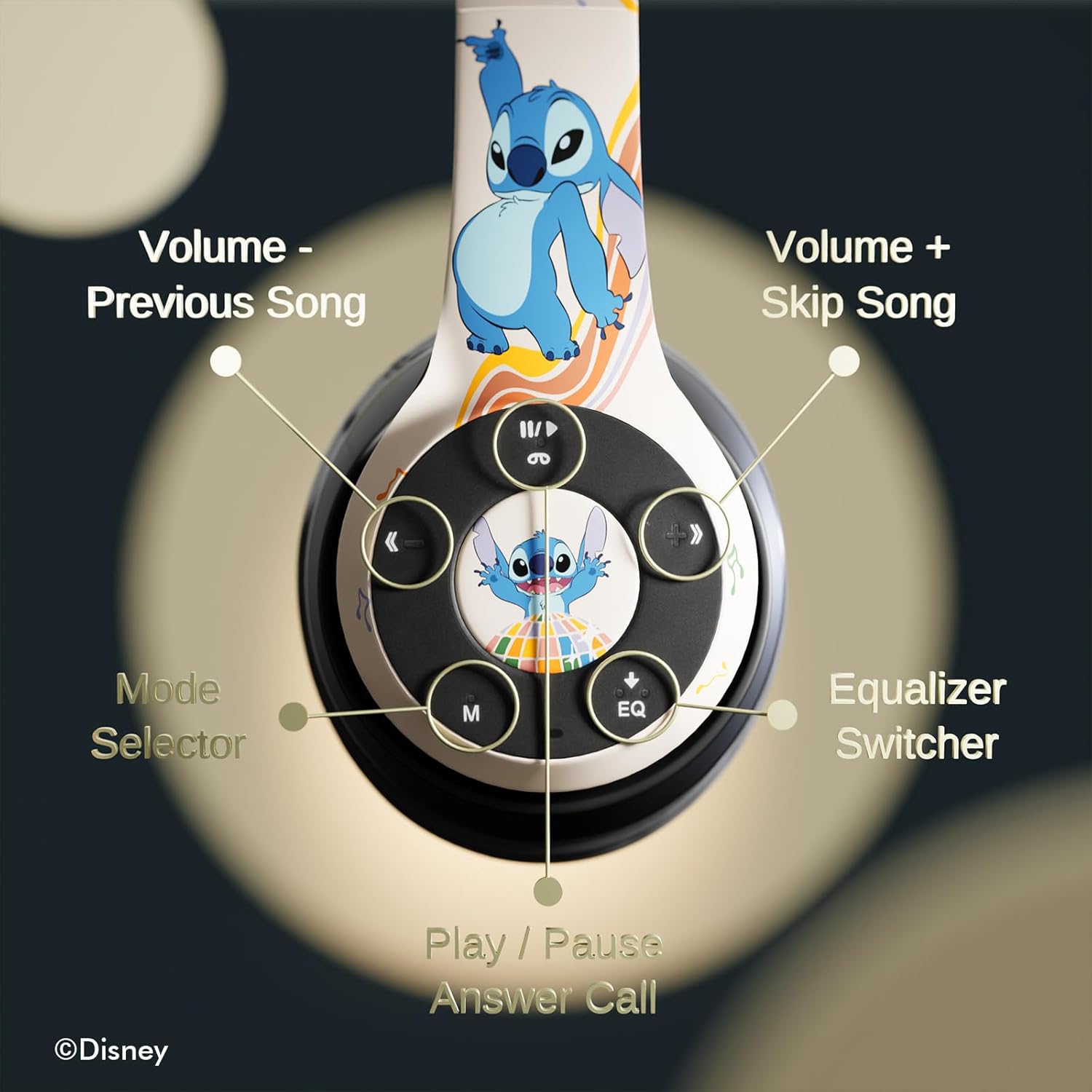
Immaġni 3.1: Dettaljata view of the control buttons on the right earcup.
Funzjonijiet ta' Kontroll:
- Volume - / Previous Song: Agħfas qasir biex tnaqqas il-volum, agħfas twil għat-trakka ta' qabel.
- Volume + / Skip Song: Agħfas qasir biex tgħolli l-volum, agħfas twil għat-trakka li jmiss.
- Play / Pause / Answer Call: Short press to play/pause music or answer/end a call. Long press to reject a call.
- Mode Selector (M): Press to switch between Bluetooth, Micro SD, and FM Radio modes.
- Equalizer Switcher (EQ): Press to cycle through available equalizer presets.
- Indikatur LED: Displays power, charging, and Bluetooth connection status.
- Mikrofonu inkorporat: Għal sejħiet mingħajr idejn.
- Slott tal-Karta Mikro SD: For direct audio playback from a Micro SD card.
4. Setup
4.1. Iċċarġjar tal-Headphones
Before initial use, fully charge the headphones. Connect the supplied USB charging cable to the charging port on the headphones and to a USB power source (e.g., computer USB port, wall adapter). The LED indicator will illuminate during charging and change color or turn off when charging is complete. A full charge provides approximately 15 hours of playtime.

Image 4.1: The headphones offer up to 15 hours of audio playback on a single charge.
4.2. Tqabbil tal-Bluetooth
- Kun żgur li l-headphones huma ċċarġjati u mitfija.
- Agħfas u żomm il-buttuna tal-Power sakemm l-indikatur LED jteptep, u dan jindika l-modalità ta' tqabbil.
- Fuq l-apparat tiegħek (smartphone, tablet, eċċ.), attiva l-Bluetooth u fittex apparati disponibbli.
- Select "iJoy Stitch Headphones" from the list of found devices.
- Ladarba jkun konness, l-indikatur LED jieqaf iteptep u jibqa' mixgħul solidu.

Image 4.2: The headphones are compatible with various Bluetooth-enabled devices.
4.3. Micro SD Card Usage
Insert a Micro SD card (not included) into the Micro SD card slot on the headphones. The headphones will automatically switch to Micro SD mode and begin playing audio files from the card. Use the Mode button to switch to this mode if already in another mode.
5. Istruzzjonijiet Operattivi
5.1. Power On/Off
- Qawwa Mixgħul: Agħfas u żomm il-buttuna tal-Power sakemm l-indikatur LED jixgħel.
- Itfi: Agħfas u żomm il-buttuna tal-Power sakemm l-indikatur LED jintefa.
5.2. Daqq tal-mużika
- Play/Pawsa: Agħfas il-buttuna Play/Pause.
- Track li jmiss: Agħfas fit-tul il-buttuna tal-Volum +.
- Track preċedenti: Agħfas fit-tul il-buttuna tal-Volum -.
- Volum 'il fuq: Agħfas fil-qosor il-buttuna Volum +.
- Volum 'l isfel: Agħfas fil-qosor il-buttuna tal-Volum -.
5.3. Ġestjoni tas-Sejħiet
- Tweġiba/Tmiem Sejħa: Agħfas il-buttuna Play/Pause.
- Irrifjuta Sejħa: Agħfas fit-tul il-buttuna Play/Pause.
5.4. Funzjoni tar-Radju FM
In FM Radio mode (selected via the Mode button), the headphones can scan and play FM radio stations. Use the Volume +/- buttons to change stations or adjust volume.
5.5. Equalizer Function
Press the EQ button to cycle through different audio equalizer presets, adjusting the sound profile għall-preferenza tiegħek.
6. Manutenzjoni
6.1. Tindif
Wipe the headphones with a soft, dry cloth. Do not use abrasive cleaners or solvents. Avoid exposing the headphones to excessive moisture.
6.2. Ħażna
When not in use, store the headphones in the provided protective carrying case. The foldable design allows for compact storage, protecting them from damage.
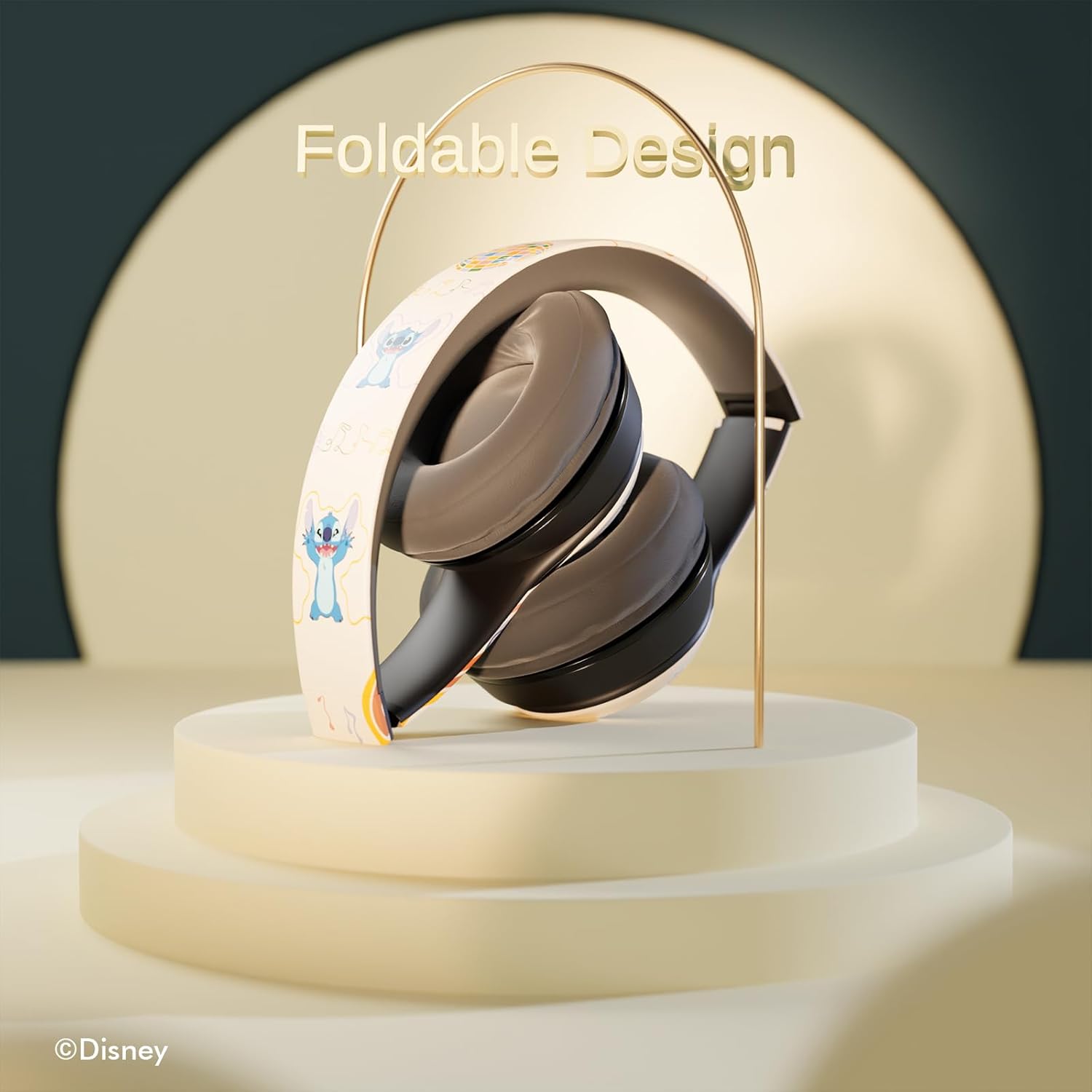
Image 6.1: The headphones feature a foldable design for easy storage and portability.
7 Issolvi l-problemi
Jekk tiltaqa' ma' problemi bil-headphones tiegħek, irreferi għall-problemi u s-soluzzjonijiet komuni li ġejjin:
- Ebda Qawwa: Kun żgur li l-headphones huma ċċarġjati kompletament. Qabbadhom ma' sors ta' enerġija u ċċekkja l-indikatur LED.
- Ma tistax tikkopja permezz tal-Bluetooth:
- Ensure the headphones are in pairing mode (LED flashing).
- Iċċekkja li l-Bluetooth huwa attivat fuq l-apparat tiegħek.
- Mexxi l-headphones eqreb lejn l-apparat tiegħek.
- Turn off and on both the headphones and your device, then attempt pairing again.
- Ebda Ħsejjes:
- Iċċekkja l-livell tal-volum kemm fuq il-headphones kif ukoll fuq l-apparat konness tiegħek.
- Ensure the headphones are correctly paired or the audio cable is fully inserted.
- If using a Micro SD card, ensure it contains compatible audio files and is inserted correctly.
- Kwalità tal-Ħoss Fqira:
- Move closer to your Bluetooth device to reduce interference.
- Kun żgur li m'hemm l-ebda ostaklu bejn il-headphones u l-apparat tiegħek.
- Ipprova sors awdjo differenti jew file.
8. Speċifikazzjonijiet
| Isem tal-Mudell | Disney Stitch Disco Party |
| Numru tal-Mudell tal-Oġġett | 810146469544 |
| Teknoloġija tal-Konnettività | Wireless (Bluetooth) |
| Teknoloġija tal-Komunikazzjoni mingħajr Fili | Bluetooth |
| Firxa ta' Età (Deskrizzjoni) | Adult, Kid |
| Tip ta' Kontroll | Kontroll tal-Volum, Mess |
| Karatteristiċi Speċjali | Built-in Radio Receiver, Foldable and Adjustable headband, Micro SD Card Plug-in, Microphone Included |
| Piż tal-oġġett | 0.26 Kilogrammi (9.1 uqija) |
| Batteriji | 1 batterija tal-polimer tal-litju (inkluża) |
| Medda ta' Frekwenzi | 20 Hz - 20,000 Hz |
| Livell ta 'Reżistenza għall-Ilma | Mhux Reżistenti għall-Ilma |
| Tqegħid tal-widnejn | Fuq il-widnejn |
| Kontroll tal-Ħoss | Iżolament tal-Ħoss |

Image 8.1: The headphones feature sound isolation and include an auxiliary cable for wired connection.
9. Informazzjoni dwar is-Sigurtà
Osserva l-linji gwida tas-sigurtà li ġejjin biex tevita ħsara lill-apparat jew korriment personali:
- Do not expose the headphones to extreme temperatures, direct sunlight, or excessive moisture.
- Evita li twaqqa’ l-headphones jew li tissottomettihom għal impatti qawwija.
- Do not disassemble or attempt to repair the headphones yourself. This may void the warranty and cause damage.
- Adjust volume to a moderate level to prevent hearing damage. Prolonged exposure to loud sounds can cause permanent hearing loss.
- Tużax headphones waqt is-sewqan, iċ-ċikliżmu, jew f'sitwazzjonijiet fejn in-nuqqas ta' tisma' ħsejjes ambjentali jista' jkun perikoluż.
10. Garanzija u Appoġġ
This product is covered by a manufacturer's warranty. For specific warranty details, please refer to the documentation included with your purchase or contact iJoy customer support. For technical assistance or inquiries, please visit the official iJoy websit jew ikkuntattja lid-dipartiment tas-servizz tal-konsumatur tagħhom.


